
A FastAPI application that runs cleanly in development can still turn into a black box the moment it hits production. Requests slow down, a dependency times out, or a background task fails silently, and there’s nothing in the terminal to explain why. Nobody’s watching the terminal anymore. This is the gap observability closes: the ability to answer “what’s actually happening in this running application” without guessing or redeploying with extra print statements.
This is a practical production observability checklist for FastAPI applications: what to monitor, why each piece matters, what typically breaks when it’s missing, and how to wire it up in a real app.
Observability usually gets summarized as three pillars (logs, metrics, and traces), but that framing undersells what you actually need in production. You need visibility into error rates, latency distribution, resource usage, dependency health, and security-relevant events too. Basic monitoring tells you the server is up. Observability tells you why it’s slow, which endpoint is failing, and what changed right before it did.
What Is Observability in a FastAPI Application?
Observability in a FastAPI application means having enough structured data, logs, metrics, and traces, to understand what a running instance is doing without attaching a debugger or redeploying. It covers request behavior, error patterns, resource consumption, and the health of everything the app depends on: databases, caches, external APIs.
The three pillars work together, not in isolation.
- Logs are discrete events with context: an exception, a failed login, a slow query.
- Metrics are aggregated numbers over time: request count, p95 latency, error rate.
- Traces show the path a single request takes across your system, including every service and database call it touched.
Take a concrete example. A POST /orders endpoint in FastAPI calls a payment service, writes to Postgres, and publishes an event. If it starts failing intermittently, logs tell you what the error was. Metrics tell you how often it’s happening and whether it’s new. A trace tells you which of the three downstream calls is actually the slow or failing one. Without tracing, you’re left guessing between three plausible causes.
Production Observability Checklist for FastAPI Applications: The Full Breakdown
Here’s the full checklist, broken into the areas that matter. Most teams implement this in phases, not all at once, and that’s fine.
Application Logging
Structured logging matters more than it sounds. A log line like logger.info(f"User {user_id} failed login") is fine to read once. It’s nearly useless to query at scale. A JSON log with {"event": "login_failed", "user_id": "...", "reason": "bad_password"} lets you filter, count, and alert on it.
What this looks like in practice:
- Use structured logs (JSON), not raw string formatting
- Set meaningful log levels:
INFOfor normal operation,WARNING/ERRORfor problems,DEBUGonly outside production - Log request method, path, status code, and duration on every request
- Capture full exception details, including stack traces, on unhandled errors
- Attach a request or correlation ID to every log line tied to a single request
- Never log passwords, tokens, API keys, session cookies, or full request bodies containing PII
- Ship logs to a centralized system, not just local files, so they survive container restarts
import logging
import json
from fastapi import FastAPI, Request
import time
import uuid

app = FastAPI()
logger = logging.getLogger("app")

@app.middleware("http")
async def logging_middleware(request: Request, call_next):
    request_id = str(uuid.uuid4())
    start = time.time()
    response = await call_next(request)
    duration_ms = round((time.time() - start) * 1000, 2)

    logger.info(json.dumps({
        "event": "request_completed",
        "request_id": request_id,
        "method": request.method,
        "path": request.url.path,
        "status_code": response.status_code,
        "duration_ms": duration_ms,
    }))
    response.headers["X-Request-ID"] = request_id
    return response
This is a minimal example. It doesn’t handle exceptions raised inside the request yet, and in a real app you’d want the request ID accessible inside route handlers too, typically through contextvars rather than just the response header. But it shows the core pattern: one structured line per request, tied together by a correlation ID.
⚠️ Secrets End Up in Logs More Often Than Teams Expect: A common failure mode is logging the full request body for debugging during an incident, then forgetting to remove it afterward. If that endpoint accepts a password reset token or an API key, it’s now sitting in your log aggregator, often with a longer retention window than the token’s own validity. Treat request and response body logging as opt-in per field, never blanket.
For a closer look at where tokens end up leaking outside of intended flows, our piece on password reset tokens in URLs covers a related and surprisingly common version of this mistake.
Metrics
At minimum, track:
| Metric | Why it matters |
|---|---|
| Request count | Baseline traffic volume |
| Request rate (req/sec) | Detects traffic spikes or drops |
| Error rate | Percentage of requests returning 5xx |
| Status code distribution | Separates client errors (4xx) from server errors (5xx) |
| Request latency (p50, p95, p99) | Shows the real user experience, not just the average |
| Active or in-progress requests | Signals whether the app is backing up |
| CPU and memory usage | Early warning for resource exhaustion |
| Process or thread count | Useful for diagnosing worker-level issues |
The percentile point is worth dwelling on. If your average latency is 120ms, that number can hide a p99 of 4 seconds affecting one in a hundred users, often the ones on a slow connection, a large payload, or a cold cache. Averages smooth out exactly the outliers you need to see. Track p50, p95, and p99 separately, and alert on the tail, not the mean.
Distributed Tracing
Tracing starts to matter once your FastAPI app talks to more than one thing: a database, a cache, another internal service, a third-party API. A single request might touch four systems, and tracing shows you the timing breakdown across all of them, connected by a shared trace ID.
Without tracing, “the API is slow” investigations turn into manually checking each dependency’s own dashboard and hoping the timing lines up. With tracing, you look at one flame graph and see that 800ms of a 900ms request went into a single Postgres query.
OpenTelemetry is the standard approach for Python instrumentation, with an official FastAPI integration:
from opentelemetry.instrumentation.fastapi import FastAPIInstrumentor
from fastapi import FastAPI

app = FastAPI()
FastAPIInstrumentor.instrument_app(app)
That gets you automatic spans for incoming requests. Combine it with instrumentation for your database driver and HTTP client (SQLAlchemy, HTTPX, and others all have their own OpenTelemetry packages) to get end-to-end traces rather than just the request boundary.
The package itself is a straightforward pip install:
opentelemetry-instrumentation-fastapi — official package page
Health Checks
A /health endpoint that just returns {"status": "ok"} tells you the process is running. It doesn’t tell you the app can actually do its job. Split health checks into two kinds: liveness, which asks whether the process is alive and not deadlocked (used by orchestrators like Kubernetes to decide whether to restart the container), and readiness, which asks whether the app can currently serve traffic by checking real dependencies like the database or cache.
from fastapi import FastAPI, Response, status

app = FastAPI()

@app.get("/health/live")
async def liveness():
    return {"status": "alive"}

@app.get("/health/ready")
async def readiness(response: Response):
    checks = {"database": await check_db_connection()}
    if not all(checks.values()):
        response.status_code = status.HTTP_503_SERVICE_UNAVAILABLE
    return {"status": "ready" if all(checks.values()) else "not ready", "checks": checks}
In Kubernetes specifically, conflating liveness and readiness is a common mistake. If your readiness check (which depends on the database) is also wired as the liveness probe, a temporary database blip causes Kubernetes to restart otherwise-healthy pods, which is the opposite of what you want.
Error Monitoring
An unhandled exception buried in a scrolling log stream might as well not exist. FastAPI’s default behavior returns a generic 500 for unhandled exceptions, which is correct for the client, but make sure you have an exception handler that logs the full traceback server-side before that response goes out. From there, a few things separate real error monitoring from just having logs: errors need to be grouped by type and location so one bug doesn’t look like fifty separate incidents, repeated failures on the same endpoint should trigger an alert rather than sit as a log entry someone might notice, and the whole thing needs to be wired into alerting rather than a dashboard someone checks occasionally.
Database Observability
Database problems are one of the most common root causes behind “the API got slow,” and one of the easiest to miss if you’re only watching the application layer. Connection pool exhaustion is a particularly sneaky example: the symptoms look like general slowness or timeouts with no obvious application-side cause, and it’s easy to spend an hour reading application code before checking whether every request is simply waiting for a free connection.
Worth watching specifically: query latency (especially outliers, not just the average), how close connection pool usage sits to its limit, failed queries and their error types, slow query logs (most databases can log anything above a configured threshold), and overall database availability.
External API Monitoring
If your FastAPI app calls any third-party service, that dependency’s reliability becomes your reliability. Track latency per external dependency separately from your own endpoint latency, the timeout rate, the HTTP error rate specific to that dependency, retry counts if you retry failed calls, and rate-limit responses from the provider.
For anything business-critical, consider a circuit breaker so one slow dependency doesn’t cascade into blocking your whole request pool. That’s a design decision, not something observability alone fixes, but you need the metrics first to know it’s actually needed.
Infrastructure Monitoring
Underneath the application layer: CPU and memory per container or process, disk usage and I/O (especially if you’re writing logs or temp files locally), network throughput and error rate, container restart counts, and overall server or node availability.
This is the layer most teams already have some visibility into, since cloud providers usually ship basic infra dashboards by default. It’s rarely enough on its own to explain application-level problems, though.
Security-Related Observability
Because this is monitoring with a defensive security lens, a few signals are worth tracking specifically: authentication failure rate and spikes in it, authorization failures (403s) concentrated on specific accounts or endpoints, repeated 401/403 responses from the same source in a short window, rate-limit trigger events, unexpected administrative or privileged actions, and secrets or tokens accidentally appearing in logs or error responses.
This section is about detection, not defense mechanics. The goal is knowing when something looks wrong, not testing whether it can be broken. If you’re building this out formally, our threat model template is a useful starting point for deciding which of these signals actually matter for your specific application before you start alerting on all of them. And if you haven’t already, our API security checklist and login security checklist cover the broader defensive controls these signals are meant to detect failures of.
📌 A Spike in 401s Isn’t Automatically an Attack: A sudden jump in failed logins can mean credential stuffing, or it can mean a frontend deploy shipped with a stale API contract, or a client-side token refresh bug. Treat it as a signal to investigate, not a conclusion. Correlate it with deploy timestamps and check whether the failures are spread across many accounts (more consistent with an attack) or concentrated on a few (more consistent with a client bug).
Prometheus and Grafana: A Practical Monitoring Stack
A common, well-supported stack for FastAPI metrics is FastAPI feeding Prometheus, which Grafana then visualizes. FastAPI exposes metrics, Prometheus scrapes and stores them as time series, and Grafana turns them into dashboards.
The prometheus-fastapi-instrumentator package handles the FastAPI side with minimal setup:
from fastapi import FastAPI
from prometheus_fastapi_instrumentator import Instrumentator

app = FastAPI()

Instrumentator().instrument(app).expose(app)
If you’d rather see the full setup end-to-end, here’s a walkthrough covering the FastAPI instrumentation, Prometheus scraping, and the resulting Grafana dashboard in one pass:
Monitoring FastAPI with Prometheus & Grafana — full setup walkthrough
By default this gives you http_requests_total (a counter broken down by handler, method, and status), request and response size, and request duration as a histogram, which is what lets you compute p50/p95/p99 later in Grafana rather than only storing an average.
Once metrics are flowing into Prometheus, a Grafana dashboard typically surfaces request rate over time, error rate as a percentage of total, latency percentiles, status code distribution, CPU and memory usage, and active or in-flight request count. You don’t need to build this from scratch. Community dashboards exist for exactly this stack and give you a reasonable starting layout to customize rather than designing panel-by-panel from an empty dashboard.
Deployment Considerations
Observability needs differ slightly depending on how you deploy: a bare Linux server, Docker, or a container orchestrator each have their own wrinkles.
For process management specifically, Uvicorn supports a --workers flag to run multiple worker processes, but it doesn’t include process monitoring. If a worker dies, nothing restarts it automatically. The official deployment guidance recommends running Uvicorn under Gunicorn with the Uvicorn worker class for production, specifically because Gunicorn’s master process detects and replaces dead workers.
There’s a specific gotcha worth knowing if you’re combining multi-worker deployments with OpenTelemetry, and it depends on how you’re running those workers. Uvicorn’s own --workers flag starts separate processes using Python’s spawn method, not a Gunicorn-style pre-fork, so module-level setup actually reruns independently in each worker and generally behaves fine.
The real fork-related OpenTelemetry problem shows up when you run through a pre-fork server like Gunicorn: each worker needs its own exporter connection, the BatchSpanProcessor‘s background thread and locks aren’t safe to initialize before a fork, and export operations need to stay isolated per worker. The safe pattern either way is initializing tracing inside a lifespan handler rather than at plain module import time. If you’re on Gunicorn specifically, use its post_fork hook so OpenTelemetry initializes after the fork instead of before it.
✅ Match Your Process Manager to Your Deployment Target: If you’re on Kubernetes or a PaaS that already restarts crashed containers, you don’t need Gunicorn on top; the platform is your process manager. If you’re deploying to a bare Linux server or a VM, Gunicorn (or systemd with restart policies) fills that gap. Don’t add both. It’s redundant and makes crash behavior harder to reason about.
If you’re behind a reverse proxy (Nginx, Caddy, a cloud load balancer) doing TLS termination, make sure your observability setup doesn’t assume it’s seeing raw client IPs or that HTTPS is guaranteed. Trust X-Forwarded-* headers only from a proxy you control, and validate them rather than assuming they’re always correct. Misconfigured TLS termination is a separate class of problem from observability, but it’s worth checking at the same time you’re setting up production monitoring. See our breakdown of dangerous SSL validation mistakes if you haven’t audited that layer yet.
One more thing worth knowing: Starlette (which FastAPI is built on) runs synchronous endpoints, file uploads, and sync background tasks through a shared thread pool capped at 40 tokens by default. That limit is shared with FastAPI’s own sync dependency handling. A burst of synchronous work can exhaust it and start queuing unrelated requests behind it, which shows up in metrics as latency with no obvious cause unless you know to check thread wait time specifically.
Initializing Tracing with Lifespan Events
This is the pattern FastAPI’s own docs recommend for startup/shutdown logic, including tracing initialization:
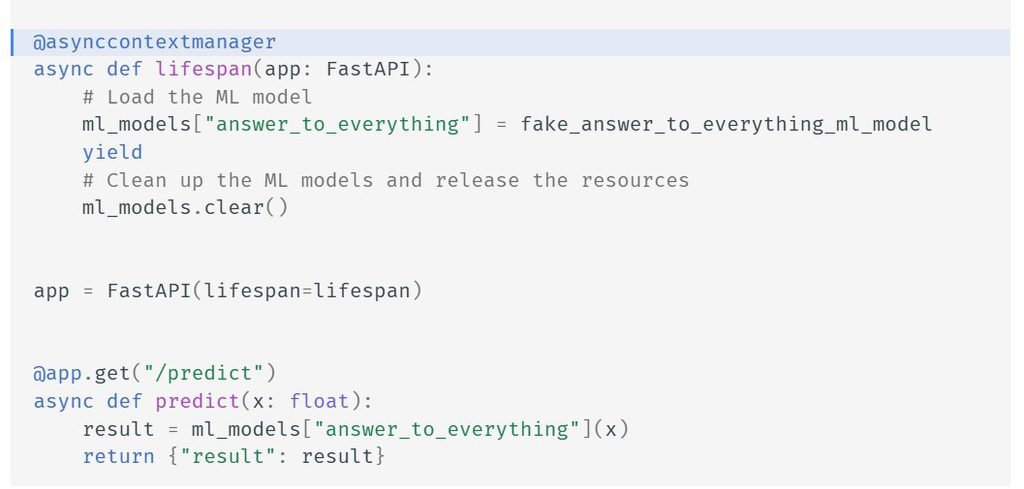
FastAPI lifespan pattern, from the official documentation
Why –workers Behaves Differently Than You’d Expect
Here’s the exact mechanism, straight from the source that clarified it:
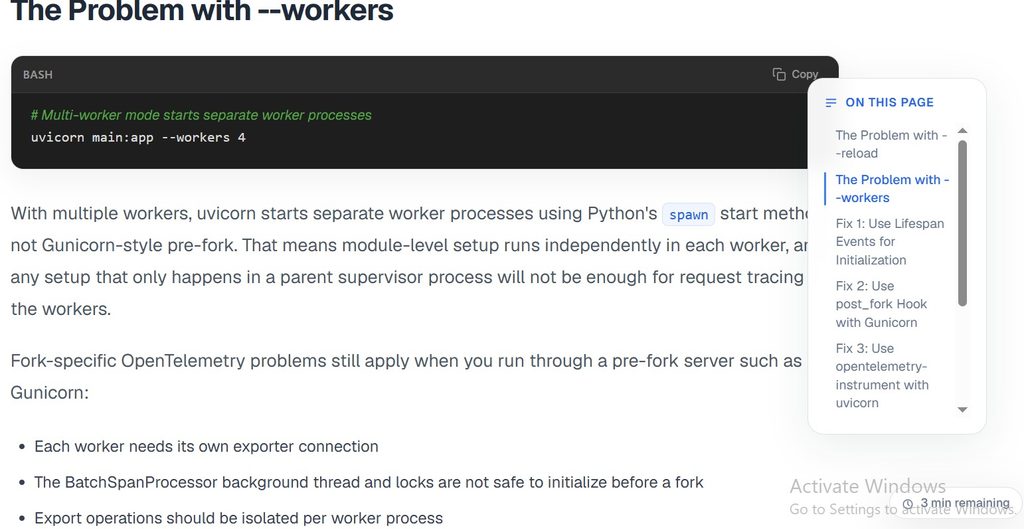
Uvicorn’s –workers flag and its spawn-based process model
Pre-Deployment Observability Checklist
- [ ] Structured logging configured and tested locally
- [ ] Metrics endpoint (
/metrics) exposed and scraping confirmed in staging - [ ] Tracing instrumented for the app and its major dependencies
- [ ] Liveness and readiness health checks implemented and distinct
- [ ] Alerts defined for error rate, latency, and availability, and actually tested, not just configured
- [ ] Sensitive fields confirmed excluded from logs and traces
- [ ] Process manager (Gunicorn, systemd, or orchestrator) confirmed to restart crashed workers
Post-Deployment Observability Checklist
- [ ] Dashboards show live traffic within the first few minutes
- [ ] A test alert actually fires and reaches the right channel
- [ ] Logs are queryable in the centralized system, not just local
- [ ] Trace data shows expected spans across all major dependencies
- [ ] Baseline latency and error rate recorded for future comparison
If you’re setting this up for the first time, it’s worth keeping this alongside your other deployment checklists rather than treating it as a one-off list. Our checklists library has a few others (API security, login security) that tend to get reviewed together with this one before a release.
Alerting
Collecting metrics without alerting means someone has to remember to look at a dashboard before a problem gets bad. Useful alerts typically cover a 5xx error rate above a defined threshold, p95/p99 latency exceeding a baseline, the application becoming unreachable or its health check failing, CPU or memory sustained near limits, the database becoming unreachable or its connection pool nearing exhaustion, an authentication failure rate spike, and an external dependency error rate spike.
Don’t invent universal threshold numbers. What counts as “high latency” depends entirely on your endpoint and traffic pattern, so set thresholds from your own measured baseline rather than a number copied from a blog post.
Alert fatigue is a real cost, not a minor annoyance. A team that gets paged for every minor blip starts ignoring alerts within a few weeks, and by the time a real incident happens, the alert gets dismissed along with the noise. Start with a small number of alerts tied to things that genuinely require action, and add more only when you have evidence they’d have caught something the existing set missed.
Common FastAPI Observability Mistakes to Avoid
- Logging everything without structure. Unsearchable logs are barely better than no logs during an actual incident.
- Logging passwords, tokens, API keys, or full user payloads. This turns your log system into a secrets store nobody’s treating as one.
- Monitoring only CPU and RAM. This misses application-level problems entirely; a healthy-looking server can still be serving 50% errors.
- Tracking average latency but ignoring percentiles. This hides exactly the slow requests worth investigating.
- No request correlation IDs. This makes it nearly impossible to trace one user’s request across logs, metrics, and traces.
- No health checks, or a health check that doesn’t test real dependencies. An orchestrator keeps routing traffic to a pod that can’t reach its database.
- No centralized logging. Logs disappear the moment a container restarts.
- No error monitoring beyond raw logs. Errors get missed until a user reports them.
- No dependency monitoring. External API degradation looks identical to your own app being slow.
- Creating alerts without testing them. An alert that’s never fired in a drill might not fire in a real incident either.
- Treating observability as a post-deployment afterthought. Retrofitting it during an active incident is the worst possible time to instrument anything.
- Building dashboards without defining what action each metric should trigger. A dashboard nobody’s watching in real time isn’t the same as monitoring.
Troubleshooting Scenarios
Scenario 1: The API suddenly becomes slow. Start with latency metrics broken down by endpoint. Is it every route, or one specific one? Check p95/p99, not the average, since the average can look fine while a subset of requests degrades badly. If it’s isolated to one endpoint, pull a trace for a slow request and see where the time actually goes: application code, a database query, or an external call. Cross-reference with database metrics (connection pool usage, query latency) and external dependency metrics at the same time. If none of those show anything unusual, check recent deploys. A slow endpoint that started at a specific timestamp is often a code change, not an infrastructure issue.
Scenario 2: 500 errors suddenly increase. Check the error rate metric first to confirm scope: one endpoint, or system-wide. Pull recent error logs and group by exception type; a spike usually has one or two dominant error types, not fifty different ones. If it’s a single new exception type that started at a specific time, check what deployed around then. If it’s a pre-existing error type just happening more often, look at what changed upstream: a dependency, a data pattern, a traffic source. Traces help confirm whether the failure originates in your code or a downstream call.
Scenario 3: Login requests generate unusual 401/403 traffic. Look at whether the failures are concentrated on a small number of accounts (more consistent with a legitimate user issue or a targeted attempt) or spread thin across many accounts (more consistent with automated credential stuffing). Check timing: is it a sudden spike or a gradual climb?
Correlate with recent frontend or auth-service deploys, since a broken token refresh or a stale API contract produces the same symptom as malicious traffic. Don’t conclude it’s an attack without evidence, but do treat a sustained, distributed pattern as a reason to review your login security controls and rate limiting. If the pattern does turn out to be a genuine incident, our security report template gives you a starting structure for documenting what happened while it’s still fresh.
Frequently Asked Questions
What should I monitor in a FastAPI application?
At minimum: request rate, error rate, latency percentiles (p50/p95/p99), resource usage (CPU/memory), database health, external dependency health, and authentication/authorization failure rates.
How do I monitor FastAPI in production?
Combine structured logging, Prometheus metrics via prometheus-fastapi-instrumentator, distributed tracing via OpenTelemetry, health checks that test real dependencies, and alerting tied to error rate and latency thresholds, not just a dashboard someone checks manually.
What is the best way to collect FastAPI metrics?
prometheus-fastapi-instrumentator is the most common approach for request-level metrics with minimal setup, paired with Prometheus for storage and Grafana for visualization.
Can Prometheus monitor FastAPI?
Yes. FastAPI doesn’t expose Prometheus metrics natively, but the prometheus-fastapi-instrumentator package adds a /metrics endpoint with request count, latency, and size metrics that Prometheus can scrape directly.
How does Grafana work with FastAPI?
Grafana doesn’t connect to FastAPI directly. It queries Prometheus (or another data source) that’s already collecting FastAPI’s metrics, then visualizes them as dashboards and panels.
Should I use OpenTelemetry with FastAPI?
If your app talks to a database, cache, or any external service, tracing is worth the setup. It’s the fastest way to isolate which dependency is actually responsible for a slow or failing request, rather than guessing across separate dashboards.
What should a FastAPI health check include?
Split it into liveness (is the process alive) and readiness (can it actually serve traffic, checking real dependencies like the database). Conflating the two can cause an orchestrator to restart healthy pods over a temporary dependency blip.
How do I monitor FastAPI errors?
Capture full stack traces on unhandled exceptions, group errors by type, and alert on error rate thresholds rather than relying on someone noticing errors in a log stream.
Final Thoughts
Production observability, in practice, is about being able to answer a small set of questions quickly. Is the application available? Is it getting slower? Which endpoint is failing, and why? Which dependency is responsible? Is this an application problem or an infrastructure one? And, ideally, can you catch it before a user reports it?
None of this requires building everything on day one. Start with structured logs, basic request metrics, and one health check that tests a real dependency. Add tracing once you have more than one moving part. Add alerting once you know what “normal” looks like for your own traffic, not a number borrowed from somewhere else.
Quick reference checklist:
- [ ] Structured logs with request correlation IDs, no secrets
- [ ] Request count, error rate, and latency percentiles (not just averages)
- [ ] Distributed tracing across app and dependencies
- [ ] Liveness and readiness health checks, tested separately
- [ ] Error monitoring with grouping and alerting
- [ ] Database and external API health tracked independently
- [ ] Security-relevant signals: auth failures, rate-limit events, anomalous access patterns
- [ ] Alerts tested before you need them, not just configured

Abdul Shakoor writes practical, defensive cybersecurity and networking guides for SentrixHub. He focuses on making API security, mobile app security, authentication, and network concepts simple for beginners and developers.