
The PVST election process is one of those topics that sounds simple on a slide deck and then quietly causes an outage months later, because nobody bothered to set a root bridge on purpose.
Most spanning-tree headaches trace back to a root bridge nobody actually chose. It just happened, by default. And when the network “just happens” to pick its own root bridge, the result is rarely ideal: an access switch out in a closet ends up with the job instead of the core switch that should have it.
This guide walks through exactly how PVST elects a root bridge, why the process matters more than most engineers assume, and where things typically go wrong. If you want the fundamentals on how the winning switch is actually determined at the protocol level, the root bridge election process in Cisco switch guide pairs well with this one.
- Root bridge election is based on Bridge ID: priority first, MAC address as tiebreaker
- Default priority (32768) on every switch means the election is decided by MAC address alone
- Each VLAN gets its own root bridge election under PVST, so they don’t have to match
- Manually setting priority (e.g.
spanning-tree vlan 10 priority 4096) is the fix
What Is PVST in Spanning Tree Protocol?
PVST, or Per-VLAN Spanning Tree, is Cisco’s answer to a limitation in the original 802.1D standard: one spanning tree instance for an entire switched network, regardless of how many VLANs you’re running.
PVST changes that by giving each VLAN its own independent STP instance. In practice, this means:
- Every VLAN can elect a different root bridge
- Traffic can be load-balanced across multiple uplinks instead of funneling through one
- You get granular control over how each VLAN’s topology behaves
That last point is the real value. On a flat, single-instance STP network, you’re stuck with one blocked path no matter how many VLANs share the link. PVST lets you spread that load: VLAN 10 goes one way, VLAN 20 goes another, assuming someone actually configures it that way instead of leaving it to chance.
What Is a Root Bridge, and Why Does It Matter?
The root bridge is the reference point every other switch in the topology measures itself against. Every non-root switch calculates its shortest path back to this one device, and that calculation shapes the entire Layer 2 topology: which ports forward, which ones block, and ultimately how traffic moves across your network.
📌 Worth knowing: The root bridge isn’t just a title. It’s the single point every switch measures distance from. Put it in the wrong place (like an edge switch three hops from your servers) and you’ve built inefficient traffic paths into the network by accident.
If the root bridge sits at the network edge instead of the core, traffic that should take a direct path ends up looping through extra hops to reach it. It’s one of the more commonly documented misconfigurations in enterprise STP deployments, and it’s entirely avoidable with a deliberate priority setting.
PVST Election Process Explained: Step by Step
Here’s the full election sequence at a glance before we break down each step:
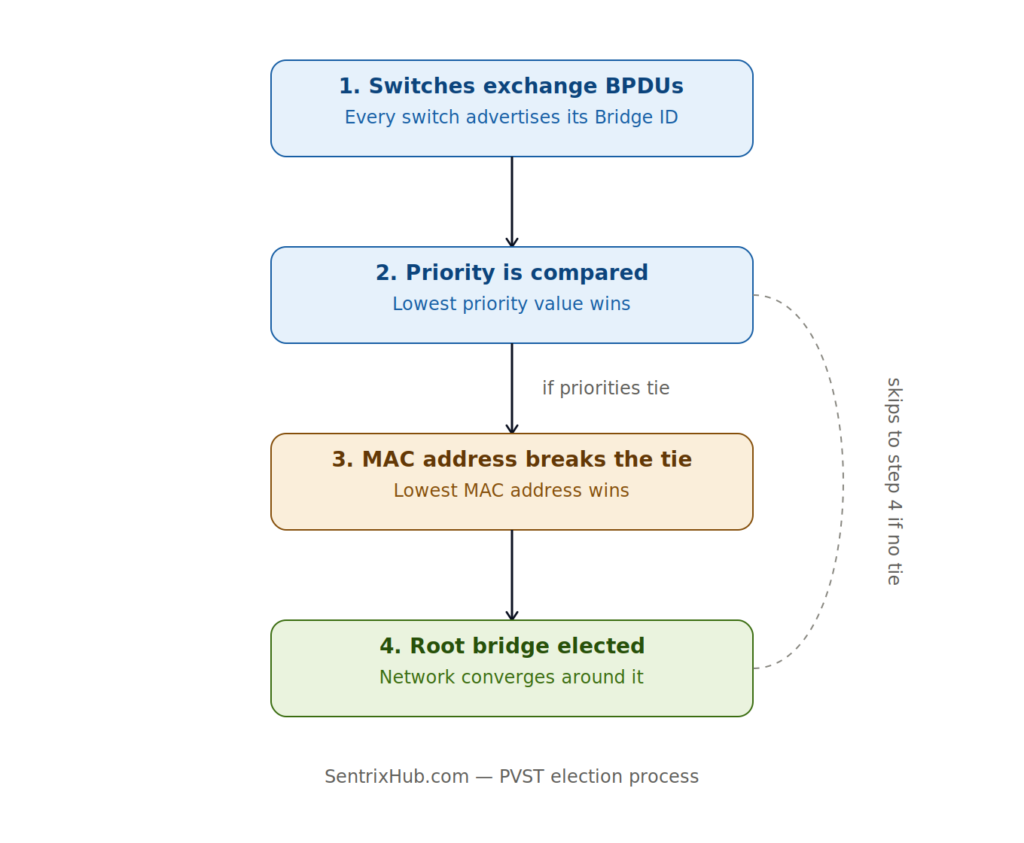
The four-stage PVST election process: priority is always checked before MAC address ever comes into play.
Here’s the actual mechanics of how switches decide which one becomes root.
Step 1: Switches Exchange BPDUs
Every switch starts by sending out Bridge Protocol Data Units (BPDUs), announcing its own Bridge ID to every connected neighbor. At this stage, every switch still believes it could be the root.
Step 2: Bridge IDs Get Compared
Each switch has a unique Bridge ID made up of:
- Priority: a configurable value, default 32768
- VLAN ID: since PVST runs a separate instance per VLAN
- MAC Address: the tiebreaker
For the full breakdown of how this identifier is structured, see what is Bridge ID in STP.
Here’s how those three pieces combine into a single Bridge ID:
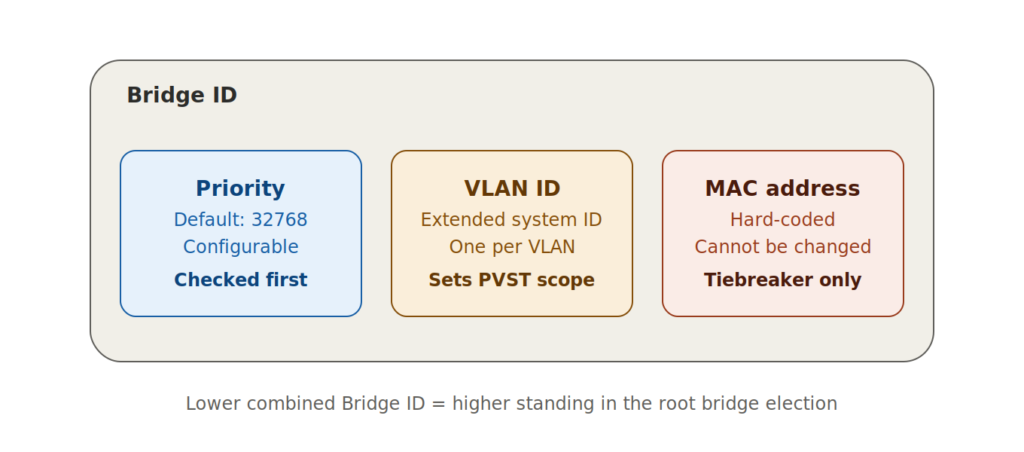
Priority is checked first and is the only field you should be actively managing. MAC address only matters if priorities tie.
Step 3: Lowest Bridge ID Wins
The switch advertising the lowest overall Bridge ID becomes the root bridge for that VLAN. Nothing fancy. Lowest number wins, full stop.
Step 4: Priority Is Checked First
Since priority carries the most weight and defaults to 32768 on every switch out of the box, leaving it untouched means the outcome comes down to whichever switch happens to have the lowest MAC address. That’s rarely your core switch by coincidence.
⚠️ Remember: Default priority (32768) on every switch means MAC address alone decides your root bridge. That’s essentially letting the network pick at random, which is a mistake that’s easy to avoid with a single configuration line.
Step 5: MAC Address Breaks the Tie
If two switches somehow land on identical priority (which they will, if nobody’s touched the config), the lowest MAC address wins. It’s a hard-coded, unchangeable value, which is exactly why relying on it as your primary deciding factor is a bad idea.
Step 6: The Network Converges
Once the root is settled, every other switch calculates its best path back to it, root ports and designated ports get assigned, and the topology stabilizes. From here, path cost takes over to determine the actual routes traffic will follow, a process covered in detail in what happens when an STP root port fails.
For a technical breakdown of the underlying election mechanics, Cisco’s own community discussion on root bridge election and root port selection is worth a read.
If seeing the BPDU exchange and election play out helps more than reading it, Jeremy’s IT Lab walks through this exact process step by step, along with how port roles get assigned once the root bridge is settled:
The video reinforces the same priority-then-MAC-address logic covered in Steps 2 through 5 above, and extends into root port selection, which ties directly into the path cost section further down this guide.
Bridge ID Structure in Spanning Tree
A Bridge ID breaks down like this:
Bridge ID = Priority + VLAN ID (extended system ID) + MAC Address
Example:
- Priority: 32768
- VLAN ID: 1
- MAC: 00:11:22:33:44:55
The lower the resulting Bridge ID, the higher that switch’s standing in the election. This is also why swapping hardware without checking priority can quietly shift a network’s root bridge: the new device’s MAC address may win a tiebreaker nobody was expecting to be in play.
STP Root Bridge Selection Criteria
Boiled down, the criteria are:
- Lowest priority value
- Lowest MAC address (only if priority ties)
That’s the entire decision tree. For a worked example showing this play out across a real topology, check this root bridge election example.
Setting Root Bridge Priority on Cisco Switches
You don’t have to leave this to chance. Cisco lets you set priority manually:
spanning-tree vlan 10 priority 4096
Lower values increase a switch’s chance of winning the election, so setting your core or distribution switch to a low priority value effectively guarantees it becomes root, assuming it’s genuinely the best-positioned device for that role.
✅ Best practice: Manually configure your core or distribution switch as root for every VLAN rather than relying on default priority. It’s a five-minute change that removes an entire category of unpredictable network behavior.
Path Cost and Root Port Selection
Once the root bridge is settled, every other switch still needs to figure out its best path there. That’s where path cost comes in:
- Fast Ethernet → cost 19
- Gigabit Ethernet → cost 4
Lower cost paths win, and this value determines which port on a non-root switch becomes the root port. Misconfigured or mismatched link speeds here are a quieter but equally damaging problem: traffic ends up taking a longer path than it needs to, even after the root bridge itself is correctly placed. For related failover concepts, see stateful switchover and enterprise failover stability with alternate ports.
Real-World Example
Take three switches:
- Switch A → Priority 32768
- Switch B → Priority 4096
- Switch C → Priority 32768
Switch B wins the election outright, because its priority is lowest. It doesn’t matter if Switch A has a lower MAC address; priority is evaluated first, and B never even gets to that tiebreaker stage.
This is a useful scenario to test in a lab or simulator like Packet Tracer or GNS3, since it makes the priority-before-MAC-address rule obvious without needing production hardware.
Common Mistakes That Break the Election
- Never manually setting a root bridge, letting MAC address decide by default
- Leaving every switch at priority 32768
- Ignoring that each VLAN needs its own root bridge decision under PVST
- Poor physical topology design that puts the root far from where traffic actually needs to go
📌 Worth knowing: These mistakes rarely show up as an immediate outage. They surface weeks or months later, usually when a new switch gets added to the closet and quietly wins a MAC address tiebreaker nobody was watching for.
The result is usually the same: unpredictable convergence, inefficient traffic paths, and outages that are hard to diagnose because nobody documented which switch was supposed to be root in the first place. If you’re chasing repeated instability, enterprise STP troubleshooting methods and serious STP failures that RSTP prevents are both worth reviewing alongside this.
Port misconfiguration compounds the problem further. It’s covered in more depth in why STP port misconfigurations break networks and dangerous STP timer mistakes beginners make.
PVST vs Rapid-PVST vs MST: How the Election Differs
The Bridge ID and priority-then-MAC logic covered above stays the same across Cisco’s spanning-tree variants. What changes is convergence speed and how many instances you’re managing.
| Feature | PVST (802.1D-based) | Rapid-PVST+ (802.1w-based) | MST (802.1s-based) |
|---|---|---|---|
| Root bridge election logic | Priority, then MAC address | Same as PVST | Same, but per instance (not per VLAN) |
| Instances | One per VLAN | One per VLAN | One per group of VLANs |
| Convergence time | 30–50 seconds | Sub-second in most cases | Sub-second, MST regions |
| Scalability | Poor with many VLANs | Better than PVST | Best for large VLAN counts |
| Typical use case | Legacy or small networks | Standard modern deployment | Enterprise networks with hundreds of VLANs |
For most current deployments, Rapid-PVST+ is the default recommendation since it keeps PVST’s per-VLAN flexibility while fixing the slow convergence problem. MST becomes worth the added configuration complexity once you’re managing enough VLANs that a separate root bridge election for each one stops making sense.
FAQ: PVST Election Process
Does every VLAN elect its own root bridge under PVST?
Yes. That’s the entire point of Per-VLAN Spanning Tree: each VLAN runs an independent instance, so VLAN 10 and VLAN 20 can have completely different root bridges if you configure them that way.
What happens if I never set a priority manually?
The switch with the lowest MAC address in the topology becomes root by default. Since MAC addresses are effectively random from a design standpoint, this means your root bridge placement is left to chance.
Can I force a specific switch to always be root?
Yes, using spanning-tree vlan <id> priority <value>. Cisco also offers spanning-tree vlan <id> root primary, which automatically calculates and sets a priority low enough to win the election.
Is PVST the same as Rapid PVST+?
No. PVST is Cisco’s original per-VLAN implementation of 802.1D. Rapid PVST+ (802.1w-based) uses the same per-VLAN root bridge election logic but converges significantly faster after a topology change.
What’s the difference between root bridge and root port?
The root bridge is the single reference switch for the whole VLAN topology. A root port is the specific port on every other switch that provides the best (lowest-cost) path back to that root bridge. See <a href=”https://sentrixhub.com/what-are-stp-port-states-in-networking/”>STP port states in networking</a> for how ports transition once roles are assigned.
Conclusion
The PVST election process isn’t just exam material. It’s one of the few STP concepts that directly determines whether your network behaves predictably or not. Get it right, and traffic flows exactly where you designed it to. Leave it on autopilot, and you’re trusting a random MAC address comparison to decide your network’s backbone.
Set your priorities deliberately. Document which switch is root for which VLAN. Future-you troubleshooting a 2 a.m. outage will be grateful.

Abdul Shakoor writes practical, defensive cybersecurity and networking guides for SentrixHub. He focuses on making API security, mobile app security, authentication, and network concepts simple for beginners and developers.