
By Abdul Shakoor · SentrixHub All code examples tested in CodePen, July 2026
Introduction: Clean Code Is a Security Habit, Not a Style Choice
This guide walks you through writing bug-free HTML CSS JavaScript CodePen projects the right way — clean, secure, and beginner-friendly.
I’ve reviewed hundreds of beginner CodePen projects while writing about web and API security for SentrixHub, and the pattern is always the same: the bugs that break a demo today are the exact same habits that create real vulnerabilities in production later. A stray unclosed tag or an unvalidated input field looks harmless in a sandbox — but in a live application, that same shortcut can leak data or open the door to an attack.
So this isn’t really a “how to avoid red squiggly lines” guide. It’s about building the instincts that keep code:
- Predictable — it behaves the same way every time it runs
- Maintainable — you (or someone else) can still understand it in six months
- Secure — it doesn’t hand attackers an easy entry point
Below are 15 practical habits I recommend to anyone learning HTML, CSS, and JavaScript inside CodePen, plus the security reasoning behind each one.
⚠️ Security Note: Every bug on this list has a production equivalent. A typo in a CodePen demo just breaks a layout — the same class of mistake in a live app can expose user data or open an injection point. Treat these habits as security training, not just tidiness tips.
What “Bug-Free” Actually Means in Practice
Nobody writes perfect code on the first try — that’s not the goal. According to MDN’s HTML elements reference, HTML offers roughly 100 semantic elements, and a huge share of beginner bugs come from ignoring them in favor of generic <div> soup. “Bug-free” in this context means:
- Markup that renders consistently across browsers
- Logic that fails safely instead of silently breaking
- Structure that a reviewer (or a security scanner) can actually follow
15 Habits for Cleaner, Safer Code in CodePen
1. Start With a Clean, Semantic HTML Structure
Nested, non-semantic markup is where most layout bugs start. Instead of wrapping everything in <div>, reach for elements that describe what the content actually is.
Messy:
<div><p><div>Text</div></p></div>
Clean:
<article>
  <p>Text</p>
</article>
Beyond avoiding bugs, semantic tags like <article>, <nav>, and <header> genuinely help search engines and screen readers understand your page — MDN’s accessibility documentation points out that using the correct HTML element for its intended purpose is one of the main things that improves both accessibility and SEO.
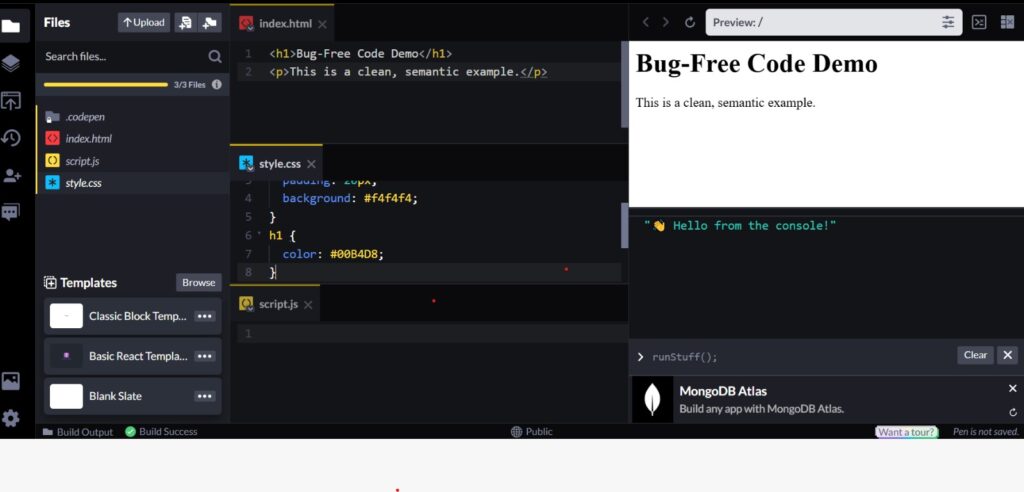
Here’s what a clean, working example looks like across all three panels — structure, style, and a live preview updating together.
📌 Pro Tip: If you’re unsure which tag to use, ask “what is this content, not what should it look like?” <nav> for navigation, <article> for standalone content, <aside> for tangential info. Styling is CSS’s job — structure is HTML’s.
2. Remember HTML Tags Are Case-Insensitive — But Be Consistent Anyway
<DIV> and <div> both work in a browser, but mixing cases across a project makes code harder to scan and review. Stick to lowercase; it’s the accepted convention and keeps diffs clean when you’re collaborating.
3. Use CodePen’s Panels the Way They’re Designed to Be Used
- HTML panel → structure only
- CSS panel → presentation only
- JS panel → behavior only
New coders often try to force logic into HTML (inline event handlers, inline styles) because it “feels faster.” It isn’t — it just moves the debugging pain to later.
🎥 Watch: See CodePen’s Panels and Debugging in Action
If you’re still getting comfortable with how the three panels talk to each other, this short walkthrough makes it click faster than reading about it. Once you’ve seen the workflow in motion, the next few habits on this list will make a lot more practical sense.
4. Double-Check Selectors and IDs Before You Blame the Browser
A shocking number of “CodePen isn’t working” issues are just a typo in a class name or a missing ID reference. Before assuming a bug in the platform, re-read your selectors line by line.
5. Treat the Console as Your First Debugging Step, Not Your Last
Open DevTools before you start guessing. Console errors almost always point directly at the broken line — reading them carefully saves far more time than trial-and-error editing.
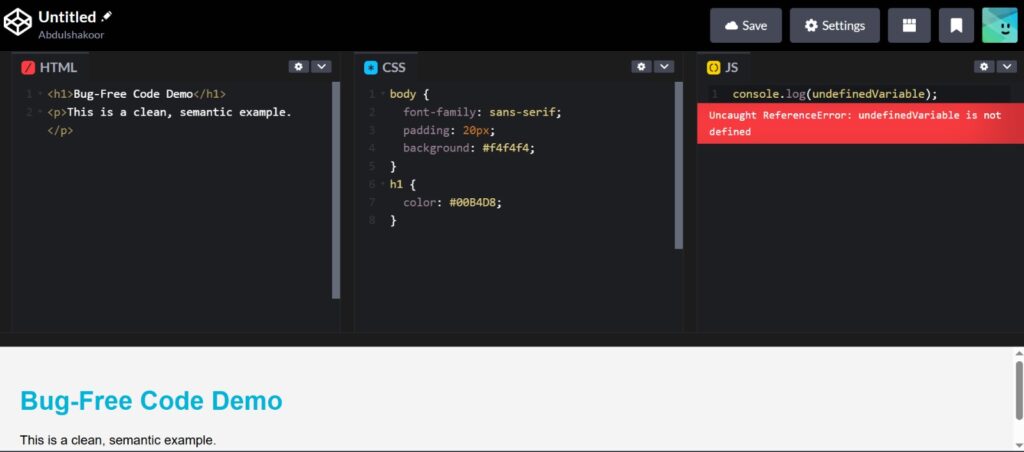
This is exactly the kind of message the console gives you — a clear line pointing to what broke and why, instead of a silent failure.
6. Avoid Global JavaScript Variables
// Avoid
var data = "test";

// Prefer
const data = "test";
Global variables are a classic source of naming collisions and unpredictable state — and in larger apps, they’re also an easy target for injection if user input ever gets assigned to one without validation.
7. Validate Every Input, Even in a “Just a Demo” Project
This is the habit that matters most for security. Any time user input reaches your JavaScript or gets rendered into the DOM, treat it as untrusted by default. The OWASP Cross-Site Scripting Prevention Cheat Sheet exists precisely because developers assume “it’s just a small form” and skip this step — and that assumption is how real XSS vulnerabilities end up in production. If you’re building anything that touches file inputs or uploads, this same mindset applies directly to an unrestricted file upload vulnerability.
⚠️ Warning: Never assume input is safe just because it comes from a form you built. If your JavaScript ever inserts user-supplied text into the DOM using innerHTML, that’s a direct XSS risk — use textContent instead unless you specifically need to render HTML, and even then, sanitize it first.
8. Keep CSS Modular
Common CSS bugs — overlapping styles, specificity wars, conflicting selectors — almost always trace back to over-nested rules or excessive ID-based styling. Favor classes, keep selectors shallow, and avoid !important as a first resort. This same “keep it minimal and scoped” thinking applies once you move a project off CodePen and onto a real server — loose file and folder permissions are just as messy a habit as loose CSS, and just as easy to fix early. We cover this in more depth in our piece on weak file permissions.
9. Use Flexbox or Grid Instead of Positioning Hacks
Float-based layouts and manual position: absolute juggling are fragile and break the moment content changes. Modern layout tools are more predictable:
display: flex;
10. Comment the “Why,” Not the “What”
// Handle button click event
is less useful than a comment that explains why a piece of logic exists — especially for validation or security-related code, where future-you needs to know the reasoning, not just the mechanics.
11. Test Across Screen Sizes Before Calling It Done
Responsive bugs are among the most common CodePen issues. Use the built-in preview alongside your browser’s device toolbar to catch layout breaks early.
12. Understand Code Before You Copy It
Pulling a snippet from someone else’s Pen without understanding what it does is how hidden bugs — and sometimes hidden security gaps — end up in your project. If you copy it, trace through it line by line first. This habit of reading code before trusting it is exactly the mindset security researchers use when they reverse-engineer apps to find out what they’re really doing under the hood.
13. Handle JavaScript Errors Gracefully
try {
  riskyFunction();
} catch (error) {
  console.log(error);
}
Unhandled errors don’t just crash a demo — in a real app, they can expose stack traces or internal logic to anyone watching the console.
14. Trim Unused CSS and Animations
Bloated stylesheets slow down rendering and make debugging harder because you’re wading through rules that no longer apply. Periodically strip anything the page no longer uses.
15. Write Small, Test Often
Don’t write 200 lines and then run it for the first time. Build in small increments and test immediately — it’s the single easiest way to catch a bug while it’s still cheap to fix.
Why Any of This Matters Beyond CodePen
A demo Pen has no real users and no real data — so a bug there just wastes your time. The moment that same code pattern reaches production, the stakes change completely:
- Broken input handling → the same gap that enables XSS or injection attacks
- Poor error handling → stack traces or internal details leaking to the client
- Weak validation on forms → a direct line to problems like weak password handling or exposed password reset tokens in URLs.
A Realistic Example
Picture a simple login form in CodePen with no input validation, wired directly to a fetch call. It looks fine in the demo. But that exact pattern — untrusted input flowing straight into a request — is the starting point for real-world credential stuffing and injection attacks against production apps. It’s the same category of mistake covered in our breakdown of API security fundamentals.
✅ Key Takeaway: A CodePen demo and a production app run the exact same JavaScript engine. If a habit is unsafe in production, it’s teaching you the wrong instinct in the demo too — even if nothing “breaks” visibly.
Common Mistakes Worth Watching For
- Unclosed or mismatched tags
- Wrong or duplicate selectors
- Ignoring console warnings until something breaks visibly
- Deeply nested, unstructured CSS
- Copy-pasting without reading the code first
How to Actually Fix and Prevent These Errors
- Read the full error message — including the file and line number, not just the first sentence.
- Use a linter to catch syntax issues and bad patterns before you even run the code.
- Break large blocks into smaller functions so each piece is independently testable.
- Pick one naming convention (
camelCasefor JS,kebab-casefor CSS classes) and stay consistent.
Security Habits Worth Building Early
- Never hardcode API keys into client-side JavaScript, even in a demo
- Validate and sanitize all inputs, every time
- Use HTTPS endpoints for any API calls — and don’t stop at “it has a padlock icon.” Misconfigured or improperly validated certificates cause real breaches; see our rundown of dangerous SSL validation mistakes for the details
- Avoid inline
<script>blocks where a CSP would block them in production - Sanitize any user-generated content before rendering it
If you want a more structured way to think about these checks at scale, our overview of the OWASP ASVS 5.0 verification standard breaks down how professional teams formalize exactly this kind of review.
📌 Pro Tip: Keep a personal checklist of these five habits and run through it before you consider any Pen “done.” It takes under a minute and catches the mistakes that are easiest to miss when you’re focused on getting something to just work.
A Few Habits From Experience
- Think like a reviewer, not just a builder — before moving on, ask “what would break this?”
- Use version control even for small Pens — CodePen’s own version history helps, but exporting to a real Git repo teaches the habit early
- Study real, working examples rather than only tutorials
- Don’t rush the fundamentals — the shortcuts you take now are the habits you’ll have to unlearn later
Conclusion
Writing bug-free HTML, CSS, and JavaScript in CodePen isn’t about achieving perfection — it’s about discipline. Clean structure, careful validation, and graceful error handling don’t just make your Pens look tidier; they build the exact instincts that keep production applications secure. In a web where frontend code talks directly to APIs and real user data, that discipline isn’t optional — it’s the baseline.
Frequently asked questions
How should beginners start using CodePen?
Start with small, separate HTML, CSS, and JS blocks, test after every change, and use the preview pane constantly rather than writing a large block of code before checking anything.
How do I fix HTML, CSS, and JavaScript errors in CodePen?
Open the browser console first, read the exact error and line number, and validate your markup structure before assuming the platform is at fault.
Can I write custom CSS in CodePen?
Yes — CodePen has a dedicated CSS panel, and styles apply live as you type, including support for preprocessors like SCSS if you enable them in the panel settings.
How is CodePen different from JSFiddle?
Both are browser-based code editors, but CodePen leans more toward UI/UX demos, design experiments, and social sharing of front-end work, while JSFiddle is often used for quick, minimal test cases.
What are the most common mistakes beginners make?
Unclosed tags, inconsistent selectors, ignoring console errors, deeply nested CSS, and copying code without understanding what it does.

Abdul Shakoor writes practical, defensive cybersecurity and networking guides for SentrixHub. He focuses on making API security, mobile app security, authentication, and network concepts simple for beginners and developers.