
Last updated: July 2026, reflecting the Broadcom VMware licensing changes and current lifecycle status.
Is Vblock still relevant in 2026, or has it quietly become a legacy system that organizations keep running only because replacing it is expensive? The honest answer sits somewhere in between, and it has less to do with the hardware than most people assume.
Vblock was a genuinely good idea when it launched. It solved a real problem. But the ground underneath it has shifted twice in the last few years, and the second shift is the one almost nobody was talking about when this question first started coming up.
This is a research-based breakdown rather than a field report. Where a claim comes from vendor documentation, the source is linked so you can check it yourself.
📌 Worth knowing: Vblock is not “dead” in the sense of switching off. Dell still supports systems within their service life. The question is whether it makes sense for anything new, and whether staying on it is getting more expensive than leaving.
What Vblock Actually Is
Vblock is a pre-engineered converged infrastructure system built by VCE, a joint venture formed by Cisco, EMC, and VMware. Rather than buying servers, storage, and virtualization separately and hoping they play nicely together, you bought one validated stack that arrived tested.
The three layers
The value was never in any one of these layers. It was in buying all three as a single tested unit:
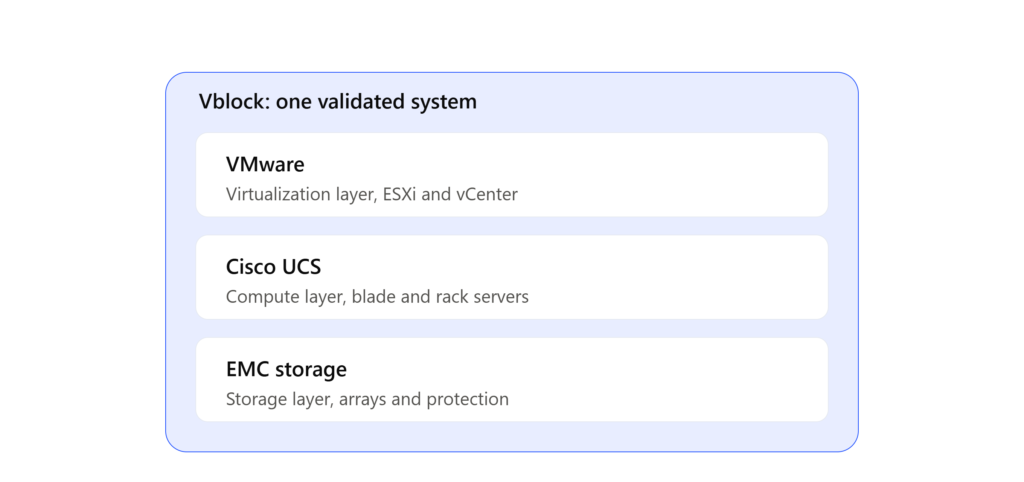
Each layer came from a different vendor, but you bought and supported them as one system. That bundling is what made Vblock attractive, and it is also what makes the VMware licensing changes so difficult to escape.
Compute came from Cisco UCS, providing blade and rack servers with centralized management through UCS Manager.
Storage came from EMC arrays, handling capacity, redundancy, and data protection.
Virtualization came from VMware, with ESXi as the hypervisor and vCenter for management.
The value was never in any single layer. It was in the fact that all three had been tested together, and that one support contract covered the whole thing. When something broke, you did not spend three days watching three vendors point at each other.
That integration is also, as it turns out, the source of most of its current problems.
Why Vblock Made Sense in Its Time
Between roughly 2010 and 2020, enterprise IT had a specific pain point. Building a data center meant integrating components from different vendors, validating compatibility yourself, and owning every problem that emerged from the seams between them.
Vblock removed that work. You got predictable performance, a documented architecture that auditors liked, and a deployment timeline measured in weeks rather than quarters. For banks, telecom operators, and government agencies with strict uptime and compliance requirements, that was worth paying for.
It is worth being clear about this, because dismissing Vblock as outdated misses why it was adopted in the first place. The problem it solved was real.
Is Vblock Still Relevant in 2026?
For organizations already running it on stable workloads, yes, in a limited sense. For anything new, no.
Where it still holds up
Existing deployments with predictable workloads. If a Vblock system is running core banking or telecom billing workloads that have not changed much in five years, it does that job well. Migration carries risk, and stable systems have real value.
Compliance-heavy environments. The pre-validated architecture is genuinely easier to document during an audit. Every component is known, tested, and covered under one agreement.
Environments where cloud is not an option. Data sovereignty rules, air-gapped requirements, and government procurement cycles all keep on-premises infrastructure in place regardless of what the market prefers.
Where it no longer fits
Anything requiring elastic scaling. SaaS platforms, e-commerce during peak events, and anything with unpredictable demand need infrastructure that scales in minutes. Vblock scales in procurement cycles.
Smaller organizations. The minimum viable deployment was built for enterprise budgets. Modern HCI or hybrid cloud serves this segment better at a fraction of the commitment.
Any new build. This one is not close. Nobody is specifying Vblock for greenfield deployments in 2026, and the vendor ecosystem has moved on.
The Broadcom Factor Changes the Whole Question
Here is the part that most Vblock articles written before 2024 completely miss, and it matters more than any hardware limitation.
Vblock’s virtualization layer is VMware. Not “compatible with VMware”, but built on it as a structural dependency. So when Broadcom acquired VMware and rewrote the commercial model, that change passed straight through to every Vblock and VxBlock system in production.
What changed: perpetual licenses were eliminated entirely, replaced by per-core subscriptions with a minimum core count applied per CPU. More than 160 individual products were collapsed into a handful of bundles, with VMware Cloud Foundation as the flagship at roughly $350 per core per year at list price. In January 2026, Broadcom also terminated its Cloud Service Provider agreements and moved to an invite-only model, which further reduced buying paths for smaller customers and regional partners.
The effect on Vblock owners is straightforward. The hardware did not get worse. The software licensing sitting on top of it got substantially more expensive, and the negotiating leverage got worse at the same time.
This is what makes the change unavoidable for Vblock owners rather than optional:
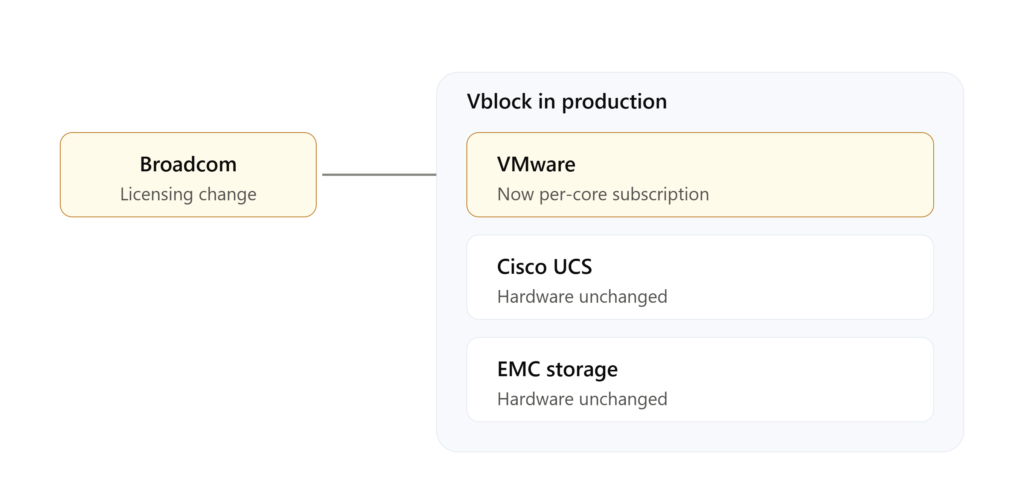
Two of the three layers are untouched. The third one was repriced, and because it sits inside the stack rather than beside it, there is no way to isolate the change. This is why the Vblock question in 2026 is a licensing question as much as a hardware one.
Gartner’s estimate is that 35 percent of VMware workloads could move to alternative platforms by 2028. Some analyses put the figure higher. Whatever the exact number, the direction is not ambiguous, and Vblock sits directly in the path of it.
⚠️ Remember: If you are evaluating whether to keep a Vblock system, the hardware lifecycle is only half the calculation. Model your VMware renewal under the current subscription terms before you decide anything. That number surprises people.
Lifecycle Status: What Dell’s Own Documentation Says
This is where guessing stops being useful, because Dell publishes the actual dates.
VxBlock Central, the management layer, reached End of Life on December 13, 2021, with End of Service Life following on December 13, 2022. Converged Management Software replaced it as the successor product. Dell documented this transition in a public FAQ on the VxBlock Central end of life.
Dell maintains this documentation publicly, and it is still being updated. Here is the article as it stands:
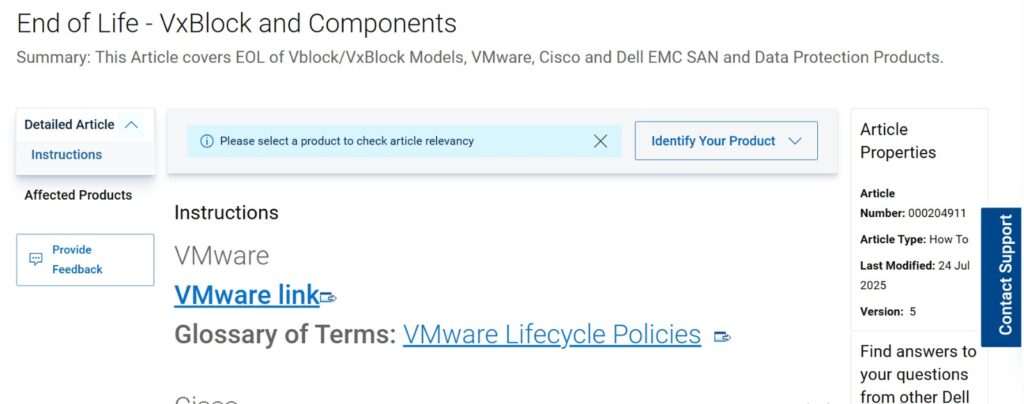
Dell’s own knowledge base article covering end of life for Vblock and VxBlock models. Note the Article Properties panel on the right: the document was last revised in July 2025, which tells you Dell is still actively maintaining lifecycle guidance for these systems. Source: Dell Support, article 000204911.
Dell also maintains a current end of life list covering VxBlock and Vblock components, which is the document to check before making any decision about a specific system.
Two details from Dell’s lifecycle policy matter more than the headline dates:
Components expire before systems do. Individual Cisco, Dell, or VMware components can reach end of life well before the overall system reaches End of Service Life. To keep the whole system supported, those components have to be replaced with supported equivalents. This is why a Vblock can be “supported” and simultaneously require expensive component swaps.
After End of Primary Support, expansion is limited. You can still expand existing capacity, such as adding drives to an existing array. What you cannot do is introduce a new technology extension into the system, because that risks version conflicts across the validated stack.
That second point is the practical trap. A system can look supported on paper while quietly losing the ability to accept anything new.
This pattern is not unique to converged infrastructure. It shows up across enterprise networking gear too, and the same budgeting problem appears in cases like the Cisco ISR 4451 end of life, where the announcement date and the date it actually starts costing you are years apart.
The Real Limitations
Scaling is structural, not incremental
Vblock scales in blocks, which is exactly what the name implies. Adding capacity often means a significant upgrade rather than adding a node. Modern HCI platforms let you add one node at a time and scale compute and storage semi-independently, which turns a capital expenditure spike into a manageable line item.
Cost is front-loaded and back-loaded at once
The initial investment was always high, that was well understood. The part organizations underestimate is the refresh cycle. When a component reaches end of life, the validated-stack model often pushes you toward upgrading more than the one failing part, because the certification applies to the combination rather than the pieces.
Published cost comparisons for Vblock versus HCI versus cloud vary enormously depending on workload, region, and negotiated terms, so treating any single figure as authoritative is a mistake. What holds consistently across them is the shape: Vblock front-loads capital cost and carries higher ongoing maintenance, HCI spreads cost across incremental nodes, and cloud converts it to operational expenditure entirely.
Vendor lock-in is now a three-way problem
Vblock ties you to Cisco, Dell EMC, and VMware simultaneously. For years that was an acceptable trade for integration. Post-Broadcom, one of those three vendors has demonstrated exactly what happens when a supplier decides to reprice an installed base, which makes the trade look different than it did in 2019.
Lifecycle pressure compounds
Older platforms including Vblock 300, 700, and 740 are well into their lifecycle tail. As they age, hardware availability tightens, compatibility with modern applications narrows, and maintenance costs climb. Some organizations extend life through third-party maintenance providers after official support ends, which is a legitimate strategy but one that trades vendor support for cost savings.
✅ Practical step: Before any budget discussion, pull your exact model and component list and check it against Dell’s published EOL documentation. Decisions made on assumed dates rather than actual ones are how organizations get caught mid-year with an unbudgeted replacement.
Vblock vs VxBlock vs HCI
| Vblock | VxBlock | HCI (Nutanix, vSAN) | |
|---|---|---|---|
| Architecture | Converged | Converged, updated | Hyper-converged, software-defined |
| Scaling | In blocks | More flexible than Vblock | Node by node |
| Storage | External EMC arrays | External arrays, newer generations | Distributed across nodes |
| Management | UCS Manager, VCE Vision | CMS after VxBlock Central EOL | Single unified control plane |
| Position in 2026 | Legacy | Late-stage | Current mainstream |
The difference between the two models comes down to one thing: where the storage lives.
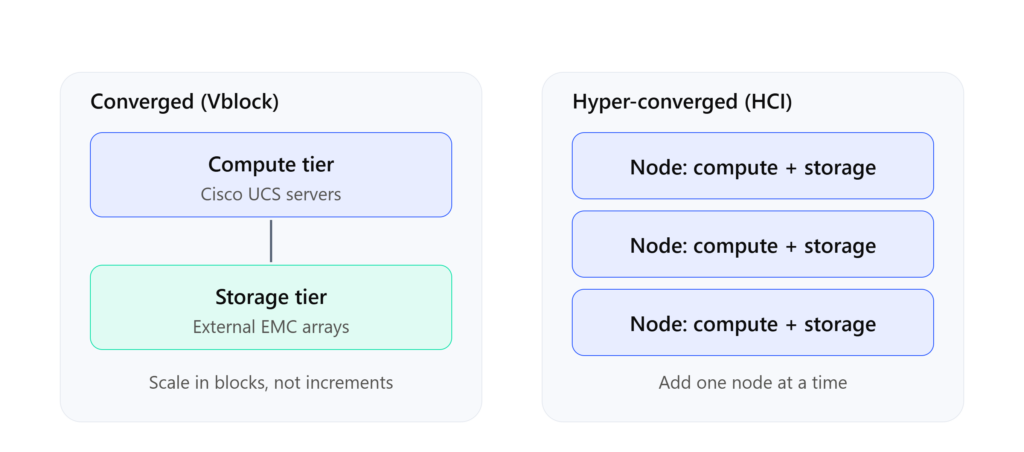
In a converged system, storage sits in external arrays connected to separate compute. In hyper-converged, every node carries both. That single architectural choice is why one scales in expensive blocks and the other scales one node at a time.
VxBlock is the evolution of Vblock rather than a different product family. It brought newer components, better automation, and more flexible scaling, but it inherits the same architectural model and the same VMware dependency.
HCI collapses storage into the same nodes as compute and manages everything through one software layer. That is the fundamental difference, and it is what makes node-by-node scaling possible.
If You Are Planning a Migration
Migration off Vblock is a project, not a weekend. The sequence below is the standard shape it takes.
Before the detail, here is the shape of the whole project:
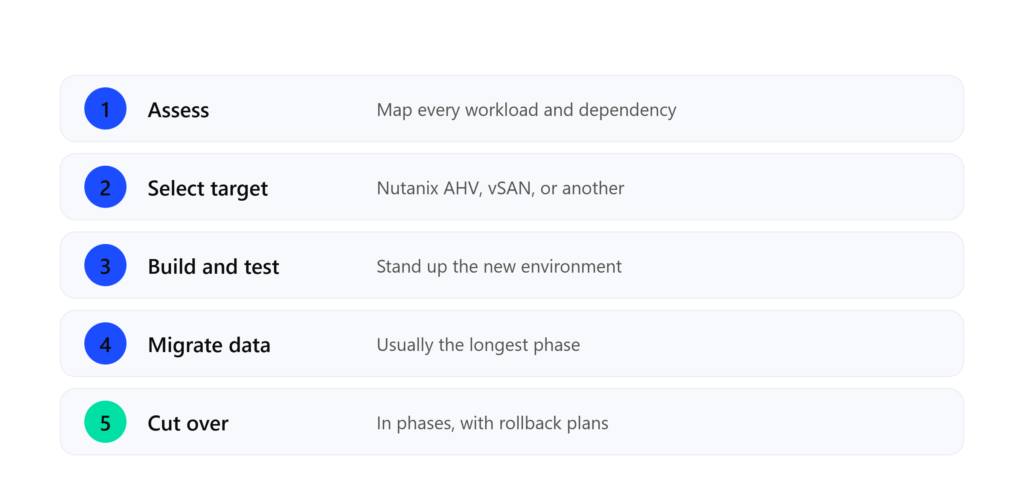
The phases run in order and each one depends on the last. Organizations that compress the first phase to save time usually pay for it in the fourth and fifth, where problems are far more expensive to fix.
Assessment comes first, and takes longer than expected
Document every virtual machine, workload dependency, storage configuration, and network path currently running on the system. Identify which workloads genuinely require zero downtime and which can accept a maintenance window. Rushing this phase is the most common reason migrations overrun.
Target platform selection is now a strategic decision
Nutanix AHV has emerged as the most direct enterprise replacement, largely because it bundles compute, storage, and management under one subscription without the per-core VMware structure. VMware vSAN remains an option for organizations that want to preserve existing tooling and administrator expertise, though that means staying inside the Broadcom licensing model. Proxmox VE has moved from lab environments into production in the mid-market. Azure Stack HCI makes sense for organizations already committed to Azure.
None of these are drop-in replacements. Each involves retraining and some ecosystem gaps.
Data migration is the long pole
Moving data off EMC arrays is the most technically demanding phase. Migration tooling exists and works, but large environments need careful scheduling to avoid saturating the network during business hours. Plan this around the calendar, not around optimism.
Cutover happens in phases, with rollback plans
Start with non-critical systems. Each cutover needs a documented rollback path, updated network and DNS configuration, and application-level validation before the old system is decommissioned.
Budget for the overlap
Both systems run simultaneously during migration. That doubles infrastructure cost for a period, and it is not optional. Organizations that fail to budget for parallel operation and staff retraining are the ones that end up making bad decisions under time pressure.
Multi-site organizations should also plan how the new platform connects across locations, since branch connectivity design shapes migration sequencing. Concepts covered in how DMVPN scales for large networks are relevant here.
Operational Challenges Commonly Reported
These are the recurring issue categories that show up in vendor documentation, community forums, and support discussions around Vblock environments. They are worth knowing about whether you run one or are evaluating leaving one.
Firmware version alignment across UCS components. The validated-stack model means firmware versions need to move together. Applying updates inconsistently across UCS Manager, fabric interconnects, and blade servers is a known source of instability, and correcting it usually requires a planned maintenance window.
VMware update compatibility. vSphere releases do not automatically align with the validated hardware compatibility matrix. Applying a VMware update outside the supported matrix is one of the more common ways a stable Vblock environment becomes unstable, and diagnosing it is complicated by the fact that three vendors each own part of the stack.
Storage tiering configuration. Latency issues under heavy mixed workloads often trace back to tiering policies that were configured at deployment and never revisited as workload patterns changed.
Management layer dependencies. With VxBlock Central now past End of Service Life, environments still relying on it are running unsupported management software, which is a distinct risk from the hardware being supported.
None of these make Vblock a poor system. They do mean it requires staff who understand the full stack. Treating it as set-and-forget infrastructure is where most difficulty originates.
High-availability design in these environments also depends on network-layer redundancy, and the principles in stateful switchover apply to keeping data center services online during failover.
Security Still Sits Outside the Stack
Converged infrastructure consolidates compute, storage, and virtualization. It does not consolidate security. Perimeter defense, traffic inspection, and segmentation remain separate concerns, and the fundamentals in how firewalls protect networks apply the same way they would in any other data center design.
Many organizations running legacy converged infrastructure pair it with modern security appliances such as the FortiGate 100F precisely because the infrastructure refresh cycle and the security refresh cycle run on different clocks. And as workloads become more API-driven, the relationship between firewall and API security becomes part of the same conversation.
What This Means by Organization Type
Banking and financial services. Existing deployments will likely stay until hardware forces the issue. Compliance documentation and migration risk both favor stability. The VMware renewal is the variable to watch.
Telecommunications. Similar picture. Stable, well-understood workloads with strict uptime requirements do not benefit much from elastic scaling. Component EOL will drive the timeline more than strategy will.
Government and public sector. Data sovereignty and procurement cycles keep these systems in place longest. On-premises remains a requirement, not a preference.
SaaS and startups. Not a fit, and never really was. These businesses need scaling behavior that Vblock’s architecture cannot provide.
E-commerce and retail. Traffic spikes are existential, and auto-scaling is a requirement rather than a nice feature. Cloud or HCI, not converged infrastructure.
Small and medium businesses. The entry cost was never designed for this segment. HCI or hybrid cloud is the right conversation.
Frequently Asked Questions
What is a Vblock system?
A pre-integrated converged infrastructure product built by VCE, combining Cisco UCS compute, EMC storage, and VMware virtualization into a single validated and supported stack.
Is Vblock still relevant in 2026?
For existing deployments with stable workloads, yes. For new deployments, no. The market has moved to hyper-converged and cloud platforms, and the VMware licensing changes have added pressure that did not exist a few years ago.
Is Vblock end of life?
It depends entirely on your specific model and components. Dell publishes an EOL list for Vblock and VxBlock systems, and individual components frequently reach end of life before the overall system does. Check your exact configuration rather than assuming.
What is the difference between Vblock and VxBlock?
VxBlock is the successor generation, with newer components, improved automation, and more flexible scaling. It shares the same architectural model and the same dependency on VMware.
What is the difference between Vblock and HCI?
Vblock keeps storage in external arrays connected to separate compute. HCI distributes storage across the same nodes that run compute, managed through one software layer. That difference is what allows HCI to scale node by node.
How do the Broadcom VMware changes affect Vblock owners?
Vblock depends structurally on VMware. The move to per-core subscription licensing, the elimination of perpetual licenses, and the reduction in partner channels all apply directly to Vblock environments, which raises the ongoing cost of keeping one running.
What are the main limitations of Vblock?
Rigid scaling, high total cost of ownership, three-way vendor dependency, and lifecycle pressure as components age out of support.
Conclusion
Vblock is not a failed product. It solved a genuine problem and did it well for the better part of a decade, and systems still in service continue to deliver the stability they were bought for.
What has changed is everything around it. The market moved to hyper-converged and cloud architectures, the scaling model that made sense in 2014 does not match how workloads behave now, and the VMware layer that Vblock is built on has been repriced in a way nobody planned for.
If you already run Vblock, the practical next step is not a decision about migration. It is two lookups: check your exact components against Dell’s published EOL documentation, and model your VMware renewal under current subscription terms. Those two numbers will tell you how much time you actually have, which is a better starting point than any general recommendation.

Abdul Shakoor writes practical, defensive cybersecurity and networking guides for SentrixHub. He focuses on making API security, mobile app security, authentication, and network concepts simple for beginners and developers.