
A router failing over shouldn’t mean a customer’s transaction failing with it. But on a lot of networks I’ve looked at, that’s exactly what happens — the standby device takes over just fine, the routing table is fine, and yet every active session drops anyway because nobody synced the state that mattered.
That’s exactly the gap real-world Stateful Switchover Best Practices are meant to close. It’s not a new idea in enterprise networking, but it’s one of those features that gets configured once, never tested again, and quietly stops doing its job after a firmware upgrade or a hardware swap. I’ve seen SSO “enabled” on paper while the actual failover behaved like a stateless one — because the standby supervisor was running a different IOS image than the active one. Nobody noticed until a real outage hit.
This guide walks through what SSO actually does, where it fits next to things like NSF, HSRP, and VRRP, and the practical mistakes that quietly break it in production.
What Is Stateful Switchover (SSO)?
In plain terms: SSO lets a standby supervisor or control plane pick up exactly where the active one left off, without the network or the end user noticing anything happened.
The setup usually looks like this:
- One device (or one supervisor engine, in chassis-based systems) is active
- A second one sits in standby
- Both continuously exchange state — not just routing information, but session and forwarding state too
- If the active fails, the standby takes over almost instantly, carrying that same state forward
This is different from a device simply “coming back online” after a failure. SSO is about continuity — the standby already knows what the active knew, so there’s no relearning, no re-establishing sessions, no visible blip.
📌 Worth knowing: SSO by itself only protects the control plane. Without Non-Stop Forwarding (NSF) running alongside it, the data plane can still hiccup during the switch — which is why the two are almost always deployed together in real Cisco environments.
How Stateful Switchover Actually Works
The mechanism behind SSO comes down to one thing: continuous state synchronization between active and standby.
What gets mirrored in real time includes:
- Routing tables
- ARP tables
- Forwarding information base (FIB) entries
- Session state (particularly relevant for firewalls, NAT devices, and load balancers)
Here’s what that four-step handoff actually looks like end to end:
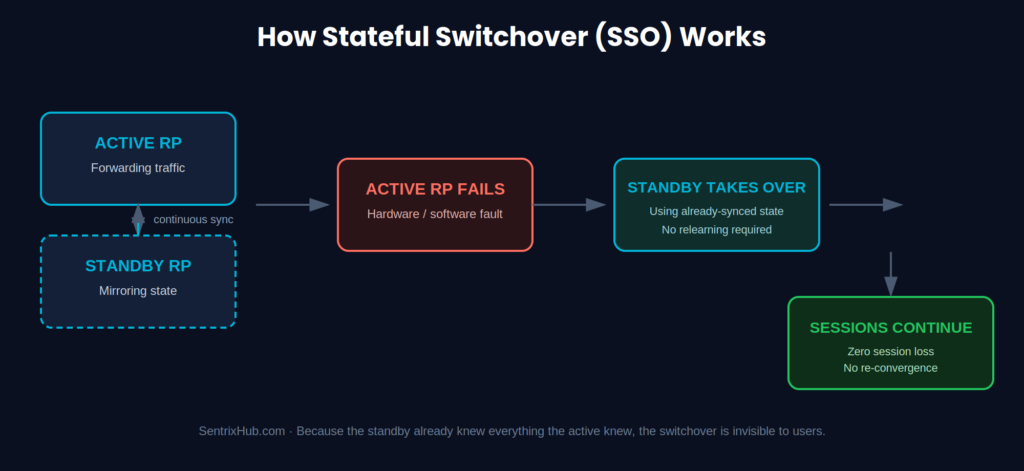
The key detail is step one — by the time the active RP fails, the standby already has everything it needs. There’s nothing left to learn on the fly.
When I’ve had to explain this to junior techs, I compare it to two people reading the same book at the same page — if one has to stop reading, the other can pick up the sentence without asking “where were we?” That’s the standby device during an SSO event.
What happens during an actual failover:
- The active device fails or is manually switched out
- The standby detects the failure almost immediately
- It assumes the active role using the state it already has
- Traffic keeps flowing — no re-convergence delay, no dropped sessions
This is a very different experience from watching a network reconverge after a traditional failover, where you can visibly see routing tables rebuild and sessions time out one by one.
Why SSO Exists: The Real Purpose Behind It
Strip away the marketing language and SSO exists to do one thing — keep things running when hardware doesn’t cooperate.
In practice, that translates to:
- Reducing downtime during planned maintenance or unplanned failures
- Preserving active application sessions (VoIP calls, financial transactions, VPN tunnels)
- Keeping routing adjacencies stable instead of forcing a full reconvergence
- Supporting the kind of high-availability architecture enterprise networks are expected to run today
If you’re managing anything customer-facing — a data center edge router, a firewall pair, a core switch supporting VoIP — this isn’t an optional nice-to-have anymore.
Stateful Switchover vs Stateless Failover
This distinction trips people up more than it should.
Stateless failover means the standby takes over, but with no memory of what the active was doing. Sessions reset. Routing has to reconverge from scratch. Users notice.
Stateful switchover means the standby already has the state. Nothing resets. Nothing reconverges. Ideally, nobody notices at all.
| Aspect | Stateless Failover | Stateful Switchover (SSO) |
| Session continuity | Sessions drop, must re-establish | Sessions preserved |
| Routing behavior | Full reconvergence required | No reconvergence needed |
| Failover speed | Seconds to tens of seconds | Sub-second to a few seconds |
| User impact | Noticeable disruption | Typically invisible |
| Requires paired feature | N/A | NSF (Non-Stop Forwarding) |
The table above covers the mechanics — this is what it actually looks like on a timeline when the same failure hits both setups:
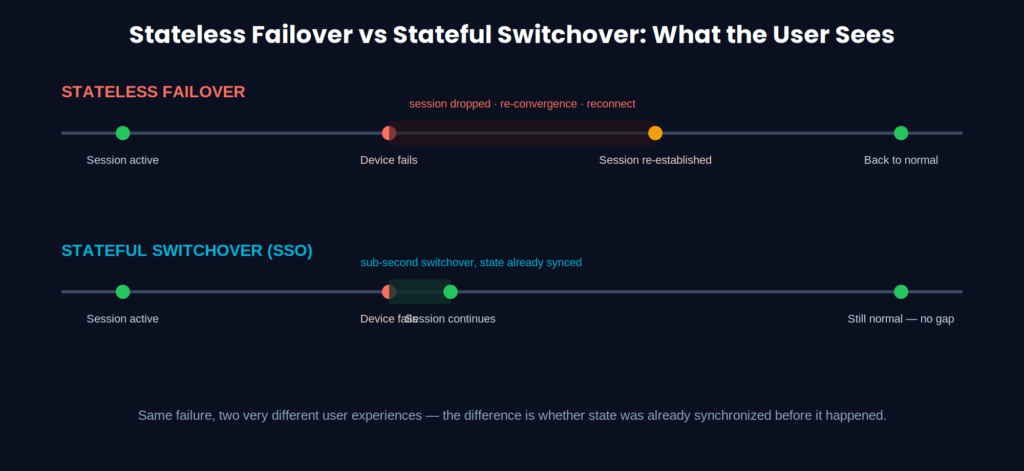
Same failure, same moment — the only difference is whether the standby already had the state it needed before things went wrong.
SSO vs NSF vs HSRP vs VRRP — Where Each One Fits
These four get lumped together constantly, but they solve different problems at different layers.
SSO vs NSF: SSO protects the control plane (the supervisor’s brain). NSF keeps the data plane forwarding packets while that control plane transition happens. You genuinely need both — SSO without NSF is like switching drivers mid-flight but forgetting to keep the engine running.
This layered split is easy to say and easy to forget in practice, so here’s what it actually looks like on the box:
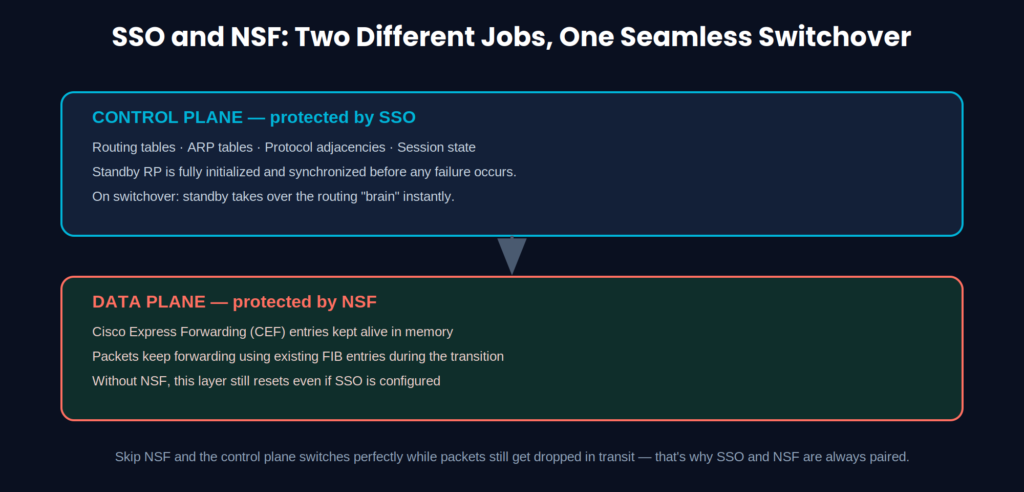
Notice both layers have to switch cleanly. A perfect control-plane switchover with no NSF still means dropped packets in transit — which is exactly the gap NSF exists to close.
SSO vs HSRP/VRRP: This one’s a layer difference. SSO deals with redundancy inside a single chassis or platform (dual supervisors, dual route processors). HSRP and VRRP handle gateway redundancy between separate physical devices, giving hosts a consistent default gateway even if one router disappears. In a well-designed enterprise network, you’ll typically see both layered together — SSO/NSF inside the chassis, HSRP or VRRP across the gateway pair.
If you’ve worked through how root port selection or root bridge election work in STP, the mental model is similar — different protocols, same underlying goal of avoiding a single point of failure.
Reading about SSO and NSF is one thing — watching the actual switchover behavior click into place is another.
If you’d rather see this in action than read through configuration steps, this walkthrough breaks down exactly how SSO synchronizes state between active and standby route processors — worth watching before you touch a production redundancy config.
How SSO Prevents Session Loss
Sessions drop in traditional failover because nothing was preserved to begin with. TCP sessions reset, VoIP calls disconnect, and applications go through a reconnect cycle that users absolutely notice.
SSO solves this by keeping state tables mirrored continuously rather than rebuilding them after the fact. When the switchover happens, the sessions were never actually interrupted from the network’s perspective — they just kept running on what is now the new active device
⚠️ Remember: SSO synchronizes state, but it doesn’t fix underlying instability. If your STP timers are misconfigured or your control plane is already flapping, SSO will faithfully synchronize a broken state to the standby too. Fix the root instability first.
Control Plane Redundancy: Why It Matters So Much
The control plane is where routing decisions, protocol adjacencies, and overall network intelligence live. If it goes down without a proper handoff, the effects ripple outward fast — routes disappear, adjacencies reset, and depending on scale, you can end up with something close to what happened during past large-scale BGP failures, where a control plane issue cascaded into a much bigger outage than anyone expected.
SSO’s job here is narrow but critical: keep the control plane synchronized so a hardware or software failure on the active unit doesn’t turn into a routing crisis.
A Real-World Scenario: Why Banks Care About This
Picture a bank’s core network handling live financial transactions. Without SSO, a router or firewall failure mid-transaction means dropped sessions, failed transfers, and a support queue full of angry customers within minutes.
With SSO properly configured and tested, the standby takes over so cleanly that transactions in flight simply continue. No rollback, no re-authentication, no customer even aware anything happened on the backend. This is precisely why financial and telecom networks were early, aggressive adopters of stateful failover technology.
Configuring Stateful Switchover (High-Level Steps)
Exact commands vary by platform and IOS/IOS-XE version, but the general process holds across most Cisco chassis-based systems:
- Enable redundancy mode on the chassis (typically
redundancythenmode sso) - Confirm both route processors/supervisors are running identical software images
- Enable NSF alongside SSO so the data plane keeps forwarding during the switch
- Let the configuration synchronize automatically between active and standby
- Verify redundancy state with
show redundancy statesbefore you trust it in production
For platform-specific syntax, Cisco’s own Configuring Stateful Switchover guide is the most reliable reference — don’t rely on forum command snippets that might be version-specific.
Common SSO Issues and How to Troubleshoot Them
The same handful of problems show up again and again in the field:
- Stateful switchover not triggering correctly — usually a mismatch between active and standby software versions
- Sync failures between devices — often caused by insufficient memory or an interrupted configuration sync
- High CPU delaying the switchover — the standby is technically ready but too busy processing something else to react instantly
- Protocol incompatibility — some features simply aren’t NSF-aware and will still reset during a switchover regardless of SSO status
When troubleshooting, start with show redundancy, check sync logs for errors, watch CPU and memory on both units, and confirm every protocol running on the box actually supports NSF-aware operation — not all of them do.
Configuration Mistakes That Quietly Break SSO
I’ve walked into more than one network where SSO was “configured” but not actually functional. The usual suspects:
- Mismatched IOS/IOS-XE versions between active and standby — this alone is responsible for most SSO failures I’ve diagnosed
- NSF left unconfigured, so the data plane still hiccups even though the control plane switches fine
- Failover never tested after initial setup — configured once during deployment and never touched again
- No synchronization monitoring, so nobody notices when sync silently stops working
✅ Best practice: After any firmware or IOS upgrade, immediately verify that both supervisors are back on matching software versions before trusting SSO again. This single check would have prevented most of the SSO failures I’ve personally traced back to root cause.
Network Failover Problems and Practical Fixes
Beyond SSO-specific issues, general failover problems still creep in:
- Slow failure detection — fix this with Bidirectional Forwarding Detection (BFD), which detects link failures in milliseconds instead of waiting on slower routing protocol timers
- Packet loss during the switch — often tied to inconsistent hardware, similar to problems seen when running end-of-life platforms like the Cisco ISR 4451-X past their supported lifecycle
- Routing instability post-switchover — usually traced back to timer mismatches, the same category of mistake that causes STP-related instability elsewhere in the network
Stateful Switchover Best Practices for Production Networks
After going through enough of these deployments, a pattern of what actually works starts to emerge — this is the core list of Stateful Switchover Best Practices that hold up under real production load:
- Always pair SSO with NSF. One without the other leaves a gap in either the control or data plane.
- Keep hardware and software identical on both units. Mismatches are the single most common cause of SSO failure.
- Monitor synchronization continuously, not just at initial setup. Sync can silently break weeks later.
- Test failover on a schedule, not just once during commissioning. A failover you haven’t tested in a year is a theory, not a plan.
- Avoid configuration drift between active and standby — even small manual changes on one side can break sync.
- Use fast detection mechanisms like BFD instead of relying on default protocol timers.
- Layer redundancy across multiple points — device-level SSO, path-level redundancy, and gateway-level protocols like HSRP or VRRP working together, not in isolation.
Building Toward Zero-Downtime Networking
SSO is one piece of a larger puzzle. Real zero-downtime architecture usually combines it with:
- In-Service Software Upgrades (ISSU) for patching without a reboot
- Path redundancy through LACP or ECMP
- Gateway redundancy via HSRP/VRRP
- Solid Layer 2 loop prevention — which is exactly why getting STP port states and alternate port behavior right still matters even in an SSO-protected network
None of these replace each other. They stack.
Where High Availability Is Headed
Enterprise HA design is shifting toward automation-driven models — AI-assisted monitoring flagging sync issues before they cause an outage, software-defined networking abstracting a lot of the manual redundancy work, and intent-based networking that self-corrects drift instead of waiting for a human to notice it.
SSO isn’t going away in this shift. If anything, it’s becoming one more input that automated systems monitor and act on, rather than something engineers configure once and forget.
Final Thoughts on Stateful Switchover Best Practices
SSO is genuinely one of the more effective tools available for keeping enterprise networks running through hardware failures — but only when it’s configured correctly, paired with NSF, and actually tested under real failure conditions rather than left as a checkbox from initial deployment.
The mistake I see most often isn’t a lack of understanding of what SSO does. It’s assuming that because it was configured once, it’s still working exactly as intended a year later. Following these Stateful Switchover Best Practices on a recurring schedule — not a one-time checklist — is what actually keeps that assumption from becoming a real outage.
Frequently Asked Questions
What is Stateful Switchover (SSO), and why do best practices matter?
SSO is a high-availability mechanism that lets a standby device take over from an active one without dropping sessions, by continuously synchronizing state between them. Following proven Stateful Switchover Best Practices is what determines whether that handoff actually stays seamless in production.
How does SSO prevent session loss?
By mirroring session, routing, and forwarding state between active and standby devices in real time, so the standby can pick up exactly where the active left off.
What’s the real difference between SSO and stateless failover?
Stateful switchover preserves active sessions during a failover; stateless failover drops them and forces a full reconnection and reconvergence.
Is SSO enough on its own for high availability?
No. It needs to be paired with NSF for data plane continuity, and ideally layered with gateway redundancy protocols like HSRP or VRRP and path redundancy at other layers.
What are the most common SSO problems in the field?
Software version mismatches between active and standby, unconfigured NSF, untested failover, and synchronization silently breaking without anyone monitoring for it.

Abdul Shakoor writes practical, defensive cybersecurity and networking guides for SentrixHub. He focuses on making API security, mobile app security, authentication, and network concepts simple for beginners and developers.