
Introduction
Picture this: someone walks into your office, finds an empty Ethernet port, plugs in a laptop, and suddenly they’re sitting inside your company network. No password prompt, no security check — just instant access.
That’s not a hypothetical. It’s one of the most common entry points attackers use against enterprise networks that rely only on firewalls and passwords at the perimeter, while leaving the network edge wide open.
This is exactly the gap that IEEE 802.1X authentication was built to close.
In plain terms, 802.1X makes sure that only authorized users and devices — wired or wireless — are allowed to talk on the network. No valid credentials, no access. Full stop.
This guide walks through how 802.1X actually works, why it matters for enterprise security, and how to deploy it correctly without the common mistakes that quietly break it.
📌 Worth knowing: 802.1X isn’t a replacement for your firewall — it works before the firewall ever sees traffic, by deciding whether a device is even allowed onto the wire in the first place.
What Is IEEE 802.1X Authentication?
IEEE 802.1X is a network access control (NAC) standard that verifies the identity of a user or device before it’s allowed to send or receive any data on the network. Think of it as a checkpoint sitting right at the switch port or wireless access point — nothing gets through until identity is confirmed.
The Three Core Components
802.1X runs on a simple three-party model:
- Supplicant — the device asking for access (laptop, phone, IoT device)
- Authenticator — the network device controlling the door (switch or wireless AP)
- Authentication Server — typically a RADIUS server that actually verifies the credentials
It’s the same logic as walking into a secured building: you show your ID, the guard checks it, and a central system confirms you’re cleared to enter. Only then does the door open.
Here’s how the three pieces connect during authentication:
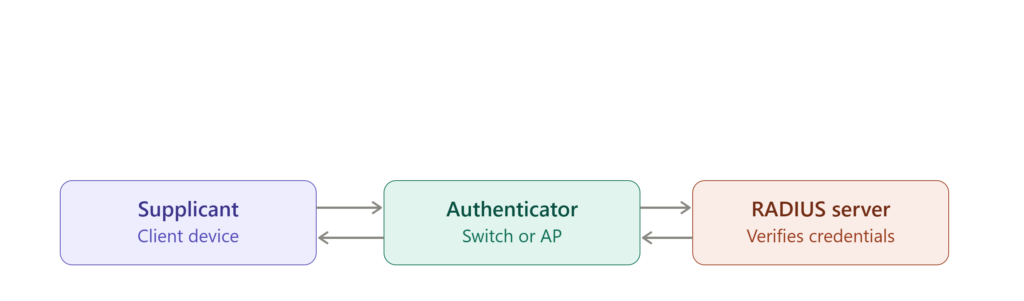
The top arrows carry the identity request forward; the bottom arrows carry the access decision back — until that decision arrives, the authenticator keeps the port closed.
How 802.1X Authentication Actually Works
Here’s the step-by-step flow, stripped of jargon:
Step 1 — Device connects. A laptop plugs into a switch port or joins a Wi-Fi network. At this point the port is sitting in a blocked state — this is conceptually similar to how switches hold ports in a non-forwarding state during STP negotiation, as covered in our breakdown of STP port states; in both cases, the port simply refuses to pass traffic until a condition is satisfied.
Step 2 — Identity requested. The switch or AP (the authenticator) asks the device to prove who it is.
Step 3 — Credentials sent via EAP. The device replies using an EAP method — commonly EAP-TLS (certificate-based), PEAP, or EAP-TTLS.
Step 4 — RADIUS verification. The authenticator forwards the request to the RADIUS server, which checks the username/password or certificate, and optionally the device’s compliance status.
Step 5 — Access decision. Valid credentials mean access granted; invalid ones mean the port stays shut.
Step 6 — Network access granted. Once verified, the port opens and the device can finally communicate.
Here’s the full sequence in one view:
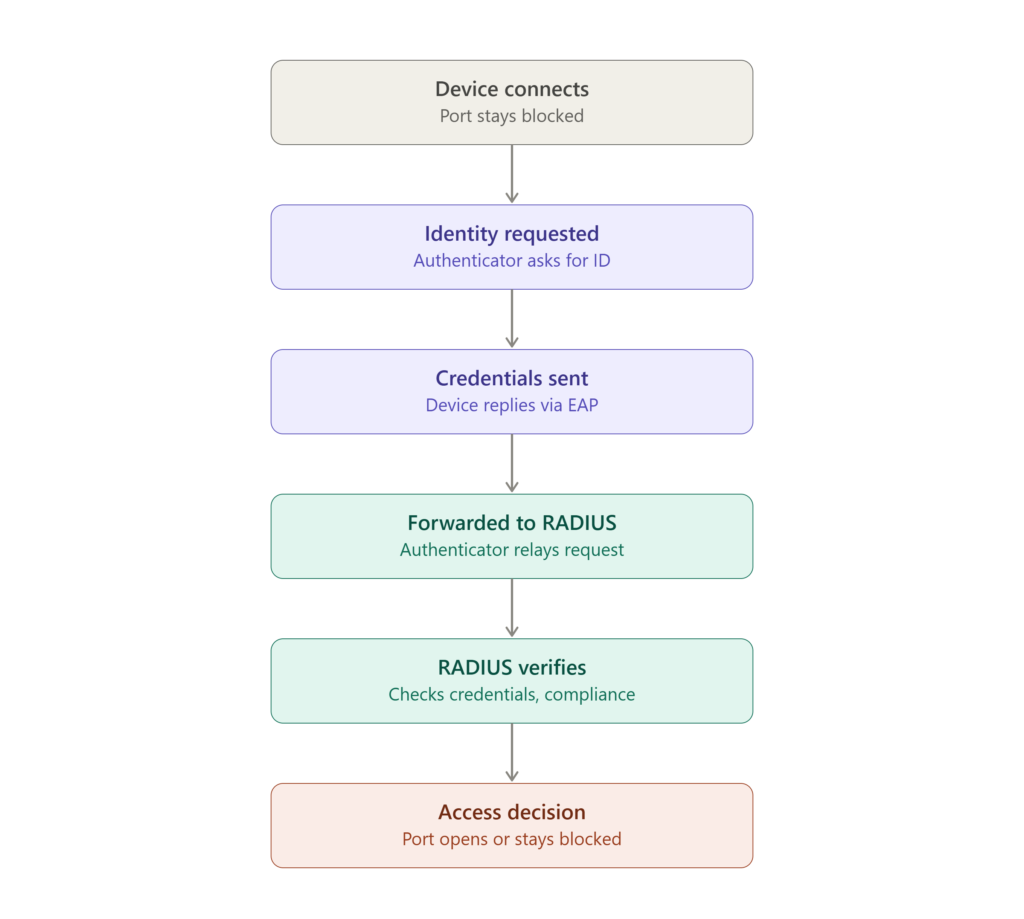
Notice the port stays blocked at both the start and the end of the failure path — access is only granted at the very last step, once the RADIUS server confirms the credentials are valid.
If you’d rather see this flow in action instead of just reading it, this walkthrough breaks down the same supplicant–authenticator–RADIUS process step by step:
As covered above, the key takeaway is that the switch port stays blocked by default — it’s the RADIUS server’s decision that flips it to an authorized state.
Why 802.1X Matters for Enterprise Security
- Stops unauthorized devices instantly. No credentials, no connection — even before the device touches internal resources.
- Reduces insider risk. Every employee device authenticates too, not just outsiders.
- Enforces Zero Trust at the network layer. Nothing is trusted by default, even inside the building.
- Enables device-level policy. You can require patched systems or corporate-managed devices only.
- Blocks rogue access points. Fake Wi-Fi networks can’t complete a legitimate authentication handshake.
⚠️ Remember: Authentication only confirms who is connecting — it doesn’t confirm the device is safe. Pair 802.1X with device compliance checks, or you’re only solving half the problem.
802.1X and Network Access Control (NAC)
802.1X is one of the strongest enforcement arms of a broader NAC strategy. NAC decides who gets in and how much they get — full access for managed laptops, limited access for guest devices, and no access at all for anything unrecognized. 802.1X is what actually enforces that decision at the port level.
Why This Matters for API Security
It might seem like a network-layer protocol has nothing to do with APIs, but the connection is direct. Internal APIs almost always run on servers reachable from the internal network. If an attacker gets that network foothold, they can intercept traffic or probe internal endpoints that were never meant to be internet-facing. Our piece on how firewalls support API security goes deeper into layering network controls around backend services — 802.1X is effectively the layer that decides who even reaches that firewall boundary in the first place.
Why This Matters for Mobile App Security
Mobile devices are usually the weakest link in enterprise networks, and 802.1X (paired with NAC) blocks compromised or jailbroken devices from joining corporate Wi-Fi in the first place, while enforcing certificate-based authentication that’s far stronger than a shared password. Attackers who reverse-engineer mobile apps to extract credentials or tokens still hit a wall if the device itself was never allowed onto the network to begin with.
Real-World Attack Scenarios
Rogue device attack. Attacker plugs a laptop into an unused wall port. Without 802.1X, that’s instant access. With it, the port simply stays blocked.
Credential theft. An attacker steals an employee’s weak or reused password. With EAP-TLS in place, that stolen password is useless without the matching device certificate.
Evil twin Wi-Fi. An attacker spins up a fake access point mimicking the corporate SSID. With certificate validation enabled, legitimate devices simply reject the untrusted network.
Common Mistakes That Break 802.1X Deployments
- Weak EAP methods — avoid anything like EAP-MD5.
- Poor certificate management — expired certificates are one of the most common causes of authentication outages, similar to the pitfalls we cover in dangerous SSL validation mistakes.
- Ignoring device compliance — a valid identity on a compromised device is still a risk.
- Misconfigured switch ports — a single wrong setting can bypass authentication entirely, the same way misconfigured file permissions quietly undermine access control elsewhere in the stack.
- No logging or monitoring — without visibility, failed and suspicious attempts go unnoticed.
Configuring 802.1X: A Practical Walkthrough
- Set up a RADIUS server — FreeRADIUS or Microsoft NPS are the standard choices.
- Enable 802.1X on network devices — switch ports and wireless access points both need it configured.
- Choose an EAP method — EAP-TLS is the recommended default for high-security environments.
- Deploy certificates — to users, devices, and servers alike.
- Configure supplicants — on Windows, macOS, and mobile clients.
- Test the full flow — confirm successful logins, correct restrictions, and proper failure handling.
For deeper protocol-level reference: SecureW2’s 802.1X configuration guide and Fortinet’s 802.1X overview.
✅ Best practice: Combine 802.1X with MFA, dynamic role-based access policies, and automated certificate lifecycle management — a manually managed certificate store is where most deployments quietly fail over time.
Best Practices for Strong 802.1X Security
- Use certificate-based authentication over password-only methods wherever possible.
- Implement VLAN segmentation so authenticated devices land in the right network zone automatically.
- Enable logging and monitoring for every authentication attempt.
- Integrate with a proper NAC solution — firewalls like the FortiGate 100F pair well with 802.1X for combined network and access-layer enforcement.
- Review policies regularly as device types and threats evolve. For teams building out a formal security baseline, the OWASP ASVS structure is a useful reference point for where access control requirements like this fit into a broader verification standard.
What Is 802.1X Security, in Simple Words?
It’s a digital security guard standing at every network entry point, checking every device before it’s allowed to join. No ID, no entry.
Conclusion
Relying on passwords and perimeter firewalls alone leaves the network edge exposed — and that edge is exactly where attackers look first. IEEE 802.1X closes that gap by enforcing identity verification before any device is allowed to communicate at all.
It strengthens enterprise network security, powers effective NAC enforcement, and adds a meaningful layer of protection for APIs, mobile devices, and every system sitting behind the network edge. If stopping unauthorized access is the goal, 802.1X isn’t optional — it’s foundational.
Frequently Asked Questions
What does IEEE 802.1X authentication do?
It verifies users and devices before allowing them onto a network, blocking unauthorized connections at the port level.
How does 802.1X authentication work?
Through a three-part system — supplicant, authenticator, and RADIUS server — that validates credentials before granting access.
What is RADIUS server authentication?
A centralized system that verifies user or device credentials and enforces access policy decisions.
Which EAP method is most secure?
EAP-TLS, since it relies on certificate-based authentication rather than passwords alone.
Is 802.1X necessary for small businesses?
Yes. Even small networks benefit from blocking unauthorized devices, especially as threats keep growing.

Abdul Shakoor writes practical, defensive cybersecurity and networking guides for SentrixHub. He focuses on making API security, mobile app security, authentication, and network concepts simple for beginners and developers.