
By Abdul Shakoor
There’s a hard lesson every mobile developer eventually learns, usually the uncomfortable way: the app on someone’s phone is not your app anymore. The moment it leaves your build server and lands on a device you don’t control, it’s running in hostile territory — and tools like Frida and Xposed are exactly how attackers turn that hostile territory to their advantage.
Modern apps aren’t simple frontends. They’re wired into APIs, authentication systems, and sensitive user data. So attackers stopped bothering to crack open the APK and read it statically. Why decompile when you can just hook into the app while it runs and rewrite its behavior live? That’s the shift, and it’s exactly why the Frida vs Xposed Framework comparison matters far beyond academic curiosity. Both tools let researchers — and attackers — reach deep inside a running Android app. Both can quietly dismantle protections that looked solid on paper.
If you build or test mobile apps, understanding these two tools isn’t optional anymore. It’s the line between an app that holds up and one that gets exploited without anyone noticing. Let me walk through what each one is, how they differ, and — most importantly — what their existence should change about how you build.
What Frida is
Frida is a dynamic instrumentation toolkit — it lets you inspect and modify an app’s behavior in real time, while it’s running.
The crucial detail is how it does this. Frida doesn’t touch the APK file on disk. Instead, it injects code into the live, running process. That makes it fast and remarkably flexible — there’s no recompiling, no repackaging, just live manipulation. At its heart sits the Frida server, which runs on the target device and talks to your machine. If you want the full picture of how this works in practice, I’ve covered it in depth in Frida hooking explained.
What makes Frida so powerful comes down to a few things: real-time function hooking, cross-platform support across Android, iOS, Windows and Linux, JavaScript-based scripting that keeps the learning curve gentle, and no need to recompile anything. In practice it feels like having a live console inside the app — you observe and change everything as it happens.
Frida in Action: Live Function Tracing
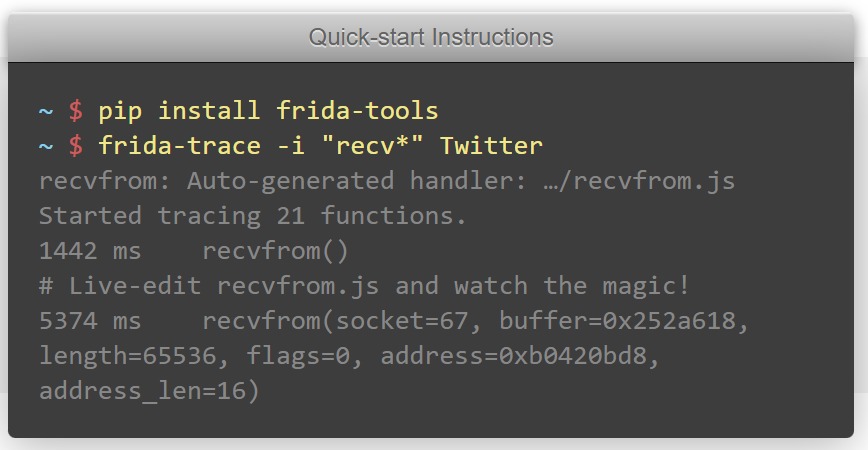
This is Frida at work — a couple of commands and it’s tracing live function calls inside a running app, showing exactly what’s being called and with what data. That instant, no-recompile feedback is what makes it so powerful for runtime analysis.
What Xposed is
Xposed takes a fundamentally different route. Instead of injecting into one running process, it changes how Android itself executes code at the system level. It hooks into the Android Runtime (ART) and lets modules override methods globally, across apps.
Originally Xposed was built for harmless things — UI customization, feature tweaks, system enhancements. But in security testing (and abuse), it found a second life: bypassing root detection, disabling SSL pinning, modifying app behavior wholesale. Users manage it through the Xposed Installer, loading modules that define what gets changed. The old days of flashing a framework zip are mostly gone; modern setups run Xposed through Magisk, which makes installation far cleaner.
Frida vs Xposed Framework: Injection vs System-Level
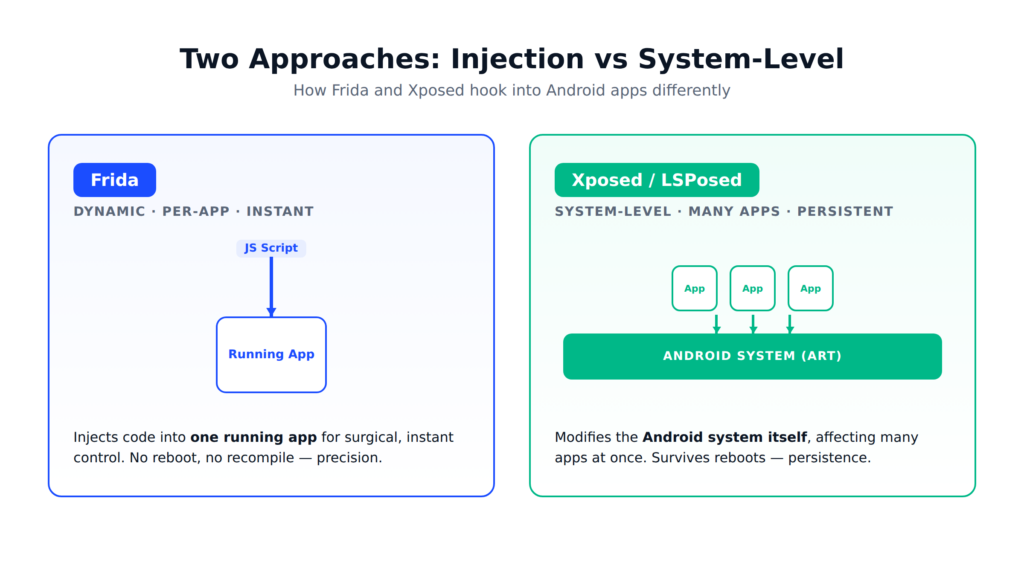
The visual makes the core split obvious: Frida injects a script into one running app for surgical, instant control, while Xposed modifies the Android system itself, affecting many apps and surviving reboots. Precision on the left, persistence on the right.
How they actually work — and where they split
The mechanics are where the real difference lives.
Frida is dynamic and per-process.
You start the Frida server on the device, attach to a running app (or spawn a fresh one), inject JavaScript to hook methods and intercept calls, and your changes apply instantly — no reboot. You can intercept login validation, capture API requests, or modify return values on the fly. It’s surgical.
Xposed is system-level and persistent.
You install the framework (usually via Magisk), install the Xposed Installer to manage modules, add the modules defining your changes, let it hook into system methods across apps, and reboot for changes to take effect. The trade-off is clear: Xposed affects multiple apps at once and survives reboots, making it ideal for persistent modifications — but it’s heavier and less surgical.
The cleanest way I can put it: Frida gives you precision; Xposed gives you persistence. Frida is a scalpel you pick up for a specific job. Xposed is a permanent modification to the operating room itself.
| Frida | Xposed (LSPosed) | |
|---|---|---|
| Approach | Dynamic, runtime injection | System-level hooking |
| Flexibility | Highly scriptable | Depends on modules |
| Ease of use | Needs scripting | More beginner-friendly |
| Root needed | Sometimes optional | Usually required |
| Execution | Instant | Requires reboot |
| Best for | Reverse engineering, API testing | Persistent system changes |
📌 The core difference: Frida gives you precision — a scalpel you pick up for a specific job, applied instantly to one process. Xposed gives you persistence — a permanent change to the system itself, affecting many apps but needing a reboot.
Watch: Frida and Xposed in Action
If you’d rather see these tools work than read about them, the video above demonstrates how each one hooks into an Android app. Watching the dynamic, instant nature of Frida next to Xposed’s system-level approach makes the precision-versus-persistence difference much clearer.
A quick word on LSPosed (because “Xposed” is now confusing)
As Android evolved, the original Xposed struggled to keep up. EdXposed came along for newer Android versions and worked with Magisk, but stability issues limited it. Today, LSPosed is the modern standard — better performance, more stability, per-app control, and improved compatibility with current Android versions.
So here’s the practical reality worth knowing: when someone says “Xposed” in 2026, they almost always mean LSPosed or a similar modern fork. The original is largely outdated, EdXposed has limited support, and LSPosed is what’s actively maintained. Don’t get tripped up by old tutorials referencing the original framework.
⚠️ Don’t get tripped up: When someone says “Xposed” in 2026, they almost always mean LSPosed. The original framework is outdated and EdXposed has limited support — LSPosed is what’s actively maintained. Old tutorials referencing the original can mislead you.
The security risks these tools expose
Both tools, in the wrong hands, are genuinely dangerous — and understanding why is the whole point of this article.
Runtime manipulation.
An attacker can modify app logic, override security checks, and force “successful” outcomes that should never happen. The check that says “is this user premium?” becomes a check that always returns yes.
Security bypass.
Root detection, SSL pinning, emulator detection — all of it can be bypassed. Can Xposed defeat these protections? Absolutely. So can Frida. If your defense assumes the client is honest, these tools dismantle that assumption in minutes.
Data exposure.
Sensitive data in transit through the app — API tokens, credentials, session data — can be intercepted live. This is the same class of risk behind token-handling mistakes: once an attacker sits inside the running app, secrets that felt safe are suddenly readable
Why this matters for API security
Most app logic now lives on the server — but the client still matters, and that’s the trap. With Frida, API requests can be modified before they’re sent and responses altered before they’re processed. Even with HTTPS in place, an attacker who controls the runtime can replay requests, abuse business logic, and extract authentication tokens.
This is exactly why the question of trust sits at the center of API and firewall security. HTTPS protects data in transit between honest endpoints. It does nothing when the endpoint itself is compromised — which is precisely what these hooking tools achieve.
Why this matters for mobile app security
Here’s the uncomfortable foundation: a mobile app runs in an inherently untrusted environment. Once Frida or Xposed is in play, client-side validation becomes useless, security checks can be switched off, and sensitive flows can be manipulated freely. Understanding how attackers reverse engineer apps in the first place makes it obvious why client-side trust is a losing bet.
What this looks like in the real world
A few concrete scenarios show the stakes:
Banking app bypass — hooking transaction logic to skip validation or raise limits. Subscription unlock — LSPosed modules that flip on premium features or bypass payment entirely. API abuse — intercepting and rewriting request parameters, tokens, and headers. Game manipulation — changing scores, currency, and rewards in real time. Different targets, same root cause: an app that trusted something it shouldn’t have.
The mistakes that make all this possible
The tools are powerful, but they thrive on developer mistakes that are entirely avoidable.
Trusting the client is the original sin — never assume the app on the device is secure. Weak SSL pinning falls to these tools easily; basic implementations are bypassed in seconds, which is its own deep topic I’ve covered under SSL validation mistakes. Hardcoded secrets get extracted instantly by hooking tools. No runtime protection means the app never even notices Frida, Xposed, or a debugger attached to it. And over-reliance on obfuscation — obfuscation slows an attacker down, but it does not stop one.
Detecting and mitigating the threat
On detection: apps can scan for suspicious processes, watch for Frida’s known ports, and check memory for known signatures — though weak checks are themselves easily evaded, so it’s a moving target. More robust approaches verify method integrity, watch for altered execution flow, and lean on behavior analysis and anti-debugging.
But detection is only half the story. The real defence is architectural:
Move critical logic to the backend — never let a client-side decision be the final word on anything that matters. Strengthen SSL pinning with layered, hardened implementations. Use runtime protection — this is exactly the gap a RASP tool fills, detecting and blocking these manipulations from inside the app as they happen. Secure your code with a combination of obfuscation, encryption, and native protections. And monitor API behavior for the anomalies that betray automated abuse.
The same defense-in-depth mindset matters at the network layer too — TLS weaknesses like the BEAST attack are a reminder that every layer needs hardening, not just the app.
✅ Best defense: Don’t rely on detection alone — it’s easily evaded. Move critical logic to the backend, harden SSL pinning, add runtime protection (RASP), and test your own app with these tools before an attacker does.
The bottom line
The Frida vs Xposed Framework debate was never really about which tool is “better.” It’s about internalizing what both prove: Frida excels at dynamic, real-time manipulation; Xposed (through LSPosed) provides persistent, system-level control. They approach the problem differently, but they expose the same truth —
⚠️ The hard truth: If your app trusts the client, it’s already vulnerable. HTTPS protects data between honest endpoints — it does nothing when the endpoint itself is hooked. Move every decision that matters to the server.
If your app trusts the client, it’s already vulnerable.
Modern mobile security comes down to minimizing trust, maximizing server-side verification, and continuously testing your own apps with these very tools before someone less friendly does. Because attackers aren’t guessing at your app’s weak points anymore. They’re hooking straight into them — and watching what falls out.
Frequently asked questions
What’s the main difference between Frida and Xposed?
When comparing Frida vs Xposed Framework, the core difference comes down to this: Frida works dynamically at runtime using injected scripts, applying instantly to a single process. Xposed modifies behaviour at the system level using modules, affecting multiple apps but requiring a reboot.
Is the Xposed Framework still supported?
The original is largely outdated and EdXposed has limited support, but LSPosed is actively maintained and is what most people mean by “Xposed” today.
Can Xposed bypass security features?
Yes. With the right modules it can bypass root detection, SSL pinning, and other protections — and Frida can do the same dynamically.
What does the Frida server do?
It runs on the target device and acts as the bridge that lets your machine inject scripts and control the app’s runtime behaviour.
Which tool is better for penetration testing?
Frida is usually preferred for its flexibility, real-time control, and scripting — but the right choice depends on whether you need surgical precision (Frida) or persistent, system-wide changes (Xposed/LSPosed).
To go deeper, explore our guides on Frida hooking explained, reverse engineering with Ghidra, and RASP runtime protection.

Abdul Shakoor writes practical, defensive cybersecurity and networking guides for SentrixHub. He focuses on making API security, mobile app security, authentication, and network concepts simple for beginners and developers.