
By Abdul Shakoor · SentrixHub
Most developers pour their security effort into the parts they can see — login pages, APIs, encryption. But the real treasure sits deeper, in the database. That’s where the user records, credentials, and business data actually live, and if that layer is weak, everything built on top of it collapses. An attacker doesn’t need to defeat your polished frontend if they can quietly dump your database, inject malicious queries, or escalate their way to admin.
That’s exactly the gap tools like DbScanner are built to close. In this guide I’ll walk through what a database vulnerability scanner really does, how it works step by step, what it can and can’t catch, and — most importantly — how to run one safely without knocking over your own systems. The goal isn’t to turn you into a tool operator; it’s to help you understand your database’s weak points the way an attacker would.
📌 Why the database matters most: Attackers don’t need to beat your polished frontend if they can reach the database underneath it. That’s where the user records, credentials, and business data actually live — so a single misconfiguration there can expose millions of records at once.
What DbScanner actually is
DbScanner is a database security scanner — a tool that automatically probes database systems for weaknesses. In plain terms, it connects to (or scans) a database, checks it against a long list of known problems, and reports what it finds: misconfigurations, weak permissions, and exploitable flaws like SQL injection exposure.
It exists to answer a few uncomfortable questions most teams never ask directly. Is your database reachable by people who shouldn’t reach it? Are the authentication mechanisms weak or left on defaults? Could someone manipulate your queries to pull data they were never meant to see? A good scanner turns those vague worries into a concrete, prioritised list.
How DbScanner works, step by step
Understanding the sequence helps you judge how much to trust the output.
It starts with database discovery — identifying database servers (MySQL, PostgreSQL, MSSQL, and others), open ports like 3306 or 1433, and connected services. This is reconnaissance, the same opening move an attacker makes. Then comes authentication testing, where the scanner checks for weak or default credentials and misconfigured access controls — the digital equivalent of trying whether the front door is simply unlocked.
Next is query and configuration analysis: the tool looks at how queries behave, hunting for unsafe SQL patterns and injection exposure, then reviews encryption settings, access permissions, and backup configuration. From there it moves to vulnerability detection, flagging SQL injection risks, privilege-escalation paths, and data-exposure issues. Finally, reporting pulls everything into risk levels, technical detail, and fix recommendations. It’s the same crawl-probe-analyze-report loop that all scanners share — the same one covered in our BScanner guide — just pointed specifically at databases.
Watch: Database Vulnerability Scanning
If seeing the process helps, the video above walks through how database vulnerability scanning works in practice. Even if it uses a different tool than DbScanner, the underlying approach — discover, test, analyze, report — applies to any database scanner.
What kinds of vulnerabilities it finds
A capable database scanner covers several distinct risk areas, and it’s worth knowing what each one means.
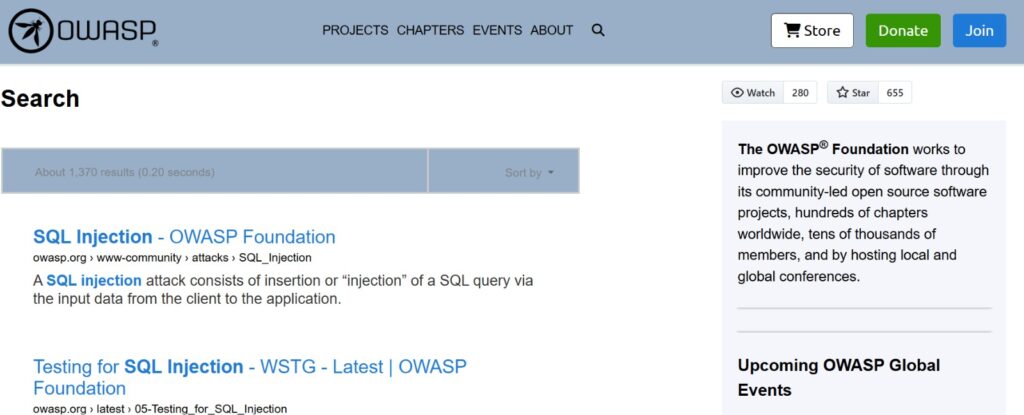
SQL injection is the headline threat — where an attacker manipulates a query to extract data or bypass authentication. It remains one of the most damaging and common weaknesses in the world, and it maps directly to the well-known weakness classification behind it (the CVE, CWE and CAPEC frameworks track it as CWE-89).
Weak authentication covers default credentials and absent password policies — the kind of soft target we dig into in dangerous passwords. Misconfigured permissions mean users hold excessive privileges or can reach sensitive tables they shouldn’t, closely related to the weak file permission problems that plague servers generally. Unencrypted data leaves sensitive records readable if they’re ever stolen. And outdated database versions carry known, already-catalogued vulnerabilities that attackers can look up and exploit.
SQL Injection: The Headline Threat
Why database scanning actually matters
Let’s be honest: databases are prime targets precisely because that’s where the valuable data sits. Real-world breaches so often come down to data leaks, credential theft, or API abuse — and a single misconfiguration can expose millions of records at once. That’s why treating database security testing as optional is a mistake teams only make once.
The stakes rise further in an API-driven world. Modern APIs lean almost entirely on databases, so a vulnerable database turns every API into a potential entry point — an insecure query becomes SQL injection, and poor validation exposes backend data directly. Solid API and firewall security has to assume the database behind the API is a target, not a safe zone. Mobile apps inherit the same risk: they depend on backend databases for user data, authentication, and transactions, so a compromised database lets an attacker bypass app-level security entirely — which is one reason attackers work so hard to reverse engineer apps and reach those backends.
How a Database Scanner Works
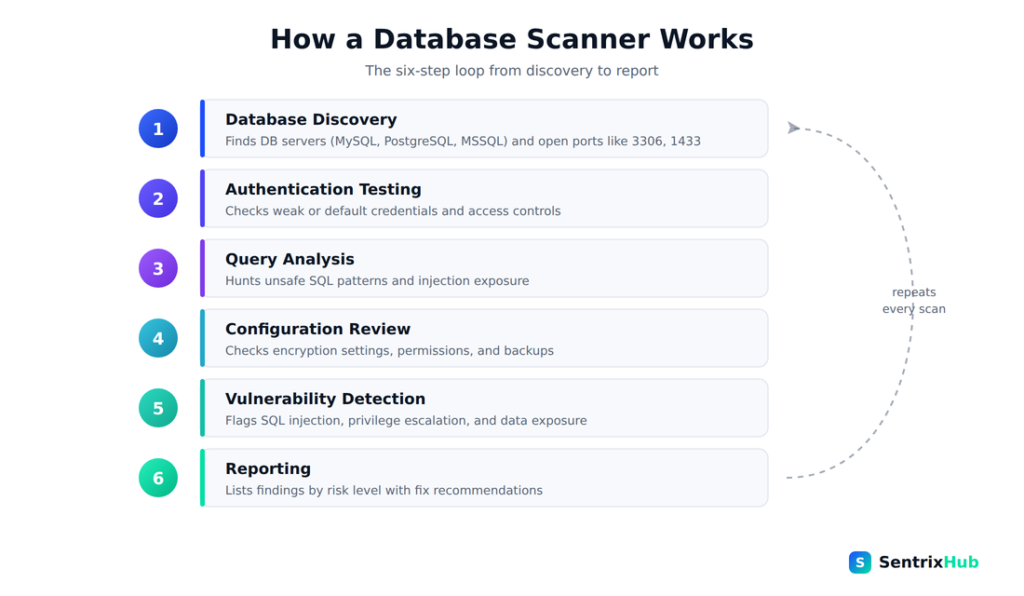
Every database scanner follows the same six-step loop — from discovering database services to producing a prioritised report. Understanding this flow is what lets you judge whether the findings can be trusted, and where a human still needs to step in.
What real attacks look like
A few concrete scenarios make the danger tangible. In a SQL injection attack, an attacker submits a classic payload like ' OR '1'='1 into an input that isn’t properly handled, and a poorly written query hands back every record in the table. In a misconfigured-database case, a database is left exposed to the public internet with no authentication required, and the entire dataset is simply downloadable by anyone who finds it. And in a weak-credentials case, defaults like admin/admin are still sitting in production long after launch. What’s striking is that the way attackers scan for these is nearly identical to how ethical testers do it — same tools, same probes, opposite intent.
The mistakes developers keep making
Most database breaches trace back to avoidable habits. Skipping database security testing entirely because all the attention went to the frontend. Deploying with default configurations still in place. Dismissing scanner reports as noise. Leaving database software unpatched long after fixes exist. And leaning so hard on automated tools that nobody does the manual thinking the tools can’t. A scanner is a starting point, not a finish line.
How to use DbScanner safely
Running a scanner carelessly can hurt the very system you’re trying to protect, so treat safety as part of the process.
Begin by setting up a safe environment — always test against staging or a dedicated test database first, never production. Then configure the scanner deliberately: define the target database, the credentials it should use, and the scan depth. Run an initial low-intensity scan with basic checks before turning up the aggression, so you don’t overwhelm the system. Analyze the results with a focus on high-risk vulnerabilities and misconfigurations rather than drowning in every minor note. Validate findings manually so you don’t waste effort chasing false positives. And finally, fix and re-test — apply the remediation, then scan again to confirm it actually worked.
⚠️ Test in staging first — always: Never point a scanner straight at a production database. Start in staging with a low-intensity scan, then increase depth carefully. Aggressive scans can slow or disrupt a live database — and never scan anything you don’t own or have permission to test.
Fixing what you find
Detection is only half the job; remediation is where security actually improves. The core defenses are well established: validate and sanitize all user input so malicious data never reaches a query; use parameterized queries to make SQL injection structurally impossible rather than merely filtered; apply least-privilege access control so accounts can only touch what they genuinely need; encrypt data both at rest and in transit; and patch database software regularly to close known holes. Layered on top, good practice means disabling unused services, monitoring and logging database activity, enforcing strong authentication, and auditing permissions on a schedule rather than a whim.
✅ The fixes that matter most: Use parameterized queries (they make SQL injection structurally impossible, not just filtered), apply least-privilege access so accounts touch only what they need, encrypt data at rest and in transit, and patch your database regularly. These four close the majority of real database risks.
Expert habits worth adopting
A few mindset shifts separate careful teams from lucky ones. Combine automated and manual testing, because scanners miss logic flaws that only a human notices. Monitor continuously — security isn’t a one-time scan but an ongoing posture. Think like an attacker and ask, honestly, “what would I exploit here?” Use more than one tool, since no single scanner covers everything. And document everything — every vulnerability found, every fix applied — so the knowledge survives past the person who found it.
The bottom line
Understanding DbScanner is really about understanding how attackers think and how systems quietly fail. Database scanners are powerful allies for catching vulnerabilities early, strengthening your posture, and protecting sensitive data — but they aren’t magic. Their real value only shows up alongside proper configuration, continuous testing, and human expertise. A clean scan is a good sign, not a guarantee.
Secure the database, and you secure the heart of your whole system. Everything else — the APIs, the apps, the polished frontend — is standing on top of it.
📌 Remember: A clean scan is a good sign, not a guarantee. Database scanners catch known issues fast, but their real value only shows up alongside proper configuration, continuous testing, and human expertise. Secure the database, and you secure the heart of the whole system.
Frequently asked questions
What is database vulnerability scanning?
It’s the process of identifying weaknesses in a database — misconfigurations, weak credentials, injection exposure, and more — using automated tools, manual testing, or both.
How do you scan a database for vulnerabilities?
Use a tool like DbScanner: define the target and credentials, run a low-intensity scan first, analyze the report, validate findings manually, then fix and re-test. Always start in a staging environment.
Are database scanning tools safe?
Yes, when used responsibly on systems you own or have permission to test. Aggressive scans can affect database performance, so tuning intensity and testing in staging first matters.
What should beginners look for in a database scanner?
Start with lightweight scanners in controlled environments, focus on the highest-risk findings first (like SQL injection and default credentials), and always validate results before acting.
How does DbScanner help find database vulnerabilities?
It discovers database services, tests authentication, analyses queries and configuration, and reports issues by severity — giving you a prioritized list to validate and fix.
For related reading, see our guides on BScanner and security scanners, CVE vs CWE vs CAPEC, API and firewall security, and weak file permissions.

Abdul Shakoor writes practical, defensive cybersecurity and networking guides for SentrixHub. He focuses on making API security, mobile app security, authentication, and network concepts simple for beginners and developers.