
By Abdul Shakoor
Almost every web application accepts file uploads somewhere — a profile picture, a document, an attachment. It feels like the most ordinary feature in the world. And that’s exactly why unrestricted file upload remains one of the most dangerous vulnerabilities on the web: it hides inside something that looks completely harmless.
The classic teaching example is the FCKeditor file upload flaw. FCKeditor was a hugely popular WYSIWYG editor in older web applications, and its upload connectors — when left misconfigured — let attackers upload executable files straight into a web-accessible folder. The result wasn’t a broken image or a corrupted document. It was full remote code execution: the attacker running commands on your server. Let me walk through why this happens, what the attack actually looks like, and how to shut it down properly.
What “unrestricted file upload” really means
An unrestricted file upload vulnerability exists when an application lets users upload files without properly checking what those files actually are. The application assumes people will upload the images or documents it expects — and an attacker simply uploads something else.
In the FCKeditor case specifically, the editor shipped with server-side “connectors” (in PHP, ASP, ASP.NET, and others) that handled uploads. If those connectors weren’t locked down, they’d happily accept a .php or .asp file, save it into a folder the web server could reach, and let the attacker request it through a browser — at which point the server executes it. That’s the whole tragedy in one sentence: the file wasn’t treated as data, it was treated as code.
This is why OWASP flags unrestricted file upload as such a high-severity issue: it’s one of the shortest paths from “anonymous internet user” to “code running on your server.” The same principle sits at the heart of the file-handling requirements in the OWASP ASVS standard, which dedicates an entire chapter to doing uploads safely.
📌 The core problem in one line: The uploaded file wasn’t treated as data — it was treated as code. When a server saves an attacker’s script into a web-accessible folder and then runs it on request, an ordinary “upload” becomes remote code execution.
How a Malicious Upload Becomes Server Control
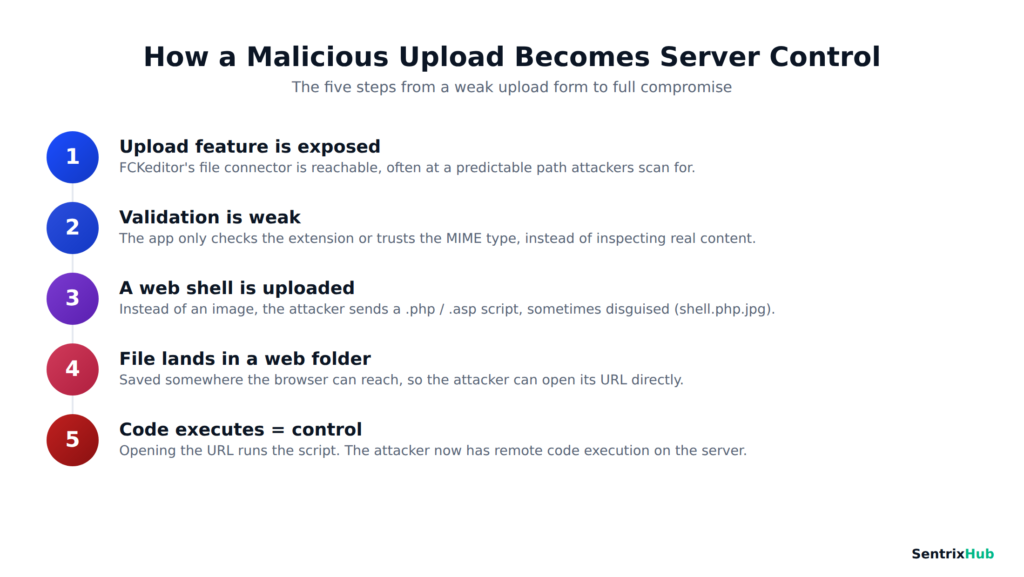
This is the whole attack in one view — a weak upload form, a disguised web shell, and a file that the server runs instead of storing safely. Each step is avoidable with proper validation and storage.
How the attack works, step by step
The mechanics are almost embarrassingly simple, which is what makes them so common.
An upload feature is exposed. FCKeditor’s file connector is reachable, often at a predictable path that attackers actively scan for.
Validation is weak or missing. The application checks the file poorly — maybe just glancing at the extension, or trusting the browser-supplied MIME type — instead of genuinely inspecting what the file is.
The attacker uploads a malicious file. Rather than an image, they send a web shell: a small .php, .asp, or .jsp script. Sometimes it’s disguised — shell.php.jpg, a double extension, or a null-byte trick — to slip past naive checks.
The file lands in a web-accessible directory. Because it’s saved somewhere the browser can reach, the attacker can simply navigate to its URL.
Code executes. When the attacker opens that URL, the server runs the script. Now they have a foothold — and from a web shell, they can read files, dump the database, or dig deeper into the network.
That final step is the difference between a mere “file was uploaded” bug and a genuine remote code execution incident — the same class of high-impact flaw that turns a small oversight into a full compromise.
Watch: File Upload Attacks Explained
If you’d rather see the attack demonstrated than read through it, the video above walks through how a weak upload form is exploited and, importantly, how to defend against it. Even if it uses a different app than FCKeditor, the underlying flaw and the fixes are exactly the same.
Why it’s so dangerous
Unrestricted upload isn’t a “leak one field” bug — it’s frequently total compromise. A successful web shell gives an attacker remote code execution, and from there, full server control: reading and modifying files, reaching sensitive data, installing more tooling. Because a web shell can be left in place, it grants persistent access — a quiet backdoor that survives long after the initial break-in. That access routinely leads to data breaches (user records, credentials, API keys) and to the server being abused for malware or phishing hosting, dragging your domain’s reputation down with it.
One upload form, in other words, can undo every other security control you have.
Where APIs and mobile apps fit in
It’s tempting to think of this as an old, form-based problem, but the exact same weakness rides along into modern architectures. Any API endpoint that accepts uploads can carry the identical flaw — an attacker sends a malicious file to the endpoint, triggers backend processing, and exploits the storage layer. Solid API and firewall security has to treat upload endpoints with the same suspicion as any other untrusted input.
Mobile apps inherit the risk too. Features that let users upload images or documents ultimately hand those files to a backend, and if that backend’s validation is weak, a friendly-looking mobile feature becomes a server-side vulnerability. It’s worth remembering that attackers routinely reverse engineer mobile apps precisely to find and abuse these backend endpoints directly.
The mistakes that cause it
Nearly every real-world case traces back to a small, avoidable decision. Trusting the file extension — checking for .jpg and stopping there — is defeated by double extensions and disguised files. Relying on the MIME type fails because the browser-supplied MIME type is trivially spoofed. Storing uploads in a public, executable directory is what turns an uploaded file into a runnable one. Leaving default configurations in place is how so many FCKeditor installs stayed exploitable for years. And keeping user-supplied filenames hands attackers control over paths and extensions they should never have. These are the same input-trust failures behind a whole family of bugs, closely related to the weak file permission problems that so often sit right alongside them.
⚠️ Never trust the label: A file extension (.jpg) and the browser-supplied MIME type are both trivially faked — with double extensions like shell.php.jpg or spoofed headers. Real validation means inspecting the actual file content (magic bytes) on the server, not trusting what the file claims to be.
How to fix it properly
There’s no single switch — safe uploads come from layering defenses so that if one fails, others still hold.
Validate files strictly and on the server. Allow only an explicit list of safe extensions, verify the true content type, and inspect the actual file content (magic bytes) rather than trusting labels.
Store uploads outside the web root, so even a malicious file simply can’t be reached and executed through a URL. Rename every upload to a random, server-generated name, stripping away attacker-chosen extensions and paths. Disable script execution in upload directories at the web-server level, so even if something slips through, it can’t run. Whitelist, never blacklist — define what’s allowed rather than trying to enumerate everything that’s forbidden. And update or replace FCKeditor entirely; it’s long superseded (by CKEditor and modern frameworks), and running the old version is a standing risk.
📌 A note on FCKeditor: FCKeditor is long superseded by CKEditor and modern frameworks. If a legacy app is still running the old FCKeditor, that alone is a standing risk — replacing it is often safer and easier than trying to fully secure the outdated connectors.
Layered on top, a web application firewall and runtime defenses like a RASP tool can catch malicious uploads and block exploitation attempts that slip past your first line of validation. The mindset here — never trusting user-supplied input, and validating on the server rather than the client — is the same discipline that prevents dangerous validation mistakes across the whole application.
✅ If you do only two things: Store uploads outside the web root (so a malicious file can’t be reached and run through a URL), and disable script execution in upload directories. Those two controls alone break the classic web-shell attack — even if a bad file slips past validation.
The bigger lesson
FCKeditor is old, but the vulnerability it made famous is very much alive — it lives on in any application that treats uploaded files as trustworthy. The lesson it teaches is timeless: input validation isn’t optional, default configurations are dangerous, and an uploaded file must never be assumed to be what it claims. Get upload handling right — strict validation, storage outside the web root, no execution, renamed files — and you close one of the most powerful attack vectors an attacker has.
Treat every upload as hostile until proven otherwise, and a feature that once handed over your whole server becomes just another safely-handled input.
Frequently asked questions
What is the FCKeditor file upload vulnerability?
It’s a flaw in the FCKeditor editor’s upload connectors that, when misconfigured, lets an attacker upload an executable file (like a web shell) which the server then runs — leading to remote code execution.
What is an unrestricted file upload vulnerability in general?
It occurs whenever an application accepts uploaded files without properly validating them, allowing dangerous file types to be uploaded and potentially executed.
Why is it so severe?
Because it often leads directly to remote code execution and full server control — not just a single leaked value, but a complete compromise, plus persistent backdoor access.
How do you fix it?
Validate files strictly on the server (extension, true content type, and content), store uploads outside the web root, rename files to random names, disable script execution in upload folders, whitelist allowed types, and replace outdated FCKeditor with a modern editor.
Is this vulnerability still relevant today?
Yes. FCKeditor itself is outdated, but the underlying unrestricted-upload weakness appears constantly in modern web apps, APIs, and mobile backends whenever upload validation is weak.
For related reading, see our guides on weak file permissions, API and firewall security, the OWASP ASVS 5.0 standard, and RASP tools.

Abdul Shakoor writes practical, defensive cybersecurity and networking guides for SentrixHub. He focuses on making API security, mobile app security, authentication, and network concepts simple for beginners and developers.