
Every few years, a chunk of the internet simply stops working. Apps won’t load, banking sites time out, and millions of people refresh their screens thinking their own connection is broken. Most of the time, it isn’t their WiFi or their phone — it’s an internet blackout due to BGP failure: a routing problem happening thousands of miles away, inside a protocol most people have never heard of.
If you work with networks, or you’re studying toward that goal, understanding how a single bad routing update can take down half the internet is one of those lessons that sticks with you. This guide walks through what BGP actually does, how it fails, the security angles that rarely get discussed, and the practical steps engineers use to fix and prevent these outages.
- A single misconfigured route can take major services offline within minutes
- Most BGP failures are accidents, not attacks — misconfiguration is still the #1 cause
- RPKI adoption is around 69% globally as of mid-2026, but nearly a third of routes remain unvalidated
- Redundancy across multiple paths and providers is the single best defense against a full blackout
What BGP Is (Without the Jargon)
BGP stands for Border Gateway Protocol. If you’ve ever heard someone call it “the protocol that runs the internet,” they weren’t exaggerating by much.
Here’s the simplest way to put it. The internet isn’t one network — it’s tens of thousands of separate networks stitched together, each run by a different ISP, company, university, or cloud provider. Each of these networks is called an Autonomous System, or AS, and every AS has its own number.
BGP is the language these networks use to tell each other: “To reach the addresses I’m responsible for, send the traffic this way.” When you open a website, your request may cross five, ten, or more of these networks before it reaches the server. BGP decides the path.
Think of it like neighboring postal services constantly updating each other on which routes are open and which are closed. As long as everyone shares accurate information, mail flows smoothly. The moment one service announces a wrong or fake route, letters start going to the wrong place — or nowhere at all.
For a deeper technical breakdown of how BGP path selection actually works, Cloudflare’s BGP learning guide is a solid reference.
If you’ve read our guide on how Bridge ID determines the STP root bridge, the concept will feel familiar at a smaller scale: switches elect a “best” path using a priority system, just like BGP routers elect a “best” route across the entire internet — except BGP does it globally, across networks that don’t even belong to the same company.
⚠️ Remember: BGP runs almost entirely on trust. When one network announces a route, others generally accept it as true. That single assumption is why both honest mistakes and deliberate hijacks can spread across the internet so fast.
Watch: BGP explained in 5 minutes
If the routing concepts above feel abstract, the video below breaks them
down visually. It walks through how BGP moves traffic between networks and
why a single wrong route can cause the kind of outages we’re about to look
at. It’s a helpful companion to the steps covered here.
How a BGP Failure Turns Into an Internet Blackout
A full-blown outage rarely starts as a dramatic event. It usually begins with something small and spreads because of how quickly BGP propagates information.
Here’s the typical chain: a network pushes out an incorrect routing update — maybe an engineer fat-fingered a config, or an automated script pushed a bad change. Neighboring routers accept that update and pass it along to their own neighbors. Traffic starts following the wrong path, or the routes vanish entirely. Packets get dropped or stuck in loops, and requests simply fail. From the outside, entire services look like they’ve disappeared.
📌 Worth knowing: BGP is built to share routing updates quickly. That speed keeps the internet efficient on a normal day, but during a mistake it means a single bad update can reach the global routing table in minutes.
Websites go dark, APIs stop responding, and mobile apps that depend on those backends throw errors that have nothing to do with the app itself.
The Most Common Causes of BGP Failure
Not every outage is an attack. In fact, most of them come down to human error.
Misconfiguration. The number one culprit. A wrong route announcement, a missing filter, a typo in a prefix. Even senior engineers do this, which is exactly why change controls and validation matter so much.
BGP hijacking. The malicious version. An attacker announces routes for address space they don’t own, pulling traffic toward their own infrastructure to intercept data, run phishing at scale, or simply cause disruption.
Route leaks. This happens when a network passes along routes it was never supposed to advertise, often between providers that shouldn’t be sharing that path. Usually accidental, but the effect can still be a large regional outage.
A route leak happens when a network passes along routes it was never supposed to advertise, often between providers that shouldn’t be sharing that path. Usually accidental, but the effect can still be a large regional outage. These aren’t rare — monitoring tools detect dozens of new leaks globally every single week, most resolved quietly before most users ever notice.
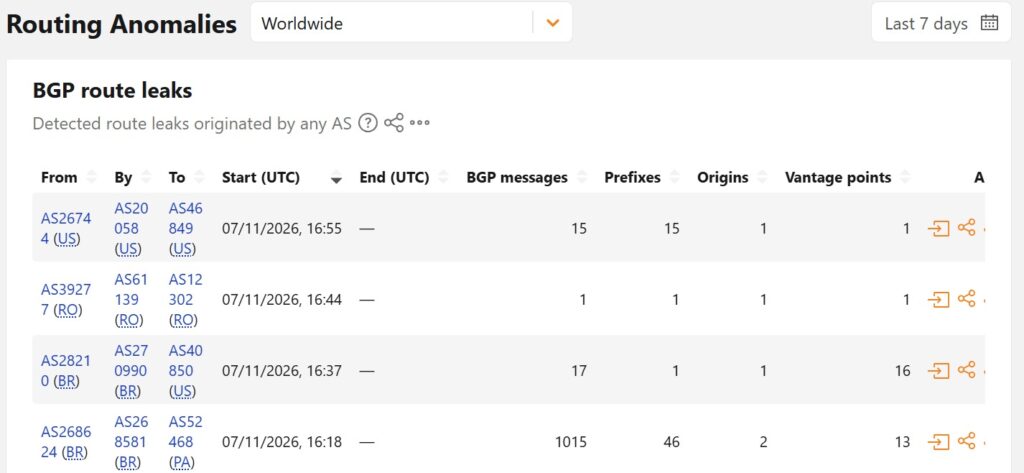
Live route leak detections from Cloudflare Radar — each row shows a real instance of one AS accidentally advertising routes it shouldn’t, exactly the kind of misconfiguration described above. (Source: Cloudflare Radar, July 2026)
BGP flapping. When a route keeps going up and down repeatedly, routers waste time constantly recalculating paths, degrading performance across a wide area. The fix usually involves stabilizing the underlying link and tuning timers.
Hardware or software failure. Routers crash. Firmware has bugs. When the device holding a BGP session dies or misbehaves, sessions drop and routing gets shaky until it recovers — a scenario not unlike what happens when an STP root port fails at Layer 2, just with much bigger blast radius.
Here’s how these five causes compare side by side:
| Cause | Intent | Typical Fix | Detection Difficulty |
| Misconfiguration | Accidental | Validate configs before push, use change control | Easy — shows up in logs quickly |
| BGP Hijacking | Malicious | RPKI validation, route filtering | Hard — looks like a legit route at first |
| Route Leaks | Usually accidental | Strict peer filtering, prefix limits | Medium — visible in routing tables if monitored |
| BGP Flapping | Instability (not intent-based) | Stabilize link, tune hold timers | Easy — repeated log entries |
| Hardware/Software Failure | Accidental | Firmware updates, redundant hardware | Medium — depends on monitoring setup |
Real Outages That Made Headlines
The 2021 Facebook outage is the textbook example. Facebook’s own engineers pushed a configuration change that effectively withdrew the routes to its data centers. For several hours, Facebook, Instagram, and WhatsApp were unreachable worldwide, and the company couldn’t even access some of its internal tools to fix it quickly. It wasn’t a hack — it was a self-inflicted routing withdrawal, and it showed how fragile things can get when BGP goes wrong.
Smaller ISP-level incidents happen far more often than the big ones make it seem. A regional provider misconfigures a route, and suddenly a country or a metro area loses access to a set of services. These rarely make international news, but they’re a daily reality somewhere on the planet.
The pattern across all of them is the same: a routing mistake or attack, rapid propagation, and a blackout that looks far bigger than its cause.
Troubleshooting BGP: A Practical Starting Checklist
When a BGP problem hits, engineers don’t panic-restart everything. They work through it methodically.
Start by checking neighbor status. If two routers aren’t forming a session, the usual suspects are an IP mismatch, an authentication (password) failure, or a plain reachability problem where the two devices can’t even see each other.
Next, verify the routing tables. Are the expected routes present? Are extra routes showing up that shouldn’t be there? Missing or unexpected prefixes tell you a lot.
Then inspect the logs and error codes. BGP logs things like connection resets and expired hold timers, and those messages point you toward whether the issue is a flapping link, a config problem, or something on the far end.
Finally, use your platform’s own diagnostic commands. Cisco, FortiGate, and Palo Alto all have their own show commands and debug tools — if you’re running a FortiGate 100F firewall, knowing its diagnostic syntax before an incident happens saves real time during one.
If a routing issue keeps recurring despite fixes, it’s worth checking whether the underlying problem resembles what we’ve documented in enterprise STP problems and troubleshooting methods — the diagnostic mindset carries over even though the protocols are different.
Why BGP Is Also a Security Problem
It’s tempting to file BGP under “networking” and move on. That’s a mistake. BGP failures are security events too.
Traffic interception. If an attacker can hijack a route, they can pull traffic through infrastructure they control and inspect or capture it. Sensitive data in transit becomes exposed.
Data manipulation. Once traffic is flowing through the wrong hands, it can be tampered with, not just read — opening the door to injection and other manipulation, similar in spirit to the risks we cover in dangerous SSL validation mistakes.
Large-scale disruption. Sometimes the goal is simply to knock services offline. A well-placed route leak or hijack can take down services for a huge number of users.
This connects directly to other layers of defense. Stable routing is the foundation that things like API security sit on top of, because an API endpoint that can’t be reached is an API that can’t authenticate anyone. And the same trust-based weakness that lets someone hijack a route is why network-level protections like how firewalls protect networks matter as much as application-level ones. If you’ve read about how attackers target enterprise WiFi and network access, the theme is familiar: wherever a system trusts input without verifying it, someone will eventually abuse that trust.
Common Mistakes Engineers Make
A few patterns show up again and again in post-incident reviews.
Poor route filtering is a big one — if you accept whatever your neighbors advertise without checking, you’re one bad announcement away from trouble. Weak or missing monitoring is another; if nobody gets alerted when routes change or sessions drop, you find out about problems from angry users instead of your dashboards. Ignoring security entirely is common too, especially treating BGP as purely operational and never hardening it. And finally, over-trusting peers — blindly accepting routes from neighbors is convenient right up until the day it isn’t, much like the assumptions we’ve written about in dangerous passwords.
How to Fix and Prevent BGP Failures
The good news is that most of these problems are preventable with discipline rather than fancy tools.
Validate configurations before and after changes — double-check route announcements and filters instead of trusting that the change “should” be fine. Restart unstable BGP sessions when one is stuck in a bad state, since a clean reset can clear a hung condition. Monitor network health continuously with real-time alerting on route changes and session drops so you catch issues early. And build in redundancy through multiple paths and providers, so a single failure doesn’t equal a full blackout — the same principle behind stateful switchover best practices and enterprise failover stability using alternate ports, just applied at internet scale instead of inside one network.
✅ Best practice: Most BGP outages are stopped by four basics — validate configs before changes, filter routes strictly, monitor for anomalies, and build redundancy across paths and providers. Missing one of these is behind most real-world incidents.
BGP Security Best Practices
Beyond keeping things running, here’s how teams actually harden BGP.
RPKI. It’s one of the strongest defenses against hijacking available today. As of mid-2026, roughly 69% of globally routed prefixes are RPKI-valid — up significantly from just a few years ago — though nearly 30% still show as unvalidated, meaning full protection is still a work in progress. You can check whether your own ISP filters invalid routes using Cloudflare’s Is BGP Safe Yet tool.
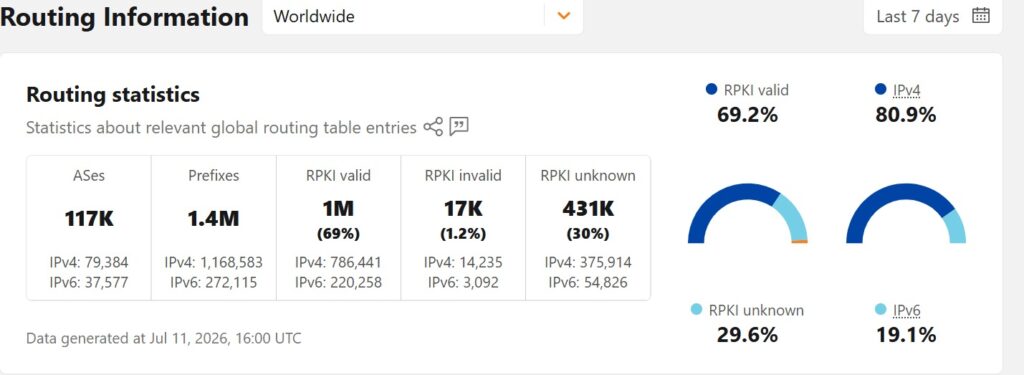
Global RPKI adoption as of July 2026 — nearly 70% of routed prefixes are now RPKI-valid, though almost a third remain unvalidated. (Source: Cloudflare Radar)
📌 Worth knowing: RPKI lets networks cryptographically prove they’re allowed to announce a route, which blocks a large share of hijacking attempts. But it only works if both the route owner registers it and the receiving network actually checks it.
Strict route filtering. Only accept routes you’ve explicitly decided are valid. Filtering is boring and it works.
Prefix limits. Cap how many prefixes you’ll accept from a peer so a misbehaving neighbor can’t flood you with routes.
Monitoring and alerts. Detect anomalies quickly — the faster you notice a weird announcement, the smaller the blast radius.
Secure configuration. Use authentication on sessions and apply access controls, the same discipline behind IEEE 802.1X authentication protecting a network at the edge.
Expert Tips for Staying Ahead
A few habits separate teams that ride out BGP problems from teams that get flattened by them.
Automate your validation so misconfigurations get caught before they ship. Simulate failures regularly — test your network the same way you’d test DMVPN scalability for large networks, so an outage isn’t the first time you’ve practiced the response. Use multiple providers to avoid a single point of failure. Keep firmware updated to dodge known bugs — outdated hardware is a recurring failure point, which is also why tracking end-of-life matters, as we covered in Cisco ISR 4451-X/K9 EOL. And study past incidents, both your own and public ones, because almost every major outage teaches a lesson someone already paid for.
Just as serious STP failures that RSTP prevents shows how protocol evolution closes old gaps, BGP security has evolved the same way — RPKI exists specifically because the original protocol never validated who could announce what.
Why BGP Stability Actually Matters
An internet blackout due to BGP failure isn’t a rare, exotic glitch. It’s a recurring reality of how the internet is built — held together by a protocol that runs on trust and moves fast enough to spread a mistake worldwide in minutes.
Interestingly, the same core lesson applies at Layer 2 as it does across the global internet: whether it’s a switch electing a root bridge in STP or a router selecting a path through BGP, a single bad announcement can cascade into an outage far bigger than the original mistake. Understanding why STP port misconfigurations break networks is genuinely useful groundwork for understanding BGP failures too — the failure modes rhyme.
The reassuring part is that the risks are manageable. With solid monitoring, disciplined configuration management, and security practices like RPKI and filtering, most failures can be prevented or contained quickly. Many outages also trace back to router-level access issues rather than routing logic alone — which is why basics like knowing how to disconnect an unauthorized device from a TP-Link router or verifying whether a tool like YaMaps is safe to use still belong in the same security conversation as enterprise-grade BGP hardening. Understanding BGP used to be something only backbone engineers needed. Today, with so much of security and infrastructure resting on stable routing, it’s knowledge worth having no matter where you sit in the field.
Frequently Asked Questions
What should I do if BGP is down?
Start by checking neighbor status, then verify your routing tables, inspect the logs for error codes, and review recent configuration changes. If a session is stuck, a controlled restart can help — the goal is to find whether it’s a config issue, a link problem, or something on the peer’s end before you start changing things.
What causes a BGP neighbor relationship to fail?
The most common reasons are an IP address mismatch between the two peers, an authentication or password failure, and a basic network reachability problem where the two routers can’t reach each other in the first place.
How do I resolve BGP flapping?
Flapping usually points to an unstable underlying link. Identify and stabilize that link, adjust your timers so the session isn’t overreacting to small changes, and use dampening carefully if your platform supports it.
How do hackers exploit BGP routing?
Mainly through hijacking and route leaks. By announcing routes they don’t legitimately control, attackers can redirect traffic through their own systems to intercept, inspect, or disrupt it.
How do I prevent BGP failures long term?
Combine route filtering, continuous monitoring, redundancy across paths and providers, and security measures like RPKI. Most outages trace back to missing one of these basics rather than to something exotic.

Abdul Shakoor writes practical, defensive cybersecurity and networking guides for SentrixHub. He focuses on making API security, mobile app security, authentication, and network concepts simple for beginners and developers.