
Last updated: July 2026, with current WiFi 7 pricing and availability.
If you are comparing 802.11ax vs 802.11ac for your home network, you are probably dealing with something more specific than curiosity. Videos buffer at the worst moment. A video call freezes right when you start talking. Everything slows to a crawl the moment three or four people in the house get online together.
Most people blame the internet package first. Sometimes that is fair. But quite often the bottleneck sits inside the house, in a router built for a time when a home had three connected devices instead of fifteen. This guide explains what actually separates WiFi 5 from WiFi 6, what the difference feels like in daily use, and whether upgrading in 2026 makes sense for your situation.
Short answer: WiFi 6 (802.11ax) is the better standard, especially in homes with many devices. But WiFi 5 (802.11ac) is still perfectly usable for light browsing on a few devices, and in 2026 WiFi 7 has become affordable enough that it belongs in the conversation too.
What is 802.11ac (WiFi 5)?
802.11ac, marketed as WiFi 5, has been the default in homes for roughly a decade. It runs on the 5 GHz band and delivers solid performance for ordinary use. Published comparisons usually put its theoretical ceiling around 3.5 Gbps, though no home setup gets anywhere near that figure in practice.
What WiFi 5 does well: HD and 4K streaming, browsing, video calls, and general use in a small home with a handful of devices. What it struggles with: many devices staying connected and active at the same time.
The reason is how it schedules traffic. WiFi 5 mostly serves devices one after another. When only two devices are active, that queue moves so fast you never notice it. Add ten devices, and the waiting starts to show up as lag and buffering.
What is 802.11ax (WiFi 6)?
802.11ax, or WiFi 6, was certified by the Wi-Fi Alliance starting in 2019 and was designed around a different problem. Earlier standards chased raw speed. WiFi 6 chased efficiency in crowded environments, which is exactly what a modern home has become.
It raises the theoretical ceiling to 9.6 Gbps, but that number is the least interesting part. The meaningful changes are these:
- OFDMA lets the router talk to several devices within a single transmission instead of one at a time.
- Improved MU-MIMO handles up to eight devices simultaneously, and unlike WiFi 5 it works in both directions, not just from router to device.
- 1024-QAM packs more data into each transmission than the 256-QAM used by WiFi 5.
- Dual-band operation covers both 2.4 GHz and 5 GHz natively, where WiFi 5 was 5 GHz only.
- Target Wake Time (TWT) lets battery devices sleep between scheduled check-ins.
For a deeper technical breakdown of these mechanisms, TechTarget’s comparison covers the engineering side in detail.
802.11ax vs 802.11ac: What Actually Changed
Here is the honest side-by-side, without the marketing gloss:
| Feature | WiFi 5 (802.11ac) | WiFi 6 (802.11ax) |
|---|---|---|
| Bands | 5 GHz only | 2.4 GHz and 5 GHz |
| Theoretical max | Around 3.5 Gbps | Up to 9.6 Gbps |
| Device scheduling | Mostly one at a time | OFDMA serves several at once |
| MU-MIMO | 4 devices, downlink only | 8 devices, both directions |
| Modulation | 256-QAM | 1024-QAM |
| Performance under load | Drops noticeably | Holds up much better |
| Battery efficiency | No TWT | TWT supported |
| Security | WPA2, WPA3 on newer models | WPA3 required |
Notice what is not on this list: a dramatic jump in the speed a single device gets when nothing else is running. If you test one laptop on an empty network, WiFi 5 often looks close to WiFi 6. The gap opens up when the network gets busy, and that is the situation most homes actually live in.
How OFDMA Changes Things in a Busy House
OFDMA is the single most useful thing WiFi 6 brings to a home network, and it is easier to picture than the acronym suggests.
Think of the WiFi channel as a delivery van. Under WiFi 5, that van carries one package per trip. It drives to the phone, drops off, comes back, loads again, drives to the laptop, comes back. Every device waits its turn. The trips are fast, so with two or three devices nobody feels the delay.
OFDMA splits the van into compartments. One trip now carries packages for the phone, the laptop, the TV and the smart speaker together. Nobody waits behind anybody else.
That is why the improvement shows up most clearly in the evening, when one person is on a call, another is streaming, and someone else is gaming. The raw download number might not change much. The stability does.
If you prefer watching over reading, this breakdown covers OFDMA, MU-MIMO and the speed differences between the two standards in a straightforward way:
The video makes the same point the comparison above does. The gain from WiFi 6 is mostly about how efficiently the router handles several devices at once, not about a bigger number on a single speed test.
📌 Worth knowing: OFDMA only helps when both the router and the connected device support WiFi 6. An older phone on a WiFi 6 router still gets served the old way.
Speed in the Real World
Advertised numbers and lived experience are different things. In a typical home, WiFi 5 delivers somewhere in the range of 200 to 500 Mbps to a nearby device, and WiFi 6 pushes that higher, often into the 600 to 900 Mbps range on a good setup with a compatible device.
But here is the part people skip. Your router cannot invent bandwidth your internet plan does not provide. If your connection is 50 Mbps, upgrading to WiFi 6 will not make it 500. What it can improve is how that 50 Mbps gets shared between devices, which is a real benefit but a different one.
It is also worth ruling out problems that have nothing to do with your hardware. Slowdowns sometimes originate far upstream, and outages at the routing level can take entire regions offline regardless of what equipment sits in your living room. If you are curious how fragile that layer can be, we covered a case where a BGP failure caused a widespread internet blackout.
⚠️ Before you spend money: Run a speed test with a device plugged in by cable. If the wired result matches your plan but WiFi is much slower, the problem is your wireless setup. If the wired result is also slow, the router is not your issue.
Range and Coverage: Correcting a Common Claim
A lot of comparison articles say WiFi 6 simply has better range. That deserves a more careful answer, because it is only partly true.
Radio physics does not change between standards. At the same frequency and the same power, a WiFi 6 signal does not travel meaningfully further through a brick wall than a WiFi 5 signal. What genuinely helps is that WiFi 6 operates natively on 2.4 GHz as well. That band travels further and handles walls better than 5 GHz, so devices at the far end of the house get a usable connection more often.
The reason has less to do with the standard and more to do with which band it can use:
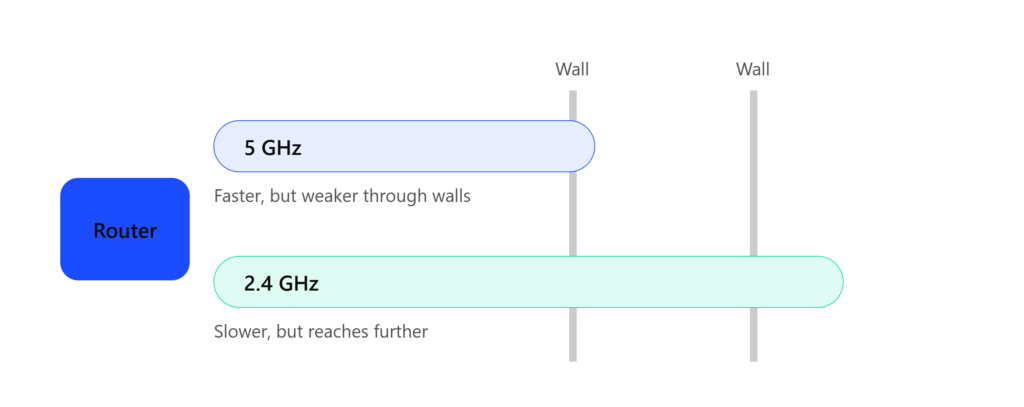
This is the whole reason WiFi 6 appears to have better reach. It is not a stronger signal, it is access to the 2.4 GHz band, which handles walls better than 5 GHz does.
WiFi 6 also handles interference from neighbouring networks more gracefully, which matters a lot in apartment buildings where a dozen networks overlap.
What WiFi 6 will not do is eliminate dead zones in a large or multi-storey home. If coverage is your main complaint, a mesh system will fix it far more reliably than a single better router. Buying a WiFi 6 router to solve a coverage problem is one of the most common ways people waste money on networking gear.
Security: Where WiFi 6 Has a Real Edge
WiFi 6 certification requires WPA3 support, which is a genuine improvement over WPA2. WPA3 replaces the old pre-shared key handshake with a method that resists offline password-guessing attacks, and it enforces protected management frames.
One clarification the usual comparison tables get wrong: WPA3 is not exclusive to WiFi 6. Since mid-2020, WPA3 has been mandatory for all new Wi-Fi Alliance certifications, which means recently manufactured WiFi 5 devices often support it too. Check your router settings before assuming you need new hardware to get WPA3.
Whichever standard you run, the password still matters more than the protocol. WPA3 makes guessing harder, it does not make a weak password safe, and a shared network password that circulates freely undermines everything. If you want to understand why, our guide on dangerous password practices explains how these mistakes actually get exploited.
It is also worth knowing who is currently connected to your network. Most router admin panels let you see and remove connected devices, and we walked through the process in this guide on disconnecting someone from your WiFi through the router settings.
✅ Do this today: Log into your router, switch to WPA3 if the option exists, and set a passphrase you have never used anywhere else. This costs nothing and takes five minutes.
Battery Life: The Quiet Benefit Nobody Mentions
Target Wake Time is one of the more useful WiFi 6 features for anyone with a lot of small devices. Instead of a device constantly listening for traffic, the router and device agree on scheduled times to communicate. Between those windows, the radio can sleep.
On a phone, the effect is modest. On battery-powered sensors, cameras and smart home gadgets that sit idle most of the day, it can extend life considerably. If your house is filling up with IoT devices, this matters more than the headline speed figure does.
802.11n vs 802.11ac vs 802.11ax
If you are still running an older router, the comparison looks different:
| Standard | Common name | Practical verdict in 2026 |
|---|---|---|
| 802.11n | WiFi 4 | Genuinely outdated, upgrade is worth it |
| 802.11ac | WiFi 5 | Still usable for light, low-device homes |
| 802.11ax | WiFi 6 | The sensible mainstream choice |
| 802.11be | WiFi 7 | Now affordable, worth considering |
Moving from WiFi 4 to WiFi 6 produces the kind of difference people actually notice: less buffering, faster downloads, steadier video calls. Moving from WiFi 5 to WiFi 6 is a smaller jump unless your home is genuinely crowded with devices.
What About WiFi 7 in 2026?
This is where advice written a year or two ago has gone stale, so it deserves a proper update.
WiFi 7 (802.11be) is no longer an expensive early-adopter product. Through 2026 it has moved firmly into the mainstream. Entry-level WiFi 7 routers now start around the same price bracket where decent WiFi 6 models sit, and capable mid-range tri-band units land in the range most people would consider for a serious router purchase. The premium over a comparable WiFi 6 model has narrowed considerably.
Here is where each generation sits today, along with what it actually costs you in practice:
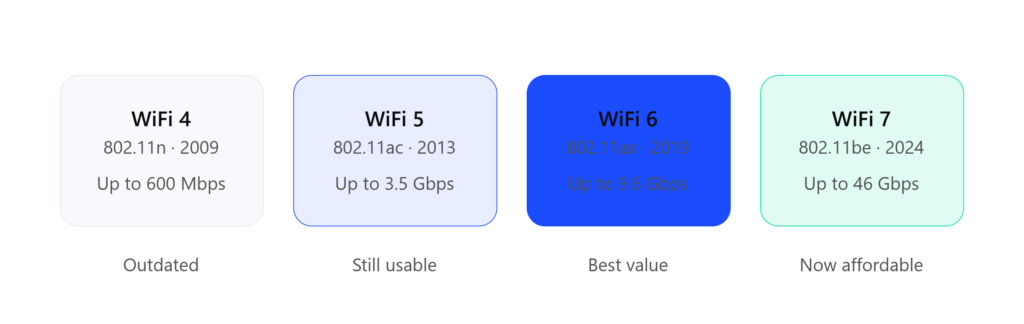
Notice that the speed figures are theoretical ceilings, not what you will see at home. The more useful column is the verdict underneath, which is about what each generation is worth buying today.
What WiFi 7 adds: Multi-Link Operation, which lets a device use more than one band at the same time instead of picking one, plus wider 320 MHz channels and 4K-QAM. MLO is the standout feature because it improves both throughput and stability at once.
So does that make WiFi 6 pointless? No, and here is the honest reasoning:
- If you already own a decent WiFi 6 router and your internet plan is 1 Gbps or below, there is no urgent reason to replace it.
- If you are buying a router anyway, in 2026 it is worth pricing WiFi 7 alongside WiFi 6 rather than assuming it is out of reach.
- If your budget is tight, WiFi 6 remains excellent value and will stay well supported for years.
WiFi 8 (802.11bn) is on the horizon but is not expected to reach consumer hardware in a meaningful way until 2027 or later, so it is not a reason to delay a purchase you need now.
📌 The rule that ages well: Buy the standard that matches your device count and internet speed, not the newest number on the box. A well-placed WiFi 6 router beats a badly placed WiFi 7 one every single time.
Should You Upgrade to 802.11ax in 2026?
Upgrade if several of these describe you:
You have a lot of connected devices. Phones, laptops, smart TVs, cameras, speakers and consoles all competing at once is precisely the scenario WiFi 6 was engineered for.
Most routers and ISP apps will show you this list. Here is mine, and the count is usually higher than people expect:
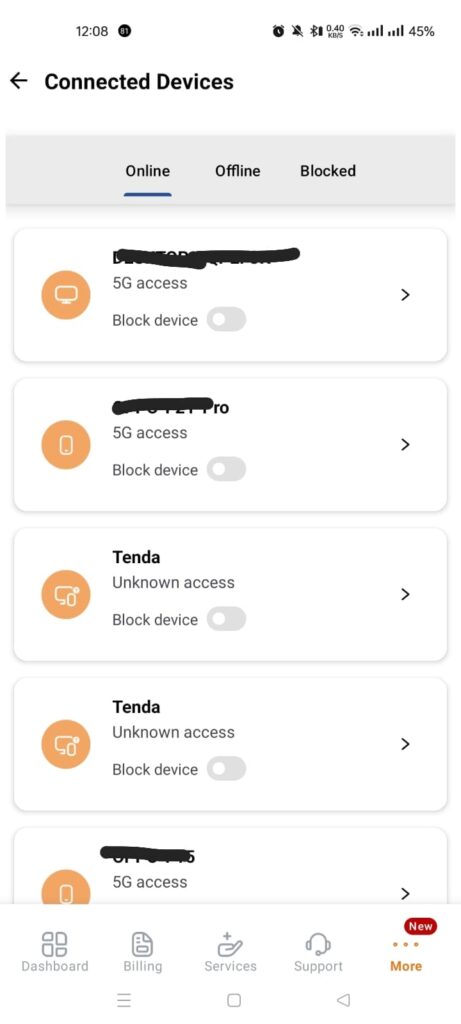
A quick look at what is actually connected. Every device on this list competes for the same airtime, which is exactly the situation WiFi 6 was designed to handle better.
You game or stream seriously. The benefit here is fewer latency spikes during busy periods rather than a higher peak speed.
You work from home. Long video calls expose instability faster than anything else. If your calls degrade whenever someone starts a download, that is a congestion problem, and congestion is what WiFi 6 addresses.
Your internet plan is 500 Mbps or faster. Below that, your router is rarely the limiting factor.
Hold off if your usage is light, you have only a handful of devices, your current setup rarely gives you trouble, or the budget is simply not there right now. There is no shame in running WiFi 5 in 2026 if it does the job.
The Compatibility Myth
A frequent misunderstanding is worth stating plainly: buying a WiFi 6 router does not make every device in your house faster.
WiFi 6 features only work when both ends support them. An older phone connecting to a WiFi 6 router still communicates using the older standard. It will connect fine, since WiFi 6 is backward compatible, but it will not benefit from OFDMA or TWT.
The upside is indirect and still real. When newer devices are served more efficiently, they free up airtime, and older devices get a slightly better share of what remains.
If you want to check what your own computer supports before buying anything, Microsoft documents a simple command for it in their guide on WiFi 6 and WPA3 support in Windows.
It takes about ten seconds to run. Here is the result on my own laptop:
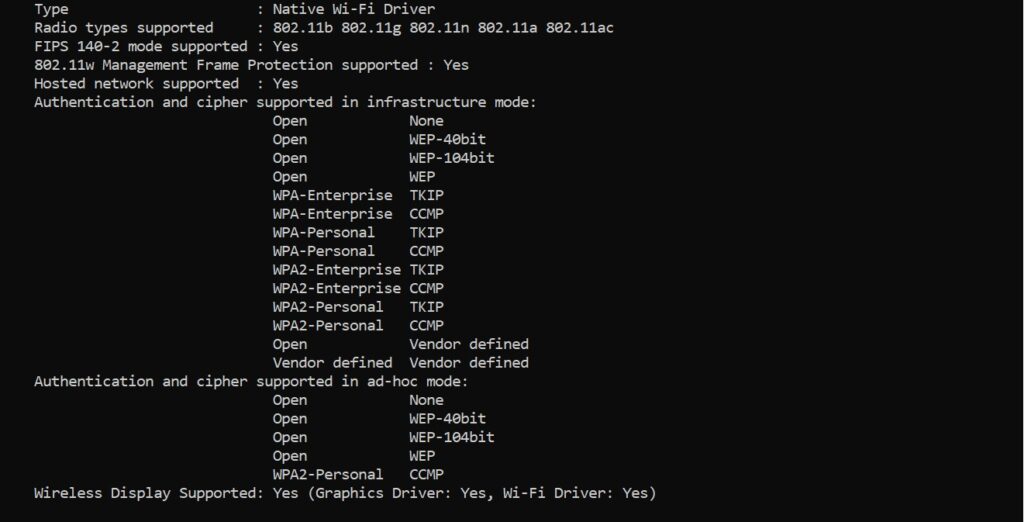
This is my own laptop. The Radio types line stops at 802.11ac, which means WiFi 6 features would be unavailable to it even on a WiFi 6 router. The authentication list tells the same story, ending at WPA2 with no WPA3 option.
A Practical Note From My Own Setup
I still run WiFi 5 at home, and I share that connection with family and a few trusted friends. Most of the usage is light: WhatsApp, Facebook, YouTube. I use it for heavier work alongside one friend who also runs work traffic over it.
Even with that mix, WiFi 5 holds up most of the time. It is not flawless during peak evening hours, but it is far from unusable, and replacing it has not been a priority.
I mention this because a lot of upgrade advice online assumes an unlimited budget. If money is tight, WiFi 5 remains a legitimate choice, and there is another practical option worth considering: sharing the cost of a better connection or router with family or trusted neighbours. That approach solves the same problem for a fraction of the individual outlay.
Get More From the Router You Already Own
Before spending anything, these adjustments often produce a noticeable improvement:
- Move the router to a central, open position. Not inside a cabinet, not on the floor, not behind a television.
- Keep it away from metal and thick walls. Metal surfaces and mirrors reflect signal badly.
- Update the firmware. Vendors ship real performance and security fixes, and most people never install them.
- Change the wireless channel. In apartments, the default channel is usually the most congested one.
- Separate your bands. Put stationary devices on 5 GHz and distant ones on 2.4 GHz where your router allows it.
- Consider mesh instead of a new router if the real problem is coverage rather than speed.
Hardware quality matters too. Cheaper routers often ship weaker firmware, run hotter, and handle sustained load poorly, which shows up months later as random reboots and dropped connections rather than as a bad review on day one.
Home WiFi and Business WiFi Are Not the Same Problem
Everything above concerns home networks, where one shared password is normal and acceptable. Business networks operate on a different model entirely, authenticating each user individually rather than trusting a single key, which is the whole idea behind 802.1X authentication.
That distinction matters if you ever set up WiFi for an office. Enterprise access points get compromised through configuration mistakes far more often than through weak encryption, something we examined closely in our breakdown of whether enterprise WiFi can really be hacked. Business environments also layer additional controls on top, and our guide on how firewalls protect networks covers where those fit.
Situation-by-Situation Comparison
| Situation | WiFi 5 (802.11ac) | WiFi 6 (802.11ax) |
|---|---|---|
| Small family, light use | Good | Excellent |
| Gaming during peak hours | Average | Better |
| Many smart home devices | Limited | Excellent |
| Crowded apartment building | Moderate | Better |
| Work from home stability | Average | Strong |
| Heavy 4K streaming | Good | Excellent |
| Future readiness | Medium | High |
| Value for tight budget | Strong | Moderate |
Frequently Asked Questions
Should I use 802.11ax or 802.11ac?
Choose 802.11ax if you have many devices connected at once, work from home, or game seriously. 802.11ac is still adequate for a small household with light usage.
Is 802.11ac still good in 2026?
Yes, for limited use. A few devices doing browsing, messaging and streaming will run fine on WiFi 5. It becomes the bottleneck once device count and simultaneous usage climb.
Is 802.11ax faster than 802.11ac?
Yes, but the gap is widest under load. With a single device on an idle network the difference is modest. With eight devices active it becomes obvious.
Does WiFi 6 have better range than WiFi 5?
Partly. WiFi 6 supports the 2.4 GHz band natively, which reaches further and penetrates walls better. The radio signal itself is not stronger, so mesh remains the proper fix for dead zones.
Do I need a new router for WiFi 6?
Yes. WiFi 6 requires an 802.11ax router, and your devices need WiFi 6 support to benefit from its features.
Should I skip WiFi 6 and buy WiFi 7 instead?
In 2026 that is a reasonable question, because WiFi 7 pricing has come down substantially. If you are buying new and the price difference is small, WiFi 7 is worth considering. If you already own a working WiFi 6 router, there is no urgency.
Should I upgrade from WiFi 4 (802.11n)?
Yes. This is the upgrade where the difference is most obvious, and it is the one most likely to be worth the money.
Conclusion
The 802.11ax vs 802.11ac decision comes down to how crowded your network is, not which number is bigger.
WiFi 5 still works for small homes with light usage and a limited budget. WiFi 6 is the better choice for busy households, remote work and smart home setups, and it is now the sensible baseline for most buyers. WiFi 7 has matured enough in 2026 that it belongs on your shortlist if you are purchasing new hardware anyway.
Before you buy anything, test your wired speed, check your device count, and try repositioning the router. Those three steps cost nothing and settle the question for a surprising number of people.

Abdul Shakoor writes practical, defensive cybersecurity and networking guides for SentrixHub. He focuses on making API security, mobile app security, authentication, and network concepts simple for beginners and developers.