
Introduction
Most developers spend their energy hardening SQL queries, locking down authentication, and securing APIs — while a much quieter vulnerability sits untouched right on the server: weak file permissions.
It’s an easy thing to overlook. There’s no exploit chain, no zero-day, no clever payload. Just a misconfigured permission bit — and suddenly a config file holding database credentials is readable by every user on the box, or a log file is writable by anyone who happens to be logged in.
On Linux servers running Python applications — where file reads, writes, and script execution happen constantly — this single misconfiguration can quietly open the door to unauthorized access, data leakage, remote code execution, and full privilege escalation.
This guide breaks down exactly how attackers exploit weak file permissions, walks through a vulnerable Python example, and shows you how to lock it down properly.
📌 Worth knowing: File permission issues rarely show up in automated vulnerability scanners the way SQL injection or XSS do — which is exactly why they survive in production for years.
What Are Weak File Permissions?
Weak file permissions are access rights on a file or directory that grant more access than necessary — letting users read, write, or execute something they were never supposed to touch.
Put simply: a file is “weak” the moment it hands out more access than its job requires.
Linux File Permission Basics
Every file on Linux carries three types of access:
- Read (r) — view the contents
- Write (w) — modify the file
- Execute (x) — run it as a program
And three categories of user it applies to: owner, group, and others.
Take this permission string as an example:
-rwxrwxrwxThat means literally everyone on the system can read, write, and execute the file — which is about as dangerous as file permissions get.
Here’s what a freshly created file’s default permission looks like in practice:
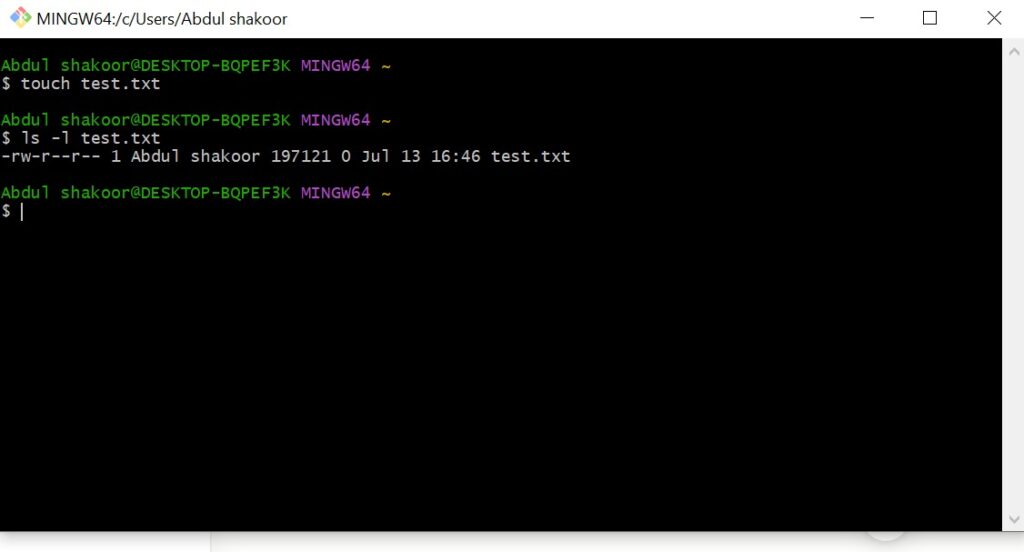
Notice this default is already reasonably safe — the risk shows up when someone deliberately loosens it, which is exactly what we’ll look at next.
How Attackers Exploit Weak File Permissions, Step by Step
Step 1 — Reconnaissance. Attackers scan for world-writable or world-readable files:
find / -perm -o+w -type f 2>/dev/nullThey’re hunting for config files, scripts, logs, and cron jobs — anything loosely permissioned.
Step 2 — Identify sensitive targets. Common favorites: .env files holding API keys and DB credentials, Python scripts, backup files, and SSH keys.
Step 3 — Modify or inject code. If a file is writable, the attacker simply edits it. Take this vulnerable pattern:
python
# app.py
with open("config.txt", "r") as f:
    secret = f.read()

print("Loaded config:", secret)
If config.txt carries permissions like -rw-rw-rw-, anyone can overwrite it:
echo "malicious_code()" > config.txtStep 4 — Trigger execution. The moment the Python app reads or runs that tampered file, the attacker’s code executes under the application’s context.
Step 5 — Privilege escalation. If that application happens to run as root, the attacker doesn’t just get code execution — they get elevated system access.
⚠️ Remember: A writable file owned by root but editable by a low-privilege user is a privilege escalation path waiting to be found — not a hypothetical one.
Why This Hits Python Applications Particularly Hard
Python itself isn’t the risk — how it’s typically used is. Python apps read configuration files dynamically, execute scripts, and handle file operations constantly, which makes insecure file reads, unsafe temporary file handling, writable script files, and improperly permissioned logs all common failure points.
Linux Permissions in Numbers
Permissions also map to numeric values:
| Permission | Value |
|---|---|
| Read | 4 |
| Write | 2 |
| Execute | 1 |
So chmod 755 file.py breaks down to: owner gets rwx (7), group gets r-x (5), others get r-x (5).
The chmod 777 Trap
chmod 777 file.pyThis hands full read, write, and execute access to absolutely everyone. It “fixes” a permission error in the moment, but it also means anyone can rewrite your code, inject malicious scripts, or compromise the whole system through that one file.
Example scenario: a Python script running as root, but the script file itself is -rwxrwxrwx root root script.py. An attacker simply appends:
python
import os
os.system("useradd hacker")
The next time that script runs, the attacker has a new privileged account.
Here’s how the same file’s exposure changes purely based on its permission setting:
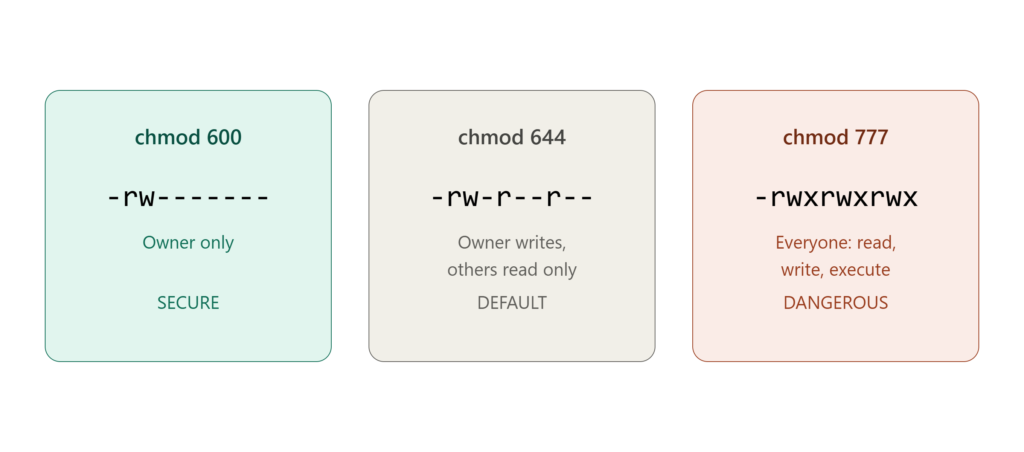
If you’d rather watch permissions and their risks in action, this walkthrough covers the same rwx, numeric, and chmod fundamentals we just went through:
The core idea to carry forward: every unnecessary permission bit is one more way in — which is exactly what the attack scenarios below show in practice.
For deeper technical reading on this, see [Aqua Security’s Python security guide] and [RedFox Sec’s breakdown of insecure deserialization in Python].
Real-World File Permission Attack Scenarios
- Writable cron job script — a script that runs every minute, writable by all users. Inject once, and it executes automatically forever.
- Exposed
.envfile — database credentials sitting world-readable, leading directly to data breach and credential theft. This is the same category of exposure we cover in dangerous password practices — the strongest password in the world doesn’t help if the file storing it is readable by anyone. - Log file injection — a writable log file that the Python app later reads back, letting an attacker plant a payload that executes on the next read.
Common Mistakes Developers Make
- Using
chmod 777everywhere — a quick fix that becomes a long-term liability. - Ignoring file ownership — files owned by root but writable by regular users is a high-risk combination.
- Storing secrets in plain files without restricting access at all.
- Unsafe temporary files — predictable file names in
/tmpare trivially guessable. - Lack of validation — reading files back without ever verifying their integrity.
Fixing Weak File Permissions in Python
1. Set secure permissions. Apply least privilege:
chmod 600 config.txtOnly the owner can read or write it — no one else touches it.
2. Set proper ownership.
chown appuser:appgroup config.txt3. Create files securely from within Python:
python
import os

with open("secure.txt", "w") as f:
    f.write("Sensitive data")

os.chmod("secure.txt", 0o600)
4. Handle temporary files safely:
python
import tempfile

with tempfile.NamedTemporaryFile(delete=True) as temp:
    temp.write(b"secure data")
5. Validate file integrity with hashing:
python
import hashlib

def hash_file(filename):
    with open(filename, "rb") as f:
        return hashlib.sha256(f.read()).hexdigest()
✅ Best practice: Treat file permissions as part of your application’s threat model, not just a deployment afterthought — the same way input fields need proper validation before they’re trusted, files need explicit permission boundaries before they’re trusted.
Secure Coding Practices Worth Adopting
- Follow least privilege — only grant the access a process actually needs.
- Avoid hardcoded secrets — use environment variables or a proper secrets vault instead.
- Use maintained, secure libraries — outdated dependencies quietly reintroduce old vulnerabilities.
- Restrict file access deliberately, rather than defaulting to broad permissions.
- Monitor file changes with tools like
auditdso tampering doesn’t go unnoticed.
Broader Python Security Habits
- Use virtual environments to isolate dependencies.
- Keep dependencies updated to avoid known CVEs.
- Implement proper role-based access control.
- Avoid unsafe functions like
eval()andexec(). - Log securely — logs that attackers can write to become attack vectors themselves.
Fixing “Permission Denied” Errors the Right Way
Sometimes tightening permissions breaks something legitimate:
PermissionError: [Errno 13] Permission deniedThe fix isn’t to reach for chmod 777 — it’s to scope the fix precisely:
chmod 644 file.txtor correct ownership instead:
chown user:user file.txtPreventing Unauthorized File Access in Python Apps
- Restrict file permissions strictly, by default.
- Require authentication before any sensitive file access.
- Encrypt sensitive data at rest.
- Validate every file input before trusting it.
- Monitor for suspicious file access patterns.
File-level access control doesn’t exist in isolation either — it’s most effective as one layer in a broader defense-in-depth strategy that also includes network-level controls like how firewalls protect networks and identity verification at the network edge, such as IEEE 802.1X authentication, which restricts which devices even reach the server in the first place.
Expert Tips From Real Security Audits
- Never trust default permissions — verify them explicitly.
- Audit your system’s permissions on a regular schedule, not just once at deployment.
- Automate permission checks as part of CI/CD rather than relying on memory.
- Combine file-level security with NAC and IAM controls for layered defense.
- Treat file access as a core part of your threat model, not an edge case.
For teams formalizing this into an actual security standard, the OWASP ASVS structure includes access control verification requirements that map directly onto file-permission hygiene like this.
Conclusion
Weak file permissions are one of the most underestimated vulnerabilities in modern systems. There’s no exploit chain required — just a misconfiguration, and attackers can read sensitive data, inject malicious code, escalate privileges, and take full control from there.
In Python applications specifically, where file operations happen constantly, that risk compounds fast.
The upside: this is completely preventable. Proper permission configuration, secure coding practices, and consistent operational discipline close this gap entirely. Fix your permissions today, before someone else finds them for you.
Frequently Asked Questions
What are weak file permissions?
Improperly configured file access rights that allow unauthorized users to read, write, or execute files they shouldn’t be able to touch.
How do hackers exploit file permissions?
They locate writable or readable files, modify or extract data from them, and use that access for code injection or privilege escalation.
What is a weakness that can be exploited by attackers?
Any misconfiguration — insecure file permissions, weak authentication, or unpatched software — can be leveraged by an attacker.
How do you fix weak file permissions in Python?
Apply secure chmod settings, correct file ownership, safe file-handling patterns, and follow the principle of least privilege throughout.
What are the top Python security vulnerabilities?
Code injection, insecure deserialization, weak file permissions, and improper input validation are among the most common.

Abdul Shakoor writes practical, defensive cybersecurity and networking guides for SentrixHub. He focuses on making API security, mobile app security, authentication, and network concepts simple for beginners and developers.