
Quick answer: These are the serious STP failures that RSTP prevents automatically — slow failover, broadcast storm escalation, and extended VoIP disruption among them — by replacing STP’s timer-based waiting with a proposal/agreement handshake and pre-computed alternate ports.
Redundant uplinks, backup paths, and interconnected access switches are supposed to make a network more reliable. Without proper Layer 2 loop prevention, that same redundancy turns dangerous fast. This is the problem Spanning Tree Protocol was built to solve, and for loop prevention specifically, it still works. What it doesn’t do well is recover quickly, and in a modern network, slow recovery causes its own kind of damage.
This is why most engineers deploying new switching infrastructure reach for Rapid Spanning Tree Protocol (RSTP) instead of classic STP. Understanding the specific failures RSTP prevents, not just the abstract idea that “it’s faster,” is what actually matters when you’re the one troubleshooting a flaky uplink at 2 AM.
What Problems Does Traditional STP Actually Prevent?
STP exists to stop Layer 2 loops. Ethernet frames have no TTL field, unlike IP packets, so nothing stops a frame from circulating forever between switches if a loop exists. STP prevents this by blocking redundant paths and keeping exactly one active path between any two points in the topology.
When that mechanism fails or gets overwhelmed, three things tend to happen together:
- Broadcast storms. A single broadcast frame looping across multiple switches replicates continuously until switch CPUs spike and interfaces choke on traffic that never should have existed.
- MAC address table instability. The same MAC address starts appearing on multiple interfaces as frames loop across redundant paths, which causes forwarding confusion and intermittent connectivity. Engineers usually notice this (“MAC flapping” in the logs) before users report anything.
- Duplicate frames. Loops don’t just multiply broadcast traffic; they duplicate unicast frames too. For VoIP and other timing-sensitive traffic, duplication shows up as jitter and call interruptions.
None of this is theoretical. Cisco’s own documentation on RSTP notes that classic 802.1D STP was designed at a time when recovering connectivity within about a minute was considered acceptable. That design assumption is the root of everything covered below.
When STP Itself Becomes the Problem
The failures above happen when STP breaks down entirely. But even when STP is working exactly as designed, its slow convergence creates a second category of problem: extended outages during ordinary topology changes, not catastrophic loop scenarios.
Before a full outage, there are usually warning signs an experienced engineer will recognize: frequent topology change notifications, brief VoIP clipping, slower switch management access, or short packet loss during failover that resolves itself before anyone can pin down what happened. These symptoms often show up during uplink failures, switch reloads, or maintenance windows rather than during normal traffic, which is exactly why they get missed until redundancy is actually tested under real conditions.
⚠️ Common Beginner Mistake: A lot of people assume STP problems only mean “there’s a loop somewhere.” In practice, most of the operational pain in enterprise networks shows up during failover and topology recalculation, not during active loop conditions. If you’re only watching for loops, you’re missing where the real disruption happens.
Why STP’s Convergence Time Becomes an Operational Risk
Classic STP convergence can take 30 to 50 seconds depending on topology and timer configuration. That number comes directly from how STP ports behave: before a port can forward traffic, it has to pass through Listening and Learning states, each held for the Forward Delay period (15 seconds by default). Add the Max Age timer if a switch needs to detect a failed root path, and you’re looking at a real, measurable gap where traffic simply doesn’t move.
If you want the full breakdown of how those specific timers interact and where beginners get the tuning wrong, our piece on dangerous STP timer mistakes covers that in more depth than makes sense to repeat here.
For a modern network, a 30-second gap isn’t just an inconvenience. VoIP calls drop, remote desktop sessions freeze, and financial or ERP applications that assume a stable connection start throwing errors. Users tend to describe this as “the network went down,” even when STP is technically functioning exactly as intended.
How RSTP Fixes This
RSTP (IEEE 802.1w) doesn’t reinvent spanning tree logic. It keeps the same fundamental goal, one loop-free active topology, but changes how switches decide when a port is safe to forward on.
Here’s a real example of what that looks like on a switch:
Switch# show spanning-tree

VLAN0001
  Spanning tree enabled protocol rstp
  Root ID    Priority    4097
             Address     001b.2bff.a100
             This bridge is the root

Interface        Role Sts Cost      Prio.Nbr Type
---------------- ---- --- --------- -------- --------------------------------
Gi0/1            Desg FWD 4         128.1    P2p
Gi0/2            Altn BLK 4         128.2    P2p
Gi0/3            Desg FWD 4         128.3    Edge P2p
Notice Gi0/2 sitting in Alternate Blocking. Under classic STP, that port would only become useful after a timer-driven recalculation. Under RSTP, it’s already prepared to take over.
Three mechanisms make that possible:
Proposal and agreement handshake. Instead of waiting through Forward Delay timers, RSTP switches negotiate directly. One switch proposes that its port become designated; if the neighbor agrees, forwarding starts almost immediately rather than after a fixed timer expires.
Alternate and backup ports. RSTP pre-computes standby paths before they’re needed. An Alternate port is a backup for the root port; a Backup port is a backup for a designated port on a shared segment. Either way, the switch already knows what to do the moment a failure happens instead of recalculating from scratch.
Edge ports. Ports connecting to end devices (workstations, not other switches) skip the Listening and Learning delay entirely and move straight to forwarding. This is functionally the same idea as Cisco’s PortFast, just built into the standard itself.
If you’d rather watch this in action than read through the mechanics, here’s a short walkthrough covering RSTP’s port roles and convergence behavior:
RSTP and RPVST+ explained — port roles and convergence, CCNA 200-301
If you’d rather watch this in action than read through the mechanics, here’s a walkthrough comparing STP and RSTP convergence side by side:
How RSTP Converges Faster Than Traditional STPhttps://www.youtube.com/watch?v=F8MX8hAMLMQ
📌 RSTP’s Speed Depends on Link Type: RSTP’s fastest convergence, often under a second, happens specifically on point-to-point full-duplex links, where the proposal/agreement handshake can run directly between two switches. On shared or half-duplex segments, RSTP has to fall back to more traditional, timer-based convergence behavior. “RSTP is fast” isn’t a universal guarantee; it depends on how the link itself is set up.
STP vs RSTP: What Actually Changes
| Area | Traditional STP | RSTP |
|---|---|---|
| Convergence speed | Slow, timer-driven | Fast on point-to-point links |
| Failover mechanism | Wait for timer expiration | Proposal/agreement handshake |
| Standby paths | Recalculated after failure | Alternate/backup ports pre-computed |
| Typical recovery time | 30–50 seconds | Often sub-second to a few seconds |
| Port states | More transitional states | Streamlined |
| Large network behavior | Convergence complexity grows | Scales better in practice |
Here’s what that difference actually looks like on a timeline:
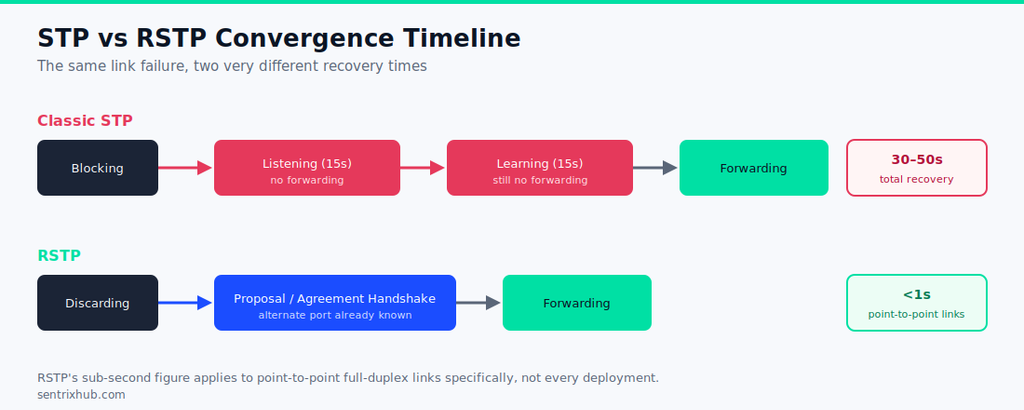
STP vs RSTP convergence timeline — from link failure to forwarding
The practical difference shows up almost entirely during failure events. Under normal traffic, STP and RSTP behave similarly. The gap opens the moment something actually breaks.
Can RSTP Work Alongside Classic STP?
Yes. RSTP is backward compatible, and a switch running RSTP will detect legacy STP neighbors and automatically drop into a compatibility mode with them. The catch is that this compatibility comes at a cost: any segment of the topology still running classic STP keeps its old, slow convergence behavior, even if the rest of the network is fully RSTP.
Mixed environments are common during a phased migration, but they’re worth tracking deliberately. It’s easy to assume the whole network converges quickly just because most of it is RSTP, when in reality a handful of legacy switches are still dragging specific paths back to 30-second recovery times.
Serious STP Failures That RSTP Prevents Automatically
Bringing this together, here’s what specifically changes once RSTP replaces classic STP in a production network:
- Slow failover recovery. The core issue. RSTP activates pre-computed alternate paths instead of waiting through Listening and Learning delays.
- Extended VoIP and real-time traffic disruption. Because failover happens faster, voice and other latency-sensitive traffic sees a much shorter interruption window, often short enough that users don’t notice it at all.
- Broadcast storm escalation during instability. Faster topology convergence means less time for a developing loop condition to spiral into a full storm before the network stabilizes.
- Root bridge instability fallout. When root bridge changes do happen (misconfiguration, a switch reboot), RSTP recalculates the topology far faster than classic STP’s timer-based approach.
- Excessive downtime from a single failed uplink. One uplink failure in classic STP can create a noticeable, sometimes lengthy interruption. RSTP’s alternate ports typically absorb this with minimal visible impact.
- Temporary loop conditions during reconvergence. Faster, more decisive topology transitions reduce the narrow window where a topology change can briefly create loop-like behavior before stabilizing.
A Realistic Failure Scenario
Picture a mid-sized office network: a handful of access switches, redundant uplinks to a distribution switch, VoIP phones, and wireless access points hanging off the access layer. The uplink between one access switch and the distribution switch drops unexpectedly, maybe a bad transceiver, maybe someone unplugged the wrong cable during a rack cleanup.
Here’s the same access-to-distribution scenario as a diagram:
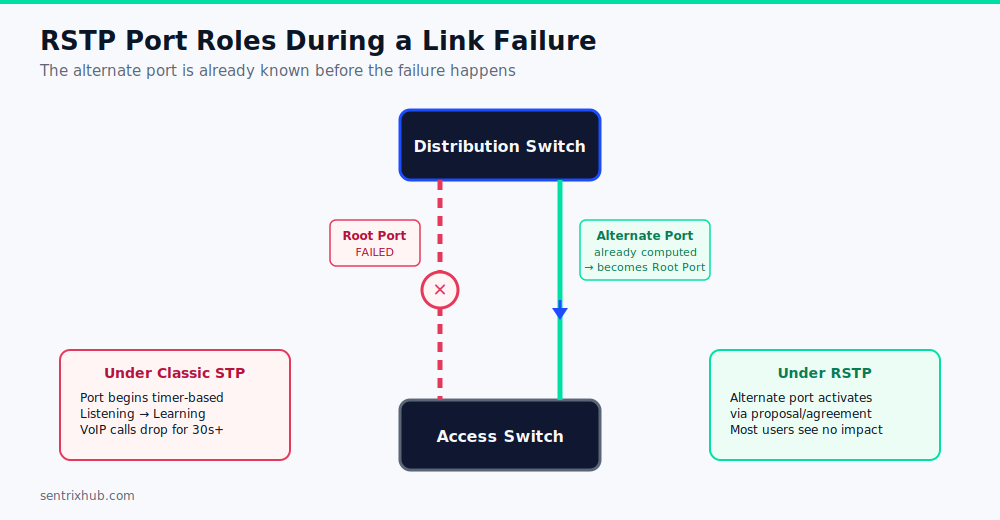
RSTP alternate port activation during a failed uplink
Under classic STP, that access switch’s ports begin timer-based transitions. For 30-plus seconds, connected devices lose upstream connectivity. Active VoIP calls on that switch drop. Anyone mid-task on a wireless client tied to that segment sees their connection stall.
Under RSTP with a properly configured alternate port, the standby path activates through the proposal/agreement handshake almost immediately. Voice traffic barely hiccups. Most users on that switch won’t consciously register that anything failed at all, which is really the whole point: good failover isn’t something users notice.
Best Practices for RSTP Deployments
A few things consistently separate stable RSTP deployments from ones that still have surprises waiting in them:
- Plan root bridge placement intentionally. Don’t let an arbitrary switch win root bridge election by default priority.
- Use BPDU Guard on edge ports. This protects against someone accidentally connecting a switch (or a misconfigured device) to a port that’s supposed to only see end devices.
- Configure edge ports deliberately, not just everywhere convenient. Edge ports skip convergence delay for a reason; that reason stops applying the moment a port actually connects to another switch.
- Design redundant uplinks with intent, not just “add a second cable and hope.” Uncontrolled Layer 2 complexity creates more convergence work, not less risk.
- Monitor topology changes. Frequent, unexplained topology change notifications are usually an early signal of instability, misconfiguration, or an actual loop, not background noise to ignore.
- Actually test failover. This is the one most teams skip, and it’s the one that matters most.
✅ Test Failover Before You Need It: Many engineers only discover convergence problems during a real outage, which is the worst possible time to find out an alternate port wasn’t configured the way you assumed. Schedule deliberate failover tests (unplugging a redundant uplink in a maintenance window, for instance) and confirm recovery time matches what you’d expect, rather than assuming redundancy works because it’s configured.
If you’re building this into a standing process rather than a one-off check, it’s worth keeping alongside your other network change procedures. Our checklists library has a few that pair naturally with failover testing, including our broader enterprise STP troubleshooting methods if you’re diagnosing something that’s already gone wrong rather than testing proactively.
⚠️ Mixed Environments Drag Down the Average: If your network is “mostly RSTP” but a few legacy switches are still running classic STP, don’t assume overall convergence is fast. Any path that has to traverse a classic STP segment inherits that segment’s slow, timer-based behavior, even if everything else around it converges in under a second.
Frequently Asked Questions
What problems does STP prevent?
Layer 2 loops, broadcast storms, MAC address table instability, and duplicate frame issues, all of which stem from having more than one active path between two points on the same VLAN.
Can RSTP work with STP?
Yes. RSTP is backward compatible with classic STP and automatically drops into compatibility mode with legacy neighbors, though any segment still running classic STP keeps its slower convergence behavior.
What happens when STP fails?
Possible consequences include broadcast storms, packet loss, VoIP interruptions, unstable VLANs, and root bridge instability, depending on whether the failure is a true loop condition or just slow convergence during a topology change.
Why is RSTP faster than STP?
RSTP replaces timer-based waiting with a proposal/agreement handshake between switches and pre-computes alternate paths in advance, so it doesn’t need to recalculate the topology from scratch after a failure.
What is STP convergence time?
Typically 30 to 50 seconds under classic STP, depending on topology size and timer configuration, largely driven by the Forward Delay and Max Age timers.
Is RSTP convergence always sub-second?
No. Sub-second convergence is common on point-to-point full-duplex links specifically. Shared or half-duplex segments, and mixed environments with legacy STP switches, can still take significantly longer.
Final Thoughts
Classic STP does what it was built to do: it stops Layer 2 loops. What it wasn’t built for is the recovery speed modern networks actually need, and that gap is where most of the real operational pain shows up, not in dramatic loop failures but in the ordinary, everyday uplink hiccup that turns into a 30-second outage.
RSTP closes that gap by changing how switches decide when to forward traffic, not by changing what spanning tree is trying to accomplish. For any network where a few seconds of downtime is actually noticeable to the people using it, that difference stops being an optimization and starts being a baseline requirement.

Abdul Shakoor writes practical, defensive cybersecurity and networking guides for SentrixHub. He focuses on making API security, mobile app security, authentication, and network concepts simple for beginners and developers.