
Quick answer: The most dangerous STP timer mistakes are setting timers too low (causes instability and MAC table flapping), setting them too high (slows failover recovery), and copying lab values into production. Stick to Cisco defaults — Hello Time 2s, Max Age 20s, Forward Delay 15s — unless you have a specific, tested reason to change them.
A single incorrect STP timer value can turn a perfectly healthy switching network into something that behaves unpredictably for no obvious reason. Most STP timer mistakes don’t announce themselves with an outage — they show up first as random uplink flapping, a few seconds of packet loss during a link change, or a topology that seems to recalculate more often than it should. By the time someone traces the symptom back to a timer value, hours have usually already gone into chasing the wrong cause.
What Are STP Timers?
STP relies on three timers to decide how the network reacts to change:
- Hello Time — how often the root bridge sends BPDUs (default: 2 seconds)
- Max Age — how long a switch trusts existing BPDU information before discarding it (default: 20 seconds)
- Forward Delay — how long a port spends in Listening and Learning before it’s allowed to forward traffic (default: 15 seconds)
Here’s how those three timers actually map onto a port’s journey from Blocking to Forwarding:
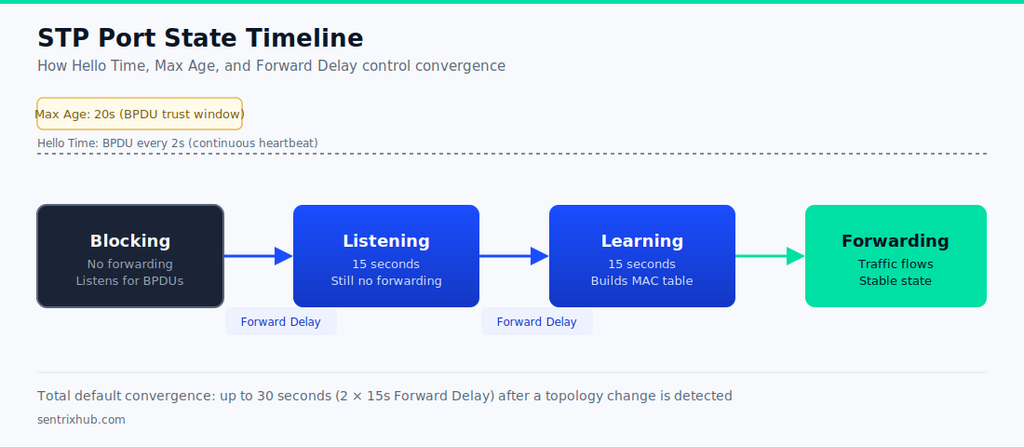
STP Port State Timeline — Hello Time, Max Age & Forward Delay
If you haven’t worked through how ports actually move between these states, it’s worth reading What Are STP Port States in Networking? first — the timer behavior below builds directly on that.
If the relationship between these timers and port state transitions still feels abstract, this walkthrough breaks down exactly how Hello Time, Max Age, and Forward Delay drive a port through each state during convergence.
STP States & Timers — CCNP ENCOR 350-401
📌 Timers Aren’t Independent Settings: Hello Time, Max Age, and Forward Delay are mathematically related to each other, not three separate dials. Changing one without accounting for the others is the single most common way beginners introduce instability while trying to “tune” STP.
| Timer | Default | Adjustable Range | Purpose |
|---|---|---|---|
| Hello Time | 2s | 1–10s | BPDU broadcast interval |
| Max Age | 20s | 6–40s | BPDU trust window before recalculation |
| Forward Delay | 15s | 4–30s | Listening + Learning duration |
Why the Defaults Exist
Cisco’s default timer values aren’t arbitrary — they’re built with enough margin to handle worst-case BPDU propagation delay across a network of the maximum diameter classic STP was designed to support reliably. Cisco’s own reference on this, Understanding and Tuning Spanning Tree Protocol Timers, walks through exactly how each timer value was derived and why the defaults hold up across most real topologies.
In practice, this means the defaults are already tuned for the worst case most networks will realistically hit. Beginners who assume they can safely tighten the numbers usually haven’t accounted for that margin.
The STP Timer Mistakes That Actually Cause Problems
How Network Diameter Affects Timer Tuning
Cisco’s defaults assume a maximum network diameter of seven switches — the number of bridges between any two endpoints. If your actual topology is smaller, the timers technically have room to be tightened, but only within strict mathematical limits:
Max Age ≤ 2 × (Forward Delay − 1)
Max Age ≥ 2 × (Hello Time + 1)
For example, a diameter of four switches allows Max Age as low as 14s and Forward Delay as low as 10s — still well above the aggressive values beginners often try. This is a narrow, calculated adjustment, not an arbitrary one, and it should only be applied after confirming your actual diameter, not guessed at.
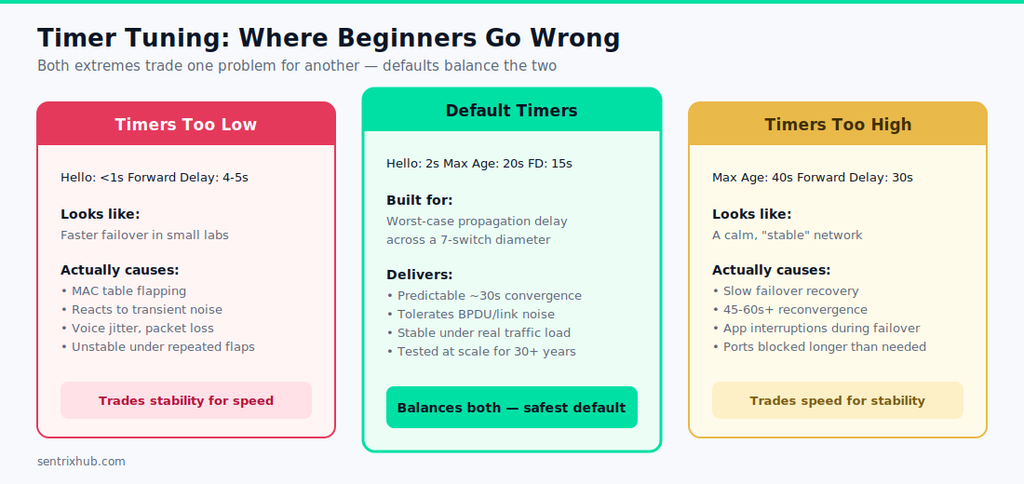
Mistake #1 — Setting Timers Too Low
The most common version of this: someone drops Forward Delay to 4–5 seconds and Hello Time to under a second, expecting faster failover. In a small lab with two or three switches, it often looks like it works — links come back up noticeably faster.
The problem shows up under repeated topology changes. In one lab test, cycling a link up and down every 15–20 seconds with an aggressively low Forward Delay caused the MAC address table to flap continuously, and ports that should have settled into a stable forwarding state kept cycling back through Listening and Learning instead. The network wasn’t failing — it was reacting to changes it should have been ignoring.
⚠️ Faster Isn’t the Same as Stable: Aggressively low timers make STP react to transient link noise as if it were a real topology change. In production, that shows up as voice jitter, brief packet loss, or MAC table instability that has nothing to do with an actual failure.
Mistake #2 — Increasing Timers Unnecessarily
The opposite mistake is just as common: someone assumes larger timers mean a “safer” network, and pushes Max Age and Forward Delay well above default. This does reduce sensitivity to noise, but it comes at a direct cost — a real uplink failure now takes proportionally longer to recover from.
This pattern shows up often when timer values get copied from an old lab configuration into a production switch without anyone checking why those values were set that way in the first place. The network feels calm day to day, then takes 45–60 seconds to reconverge after a real failure instead of the 30 seconds default timers would have delivered.
Side by side, the tradeoff each extreme makes becomes clear:
Mistake #3 — Ignoring Default Timer Values
A lot of beginners change timers simply because they can, without understanding what the defaults already account for. Once you understand how a root bridge gets elected and how BPDUs propagate outward from it, it becomes clearer why Hello Time, Max Age, and Forward Delay were set where they are — they’re built around worst-case propagation delay across the whole topology, not just the segment directly in front of you.
Mistake #4 — Misunderstanding Timer Relationships
This is the mistake that causes the most confusing symptoms, because the network doesn’t fail outright — it just behaves inconsistently. If Hello Time is reduced but Max Age is left at default, a switch may declare a neighbor unreachable far sooner than the rest of the topology expects, creating asymmetric reconvergence behavior that’s genuinely hard to diagnose from the symptoms alone.
Understanding how Bridge ID influences STP decisions helps here too, since timer behavior interacts with root bridge selection in ways that aren’t obvious from the timer values alone.
Mistake #5 — Copying Lab Configurations Into Production
A timer setup that behaves fine in Packet Tracer or a small GNS3 topology can behave very differently once it’s dropped into a network with more switches, more BPDUs in flight, and real latency variation between segments. Lab environments are useful for learning what each timer does in isolation — they’re a poor substitute for testing what happens when 15 switches all react to the same topology change at once.
Where Timers Alone Can’t Fix STP’s Limitations
Even with perfectly tuned timers, classic STP still converges slower than RSTP, because ports still have to pass through transitional states before forwarding. Timer tuning can smooth out specific symptoms, but it won’t fix a Layer 2 design that’s fundamentally too flat or too dependent on a single redundant path. If you’ve run into a root port failing outright, that’s usually a design and topology issue first, and a timer issue second.
Troubleshooting STP Timer Misconfiguration
Two commands cover most of what you need:
show spanning-tree
Shows root bridge status, port roles, and current timer values in use.
show spanning-tree detail
Useful for tracing recent topology changes and confirming whether a port’s behavior matches what the configured timers should produce.
Signs that point to a timer problem rather than a physical one: frequent topology change notifications with no matching physical event, MAC addresses flapping between ports, or failover recovery that’s noticeably slower or faster than the 30-second default behavior would predict. For a deeper walkthrough of isolating these symptoms from actual link failures, our enterprise STP troubleshooting guide covers the diagnostic sequence in more detail.
✅ Restore Defaults Before You Tune Further: When STP behavior looks inconsistent and you can’t immediately explain why, reverting to default timer values is usually faster than trying to debug a custom configuration you didn’t originally design. Once the network is stable again, only re-tune with a specific, tested reason.
Documenting what you change and why is worth doing even for a “quick” timer adjustment — a short written note of the before/after values and the reason for the change saves real time the next time someone touches the same switch. Our checklists section has templates for exactly this kind of change-tracking if you don’t already have one.
STP Timer Best Practices
- Keep default timers unless a specific, tested design requirement says otherwise
- If you must tune timers, test the change under repeated topology flaps, not just a single failover
- Never copy timer values from a lab into production without re-validating them at scale
- Treat predictable convergence as more valuable than the fastest possible convergence
Frequently Asked Questions
What are the STP timers?
Hello Time, Max Age, and Forward Delay — together they control BPDU exchange, topology stability, and how ports transition between states.
What is the Max Age timer in STP?
The amount of time a switch trusts existing BPDU information before discarding it and recalculating the topology. Default is 20 seconds.
What is the default Forward Delay timer for STP?
15 seconds. It controls how long a port spends in Listening and Learning before it’s allowed to forward traffic.
Why are incorrect STP timer settings dangerous?
They can cause slow failover, frequent unnecessary topology changes, MAC table instability, or in some cases temporary loops — depending on whether the timers were set too aggressively or too conservatively.
Should you change STP timers in production networks?
In most cases, no. Default timers already account for worst-case propagation delay. Only change them for a specific, well-tested design requirement.
Final Takeaways
Default timers are usually the safest choice. Faster convergence isn’t automatically better convergence — it’s only better if the network stays stable while getting there. Timer values are related to each other, not independent settings, and a lab configuration is never a safe assumption for production behavior. Understanding these relationships is what separates a beginner tuning STP by trial and error from an engineer making a deliberate, tested design decision.

Abdul Shakoor writes practical, defensive cybersecurity and networking guides for SentrixHub. He focuses on making API security, mobile app security, authentication, and network concepts simple for beginners and developers.