
Dangerous passwords are still everywhere in 2026, and that’s honestly surprising given how many breach headlines we’ve all seen by now. Most people log in with something a cracking tool can guess in under a second, and most of them have no idea.
The attackers have changed a lot more than the users have. Nobody’s manually guessing passwords anymore. It’s automated scripts, leaked-credential databases, and increasingly, AI-assisted tools chewing through billions of combinations per second. So maybe the real question isn’t “are weak passwords dangerous.” It’s whether passwords, as a concept, are already on their way out.
This article walks through what actually makes a password dangerous, how attackers exploit weak credentials step by step, and why the industry keeps pushing toward passkeys and biometric login instead.
📌 Worth knowing: Weak passwords aren’t just short ones. A 12-character password built from a predictable pattern, like a keyboard sequence or a birthday, can be just as easy to crack as a 6-character one. Length without randomness gives a false sense of security.
What Makes a Password Dangerous?
A dangerous password is basically any login credential that’s missing complexity, uniqueness, or unpredictability. That’s a fancy way of saying: it’s something a cracking tool can guess through patterns instead of grinding through every possible combination.
Common traits of a weak password include:
- Short length, such as “abc123”
- Predictable sequences, like “123456” or “qwerty”
- Personal details such as birthdays, pet names, or phone numbers
- Reuse across multiple accounts
These patterns show up constantly in breach databases, which is exactly why they’re the first combinations attackers’ tools try. NIST’s digital identity guidelines actually moved away from strict complexity rules a while back, leaning instead toward length and checking against known-breached password lists. Turns out predictability matters a lot more than character variety when it comes to real-world cracking success.
NIST’s own guidelines explain why forcing complexity often backfires:

NIST SP 800-63B, Appendix A.3 — composition rules and predictable password patterns.
Why Passwords Are Struggling to Keep Up in 2026
Passwords were built for a much simpler internet than the one we’re dealing with now. A few things explain why they’ve become more of a liability than a safeguard.
Massive data breaches. Every year, millions of credentials leak out of compromised platforms and get added to databases of stolen login data that just keep growing.
Automation and AI-driven attacks. Modern cracking tools can test enormous volumes of password combinations in seconds, especially when the credentials are weak or reused.
Human behavior. This one’s the hardest to fix. Convenience wins over security almost every time — people reuse passwords, skip password managers, and pick something memorable that’s also, unfortunately, guessable.
Phishing. Even a genuinely strong password is useless if someone gets tricked into typing it into a fake login page. It’s the same social-engineering trick behind NADRA verification scams in Pakistan, where victims hand over their credentials to something that looks legitimate but isn’t.
⚠️ Remember: A strong password can still be stolen through phishing, not just cracked through brute force. Password strength protects against guessing attacks. It does nothing against a convincing fake login page.
How Attackers Actually Exploit Weak Passwords
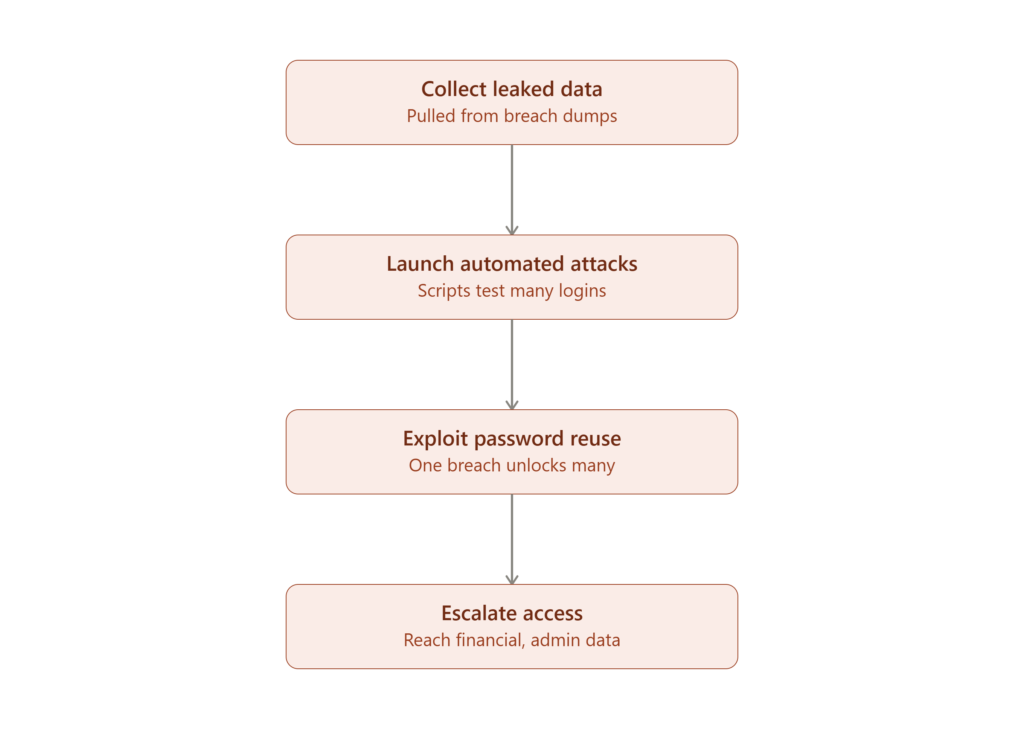
Figure: The four-stage process attackers follow after leaked credentials surface online.
Understanding the attacker’s playbook makes it a lot easier to see why small habits create big risks.
Step 1 — Collect leaked data. Attackers pull massive lists of previously breached usernames and passwords from dark web markets or public dumps.
Step 2 — Launch automated attacks. Scripts test these credentials against login forms across dozens of platforms at once. This is called credential stuffing.
Step 3 — Exploit password reuse. If a password got reused anywhere, one breach can unlock several unrelated accounts — email, banking, social media, all at once.
Step 4 — Escalate access. Once they’re in, attackers move toward higher-value targets: financial accounts, saved payment details, or admin-level access on business systems.
None of this requires the attacker to specifically target you. That’s what makes it scary. Weak passwords just make victims interchangeable.
The Passwords Attackers Try First
Even in 2026, the most commonly used passwords are still shockingly predictable:
- 123456
- password
- 123456789
- qwerty
- 12345678
- abc123
- password1
“123456” was also the most common password back in 2012. More than a decade of breach headlines later, and it’s still near the top. That tells you something about how slowly user behavior actually changes.
A password like 1234567890 falls into the same trap, just with more digits. It’s longer than most entries on that list above, sure, but it’s still a predictable numeric sequence sitting in virtually every password-cracking dictionary out there. Length alone doesn’t make a password strong. Unpredictability does.
Common Password Hacking Methods
Cybercriminals lean on a handful of proven techniques to break into accounts:
- Brute force attacks — systematically trying every possible combination until one works
- Dictionary attacks — testing lists of common words and known weak passwords
- Credential stuffing — reusing leaked username/password pairs across multiple sites
- Phishing — tricking users into typing credentials into a fake page, not too different from how fake e-challan links capture OTPs in local scam campaigns
- Keylogging — silently recording keystrokes to capture credentials as they’re typed
Most of these exploit human behavior just as much as, or more than, any technical weakness in the system itself.
Brute force attacks specifically have gotten a lot scarier with modern hardware. Automated tools can generate and test combinations at massive speed now, and a genuinely weak password can be cracked in seconds using a consumer-grade GPU. Not even a particularly expensive one.
✅ Best practice: Treat every account as if it will eventually appear in a breach. Use a unique password for each service so that one leaked credential can’t be replayed across your email, banking, and social accounts.
The Real Cost of Password Reuse
Reusing one password across multiple accounts feels convenient. It turns a single breach into a multi-account compromise, though, which is a pretty rough tradeoff. When credentials leak from one platform, attackers test them everywhere else almost immediately — email providers, banking apps, e-commerce accounts, even workplace logins.
This is one of the bigger contributors to account takeover incidents today. It usually gets worse alongside other small oversights too, the kind you see in issues like weak file permissions on servers, where one overlooked setting ends up exposing far more than anyone intended.
Leaked, reused credentials tend to cause a chain reaction: hijacked email accounts, financial fraud, identity theft, and for businesses, corporate data exposure. A lot of attackers don’t even bother breaching a system directly anymore. They just wait for someone else’s breach and reuse the data. Free tools like Have I Been Pwned let anyone check whether their email or password has already surfaced in a known breach — worth bookmarking, honestly.
Here’s what that looks like in practice — a quick search shows exactly which breaches an email has been exposed in:
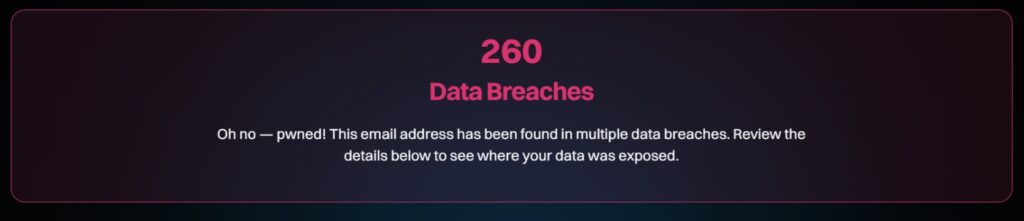
A Have I Been Pwned search result showing an email exposed across multiple known breaches.
Why the Industry Is Moving Past Passwords
Passwords depend entirely on human memory, and human memory isn’t exactly reliable under pressure. People forget things, reuse things, write things down somewhere insecure. That’s a big part of what’s driving the shift toward passwordless authentication.
| Feature | Passwords | Passkeys |
|---|---|---|
| Security | Weak | Strong |
| Phishing risk | High | Very low |
| User experience | Poor | Seamless |
| Reuse risk | High | None |

Passkeys work differently from passwords at a fundamental level. They use cryptographic key pairs instead of a shared secret you type into a form, so there’s nothing to phish, guess, or leak in the traditional sense. Google, Apple, and Microsoft have all made passkeys a default or strongly recommended login option already. Passwords won’t vanish overnight, but the shift is well underway.
Biometric authentication plays a similar role here — fingerprint scanning, facial recognition, iris scanning. It verifies who you are directly instead of relying on something you have to remember. Put it all together and passwordless systems mean fewer credentials to remember, less phishing exposure, faster logins, and generally stronger security.
Organizations formalizing this shift often map it against structured security requirements, similar to how authentication controls are laid out in frameworks like OWASP ASVS 5.0, which defines verification standards for modern login and session security. The FIDO Alliance maintains the actual cryptographic standard behind passkeys — they’re the industry body responsible for the passwordless specs that Google, Apple, and Microsoft all ended up adopting.
Here’s what that actually looks like when signing in — no password field in sight:
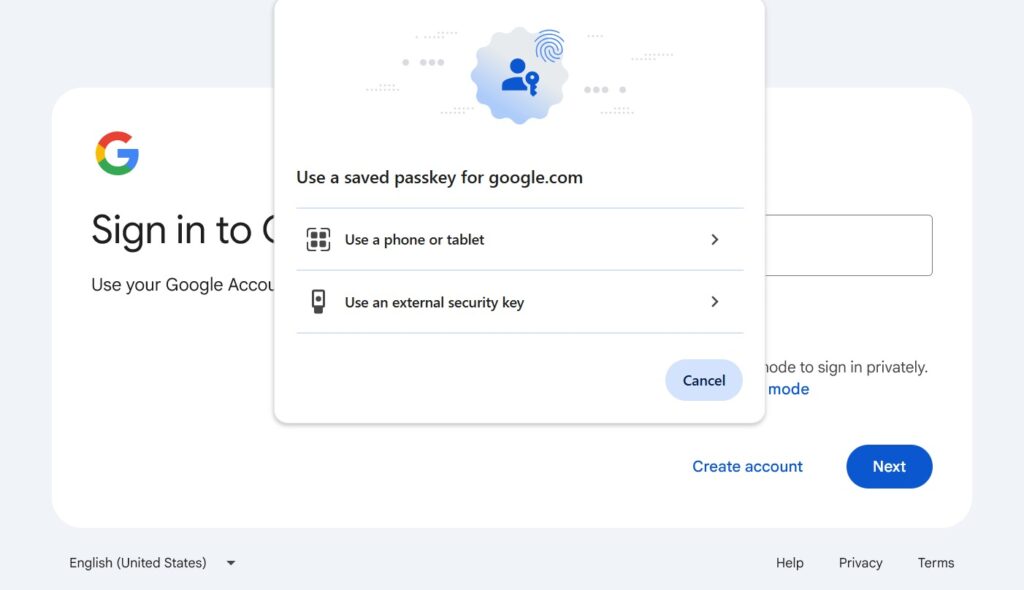
Google’s sign-in flow offering a saved passkey instead of a password.
📌 Worth knowing: Passkeys aren’t just “passwords but longer.” They rely on public-key cryptography, meaning your device proves your identity without ever transmitting a secret that could be intercepted or phished.
Practical Steps to Reduce Your Password Risk
Here’s what a password manager’s generator looks like in practice — random, long, and nowhere near a dictionary word:
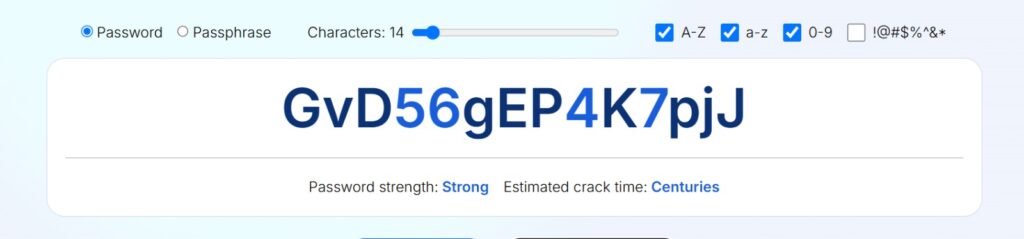
A 14-character randomly generated password with an estimated crack time of centuries.
You don’t need advanced technical skills for most of this. A few habit changes go a long way:
- Use a password manager to generate and store unique passwords per account
- Enable multi-factor authentication everywhere it’s offered
- Avoid reusing passwords across any two accounts
- Update passwords right away after any breach notification
- Switch to passkeys wherever a platform supports them
For a quick visual breakdown of these mistakes, watch this walkthrough on common password errors and how to fix them:
Watch: common password mistakes explained, and simple fixes to reduce your risk.
For accounts and networks that need stronger authentication, enterprise environments increasingly lean on standards like IEEE 802.1X authentication to verify devices and users before granting network access at all. That’s a layer well beyond anything a password alone can provide.
⚠️ Remember: Multi-factor authentication isn’t optional insurance anymore. It’s often the one thing standing between a leaked password and a full account takeover. Turn it on even for accounts that feel low-risk.
Conclusion
Relying purely on passwords doesn’t really hold up anymore. In 2026, sticking with weak, reused, or predictable passwords is more than just risky. It’s basically leaving the door open for automated tools that are built specifically to exploit exactly these habits.
Unique credentials per account, multi-factor authentication turned on by default, and a gradual move toward passkeys where they’re available. That’s really the whole game plan. Nothing complicated about it, just a matter of actually doing it before a breach forces the issue.
Frequently Asked Questions
What makes a password dangerous?
Mostly it comes down to predictability. Short, personal, or reused passwords are the easiest for automated tools to guess, no matter how “clever” you think the pattern is.
What are the most commonly used weak passwords?
123456, password, qwerty, and 123456789 are still near the top of every breach list. They’re also the first combinations attackers try.
Are passwords becoming obsolete?
Not overnight, but gradually, yes. Passkeys and biometric login are already the default on most major platforms.
How do attackers actually steal passwords?
Phishing and credential stuffing account for most of it. Brute force and keylogging still happen too, just less often now that easier options exist.
What’s the safest way to log in today?
Passkeys where they’re supported, a password manager everywhere else, and multi-factor authentication turned on regardless.

Abdul Shakoor writes practical, defensive cybersecurity and networking guides for SentrixHub. He focuses on making API security, mobile app security, authentication, and network concepts simple for beginners and developers.