
A “redundant” cable is often how this kind of trouble starts. Someone adds a spare Ethernet run between two switches “just for backup,” and within minutes the whole access layer slows to a crawl. No alarms, no obvious fault — just switches pinned at 90%+ CPU and users staring at spinning loading icons. That’s the exact scenario STP port states exist to prevent, and it’s why this guide walks through the mechanism itself rather than just listing definitions.
Spanning Tree Protocol doesn’t just “prevent loops” as a slogan. It controls, second by second, whether a specific port is allowed to touch your traffic at all. Understanding those states is the difference between diagnosing a flapping link in five minutes and spending an afternoon chasing a broadcast storm with no idea where it started.
What Is STP in Networking?
Spanning Tree Protocol (STP) is a Layer 2 protocol built to keep redundant switch topologies from turning into loops. Redundancy is good — a second uplink between your access and core switches means one link failing doesn’t take the building offline. But two active paths between the same two switches, without any control mechanism, means a broadcast frame can circle forever, doubling and tripling with every pass until the switches choke on their own traffic.
STP solves this by calculating a loop-free logical topology on top of your physical, redundant one. One path forwards. The rest sit in reserve. If you haven’t already, it’s worth reading how the root bridge election process works first, because port states only make sense once you know which switch is acting as the reference point for the whole topology.
What Is a Port State in Networking?
A port state is simply the operational mode a switch interface is in at a given moment. It answers three questions:
- Is the port forwarding data frames right now?
- Is it learning MAC addresses from what it sees?
- Is it participating in the STP conversation (BPDUs) at all?
Cisco’s own configuration guides describe this directly — a Layer 2 interface moves through blocking, then the transitory listening and learning states, before it’s trusted to forward frames.
📌 Why this matters more than people think: A port that shows “up” in a monitoring tool isn’t necessarily forwarding anything. It’s easy to mistake a port correctly sitting in listening state for 15 seconds after a topology change for a dead port. Knowing the state saves time that would otherwise go into chasing a problem that doesn’t exist.
Overview of STP Port States
Classic 802.1D STP defines four operational states that matter day-to-day (a fifth, disabled, just means the port isn’t running STP at all):
- Blocking
- Listening
- Learning
- Forwarding
Each one exists to buy the network time — time to confirm a path is safe before it’s allowed to carry real traffic.
What a Link Failure Actually Looks Like
Take a typical access-to-core setup: two uplinks, one active in forwarding, the second held in blocking as backup. When the primary link fails — a bad SFP, a cut cable, whatever the cause — here’s the sequence that plays out:
- The forwarding port goes down.
- The backup port detects the topology change and leaves blocking.
- It moves into listening — no traffic, just processing BPDUs.
- Then into learning — building the MAC table, still not forwarding.
- Finally into forwarding, and traffic resumes.
On classic STP timers, this whole sequence takes roughly 30 to 50 seconds. That gap is easy to overlook until real-time traffic is involved — a VoIP call or an RDP session sitting in that window will visibly drop. This is exactly why networks carrying latency-sensitive traffic tend to migrate off classic STP; see our breakdown of serious STP failures that RSTP prevents for the comparison.
In a redundant setup like this, only one uplink actually carries traffic — the other sits ready as a backup:
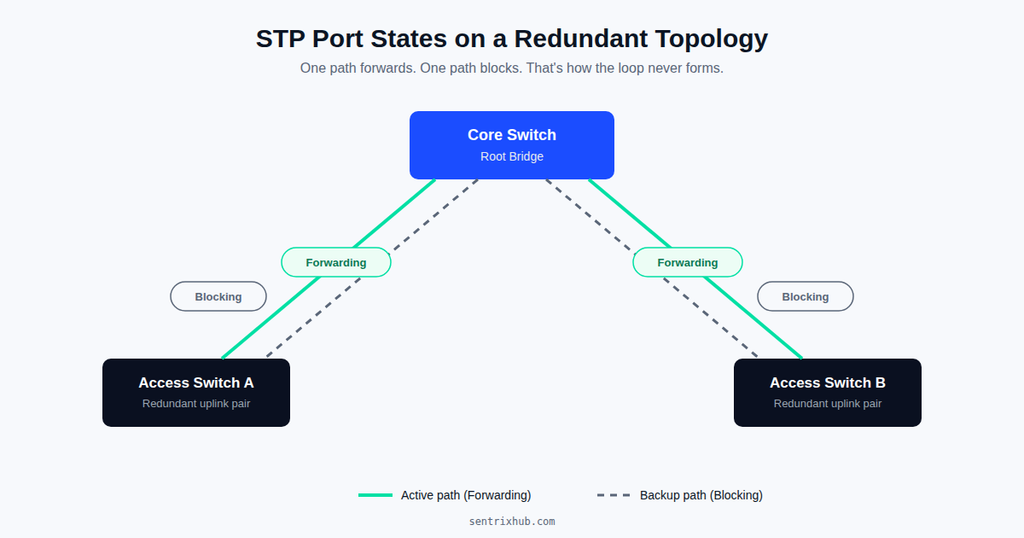
One link stays in Forwarding while the redundant link sits in Blocking — this is what stops a loop from ever forming between the two switches.
Blocking State
Definition: The port receives and processes BPDUs but does nothing else — no forwarding, no learning.
Behavior:
- Listens to BPDU messages only
- Frames are silently discarded
- MAC address table is not updated
Why it exists: In a redundant topology, at least one path has to sit inactive, or you get a loop the instant both paths go active together. Blocking is the “off” switch that keeps that from happening.
⚠️ A mistake worth flagging: Treating a blocked port as “wasted” and manually forcing it into forwarding to “fix connectivity.” That’s precisely how a loop gets built by accident. For a closer look at how this specific misstep plays out on live networks, read why STP port misconfigurations break networks.
Listening State
Definition: A transitional checkpoint where the switch effectively asks, “if I activate this port, will it create a loop?”
Behavior:
- Processes BPDUs
- Still no frame forwarding
- Still no MAC learning
Why it exists: This is a deliberate pause. Every port that comes up normally walks through listening, learning, and forwarding before it’s allowed to pass user traffic — and that pause is what stops a port from jumping straight into an active loop before the topology has stabilized.
Learning State
Definition: The port starts building its MAC address table, but frames still aren’t forwarded.
Behavior:
- Learns MAC addresses from incoming frames
- Forwarding remains off
Why it exists: Without this stage, a port that suddenly goes forwarding would have to flood every frame because it has no idea where any device actually lives on the network. Learning gets the switch caught up before the traffic starts flowing.
Forwarding State
Definition: The port is fully operational — this is the only state where normal traffic actually moves.
Behavior:
- Forwards data frames
- Continues learning MAC addresses
✅ Best practice worth adopting: For ports connected to end devices — PCs, printers, IP phones — enable PortFast so they skip the listening/learning delay entirely and jump straight to forwarding, since a host can’t create a switching loop on its own. Pair it with BPDU Guard so that if someone accidentally plugs a switch into that port, it gets shut down instead of silently joining your spanning tree. Cisco’s own guidance on this is worth reading directly: Understand Spanning Tree PortFast and BPDU Guard Features.
Broadcast Storm Prevention in Practice
The spare-cable scenario from the opening is one of the most common ways a small office network takes itself offline. Two switches, accidentally cross-connected with an extra cable, and without STP that loop floods broadcast traffic endlessly — CPU usage on both switches spikes, and MAC tables start flapping between ports as the same source address appears to arrive from two directions at once.
With STP running, one of those two ports gets forced into blocking the moment it detects a better path already exists to the root, and the loop never forms. It’s unglamorous work, but it’s the single biggest reason accidental redundancy doesn’t turn into an outage.
Convergence Delay and Why It Actually Matters
On a data-only network, a 30-to-50-second convergence delay after a link failure is annoying. On a network carrying VoIP, video conferencing, or anything latency-sensitive, it’s the difference between a minor blip and a dropped meeting. This is the practical argument for RSTP over classic STP — not a checkbox on a compliance sheet, but a real reduction in how long users sit without service during a failover.
State Transitions at a Glance
Blocking → Listening → Learning → Forwarding
Each transition step buys the network something specific: loop prevention, accurate MAC learning, and — only at the end — stable forwarding. The pacing between these states is governed by STP timers, and getting those timers wrong is a surprisingly common source of instability; see dangerous STP timer mistakes beginners make if you’ve inherited a network with non-default timer values.
Here’s what changes at each stage — whether BPDUs are processed, MAC addresses are learned, and traffic is actually forwarded:
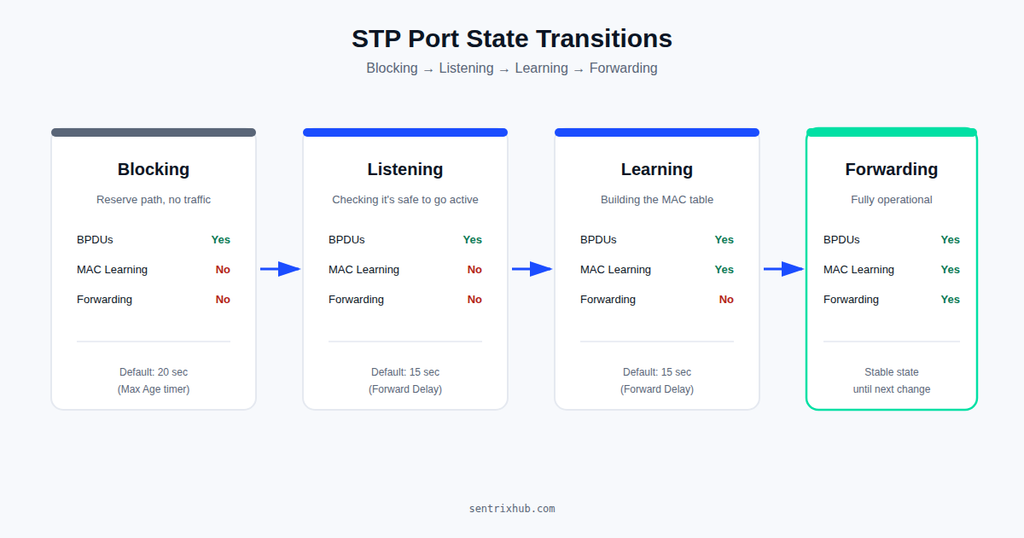
Each state adds one capability at a time — BPDU processing first, then MAC learning, and only at the end, forwarding.
Watch the Transitions in Action
Reading through blocking-to-forwarding is one thing; watching a port actually walk through it during a simulated failure makes the timing click faster. This walkthrough covers the same four states discussed above and is worth pausing on if the listening/learning delay still feels abstract:
A step-by-step look at how a switch port moves from Blocking to Forwarding, including how each state affects BPDU processing and MAC learning.
Known Issues Seen on Live Networks
- Slow convergence causing brief but noticeable outages during a link failure
- PortFast enabled on a port that’s actually uplinked to another switch — this is how loops sneak past BPDU Guard if it isn’t also enabled
- Missing BPDU Guard on access ports, which is fine until someone plugs in an unmanaged switch
- Root bridge changing unexpectedly because bridge priority was never set explicitly
- MAC address flapping on unstable or partially-failing links
None of these are STP’s fault. They’re almost always design or configuration gaps sitting on top of a protocol that’s doing exactly what it was told to do.
Verifying Port States on a Live Switch
The commands that matter most during troubleshooting:
show spanning-tree
show spanning-tree root
show spanning-tree vlan 10
These show the current port state, which switch is root, and what the active topology looks like right now — not what it looked like when the network was designed two years ago.
STP Port States in Plain Language
- Blocking — stay quiet, don’t create a loop
- Listening — check if it’s safe to go active
- Learning — start memorizing where devices live
- Forwarding — carry traffic normally
STP vs RSTP, Quickly
Classic STP relies on fixed timers and a full walk through every transitional state, which is where that 30-50 second convergence time comes from. RSTP collapses this by actively negotiating with neighboring switches instead of just waiting out a timer, cutting failover down to seconds in most well-designed topologies.
Final Thoughts
The misconception that comes up most often, even among people who’ve managed switches for years, is that adding a redundant link automatically makes a network more reliable. It doesn’t, not on its own. Redundancy without a control mechanism is just a bigger surface for something to go wrong. STP port states are that control mechanism. They’re the reason a second uplink is an asset instead of a liability.
If you’re building out a topology with multiple paths between switches, it’s worth reviewing how STP root port selection actually picks which path wins before assuming the “obvious” link is the one that’ll be active — and keeping a basic network troubleshooting checklist on hand makes it much faster to isolate whether a slowdown is a real STP event or something else entirely.
Frequently Asked Questions
What is STP state in networking?
It’s the operational mode a switch port is in — blocking, listening, learning, or forwarding — which determines whether it’s allowed to pass traffic at that moment.
What is port state in networking?
It defines whether a port forwards frames, learns MAC addresses, or is participating in STP calculations at all.
How many STP port states are there?
Classic STP has four operational states: blocking, listening, learning, and forwarding (plus disabled, for ports not running STP).
Why does STP use multiple states?
So a port never jumps straight into forwarding without first confirming the topology is safe and its MAC table is current.
What happens during STP convergence?
Ports move through the blocking-to-forwarding sequence to rebuild a loop-free topology after any change.
Why is STP slow in some networks?
Classic STP relies on fixed timers rather than active negotiation, which is exactly what RSTP was built to fix.
What’s the difference between STP states and port roles?
States describe behavior (forwarding or not); roles describe position in the topology (root port, designated port, and so on).
Which STP state causes the most delay in recovery?
Listening and learning — both are deliberate pauses built in for safety, not inefficiency.
How can STP issues be prevented?
Set root bridge priority explicitly, use PortFast + BPDU Guard on access ports, migrate to RSTP where possible, and audit timer values instead of leaving them at legacy defaults.
Conclusion
STP port states aren’t a formality to memorize for a certification exam — they’re the actual mechanism keeping a redundant Layer 2 network from tearing itself apart. Blocking holds a path in reserve. Listening and learning confirm it’s safe to activate. Forwarding is where the real work happens. Once that sequence clicks, troubleshooting a flapping link stops being guesswork.

Abdul Shakoor writes practical, defensive cybersecurity and networking guides for SentrixHub. He focuses on making API security, mobile app security, authentication, and network concepts simple for beginners and developers.