
When an STP root port fails, a network with redundant paths built into it shouldn’t go down at all — and yet it happens more often than most engineers expect. The reason is almost never the missing backup path itself. It’s what happens in the gap between the failure and the moment STP finishes recalculating.
More than once, an incident call has turned out to be exactly this: a root port failure that triggered a completely normal STP convergence process, except the network wasn’t designed to make that process fast. Understanding what actually happens when a root port fails — step by step — is the difference between a five-second blip nobody notices and a thirty-second outage that generates a dozen support tickets.
What Is the Role of the Root Port in STP?
The root port is the interface on a non-root switch that provides the lowest-cost path back to the root bridge. Every non-root switch keeps exactly one root port per STP instance, and it stays in the forwarding state under normal conditions.
If you need the full mechanics of how that port gets chosen in the first place — cost, Bridge ID, and port ID tiebreakers — the root port selection guide with examples covers that decision process in detail. Bridge ID specifically plays a bigger role than people expect, since it combines priority and MAC address; that’s broken down in what Bridge ID actually means in STP.
📌 Worth flagging: Root port failure rarely announces itself clearly in production. Users report vague symptoms — a dropped VoIP call, a slow login screen, a file share that briefly disconnects — and it’s only after checking show spanning-tree that the actual cause turns out to be a root port that flapped thirty seconds earlier.
What Happens When a Root Port Failure Occurs
Root port failure triggers a controlled, six-stage recovery process rather than an instant recovery. Here’s the sequence.
Step 1: The Switch Detects Loss of BPDU
BPDUs (Bridge Protocol Data Units) are the control messages switches use to share topology information. The root port normally receives a steady stream of them from the upstream switch. When the link fails or the neighbor stops sending them, the switch has no way to confirm the old path is still valid.
Step 2: The Existing Root Path Becomes Invalid
Once BPDUs stop arriving, the switch discards its old root path information. Some platforms log this as something close to “STP root status released” — which simply means the switch has lost its current root relationship and needs to recalculate, not that anything is broken permanently.
Step 3: STP Checks for an Alternate Port
If a backup path exists — an alternate port that was previously blocked — STP evaluates whether it can take over. In classic 802.1D STP, that port has to move through listening and learning states before it can forward traffic. RSTP handles this transition considerably faster, which is one of the main reasons RSTP prevents several serious STP failure modes that classic STP struggles with.
Here’s the same six-stage process mapped visually, along with why RSTP recovers so much faster:
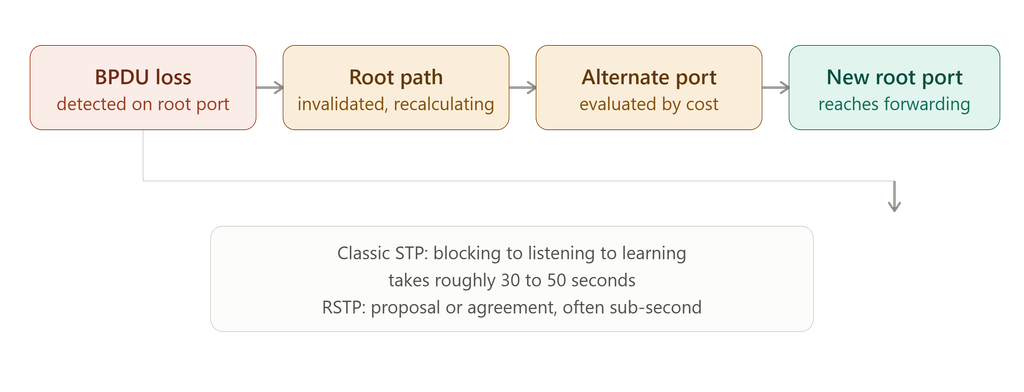
The switch moves from BPDU loss to a forwarding root port in stages — classic STP takes 30-50 seconds through this sequence, while RSTP’s proposal/agreement handshake often completes in under a second.
Step 4: A New Root Port Is Selected
The switch reapplies the standard selection rules — lowest path cost first, then lowest Bridge ID, then lowest port ID — to pick the new root port. For a walkthrough of this same logic applied to root bridge elections, see the STP root bridge election example and the broader root bridge election process on Cisco switches.
Step 5: The Port Moves Through STP States
In classic STP, the newly selected root port doesn’t jump straight to forwarding. It passes through blocking, listening, and learning before it can carry traffic — a process that typically takes 30 to 50 seconds depending on timers. This delay is exactly what people mean when they describe STP port states as the source of convergence lag.
⚠️ Don’t assume a backup link means fast recovery. A redundant path existing and a redundant path activating quickly are two different things. On classic STP, that 30-50 second window is real, and it’s long enough for VoIP calls to drop and authentication sessions to time out — regardless of how well-provisioned the backup link itself is.
Step 6: STP Convergence Completes
Once the new root port reaches forwarding, traffic resumes, and MAC address tables start rebuilding. From a user’s perspective, things look normal again. From an engineer’s perspective, this is exactly the point to check why the failure happened and whether the design handled it as well as it should have.
To see this convergence-time difference demonstrated directly on real switches, this video walks through STP versus RSTP failover behavior:
Watch: A side-by-side look at why RSTP recovers from a root port failure in a fraction of the time classic STP takes.
STP vs. RSTP Failover Timing
| Feature | Traditional STP | RSTP |
|---|---|---|
| Convergence speed | Slower (30-50s) | Faster (sub-second to a few seconds) |
| Failover mechanism | Timer-based | Proposal/agreement handshake |
| Backup path activation | Delayed | Near-immediate |
| Best fit | Legacy networks | Modern production networks |
RSTP is the practical choice for most current deployments because it removes almost all of that timer-based delay. But RSTP still depends on correct design — a bad root bridge placement or a missing protection feature can undermine even a fast-converging protocol.
Symptoms of a Spanning Tree Failure
A failing or poorly recovering STP topology tends to show up as one or more of these:
- Broadcast storms — circulating broadcast frames, spiking link utilization and switch CPU
- MAC address table instability — the same MAC address relearning on different ports repeatedly (MAC flapping)
- High CPU usage — switches processing excessive control-plane or loop-generated traffic
- Intermittent connectivity — the network working for a few seconds, then dropping, in a repeating pattern
- Slow performance without a full outage — delayed logins, poor VoIP quality, timing-out applications
A large share of these trace back to configuration issues rather than the protocol itself — why STP port misconfigurations break networks goes through the specific patterns that cause this.
How Do You Troubleshoot STP Issues?
Work through this in order rather than changing settings at random:
- Identify the root bridge —
show spanning-tree rootconfirms whether the expected switch actually holds root - Check the root port —
show spanning-treeshows whether it’s up, forwarding, and at the expected cost - Check port roles and states — unexpected forwarding ports suggest loop risk; unexpected blocking suggests a cost or topology issue
- Look for topology changes — repeated recalculation is the clearest sign of instability
- Check the physical layer — fiber, copper, duplex mismatches, and interface errors trigger a large share of “STP problems” that aren’t STP problems at all
- Review logs —
show loggingfor root changes, BPDU Guard events, and topology change notifications - Verify protection features — confirm Root Guard, BPDU Guard, and PortFast are configured where they should be
✅ Two commands, one minute. show spanning-tree and show spanning-tree root together take under a minute to run and will tell you almost immediately whether the root bridge and root port match what your design intends. That’s the starting point before touching a single physical cable.
Root Guard in STP: A Real-World Scenario
Root Guard stops an unexpected switch from taking over as root bridge. Picture a design where the core switch is the intended root, a distribution switch is the secondary root, and access switches should never win a root election. If someone connects an unmanaged switch to an access port and it happens to advertise a lower bridge priority, STP will normally let it become root — reshaping the entire topology around a device nobody planned for.
Here’s the same scenario laid out visually:
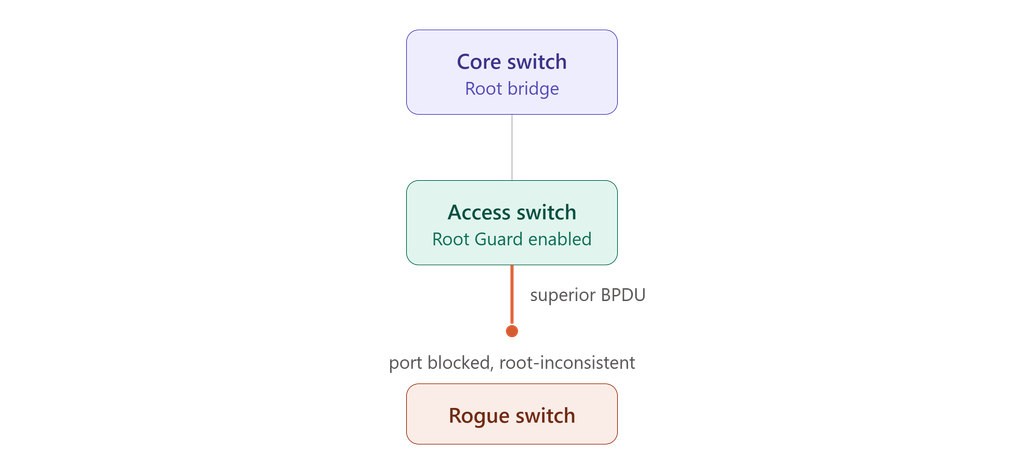
Root Guard doesn’t stop the rogue switch from connecting — it stops the topology from ever shifting toward it, by blocking the port the moment a superior BPDU arrives.
With Root Guard enabled on that port, a superior BPDU puts the port into a root-inconsistent state instead of letting the topology shift. According to Cisco’s documentation on the root guard enhancement, root guard enforces which ports are allowed to remain designated, effectively fencing off where the root bridge is permitted to appear in the network. It’s worth noting that root guard doesn’t address every failure mode — a unidirectional link failure between two bridges can still cause problems that root guard alone won’t catch, which is where loop guard and UDLD come in.
Best Practices to Prevent STP Failures
- Manually configure the root bridge and a secondary root — don’t leave it to default priority and MAC address comparison
- Use RSTP instead of classic STP wherever the platform supports it
- Enable BPDU Guard on every access/edge port. Cisco’s own documentation on PortFast and BPDU Guard describes a real case where a Linux-based bridging app on a user PC advertised a low bridge priority and the network actually elected that PC as root — precisely the scenario BPDU Guard exists to prevent
- Apply Root Guard on ports where a root bridge should never legitimately appear
- Avoid unplanned, uncontrolled Layer 2 extensions across the network
- Monitor for repeated topology change notifications, not just outright failures
- Document the intended design — primary root, secondary root, root ports, and protection features — in something durable like a security report template rather than relying on memory
- Test root port and uplink failover deliberately, before a real outage forces the question
⚠️ The gap that shows up most often in reviews: it’s rarely hardware failure. It’s a backup path that was designed correctly on paper but never triggered on purpose. Until failover has actually been tested, it’s an assumption, not a verified capability.
Practical Example: Root Port Failure in a Three-Switch Network
Take a simple topology: SW1 is the root bridge, SW2 is an access switch with a direct link to SW1, and SW3 provides a backup path. Under normal conditions, SW2’s direct link to SW1 is its root port.
When that direct link fails:
- SW2 stops receiving BPDUs on its root port
- The old root path is invalidated
- SW2 evaluates its backup path through SW3
- Cost comparison determines the new root port
- The new port transitions toward forwarding
- Traffic resumes once convergence completes
On RSTP with the alternate path already known and valid, this can happen in well under a second. On classic STP, users are likely to notice a brief but real interruption.
Common Mistakes That Make Root Port Failure Worse
- Leaving default bridge priority everywhere — the root bridge ends up decided by whichever switch has the lowest MAC address, which is rarely the switch you’d choose
- No secondary root bridge configured — if the primary root goes down, STP may promote a switch you never intended
- No BPDU Guard on access ports — an unauthorized device can influence the topology directly
- No Root Guard — a downstream switch sending superior BPDUs can become root unchecked
- Ignoring link flaps — a flapping root port triggers repeated convergence events instead of one clean recovery, which is exactly the kind of instability covered in dangerous STP timer mistakes beginners make
For a broader troubleshooting framework once you’re past the basics, enterprise STP problems and troubleshooting methods and alternate port failover stability both go deeper into multi-switch scenarios.
Conclusion
STP doesn’t fail when a root port goes down — it behaves exactly as it was designed to. It detects the loss, invalidates the old path, evaluates alternatives, selects a new root port, and transitions it into forwarding. The real question isn’t whether STP will recover. It’s whether the design lets it recover in a way nobody notices, or in a way that generates a dozen tickets and a VoIP outage.
A network with a manually defined root bridge, RSTP enabled, BPDU Guard on edge ports, and Root Guard where it belongs will usually turn a root port failure into a non-event. A network running on default settings will feel every second of that convergence delay.
What happens when STP root port fails?
The switch loses its best path to the root bridge, checks for an alternate path, selects a new root port following the standard cost/Bridge ID/port ID rules, and reconverges the topology.
What is the role of the root port in STP?
It’s the interface providing the lowest-cost path from a non-root switch to the root bridge, and it normally stays in the forwarding state.
What does “STP root status released” mean?
It indicates the switch has lost its current root path information — often due to BPDU loss — and is recalculating the topology. It’s part of normal failover unless it recurs frequently.
What are the symptoms of a spanning tree failure?
Broadcast storms, MAC address flapping, high CPU usage, intermittent connectivity, and degraded performance without a full outage.
How do you troubleshoot STP issues?
Start with the root bridge and root port, check port roles and states, review topology change logs, verify the physical layer, and confirm protection features are active.
What is Root Guard in STP?
A feature that prevents an unexpected switch from becoming root by placing a port in a root-inconsistent state when it receives a superior BPDU.
Is RSTP better than STP for failover?
Yes — RSTP converges dramatically faster than classic 802.1D STP, which matters most for real-time traffic like VoIP.
Why does STP take 30-50 seconds to converge?
Because it moves ports through blocking, listening, and learning states in sequence to prevent loops, and each state has its own timer.
How can you reduce STP convergence time?
Switch to RSTP, and pair it with correct root bridge placement, BPDU Guard, and PortFast on the right ports.x

Abdul Shakoor writes practical, defensive cybersecurity and networking guides for SentrixHub. He focuses on making API security, mobile app security, authentication, and network concepts simple for beginners and developers.