
If you’ve spent any real time staring at a show spanning-tree output, you’ve probably noticed something that looks almost contradictory at first: two switches, connected by two separate links, and yet only one of those links is actually carrying traffic. The other just sits there, technically connected, technically part of the topology, but not forwarding a single frame. That’s not a fault. That’s STP port forwarding and blocking doing exactly what it was designed to do.
It trips up a lot of people early on, mostly because the instinct is to assume more connections mean more bandwidth. In a Layer 2 network, that assumption is dangerous.
How STP Prevents Network Loops
Spanning Tree Protocol exists for one reason: to stop Ethernet frames from looping endlessly around a switched network. Without it, redundant physical links between switches would create loops, and loops in a Layer 2 network are genuinely destructive. Broadcast traffic multiplies with every pass around the loop, MAC address tables start flapping between ports because the same source address shows up from two directions, and within seconds the network can grind to a halt.
STP’s solution is almost blunt in its simplicity: keep every physical link, but only let traffic flow over a subset of them. The rest stay in reserve.
STP Meaning in Plain Terms
Strip away the jargon and STP is just this: a Layer 2 protocol that calculates a loop-free logical path across a physically redundant network, then blocks whatever links aren’t part of that path.
That’s it. It doesn’t disable the cable. It doesn’t ignore the link. It just tells that port not to forward frames — for now.
If you’re still getting comfortable with the basics, it helps to first go through what STP port states actually mean, since the forwarding/blocking behavior only makes sense once you understand the states a port moves through.
Why One Switch Port Forwards While Another Blocks in STP
Here’s the actual mechanism, not the marketing version of it.
Picture two switches wired together with two separate links — maybe for redundancy, maybe because someone ran an extra cable “just in case.” Both links are physically fine. Both would work if used independently. But if STP let both forward at the same time, a frame sent out one link would loop back in through the other, and you’d have a broadcast storm within moments.
So STP picks one. The decision isn’t random, and it isn’t based on which link happens to be faster. It runs through a fixed set of criteria:
- Root bridge (which switch is the reference point for the whole topology)
- Path cost to reach that root bridge
- Bridge ID of the neighboring switch
- Port ID/priority on the local switch
Whichever link comes out ahead on this comparison gets to forward. The other one is placed in a blocking state — not disabled, just held in reserve, silently listening for BPDUs in case something changes upstream.
Here’s what that decision actually looks like on the wire:
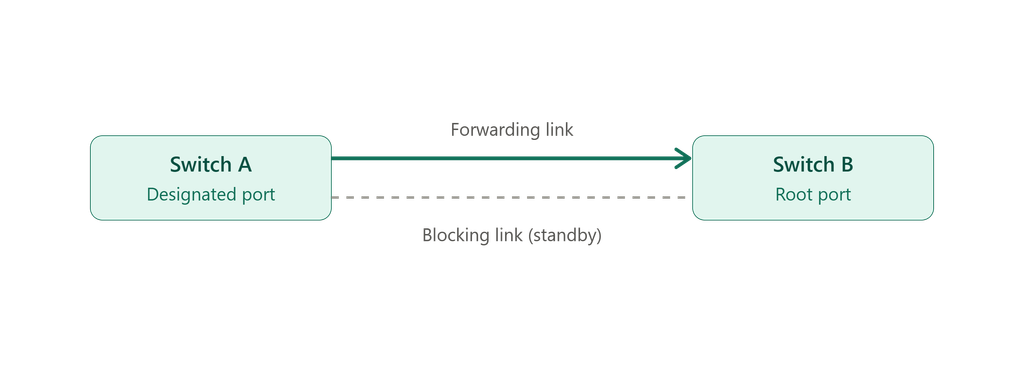
Only one link is elected to forward — the other stays blocked as a standby path.
Tie-Breaker Logic (Worth Knowing for Interviews Too)
When path costs come out equal, which happens more often than people expect in symmetric topologies, STP falls back on this order:
- Lowest root path cost
- Lowest Bridge ID
- Lowest Port ID
📌 Interview Trap Alert: This exact tie-breaking sequence — cost, then Bridge ID, then Port ID — is one of the most commonly asked STP questions in CCNA and networking interviews. Memorizing the order isn’t enough; you need to be able to explain why each tiebreaker exists, because interviewers often ask a follow-up scenario question to test real understanding.
This is also the part that confuses people the most: STP will happily block a 10 Gbps link and forward over a 1 Gbps one if the cost/priority math says so. Speed isn’t in the decision tree unless it’s been factored into path cost manually — a detail that’s easy to miss when you’re first learning STP port forwarding and blocking behavior.
STP Port Roles You Actually Need to Know
Root Port — the port on a non-root switch with the best (lowest cost) path back to the root bridge. Always forwarding.
Designated Port — the port responsible for forwarding traffic onto a specific network segment. Every segment has exactly one.
Blocking (or Alternate) Port — the backup. It doesn’t forward traffic, but it’s not idle either — it keeps listening to BPDUs so it can take over quickly if the active path fails.
Root and Designated ports forward. Everything else that isn’t needed for the loop-free topology gets blocked. That’s the whole logic in one sentence, even though it takes a while to internalize.
Seeing all three roles on one topology makes the pattern click faster than reading definitions:
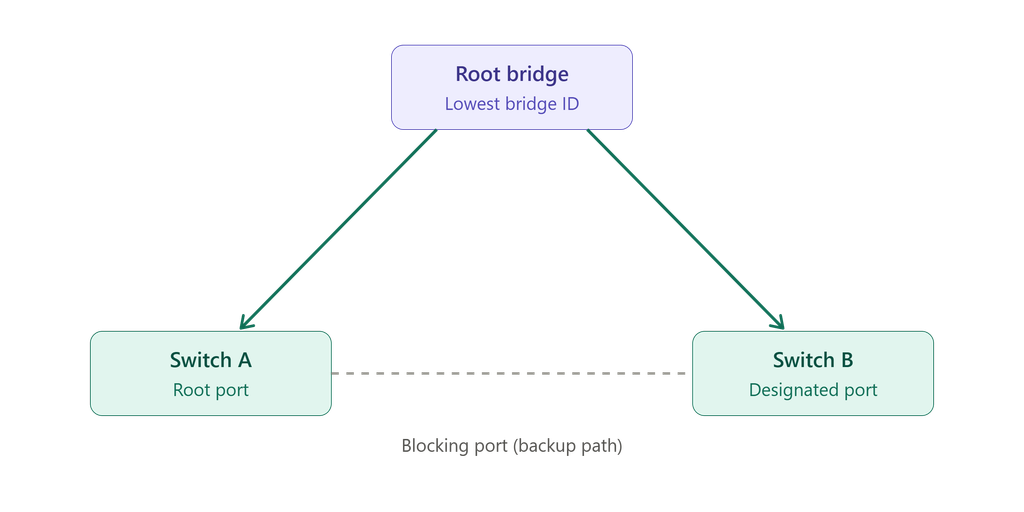
Root and Designated ports forward traffic; the Blocking port waits in reserve.
⚠️ Common Misconception: A lot of people assume a blocking port is a sign of a misconfiguration or a wasted cable. It’s usually neither. Blocking ports are a deliberate part of the design — they’re what let the network recover in seconds instead of requiring someone to physically move a cable when a link dies.
STP Port States, Briefly
A port doesn’t just jump straight to forwarding. It moves through:
- Blocking — no traffic, listening to BPDUs only
- Listening — preparing to participate, still no data forwarding
- Learning — building the MAC address table
- Forwarding — fully active
Classic STP takes its time moving through these states, which is part of why convergence can feel painfully slow compared to RSTP (more on that shortly).
The transition itself follows a fixed sequence:

Every port passes through these four states before it’s allowed to forward traffic.
Watch STP in Action
Reading through the states and tie-breaker logic is one thing — watching them actually play out with real BPDU timers and port transitions makes it click faster. This walkthrough covers the port states, timers, and toolkit features like BPDU Guard discussed above.
A closer look at STP port states, timers, and the toolkit features used to keep a topology stable.
How the Root Bridge Gets Elected
Every STP calculation starts with a reference point, and that reference point is the root bridge. It’s chosen based on Bridge ID, which is a combination of a configurable priority value and the switch’s MAC address. Lower Bridge ID wins.
Left on default settings, this election can go badly — an old access switch with a low MAC address could technically win root bridge status over a core switch that’s actually built to handle that role. That’s a common source of poor traffic patterns in networks that haven’t had their STP priorities touched since initial setup, as outlined in Cisco’s official Spanning Tree Protocol documentation. For a closer look at the election mechanics, this breakdown of the root bridge election process walks through it with concrete priority values.
✅ Best Practice: Don’t leave root bridge election to chance. Manually set the priority on your core or distribution switch so it wins the election deliberately, and configure a secondary root bridge as a backup. This single step prevents a surprising number of “why is my traffic taking this weird path” tickets.
A quick visual on how that comparison plays out:
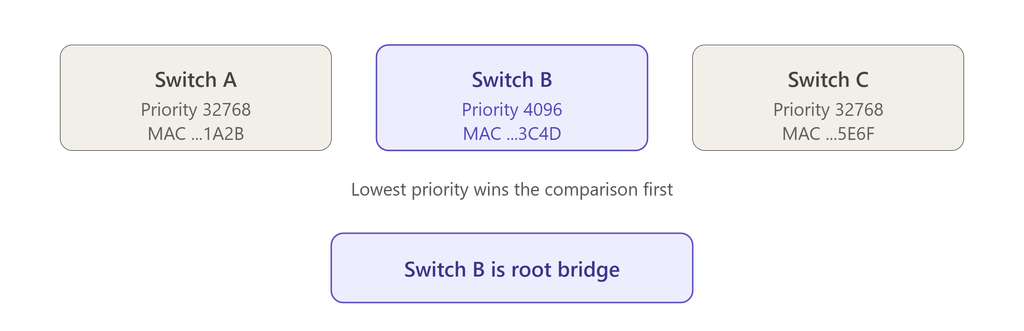
The switch with the lowest Bridge ID always wins root bridge status.
Port Priority as a Tie-Breaker
Port priority only comes into play once path cost is already tied. When it does matter, the lower value wins, and it becomes the final tiebreaker before Port ID gets involved.
The practical takeaway is that STP is fully deterministic. Nothing about it is left to chance once the inputs — priority, cost, Bridge ID — are set. If you’re not happy with which links are forwarding, the fix isn’t to fight the protocol, it’s to adjust those inputs so the outcome matches your intended topology.
What Happens When a Loop Actually Forms
A common real-world trigger for STP-related chaos isn’t a switch failure at all — it’s someone plugging an unmanaged mini-switch into two different wall ports without realizing both ports land on the same VLAN. Suddenly there’s a physical loop that wasn’t part of anyone’s design.
If STP is functioning correctly, it detects the loop and blocks one of the resulting paths before things spiral into a broadcast storm. But relying on STP to clean up after the fact isn’t the same as preventing the problem. That’s where BPDU Guard earns its keep — it shuts down a port the moment it receives a BPDU it shouldn’t be seeing, as defined in the IEEE 802.1D standard, rather than letting STP go through its recalculation dance.
spanning-tree bpduguard enable
Enabling this on access ports is a small config change that closes off an entire category of accidental-loop incidents.
🔥 Quick Pattern Recognition
- Traffic suddenly taking a longer or slower path → check which switch is root bridge
- Random topology change events in logs → something is triggering repeated STP recalculation, worth investigating
- A port stuck in blocking isn’t inherently a problem — the question is whether it’s blocking because of correct topology math, or because someone misconfigured priority somewhere
STP Port Forwarding and Blocking vs RSTP’s Faster Approach
| Feature | STP | RSTP |
|---|---|---|
| Convergence time | 30–50 seconds | 1–6 seconds |
| Mechanism | Timer-based | Event-driven |
| Port roles | Root, Designated, Blocking | Adds Alternate and Backup roles |
RSTP was built specifically to fix STP’s biggest weakness — how long it takes to react to a topology change. If you’re managing anything beyond a small, static network, RSTP (or one of its variants like PVST) is generally the more sensible choice. For networks that need even faster failover behavior on critical links, it’s also worth reading up on stateful switchover and how it complements STP-based redundancy.
A Few Practical Habits Worth Adopting
- Set root bridge priority manually — don’t let election happen by default
- Configure a secondary root bridge for backup
- Enable PortFast on access ports connecting to end devices, not other switches
- Use BPDU Guard on access ports to catch accidental loops early
- Periodically audit for unnecessary redundant links that weren’t part of the original design
If STP keeps surprising you in ways that don’t match what you’d expect, it’s worth checking for common STP misconfigurations that cause instability or reviewing timer-related mistakes beginners tend to make — both are more common causes of “weird” STP behavior than an actual protocol bug.
Frequently Asked Questions
What happens to a port in the blocking state in STP?
It stops forwarding traffic but continues listening for BPDUs, staying ready to take over as an active path if needed.
How does STP decide which port forwards traffic?
It compares root path cost first, then Bridge ID, then Port ID, and whichever port wins that comparison moves to forwarding.
Which port roles actually forward traffic?
Root ports and Designated ports. Everything else stays in blocking or alternate state.
How is the root bridge selected?
By the lowest Bridge ID, which combines priority and MAC address — priority should generally be set manually rather than left on defaults.
Why would STP block a faster link?
Because the decision is based on configured cost and topology position, not raw link speed. Cost has to reflect speed manually if that’s the intended behavior.
What should you do if a loop forms in the network?
Check show spanning-tree detail, identify which port is unexpectedly forwarding or flapping, and correct the root cause — usually an unmanaged switch or misconfigured priority — rather than just re-enabling the port.
Final Takeaways
At its core, STP port forwarding and blocking comes down to a fixed, predictable set of rules based on root bridge, path cost, and ID values. Once you can read that logic instead of memorizing it, troubleshooting stops feeling like trial and error and starts feeling like just checking the math.

Abdul Shakoor writes practical, defensive cybersecurity and networking guides for SentrixHub. He focuses on making API security, mobile app security, authentication, and network concepts simple for beginners and developers.