
What is Bridge ID in STP? It’s the single value that decides which switch controls your entire Layer 2 topology, and most engineers never touch it until something breaks. Every switched network with more than one path between switches carries the same risk: a loop. Loops trigger broadcast storms, MAC table instability, and in bad cases, they take down an entire access layer. Spanning Tree Protocol exists to prevent exactly that, and the mechanism it relies on to keep the network sane is the Bridge ID.
This guide breaks down what Bridge ID actually is, how it’s built from two very different values, how the election process uses it, and how to take manual control instead of leaving it to chance.
✅ Key takeaways: Bridge ID combines a configurable priority value with a fixed MAC address, and the switch with the numerically lowest combined value wins the root bridge election. Priority defaults to 32768 on every switch, which means an unconfigured network lets MAC address, something nobody chose, decide the outcome. The root primary command doesn’t always set priority to 24576, it sets it 4096 lower than whatever the current lowest priority already is. Document your intended root bridge before you need to explain why traffic is taking an inefficient path.
What Is Bridge ID in STP?
Bridge ID (BID) is a unique value assigned to every switch running STP. It’s made up of two parts: a configurable bridge priority and the switch’s MAC address. STP uses this combined value to elect a single root bridge for the topology, and the switch with the numerically lowest Bridge ID always wins.
Think of it as the switch’s identity card in the spanning tree conversation. Every switch advertises its Bridge ID through BPDUs (Bridge Protocol Data Units), and the entire election is nothing more than switches comparing these values against each other until one clear winner remains.
Bridge ID doesn’t operate in isolation. Once the root bridge is settled, the same comparison logic cascades into root port selection on every non-root switch. If you haven’t gone through that process yet, the root port selection guide with worked examples walks through it in detail.
The Two Components of Bridge ID
Two values make up a Bridge ID, and they behave completely differently from each other.
Bridge Priority. Default value 32768, valid range 0 to 65535. On modern switches with the extended system ID enabled, values are restricted to increments of 4096, so you’ll only ever see 0, 4096, 8192, and so on up the scale. Lower numbers win. This is the value network engineers are actually supposed to configure, and in most networks that never happens.
MAC Address. Nobody configures this one. It’s burned into the hardware, which is exactly why it only matters as a tiebreaker. When two or more switches share the same priority, and on a default setup every single one does, whichever switch has the numerically lowest MAC address wins the root role. Cisco’s own switching configuration guide confirms this directly: if all devices are left at default priority, the device with the lowest MAC address in the VLAN becomes the root device. That’s not a design choice anyone made. It’s an accident of manufacturing order.
📌 Worth knowing: A network where every switch sits at default priority isn’t really running an election, it’s running a coin flip decided by whichever vendor happened to burn in the lowest MAC address. The outcome is technically deterministic, but it has nothing to do with which switch should actually be root.
Here’s what that combination actually looks like:
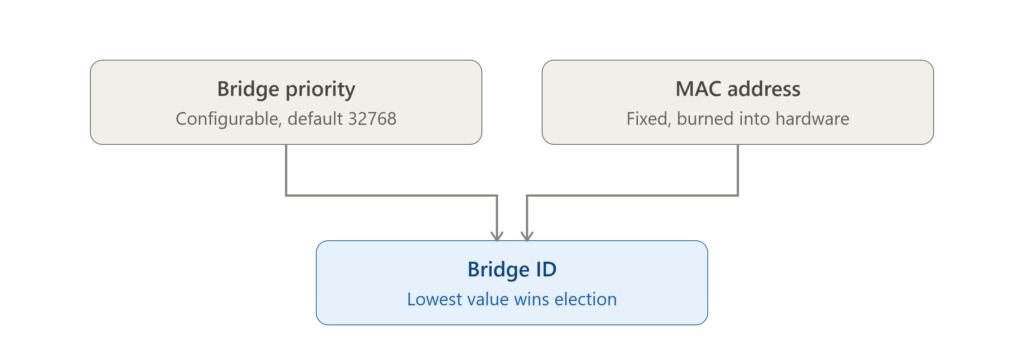
Two very different kinds of values feed into one number. One of them you control, one of them you never will.
How Bridge ID Is Calculated
The formula is straightforward:
Bridge ID = Bridge Priority + MAC Address
Example: priority 32768, MAC address 00:1A:2B:3C:4D:5E, giving a combined value of 32768.001A.2B3C.4D5E. When you run show spanning-tree on a Cisco switch, this is close to the format the output shows, and being able to read it at a glance saves real time during any kind of troubleshooting.
Root Bridge Election, Step by Step
The election logic only has two comparison steps. Step one, compare bridge priority, and the switch advertising the lowest value wins outright. Step two, compare MAC address, but only if priorities are tied, and the switch with the lowest MAC address becomes root.
Whichever switch ends up with the lowest combined Bridge ID wins for that VLAN instance. For the mechanics of this comparison laid out with topology diagrams, the root bridge election process on Cisco switches and this worked root bridge election example both cover the same logic from slightly different angles.
⚠️ Remember: This election isn’t a one-time event. It reruns every time there’s a topology change, a switch reboot, or a link failure. If you’re running Per-VLAN STP, each VLAN elects its own root independently, and how the PVST election process works is worth reading before you scale this beyond a single VLAN.
If watching the full election play out helps more than reading it, Jeremy’s IT Lab covers this exact priority-then-MAC-address comparison in detail:
The demo in this video is the same logic broken down in this article, just watched in real time instead of read step by step. Pair it with the decision flow below to see both versions side by side.
Here’s the same two-step logic laid out as a decision path:
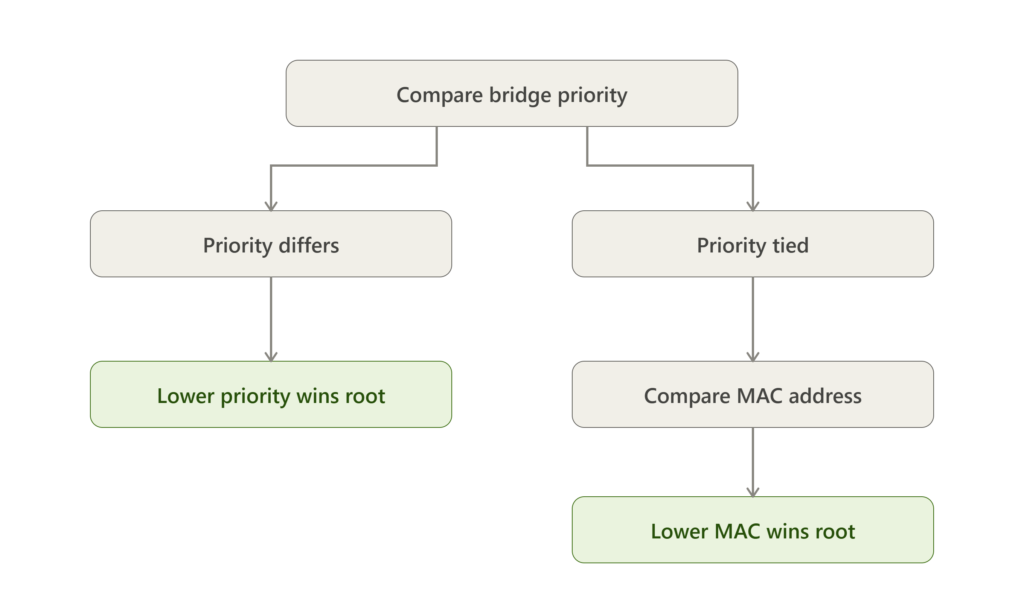
Notice how narrow the MAC address path actually is. It only gets used when priority comparison ends in a tie, which on a default network is every single time.
A Quick Example
Take two switches on the same VLAN. SW-A sits at the default priority, 32768, with MAC address 00:AA:BB:CC:DD:01. SW-B has been manually set to priority 20480, with MAC address 00:AA:BB:CC:DD:99.
SW-B wins immediately. Its priority is lower, and priority is always compared first, so the MAC address comparison never even happens here. Notice that SW-B’s MAC address is actually the higher of the two. It doesn’t matter. Priority settles the question before MAC address gets a turn.
For a full three-switch walkthrough with a comparison table and a step-by-step breakdown of both outcomes, the worked root bridge election example covers that in complete detail.
Bridge Priority Values Reference
| Priority Value | Meaning |
|---|---|
| 0 | Highest priority |
| 4096 | Very high |
| 8192 | High |
| 16384 | Medium |
| 32768 | Default |
| 65535 | Lowest priority |
Setting Bridge Priority Manually
You have two practical options on Cisco IOS. The manual route sets an exact value:
spanning-tree vlan 1 priority 24576Or you can let the switch calculate a safe value relative to the rest of the network:
spanning-tree vlan 1 root primaryHere’s where it’s worth being precise, because this command doesn’t always land on the same number. If every other switch in the VLAN is at or above the default priority, root primary sets this switch to 24576. But if some other switch already has a priority lower than 24576, the command instead sets this switch’s priority to 4096 less than whatever that lowest existing value is, guaranteeing it wins. The companion command, spanning-tree vlan 1 root secondary, behaves differently: it always sets priority to a fixed 28672, regardless of what the rest of the network is doing.
📌 Worth knowing: Because root secondary doesn’t recalculate dynamically, a switch you never intended to be a backup root can end up with a priority lower than 28672 through totally separate manual configuration, and quietly become more eligible for the role than the switch you actually designated. Checking show spanning-tree vlan X after any priority change confirms the outcome instead of assuming it.
One edge case worth knowing: if the current root already sits at the lowest possible priority, 0, running root primary on another switch doesn’t do anything clever. It simply fails and returns an error, since there’s no lower multiple of 4096 left to assign.
Here’s the accepted answer from Cisco’s own community that confirms this exact behavior:
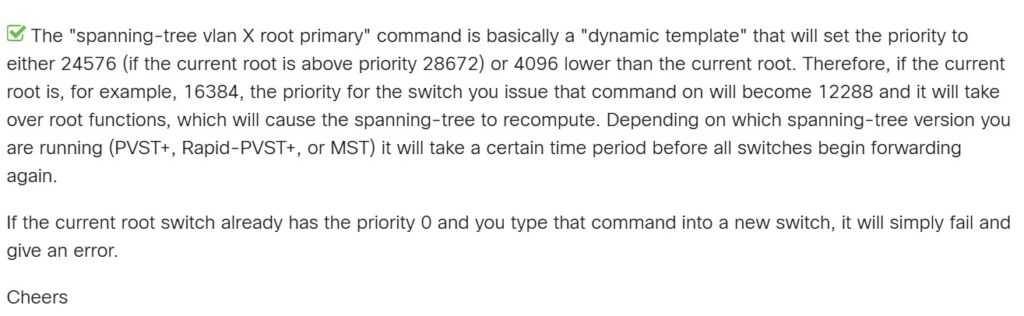
This also answers a question the explanation above doesn’t cover: if the current root already sits at priority 0, running root primary on another switch simply fails with an error, since there’s no lower multiple of 4096 left to assign.
Common Mistakes
The same few mistakes account for most unplanned root bridge placements. Leaving every switch at default priority hands the decision to MAC address instead of network design. Configuring STP once and never revisiting it means the topology’s assumptions quietly go stale every time a new switch gets added. And treating root primary and root secondary as fixed, predictable values, rather than checking the actual output afterward, leads to backup roots that don’t behave the way anyone expected.
Timers compound these problems in ways that aren’t obvious until convergence goes wrong. Dangerous STP timer mistakes beginners make covers a related category of failure, and moving to Rapid STP where possible closes off a lot of this risk on its own, which the STP failures RSTP actually prevents breaks down in detail.
BPDU Spoofing: Why Bridge ID Has a Security Dimension Too
Bridge ID isn’t purely a performance concern. A poorly controlled election can be manipulated, not just mismanaged. In a BPDU spoofing attack, a device connected to an access port advertises a superior Bridge ID, forcing itself into the root role and positioning itself to intercept traffic that should never have passed through it.
BPDU Guard is the direct defense: it disables a port the moment it receives a BPDU where none should exist, which is exactly the access-port scenario this attack relies on. If port hardening is a gap in your environment more broadly, why STP port misconfigurations break networks is worth reading alongside enabling it.
Documenting Root Bridge Assignments
If you’re reviewing an existing network and want to record which switch holds which priority across VLANs, rather than reconstructing it from show spanning-tree output every time someone asks, our security report template gives that documentation a consistent structure worth using instead of starting from a blank page each time.
Frequently Asked Questions
What is Bridge ID in STP?
A unique identifier combining bridge priority and MAC address that STP uses to elect the root bridge. The switch with the numerically lowest Bridge ID wins.
What determines the root bridge?
Priority is compared first, and the lowest value wins outright. MAC address only comes into play as a tiebreaker when two or more switches share identical priority.
How do I change bridge priority in STP?
Use spanning-tree vlan [vlan-id] priority [value] for an exact number, or spanning-tree vlan [vlan-id] root primary to let the switch calculate a value that beats the current lowest priority automatically.
What is the default STP priority?
32768, identical on every switch until someone changes it.
What happens if priority is the same on multiple switches?
STP falls back to comparing MAC address, and the switch with the lowest one wins the root bridge role, regardless of whether that switch is actually the best choice for the job.
Does root primary always set priority to 24576?
No. It sets it to 24576 only if no other switch already has a lower priority. If one does, root primary instead sets the priority 4096 below that existing value.
Conclusion
Once Bridge ID clicks, the rest of spanning tree stops feeling like a black box. Root ports, designated ports, port states, all of it is a downstream consequence of this one election, so getting comfortable with priority and MAC address pays off well beyond this single topic.
Set priorities manually rather than trusting the defaults. Verify what root primary and root secondary actually produced instead of assuming the textbook numbers. And whenever new hardware joins the topology, check whether your assumptions about root placement still hold. Networks that leave this to default settings tend to work fine right up until they don’t, usually at the worst possible moment.

Abdul Shakoor writes practical, defensive cybersecurity and networking guides for SentrixHub. He focuses on making API security, mobile app security, authentication, and network concepts simple for beginners and developers.