
Cisco ISR 4451-X/K9 EOL is no longer a distant lifecycle note. It’s a decision a lot of IT teams are quietly putting off. A lot of network teams still have an ISR 4451-X/K9 sitting somewhere in the rack, doing its job, and nobody’s touched its configuration in years.
Honestly, that’s usually the first sign of trouble. Hardware that “just works” tends to be the hardware nobody’s audited lately, and with this router, that’s turned into a real problem. I’ve run into the same pattern with other legacy infrastructure that’s technically still running but quietly aging out.
Honestly, that’s usually the first sign of trouble. Hardware that “just works” tends to be the hardware nobody’s audited lately, and with this router, that’s turned into a real problem. I’ve run into the same pattern with other legacy infrastructure that’s technically still running but quietly aging out. Vblock deployments are a good comparison: still functional in plenty of data centers, but increasingly disconnected from where vendor support and modern security tooling actually are.
The router has officially moved into its End-of-Life cycle, and Cisco’s own bulletin lists End of Vulnerability/Security Support (HW) as November 30, 2028. That sounds far off until you remember how long enterprise procurement and migration planning actually takes. Most teams that have been through a router refresh before will tell you the same thing: waiting until the deadline is close is exactly how you end up rushing it.
This article breaks down what the EOL status actually means, what happens to your security posture once support ends, and what a realistic upgrade path looks like.
📌 Worth knowing: EOL and EOS aren’t the same milestone. End-of-Life means Cisco stops selling and manufacturing the unit. End-of-Support, sometimes called Last Date of Support, is the harder deadline. After it passes, there are no more patches, no more TAC tickets, nothing.
What Does Cisco ISR 4451-X/K9 EOL Actually Mean?
End-of-Life is the stage where Cisco formally discontinues a product line. In practical terms that means no new hardware production, spare parts availability starts drying up, firmware updates slow down and then stop entirely, and technical support eventually ends altogether.
The ISR 4451-X/K9 is part of Cisco’s ISR 4000 family, originally built for mid-to-large branch offices and WAN aggregation duty. It was a solid platform in its day, a 2RU chassis with modular architecture, multi-core processing, and enough throughput headroom for most mid-sized deployments. That’s exactly why so many networks still have one running somewhere.
You can check the official Cisco EOL bulletin directly if you want to confirm dates for your specific bundle, whether that’s SEC, AX, UC, or the base K9, since the exact date can vary slightly by SKU. Here’s the full milestone breakdown straight from Cisco’s bulletin for the standard K9 model:
| Milestone | Date |
|---|---|
| End-of-Life Announcement Date | November 7, 2022 |
| End-of-Sale Date (HW, License) | November 7, 2023 |
| Last Ship Date (HW, License) | February 6, 2024 |
| End of SW Maintenance Releases Date | August 31, 2025 |
| End of Vulnerability/Security Support (HW) | November 30, 2028 |
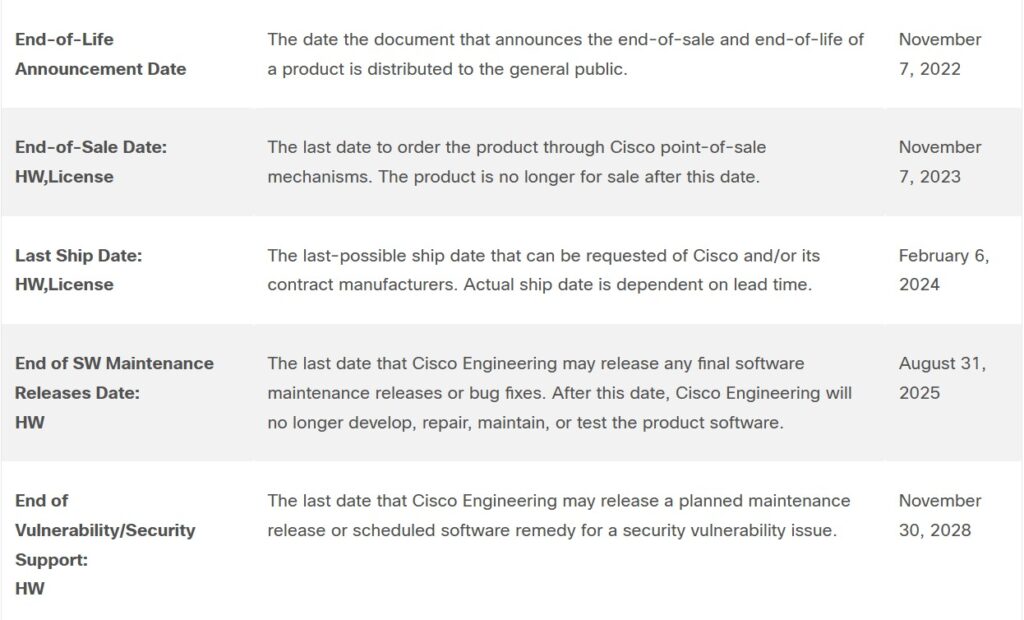
The last row is really the only one that matters for security planning. Everything above it is procurement housekeeping. Once November 30, 2028 passes, no new vulnerability fixes get released for this hardware. Full stop.
Specs and Throughput: Why It Was Popular in the First Place
Before getting into the risks, it’s worth remembering why this router ended up in so many networks. Key specifications include a 2RU form factor, modular NIM/SM slot architecture, a multi-core CPU, and integrated routing, security, voice, and WAN optimization in a single box.
On the performance side, base throughput sits at roughly 1 Gbps, climbing to about 2 Gbps with performance licensing. IPsec throughput typically lands between 200 and 500 Mbps depending on configuration and license tier.
That IPsec number tends to trip people up. It was fine for branch VPN traffic a few years back, but with encrypted traffic volumes climbing everywhere now, that ceiling shows up fast in busy environments, especially anywhere doing full-tunnel VPN for remote staff.
⚠️ Remember: Licensing tier changes the throughput ceiling, not just feature availability. If you’re troubleshooting slow VPN performance on this router, check which license is actually active before assuming it’s a hardware limitation.
What Happens After Support Ends
Once the Last Date of Support passes, a few things happen in sequence, and none of them are good.
Security patching stops first. Any vulnerability discovered after that date stays unpatched, permanently. Downtime risk climbs right alongside it, since spare parts get harder to source and a hardware failure can turn into a multi-week wait instead of a next-business-day replacement. Redundancy features that once masked this risk, like stateful switchover, only help if the underlying hardware is still serviceable in the first place, and on EOL units, that’s increasingly not a safe assumption.
Compliance gets harder too. Frameworks like PCI-DSS and ISO 27001 increasingly flag unsupported infrastructure as a finding rather than a suggestion, and the same verification logic auditors apply shows up in structured checklists like OWASP ASVS 5.0, where an unpatched device fails the control regardless of whether it’s ever actually been exploited. And TAC support disappears entirely. If something breaks, you’re troubleshooting it alone or paying a third-party maintenance provider to cover the gap.
People tend to underestimate all this. A router that’s merely old is an inconvenience. A router that’s unpatchable is a standing liability, and it stays that way until it’s replaced.
How Attackers Actually Target Legacy Routers
Attackers don’t need to discover anything new here. Legacy, unsupported hardware is attractive precisely because the work’s already been done for them. In my own audits, this is usually the first category of device I flag, before I even get to checking configuration quality.
Public vulnerability databases document exact attack paths for older IOS and IOS XE builds, and once a device stops receiving patches, every disclosed CVE against it stays open forever. If you’re not sure how CVE severity actually maps to real risk, our breakdown of CVE vs CWE vs CAPEC is a decent starting point.
Brute-force credential attacks are also more common on older deployments, which are more likely to still be running default or weak local credentials, not too different from the dangerous password habits that show up across breach data everywhere. Remote code execution is the scarier one: unpatched firmware flaws in IOS XE have historically enabled full device takeover in a handful of documented cases, and Cisco’s security advisories page is the best place to check whether a specific CVE affects your build. Then there’s VPN and IPsec exploitation, where older cryptographic implementations weren’t built for today’s attack tooling, and a compromised VPN endpoint on a branch router hands an attacker a foothold straight into internal traffic.
None of this requires a targeted attack. Automated scanning tools fingerprint device types and firmware versions constantly, and an EOL router with an open management port is basically flagged for anyone running that kind of scan. Cisco’s own ISR 4451-X support and field notices page is worth a look too. It lists known hardware and firmware issues specific to this model, some dating back years, that never went away for units still in service.
Is the ISR 4451-X/K9 Still Safe to Run in Production?
Short answer: no, not for anything customer-facing or security-sensitive.
It’ll keep routing packets just fine, mechanically. The problem isn’t function, it’s exposure. Once a device stops getting patched, every new vulnerability disclosed against IOS XE for that platform is a door that stays open indefinitely. And it’s not just the router itself. An EOL device sitting at the network edge, without the kind of active threat inspection a platform like the Fortigate 100F provides, tends to become the weak link the rest of the perimeter gets judged by, even if every other firewall protecting the network is current.
One pattern I keep running into during audits: teams that migrated their WAN to DMVPN for scalability sometimes forget the hub or spoke routers running that overlay are the exact ISR 4000-series units now hitting EOL. The tunnel design can look modern on paper while the hardware underneath it quietly isn’t.
There are still a few places where running one is reasonable: isolated lab and training environments, non-critical internal test networks, or temporary deployments with no internet-facing services. What it shouldn’t be doing anymore is handling customer data, terminating branch VPNs, or sitting inside any network that falls under a compliance audit.
Comparison: ISR 4451-X/K9 vs. Its Recommended Replacements
| Feature | ISR 4451-X/K9 | Catalyst 8300 Series | Catalyst 8200 Series |
|---|---|---|---|
| Max throughput | ~2 Gbps | Up to 18.8 Gbps SD-WAN IPsec (2RU, 10G WAN) | Up to 2 Gbps SD-WAN IPsec |
| Native SD-WAN support | No | Yes | Yes |
| IOS XE support | Legacy builds only | Full current support | Full current support |
| Best fit | Legacy branch/WAN | Enterprise WAN aggregation | Smaller branch deployments |
| Security patching | Ended | Active | Active |
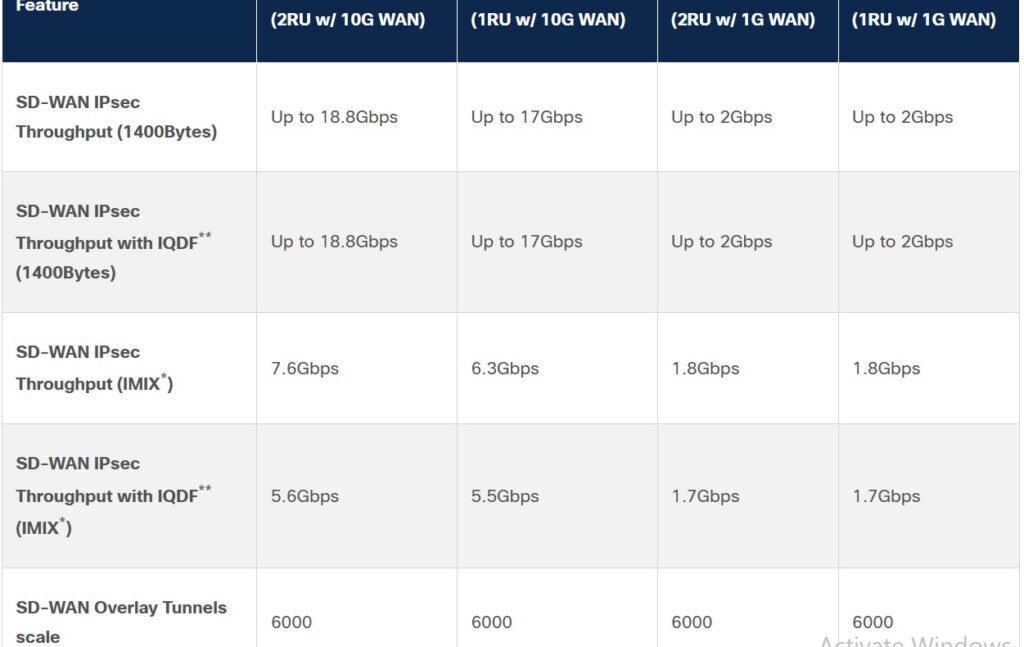
Cisco’s own migration guidance points toward the Catalyst 8300 Series, specifically the C8300-2N2S-4T2X or C8300-2N2S-6T models, as the direct successor for most ISR 4451-X/K9 deployments, particularly where SD-WAN is on the roadmap. For smaller branches with lighter throughput needs, the Catalyst 8200 Series covers the same role in a smaller footprint without over-provisioning.
✅ Best practice: Start the replacement conversation with a real inventory, not a hardware catalog. List every ISR 4451-X/K9 unit still in service, its role, its NIM/SM modules, and its current throughput usage before picking a replacement platform. Sizing the wrong Catalyst model is a common and avoidable mistake.
How to Plan the Replacement Without It Turning Into a Fire Drill
- Inventory everything. Every unit, its location, its role, and its current configuration. SNMP polling or Cisco DNA Center makes this faster than manual audits.
- Identify performance gaps. Compare current throughput and feature usage against what the replacement platform needs to support.
- Pick the right target platform. Catalyst 8300 for full SD-WAN and higher throughput needs, Catalyst 8200 for lighter branch deployments.
- Build a phased migration schedule. Start with the least critical sites first, and work backward from the 2028 deadline with at least 18 to 24 months of buffer, which is roughly the lead time most enterprise teams report needing in practice.
- Test before full cutover. Validate VPN tunnels, routing policies, and any integrated services like voice or security modules in a staging environment before touching production traffic.
Step 3 — picking the right platform — usually comes down to one simple question. This flowchart lays out the decision path:
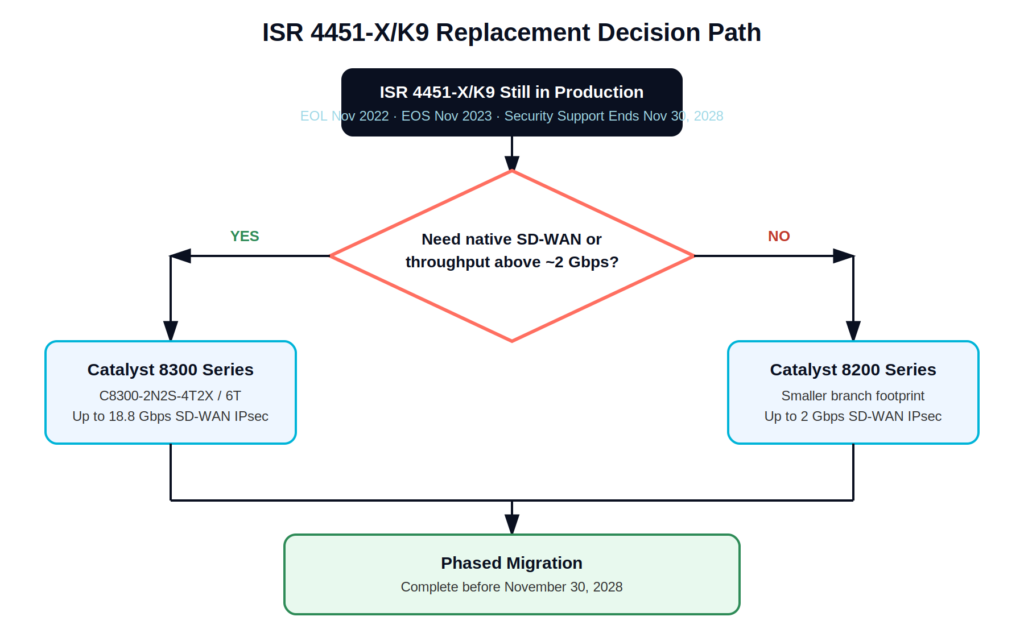
Migration decision path from ISR 4451-X/K9 to its two recommended replacements, based on SD-WAN and throughput requirements.
Enterprises that get this right treat the 2028 date as the last resort, not the target. If a broader Zero Trust or SASE rollout is already on the roadmap, this is a natural point to fold the router refresh into that same project instead of running it as a separate initiative later.
For a closer look at how the Catalyst 8300 and 8200 Series actually compare side by side, this walkthrough breaks down the platform differences in more detail:
Watch: an overview of the Catalyst 8300 and 8200 Series Edge Platforms, the two most common ISR 4451-X/K9 replacement options.
Frequently Asked Questions
What is Cisco ISR 4451-X/K9 EOL?
It marks the point where Cisco has stopped selling and manufacturing the router. End of Vulnerability/Security Support is set for November 30, 2028, after which no security patches, updates, or TAC support will be available.
Is Cisco ISR 4451-X/K9 still safe to use?
Not for production, customer-facing, or compliance-sensitive environments. It’s fine for isolated lab or non-critical use, but the security exposure isn’t worth the risk anywhere else.
What is the IPsec throughput of Cisco ISR 4451-X/K9?
Typically between 200 Mbps and 500 Mbps, depending on the license tier and configuration in use.
What happens after Cisco ISR 4451-X/K9’s end of support?
Security patching stops, TAC support ends, and spare-part availability keeps declining. Any vulnerability found after that date stays unpatched indefinitely.
What are the best upgrade options?
The Cisco Catalyst 8300 Series is the officially recommended successor, especially for SD-WAN-ready deployments. The Catalyst 8200 Series is a better fit for smaller branch sites with lighter throughput needs.

Abdul Shakoor writes practical, defensive cybersecurity and networking guides for SentrixHub. He focuses on making API security, mobile app security, authentication, and network concepts simple for beginners and developers.