
You’ve been there. You walk into a mall or an airport, glance at a directory board, take what looks like the right turn, and five minutes later you’re more lost than when you started. In an airport, that confusion isn’t just annoying — it can mean a missed gate, a missed flight, and a genuinely stressful sprint through security.
That poor navigation experience isn’t a minor UX complaint. It costs retailers foot traffic, it costs airports operational efficiency, and in high-stress environments it costs travelers real time and peace of mind. The fix that most large venues are now investing in is digital wayfinding — kiosks, apps, and beacons that replace static signage with real-time, personalized directions.
But here’s the part most “smart navigation” articles skip: the moment you turn a directory board into a connected, data-collecting system, you’ve also created a new attack surface. This article walks through how digital wayfinding actually works, why it solves the navigation problem, and — because this is a security blog, not a marketing one — what can go wrong if it’s deployed carelessly.
Key Takeaways
- Digital wayfinding replaces static signage with real-time, technology-driven navigation using kiosks, apps, and indoor positioning.
- Indoor location relies on BLE beacons, Wi-Fi triangulation, and RFID — GPS doesn’t work reliably indoors.
- Every beacon, kiosk, and sensor is an IoT endpoint, and most security audits skip them entirely.
- Done right, wayfinding measurably improves dwell time, sales, and passenger flow — done carelessly, it opens a new attack surface.
What Is Digital Wayfinding?
Digital wayfinding is a navigation system that guides people through large, complex indoor spaces using technology instead of fixed signboards. Instead of scanning a mall directory trying to figure out which wing “Food Court” is in, you type it into a kiosk or app and get a live, turn-by-turn route — the same experience as outdoor GPS navigation, just adapted for indoor spaces where GPS signals don’t reach.
It typically combines four pieces:
- Interactive kiosks or mobile apps for input
- Indoor positioning technology to locate the user
- Real-time data processing to calculate routes
- Dynamic displays or voice guidance to deliver directions
Why Navigation Actually Breaks Down in Malls and Airports
Before jumping to the fix, it’s worth understanding why this problem persists even in buildings that clearly try to help visitors find their way.
Layouts have gotten genuinely complex. A modern mall isn’t one open floor anymore — it’s multiple levels, wings that don’t align, and stores that rotate every few months. Airports add terminals, security checkpoints, and gate changes on top of that. Static signage was designed for a simpler era of building design, and it hasn’t kept up.
Signboards can’t update themselves. If a store relocates or a gate changes an hour before boarding, a printed sign is already wrong. Nobody’s updating it in real time.
Time pressure makes it worse. Airport navigation stress is a well-documented problem — when someone’s already anxious about making a flight, every wrong turn compounds the panic.
Everyone navigates differently. A frequent business traveler, a first-time visitor, and someone using a wheelchair all need different routes through the same building, but a static map treats them identically.
This isn’t just anecdotal. Industry data backs it up — one retail analytics report found that nearly half of Gen Z shoppers cite difficulty finding products as their top in-store frustration, and separate market analysis estimates that indoor location-based wayfinding can lift retail sales by 1.5 to 3 percent. Confusion isn’t a minor UX gap — it’s a measurable revenue leak.
📌 Worth knowing: Wayfinding UX researchers often point out that confusion in large public spaces isn’t really about lack of signage — it’s about signage that can’t respond to the two variables that actually matter: where you are right now, and what’s changed since the sign was printed.
How Digital Wayfinding Actually Solves This — Step by Step
Step 1: You tell it where you want to go. Through a kiosk touchscreen, a mobile app, or a QR code scan at an entrance point.
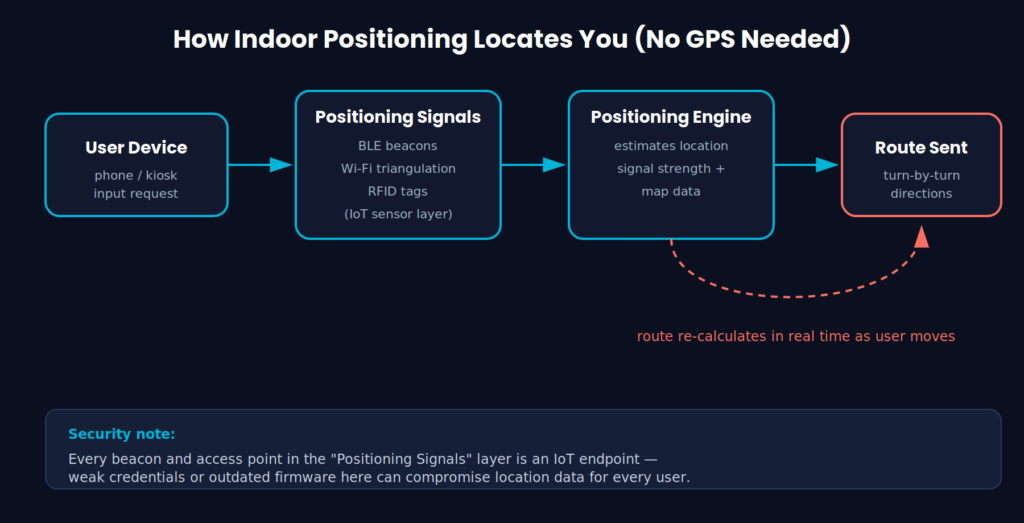
Step 2: The system figures out where you are. This is the hard part indoors, since GPS doesn’t penetrate buildings reliably. Instead, the system uses Bluetooth Low Energy (BLE) beacons, Wi-Fi signal triangulation, or RFID tags placed throughout the building to estimate position.
Step 3: It calculates a route. Not just the shortest path — a good system factors in crowd density, accessibility needs, and sometimes real-time closures.
Step 4: You get guided. Turn-by-turn text, a visual map, or voice prompts, depending on the platform.
Step 5: It adjusts on the fly. If your gate changes or a corridor gets blocked off, the route updates without you having to ask again.
This is the same underlying logic as outdoor turn-by-turn navigation, just re-engineered for an environment where satellite positioning doesn’t work.
✅ Best practice: If you’re evaluating a wayfinding vendor for a facility, ask specifically how positioning accuracy degrades in dense crowds and near metal structures (elevators, escalators, structural beams tend to interfere with both BLE and Wi-Fi signals). Vendors rarely volunteer this unless you ask directly.
The Technology Stack Behind It
A few components show up in almost every deployment:
- Digital signage — large displays showing live directions, gate info, or promotions
- Interactive kiosks — the primary touchpoint for people without the venue’s app installed
- AI-driven route optimization — learns from aggregate movement patterns to suggest faster paths
- IoT sensor networks — beacons, cameras, and occupancy sensors feeding the positioning engine
Since GPS is unreliable indoors, the positioning layer usually blends BLE beacons, Wi-Fi access point triangulation, and sometimes RFID. If you’re curious how Wi-Fi standards affect signal reliability in dense indoor deployments like this, our breakdown of 802.11ax vs 802.11ac covers why newer access points handle crowded environments noticeably better.
| Technology | Typical Accuracy | Deployment Cost | Main Security Weakness |
|---|---|---|---|
| BLE Beacons | 1–3 meters | Low to moderate | Weak default credentials, rarely patched firmware |
| Wi-Fi Triangulation | 3–10 meters | Low (uses existing APs) | Rogue AP spoofing, unsegmented network access |
| RFID Tags | Sub-meter (near tag) | Moderate to high | Tag cloning, unauthorized read range |
Where This Gets Interesting for Security People
Every piece of that stack above is also, functionally, an IoT device on a network — and that’s where a lot of wayfinding deployments quietly cut corners.
Data collection is heavier than most visitors realize. To route you accurately, the system needs your live location, and often your movement history to improve future routing. That’s location data, timestamps, and behavioral patterns, collected on people who never explicitly signed up for tracking — they just wanted directions to their gate.
Kiosks are unattended endpoints. A public kiosk is physically accessible to anyone in the building. If it’s running outdated firmware or has a weak authentication setup for admin access, it becomes a soft entry point into the venue’s broader network — not unlike the kind of exposure we covered in our piece on weak file permissions, where the underlying issue is the same: something meant to be locked down was left just accessible enough to be a problem.
Beacons and sensors are classic IoT weak points. BLE beacons and positioning sensors are typically low-power, low-compute devices — which usually means weak authentication, infrequent firmware updates, and minimal built-in monitoring. NIST’s IoT device cybersecurity guidance exists precisely because devices like this tend to ship with security treated as an afterthought rather than a requirement.
Picture a mid-sized regional airport that rolls out beacon-based wayfinding to cut passenger complaints. The project ships on schedule, the app works well — but the beacon admin dashboard stays on its factory-default login because “it’s just a map system.” Six months later, someone on the same Wi-Fi segment finds that dashboard, and now they can push false gate directions to every phone in the terminal. Nothing exotic happened here — just a convenience feature that nobody treated as a security asset.
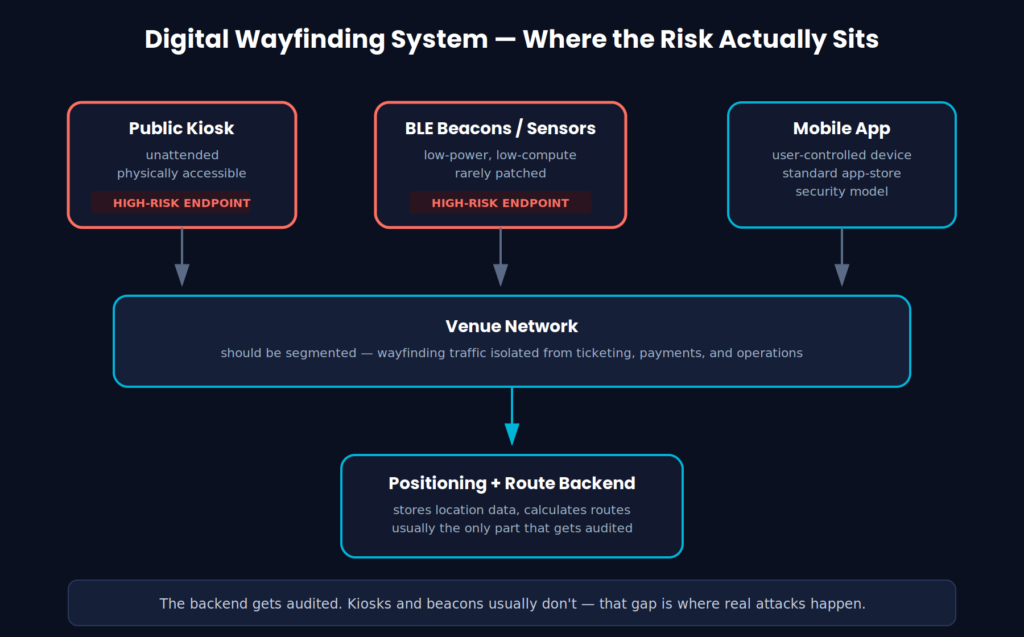
The backend gets audited. The kiosks and beacons rarely do — that’s the real gap attackers exploit
⚠️ Remember: A compromised wayfinding system isn’t just a privacy problem — it’s a physical safety one. If an attacker can manipulate the routes an airport wayfinding system displays, they could misdirect passengers during an actual emergency evacuation, not just cause minor annoyance.
Best Practices for Deploying Digital Wayfinding Securely
If you’re the one responsible for rolling this out — whether it’s a mall operations team or an airport IT department — a few non-negotiables:
- Encrypt everything in transit and at rest. Location and movement data should never sit in plaintext, even temporarily.
- Run regular security audits on kiosks and beacons specifically, not just the backend servers. Unattended hardware gets forgotten in standard audit cycles.
- Collect the minimum data needed. If the system doesn’t need to retain individual movement history after the session ends, don’t retain it.
- Harden every IoT device on the network — unique credentials per device, scheduled firmware updates, and segmented network access so a compromised beacon can’t reach ticketing or payment systems. Strong authentication at the device level matters here the same way it does at the user level; our explainer on how IEEE 802.1X authentication protects networks is directly applicable if you’re segmenting IoT devices onto their own authenticated network zone.
- Build compliance in from the start — not as a retrofit once regulators ask questions.
- segmented network access so a compromised beacon can’t reach ticketing or payment systems. If you’re setting up that segmentation at the perimeter, our guide on how firewalls protect networks covers the fundamentals of isolating traffic by zone.
📌 Worth knowing: The venues that get this right treat wayfinding kiosks the same way they’d treat a point-of-sale terminal — an endpoint on a sensitive network, not just “a screen with a map on it.”
What Digital Wayfinding Actually Gets You Right
None of the above is a reason to avoid the technology — it’s a reason to deploy it properly. Done right, digital wayfinding delivers real, measurable benefits:
- Fewer lost, frustrated visitors — which in a mall translates directly into more completed store visits and higher spend
- Smoother passenger flow in airports — less congestion at pinch points, fewer missed connections
- Personalized guidance — accessibility-aware routes for travelers who need them, instead of a one-size-fits-all map
- Real-time responsiveness — gate changes, closures, and crowd surges get reflected instantly instead of an hour later
Here’s what this looks like in practice — a walkthrough of AR-based indoor wayfinding in action:
Where This Is Heading
A few trends are already visible heading further into 2026:
- Predictive navigation that anticipates where you’re headed before you finish typing
- AR overlays on phones or smart glasses replacing screen-based directions entirely
- Voice-first navigation for hands-free guidance, especially useful for travelers juggling luggage
- Deeper smart-city integration, tying indoor wayfinding into public transit and traffic systems
Each of these expands the data being collected and the number of connected devices in play — which means the security groundwork discussed above only becomes more important, not less, as the technology matures.
FAQ
1. What is digital wayfinding? It’s a navigation system that replaces static signage with real-time, technology-driven guidance — using kiosks, apps, and indoor positioning to give visitors turn-by-turn directions through large buildings.
2. How does an indoor navigation system find your location without GPS? It relies on alternatives like Bluetooth Low Energy beacons, Wi-Fi signal triangulation, and RFID tags placed throughout the building, since satellite GPS signals don’t penetrate indoor structures reliably.
3. Is digital wayfinding actually secure? It can be, but only with deliberate effort — encrypted data, hardened IoT devices, minimal data retention, and regular audits of kiosks and beacons specifically. Left unmanaged, it introduces real risk.
4. Does digital wayfinding track individual users? Most systems collect location data to function at all. Responsible deployments limit how long that data is retained and avoid tying it to identifiable profiles unless the visitor explicitly opts in.
5. What’s the biggest overlooked risk in these systems? Unattended hardware — kiosks and beacons are physically accessible and often run outdated firmware, making them a weaker link than the backend servers that get most of the security attention.
Reviewed by Abdul Shakoor, SentrixHub — WordPress security and networking specialist.

Abdul Shakoor writes practical, defensive cybersecurity and networking guides for SentrixHub. He focuses on making API security, mobile app security, authentication, and network concepts simple for beginners and developers.