
Enterprise WiFi hacked — is that really possible with hardware like the Cisco Meraki MR36? You walk into an office, tap the network name, and you’re online in seconds. That effortless moment hides a fairly complicated system underneath, and enterprise WiFi security lives or dies on how well that system is put together.
The short answer is yes, but almost never because the device itself is weak. The weakness sits in configuration, in user habits, and in attackers who exploit trust instead of cracking encryption. Let’s break that down in a way that makes sense whether you’re new to this or you already work in security.
What enterprise WiFi security actually is
Home WiFi trusts one shared password. Enterprise WiFi is built to trust identity. Instead of a single key everyone knows, it layers protections: authentication servers, individual identity verification, strong encryption, and monitoring. Access points like the MR36 are designed to slot into that layered model, supporting WPA3, RADIUS integration, and centralized cloud management.
The catch is that every layer has to be configured right. When one of them is weak, an attacker doesn’t need to defeat the encryption. They just walk around it.
The core difference between home and enterprise WiFi comes down to what each one actually trusts.
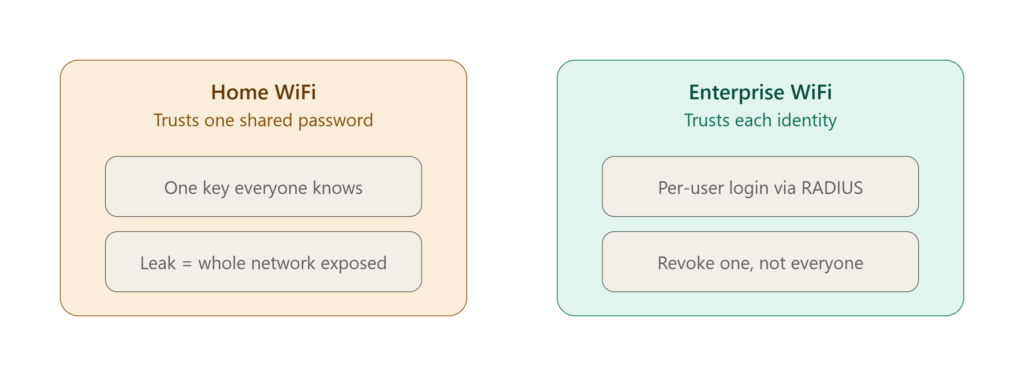
Home WiFi hands the same key to everyone, so a single leaked password compromises the whole network. Enterprise WiFi flips that model by verifying each user individually, usually through a RADIUS server. A departing employee’s access can be revoked without disturbing anyone else, and one stolen credential doesn’t unlock the entire environment. This is exactly why the MR36 is built to run in this identity-based mode rather than a shared-password setup.
📌 Worth knowing — Enterprise WiFi isn’t a product you buy, it’s a system you maintain. WPA3-capable hardware means nothing if the RADIUS backend or client settings are sloppy.
Can secure Wi-Fi really be hacked?
Yes, but rarely in the dramatic way people picture. Modern WPA2 and WPA3 encryption is genuinely strong, and brute-forcing a properly configured enterprise network isn’t practical. So attackers skip the encryption entirely and go after everything around it.
The one famous exception people still mention is the WPA2 KRACK flaw, which exposed a weakness in how the encryption handshake handled keys. The original KRACK research is worth reading. But even that needed the attacker within radio range, and vendors patched it quickly. In the real world, breaches come from deception, misconfiguration, and human behavior, not cryptographic breakthroughs.
How hackers target enterprise WiFi like the MR36
Attackers follow a predictable rhythm. First they scan: available networks, signal strength, connected devices, all easy to enumerate. Then they hunt for weak points such as poor authentication, outdated firmware, or devices set to reconnect automatically. Next comes the actual move, usually a fake access point or traffic interception. Finally they escalate, capturing credentials and pushing deeper into internal systems.
This whole cycle, often called wireless network exploitation, can take minutes rather than hours when the groundwork was laid carelessly.
Attackers rarely improvise. Most wireless breaches follow the same predictable four-stage rhythm.
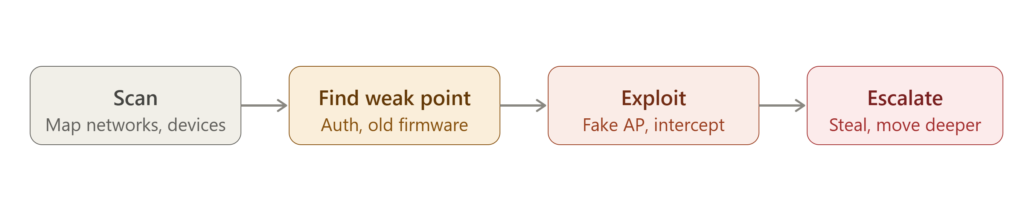
First they scan to map out the available networks and connected devices. Then they hunt for the weak point, usually poor authentication or outdated firmware, before exploiting it with a fake access point or traffic interception. Once inside, they escalate by harvesting credentials and pushing deeper into internal systems. When the groundwork was laid carelessly, this whole cycle can take minutes rather than hours.
MR36 security architecture, explained
The MR36 is part of Cisco Meraki’s access point lineup and it’s built with modern security in mind. It supports WPA3, integrates with identity providers, and includes wireless intrusion detection. Administrators manage policies centrally and can respond to threats in near real time. Cisco documents all of this in the official Meraki MR documentation, which is the source of truth for what the platform genuinely does.
On paper, that architecture is strong. In practice, it depends entirely on configuration. Skip certificate validation or leave the network un-segmented, and the best hardware in the rack loses most of its value. The cloud management piece also quietly handles firmware updates, which removes a whole category of “we forgot to patch it” breaches.
⚠️ Remember — Cloud management is only as safe as the dashboard account behind it. A Meraki admin login with a weak password and no MFA undoes everything the access point does well.
MR36 vulnerabilities and the real risks
There’s a lot of confusion around “MR36 vulnerabilities.” The device itself isn’t inherently insecure. Most risk is operational, not a hardware flaw. The usual suspects are weak authentication setups, shared credentials, outdated firmware, and flat network design.
Shared or weak passwords are a big one. When a single Wi-Fi password gets passed around a whole department, the identity model collapses, which is exactly why dangerous password practices sink even good hardware. And once an attacker has any foothold, loose internal permissions let them roam. That’s where poorly managed file and resource permissions turn a small compromise into a network-wide one.
From the field: During audits, the phrase I hear most is “but we bought enterprise gear.” The gear is usually fine. What isn’t fine is the pre-shared-key config someone left in place because 802.1X “seemed like a lot of setup.” The hardware was never the problem.
The top 3 wireless attacks worth knowing
Three techniques show up again and again in enterprise breaches.
The first is the evil twin attack, where an attacker broadcasts a network with the same name as the real one and lets devices connect on their own. The second is the man-in-the-middle attack, sitting between users and the network to intercept and tamper with data. The third is credential harvesting, where weak authentication lets attackers collect logins without ever touching the encryption.
All three are popular for the same reason: they’re simple, effective, and they exploit human behavior rather than math.
Evil twin and rogue access point attacks
The evil twin is one of the most common real threats. Your device remembers a network name and reconnects to it automatically, and the attacker just names their fake AP the same thing. A rogue access point goes further, planting an actual device inside the environment, sometimes physically wired into the network.
Here’s how an evil twin attack plays out in practice. The rogue access point simply copies the real network’s name and waits.
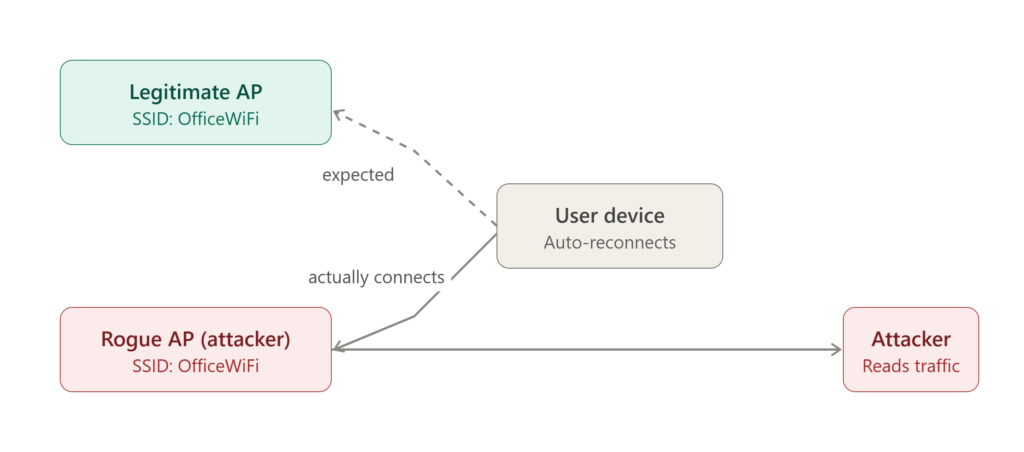
The device expects to reach the legitimate access point, but because it auto-reconnects to any network with a familiar name, it lands on the attacker’s rogue AP instead. From that moment the attacker sits in the middle of the connection and can read everything that isn’t independently encrypted. Notice that nothing here involved cracking a password, the attack succeeded purely by abusing trust in a network name.
Wireless security isn’t only about encryption. A stable network foundation matters too, and concepts like the STP Bridge ID election process help prevent the loops and instability that can mask malicious activity. The real defense against evil twins, though, is certificate-based authentication. When clients validate the server certificate through 802.1X authentication, a rogue AP can’t produce a valid certificate and properly configured devices refuse to connect.
If you’d rather see how this works than just read about it, this short breakdown from Professor Messer walks through exactly how rogue access points and evil twins trick devices into connecting:
The key takeaway from the video lines up with everything above: the attack never breaks the encryption, it exploits a device’s willingness to trust a familiar network name. That’s exactly why enforcing server certificate validation matters so much.
✅ Best practice — Enforce server certificate validation on client devices and pin the expected certificate authority. Without it, 802.1X will happily authenticate your users to a fake server, which defeats the entire point.
Packet sniffing and credential theft
With packet sniffing, an attacker in range captures traffic and picks through it for anything useful. Encryption protects most of it, but misconfigurations can leak session tokens, cookies, and credentials. Certificate validation failures are a frequent culprit here, the kind covered in common SSL/TLS validation mistakes. Once an attacker has valid credentials, they stop “hacking” anything. They just log in, escalate privileges, and move laterally.
WiFi misconfigurations
If there’s one pattern across enterprise breaches, it’s misconfiguration. Auto-connect left enabled, certificate validation not enforced, shared credentials, and above all, no segmentation. When every device shares one flat network, a single compromise spreads fast. These gaps are dangerous precisely because they cause no immediate problem, so nobody notices them until an attacker does.
Cisco Meraki security risks, explained
“Cisco Meraki security risks” is a phrase that gets misread. The risk isn’t the technology, it’s the deployment. Skip proper firewall controls and the network sits exposed, which is why understanding how firewalls protect networks is part of the job, not an afterthought. The other common gap is a lack of monitoring: without visibility, an attacker can operate quietly for a long time. Meraki’s cloud model is a real strength, but it also centralizes risk, so one compromised dashboard account can reconfigure every AP at once.
From the field: Beginners are often surprised that the most common serious finding isn’t a clever exploit at all. It’s a “guest” network that can still reach internal resources because VLAN isolation was configured on paper but never actually tested. Ten minutes of probing from the guest SSID exposes it almost every time.
How to protect enterprise WiFi networks
Protection works when it’s layered, and each layer assumes the one before it might fail. Start with strong encryption and certificate-based authentication rather than passwords alone. Add real network segmentation, keeping user devices, guest access, and IoT separated. Layer in continuous monitoring so a wireless intrusion detection system can flag odd behavior in real time. And keep firmware current and test regularly.
Firewalls carry a lot of that load, and for a serious layered stack, dedicated hardware like the FortiGate 100F handles the inspection and throughput an access point was never built for. For a structured baseline, NIST SP 800-153, Guidelines for Securing WLANs is the reference I’d hand any team.
No single control keeps an enterprise network safe. Real protection is layered, with each layer assuming the one before it might fail.
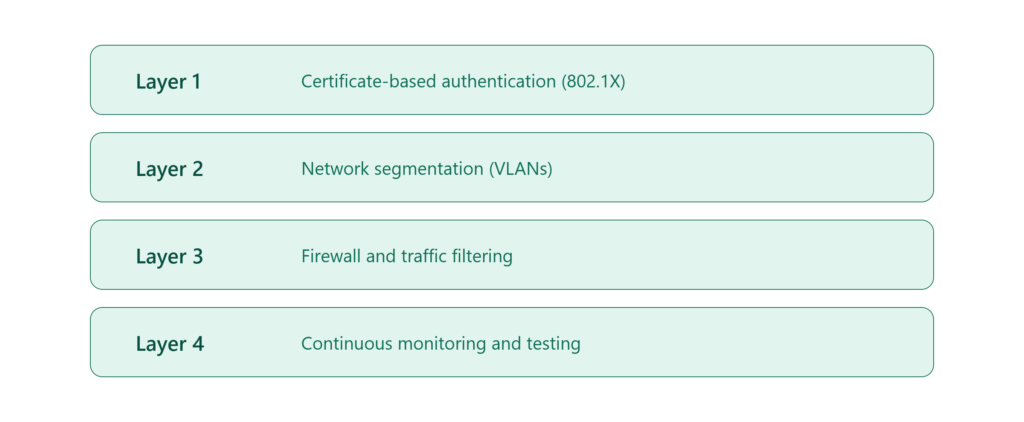
Strong per-user authentication comes first, so a stolen password alone gets an attacker nowhere. Segmentation contains the damage if something does slip through, keeping a breach on one VLAN from reaching another. Firewalls handle the inspection and filtering that access points were never built for, and continuous monitoring catches the odd behavior the earlier layers missed. Stacked together, these turn a single mistake into a contained incident instead of a full compromise.
Intro line (upar): This is the defense that actually stops an evil twin: making the client check the server’s certificate before it trusts any network.
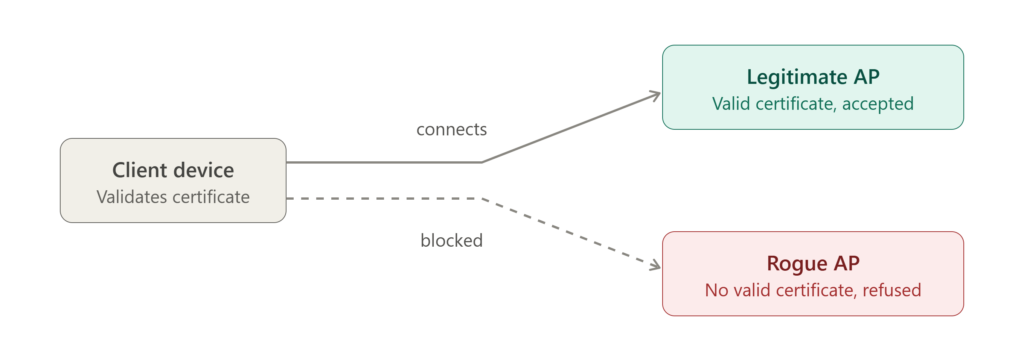
When certificate validation is enforced, the client only connects to an access point that can present a valid, trusted certificate. The legitimate AP passes and the connection goes through. The rogue AP can copy the network name all it wants, but it can’t produce a valid certificate, so a properly configured device simply refuses it. This is why enforcing server certificate validation on clients matters far more than the strength of the password.
⚠️ Remember — Segmentation only counts if you’ve verified it. An isolated VLAN that was never tested is worse than no VLAN, because it hands you false confidence.
Wireless penetration testing overview
Pentesting simulates a real attack in a controlled, authorized way. Testers probe authentication systems, network configuration, and user behavior to surface weaknesses before an attacker finds them. Plenty of enterprise networks fail basic tests purely because of misconfiguration. For a structured methodology you can adapt to wireless work, the OWASP Testing Guide is a solid framework. The mindset carries over: map the surface, test each control, document what breaks. The goal isn’t to prove you can break in, it’s to find the gap first.
A Real-World Example of Enterprise WiFi Hacked in Minutes
Picture a corporate office running MR36 access points in PSK mode, with the Wi-Fi password printed in the onboarding doc. An attacker sets up an evil twin outside the building. A few staff devices auto-connect, thinking it’s the usual network. The attacker captures credentials, logs into internal systems, and because the network is flat with loose permissions, moving toward file shares takes almost no effort.
No encryption was ever broken. Every single link in that chain was a configuration choice.
Common mistakes in WiFi security
Organizations tend to repeat the same errors. They lean on default configurations and assume enterprise hardware equals complete security. They skip updates and don’t monitor activity. They underestimate human error and never train staff. Each of those is unremarkable on its own, and each one hands an attacker an opening.
Security best practices for enterprises
Use strong encryption and enforce a secure WiFi configuration. Choose certificate-based authentication over passwords. Segment networks to contain damage. Disable auto-connect on devices. Monitor activity continuously. Run regular penetration tests. And train employees to spot suspicious networks and phishing attempts, since they’re often the layer that fails first.
| Attack Type | How It Works | Primary Defense |
|---|---|---|
| Evil twin / rogue AP | Fake AP copies the real network’s name; devices auto-connect | Server certificate validation with 802.1X |
| Packet sniffing | Traffic captured and analyzed for exposed credentials | Strong encryption plus proper TLS/certificate checks |
| Credential harvesting | Weak or shared logins collected without breaking encryption | Per-user authentication, no shared passwords |
| Misconfiguration | Flat networks and loose rules let one breach spread | Network segmentation and regular config audits |
| Man-in-the-middle | Attacker sits between user and network to alter data | Certificate validation and continuous monitoring |
Conclusion
So, can enterprise WiFi get hacked the way the MR36 case shows here? Yes, but not because the device is weak. The real danger is misconfiguration, weak operational habits, and human behavior. Configured and managed properly, the MR36 delivers strong enterprise wireless security. Fix the shared passwords, enforce the certificate checks, verify your segmentation, and lock down the admin accounts, then test what you fixed.
Frequently Asked Questions
Can properly secured Wi-Fi still be compromised?
Yes. It’s rarely the encryption that fails. Attackers get in through misconfiguration, rogue access points, and user deception rather than by cracking WPA2 or WPA3 directly.
Which wireless attacks are the most common in enterprises?
Evil twin attacks, man-in-the-middle interception, and credential harvesting. All three succeed by exploiting human behavior and weak configuration instead of defeating encryption.
Is the MR36 insecure by design?
No. It ships with strong enterprise security features. The risk almost always comes from how it’s deployed, such as PSK mode, missing segmentation, or unverified certificate validation.
What’s the single biggest risk in enterprise WiFi security?
Human error and misconfiguration. Together they cause most credential theft and unauthorized access, far more than any hardware flaw does.
What’s the most effective way to secure enterprise WiFi?
Layer your defenses: strong encryption, certificate-based authentication, real network segmentation, continuous monitoring, and regular penetration testing.

Abdul Shakoor writes practical, defensive cybersecurity and networking guides for SentrixHub. He focuses on making API security, mobile app security, authentication, and network concepts simple for beginners and developers.