
By Abdul Shakoor
Here’s a problem that sounds simple but trips up even experienced security teams: you’ve just found something serious — a vulnerability, a live threat, an active breach — and now you have to decide who gets to know about it. Tell too many people too soon, and you’ve basically handed attackers a roadmap. Tell too few, and the teams who could actually defend against it are left in the dark.
I think most people assume the hard part of security is finding the problem. In my experience, deciding how to share what you found is just as tricky — and getting it wrong has burned plenty of organisations. That’s the exact gap the Traffic Light Protocol fills, and it’s one of those rare frameworks that’s genuinely simple without being simplistic.
TLP — Traffic Light Protocol — is a system for labelling sensitive information so everyone instantly understands how far it’s allowed to travel. Four colors, four levels of “who can see this.” That’s it. But that small system quietly prevents a lot of chaos, and once you start using it, you wonder how teams coordinated without it.
What TLP actually means
TLP stands for Traffic Light Protocol, and it’s a way to label information based on how widely it can be shared. The simplest way I’ve heard it put: TLP tells you who can see your data and how far it’s allowed to go.
It’s maintained by FIRST (the Forum of Incident Response and Security Teams), a globally trusted body in security collaboration — which matters, because it means TLP is a shared language. When a team in one country labels something TLP:AMBER, a team on the other side of the world knows exactly what that means and how to handle it. That common understanding is the whole point.
The four colours, the way I’d explain them to a new teammate
The traffic-light analogy does most of the work here, which is why the protocol has stuck around.
🔴 TLP:RED — stop, do not share.
This is the most restrictive level. The information stays with the specific people in the room, full stop. No forwarding, no “I’ll just loop in my manager.” When something could cause immediate damage if it leaked, it’s RED.
🟠 TLP:AMBER — share carefully, within limits.
You can share it inside your organization or with specific trusted partners who need it — but not beyond that circle. AMBER is the workhorse level; a lot of real security intelligence lives here.
🟢 TLP:GREEN — share within the community.
Now you can pass it to peers and industry groups, beyond just your own organization, but it’s still not for public release. GREEN is how the broader defender community warns each other.
⚪ TLP:CLEAR — share freely.
Formerly called TLP:WHITE, this is fully open. Anyone, anywhere, no restrictions. It’s what you use once information is safe to make public.
📌 Worth knowing: TLP:WHITE was officially renamed TLP:CLEAR in the 2022 update to the standard. If you see older documents still using “WHITE,” they mean the same thing — but CLEAR is the current, correct term.
The Official TLP Definitions from FIRST
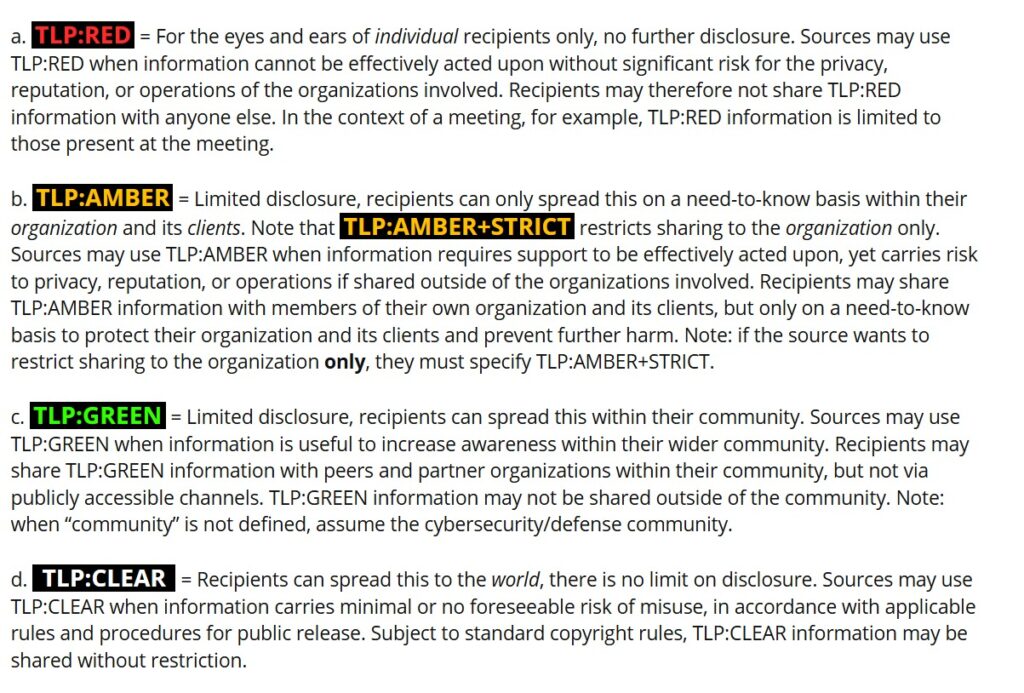
Here are the four levels straight from FIRST, the body that maintains the standard. Notice the detail beyond the basics — for instance, TLP:AMBER+STRICT, which restricts sharing to your organisation only, with no clients included. When you need the authoritative wording, this is the source to quote.
TLP Levels at a Glance
| Level | Who Can See It | Use When |
| 🔴 TLP:RED | Named individuals only — no forwarding | Leaking it would cause immediate harm |
| 🟠 TLP:AMBER | Your organisation + specific trusted partners | Needs limited sharing to act on, but carries risk |
| 🟢 TLP:GREEN | Your wider community / industry peers | Useful to raise awareness, but not public |
| ⚪ TLP:CLEAR | Anyone — fully public | Minimal or no risk in sharing freely |
The rule of thumb: start as restrictive as the risk demands, then downgrade the level as a fix rolls out and the danger drops. It’s always easier to loosen sharing than to claw back information that’s already spread.
How TLP works in a real workflow
The colours only make sense when you see them move. Here’s the lifecycle I’ve watched play out countless times.
It starts when someone identifies sensitive information — a freshly discovered vulnerability, suspicious activity on an API, malware indicators, incident findings. The first instinct, and usually the right one, is to lock it down tight.
Then you assign a label based on risk. Highly confidential and dangerous-if-leaked goes RED. Internal-and-trusted-partners goes AMBER. Worth-warning-the-community goes GREEN. Safe-for-everyone goes CLEAR.
From there you share according to the rules that label defines — who’s allowed access, and whether they can pass it on. And finally you enforce the boundaries, making sure AMBER intelligence doesn’t accidentally end up in a public channel.
The thing nobody tells you starting out: a single piece of information usually changes colour over its lifetime. Something often begins life as RED and gets downgraded as the risk drops and the fix rolls out. That progression is the heart of how TLP actually works in practice.
Watching one piece of intel move through all four levels
Let me make this concrete with the pattern I find clearest — a vulnerability’s journey.
Say your team finds a flaw in an API’s authentication. On day one, that’s TLP:RED — only the senior engineers and security leads know, because if it leaked before a fix existed, attackers could walk right in. This is the same instinct behind responsible handling of any serious bug, like the kind of API security flaws that need a fix shipped before the world finds out.
Once a patch is in progress, it moves to TLP:AMBER — now the wider development and ops teams need to know so they can deploy the fix. After it’s patched and you want to warn peers who might have the same weakness, it becomes TLP:GREEN. And finally, once everyone’s protected, it’s published as TLP:CLEAR — a public advisory anyone can read.
That exact progression is what played out with something like the recent Axios CVE I wrote about: tightly held at first, shared with maintainers, then disclosed publicly with a fix once it was safe to do so. TLP is the framework that makes that controlled, staged disclosure possible instead of chaotic.
Watch: The TLP Levels Explained
If you’d rather see the four levels laid out visually, the video above walks through how Red, Amber, Green, and Clear work in practice. It’s a quick way to lock in the difference between them before we look at how a single piece of intel moves through all four.
Why TLP matters more than it looks
At a glance TLP seems almost too basic to bother formalising. But the impact runs deep.
It prevents data leaks by making sure sensitive findings don’t drift to people who shouldn’t have them — including, eventually, attackers. It enables safe collaboration, letting security teams share threat intelligence with each other without exposing secrets, which is huge because no single team sees the whole threat landscape. And during an active incident, it sharpens response — when a breach is unfolding, fast but controlled communication is everything, and TLP removes the “wait, who am I allowed to tell?” hesitation at the worst possible moment.
Where TLP meets API and mobile security
This isn’t abstract theory — it shows up everywhere I look in modern security work.
In API security, vulnerabilities are a constant, and they’re exactly the kind of thing you can’t just blurt out publicly. Expose an API flaw too early and you’ve invited exploitation; sit on it too long and the fix gets delayed. TLP gives you the staged middle path. The same careful handling applies to sensitive findings like leaked credentials or token-handling mistakes — you want the right people fixing them, not the whole internet learning about them first.
In mobile app security, findings often include hardcoded API keys, weak encryption, or data leaks. If those details get out before a fix, attackers can reverse engineer the app and go straight for the weakness — which is exactly why testers who use tools like Frida to uncover these issues need to be disciplined about how they share what they find. The skill of finding a flaw and the discipline of handling it responsibly go hand in hand.
The mistakes I see teams make
A few patterns come up over and over, and they’re worth flagging because they’re easy to avoid once you’re aware of them.
Overusing TLP:RED
is the most common. It feels safe to mark everything top-secret, but when everything’s RED, collaboration grinds to a halt and people start ignoring the label entirely. Restriction has a cost.
Mislabelling information
cuts both ways — too strict and useful intelligence never reaches defenders; too loose and sensitive data spreads too far. Both are failures.
Ignoring the rules
like forwarding AMBER intel into a public channel — is the kind of slip that causes real damage, usually by accident.
And lack of training underpins all of it. TLP only works if everyone touching the information actually understands the levels. A protocol nobody’s been taught is just decoration.
⚠️ The most common mistake: Overusing TLP:RED. When everything is marked top-secret, collaboration grinds to a halt and people start ignoring the label entirely. Restriction has a real cost.
Practical advice from doing this for real
Practical advice from doing this for real
Start strict, then relax.
Begin at RED and downgrade as the risk drops. It’s far easier to loosen restrictions than to claw back information that’s already spread.
Lean on context, not just rules.
The label should reflect the real impact, the actual audience, and the current threat level — not a mechanical checklist. Judgement matters.
Document your decisions.
Track why a level was assigned and who received the information. When things move fast, that record saves you later.
Review regularly.
Threat situations evolve, and a label that made sense last week might be wrong today. TLP isn’t set-and-forget.
And the broader point: combine TLP with actual access controls — role-based access, identity management — so the protocol is backed by technical enforcement, not just good intentions.
The bottom line
TLP is one of the simplest frameworks in cybersecurity and also one of the most quietly effective. From API vulnerabilities to mobile app flaws, it makes sure the right people get the right information at the right time — without handing anything to the wrong ones.
The deeper lesson it taught me is this: protecting your systems is only half of security. You also have to protect the flow of information about those systems. A perfectly patched vulnerability still causes damage if the details leaked before the patch landed. TLP is how you manage that flow with intention instead of crossing your fingers — four colours that turn a stressful judgement call into a shared, repeatable decision.
Frequently asked questions
What does TLP mean in cybersecurity?
TLP stands for Traffic Light Protocol — a system for classifying and controlling how sensitive information is shared, using four labels: Red, Amber, Green, and Clear.
What is TLP:RED in cybersecurity?
The most restrictive level. Information is shared only with specific named individuals and must not be forwarded or distributed any further.
What’s the difference between TLP:AMBER and TLP:RED?
TLP:RED restricts sharing to specific individuals only. TLP:AMBER allows limited sharing within your organisation or with specific trusted partners.
What’s the difference between TLP:CLEAR and TLP:GREEN?
TLP:GREEN allows sharing within a trusted community but not publicly. TLP:CLEAR (formerly TLP:WHITE) allows unrestricted public sharing.
Why is TLP important in cybersecurity?
It prevents data leaks, enables safe collaboration between teams, and supports fast but controlled communication during incident response — balancing secrecy with the need to defend.
For more on handling security findings responsibly, explore our guides on the BEAST attack, Frida hooking, and API and firewall security.

Abdul Shakoor writes practical, defensive cybersecurity and networking guides for SentrixHub. He focuses on making API security, mobile app security, authentication, and network concepts simple for beginners and developers.