
By Abdul Shakoor · SentrixHub
If you run a Joomla or WordPress website that sends newsletters, there’s a good chance you’ve used AcyMailing. It’s one of the most popular email and newsletter extensions across both ecosystems. In July 2026, a serious security flaw in that extension was assigned the identifier CVE-2026-56292, and if your site is running an older version, it deserves your attention today rather than next week.
CVE-2026-56292 is a SQL injection vulnerability in AcyMailing, affecting both the Joomla component and the WordPress plugin on versions before 10.11.1. In plain terms, it can allow an attacker to reach into your site’s database and pull out information they were never supposed to see. This guide breaks down what the vulnerability is, why it matters, who is affected, and exactly what you should do about it, in language that a beginner can follow but with enough depth to be useful to security professionals too.
What Is CVE-2026-56292?
CVE-2026-56292 is the official tracking number for a specific SQL injection (SQLi) weakness discovered in AcyMailing. Every publicly known vulnerability gets a unique CVE identifier so that security teams, vendors, and site owners can all refer to the same issue without confusion. If you’re new to how these identifiers work and how they relate to the underlying weakness classes, our explainer on how CVE, CWE, and CAPEC fit together is a helpful starting point, because SQL injection itself is catalogued as CWE-89.
Here’s a quick-facts summary:
| Item | Detail |
|---|---|
| CVE ID | CVE-2026-56292 |
| Vulnerability type | SQL Injection (CWE-89) |
| Affected software | AcyMailing — Joomla component and WordPress plugin |
| Vulnerable versions | Before 10.11.1 |
| Fixed version | 10.11.1 |
| CVSS 3.1 score | 7.5 (High) |
| CVSS vector | AV:N/AC:L/PR:N/UI:N/S:U/C:H/I:N/A:N |
| Impact | Unauthorized database access, data leakage |
| Published | July 9, 2026 |
Here’s the official NVD record confirming the CVSS score and vector string:
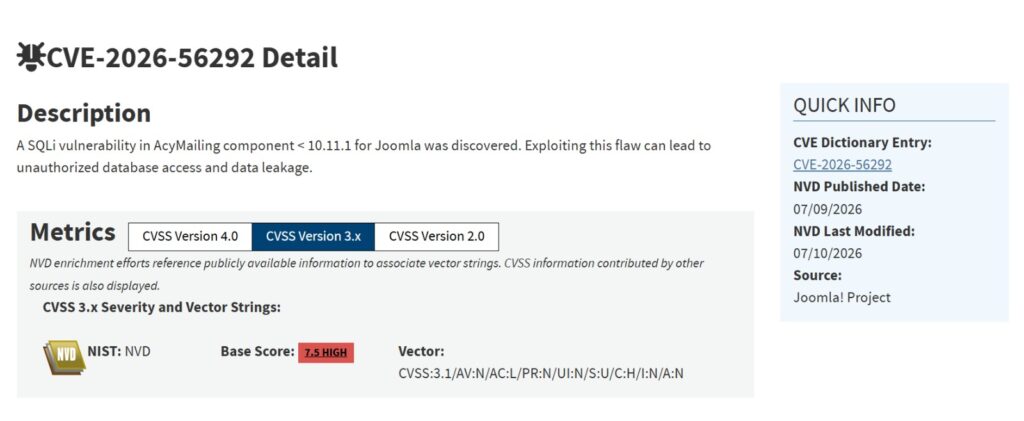
Official NVD entry for CVE-2026-56292, showing a CVSS 3.1 base score of 7.5 (High). Note: NVD’s record lists the Joomla component; the WordPress plugin fix was confirmed separately via the vendor changelog below. (Source: NVD)
That vector string is worth unpacking briefly, because it tells you exactly how easy this is to exploit: attackable over the network (AV:N), low attack complexity (AC:L), no privileges required (PR:N), no user interaction needed (UI:N). The impact is confidentiality only (C:H, with I:N and A:N) — meaning the risk here is data being read, not the site being taken down or defaced directly. That combination, easy to reach plus real data exposure, is exactly why this one deserves fast patching rather than a “get to it eventually” response.
you can view the full breakdown on the official NVD entry.
📌 About the CVSS score: Because this CVE is very recent, always confirm
the exact base score and severity rating on the official NVD page before
quoting a number. Scores are sometimes assigned or adjusted shortly after
a CVE is published.
What Is AcyMailing?
AcyMailing is a widely used newsletter and email marketing extension, available both as a Joomla component and a WordPress plugin built from a shared codebase. It’s popular with site owners who want to build mailing lists, send campaigns, and manage subscribers without leaving their CMS. On WordPress alone, the plugin has racked up more than 7,000 active installations, and it holds a similarly strong footprint across the Joomla extension directory.
Because it touches subscriber data, email content, and site configuration, AcyMailing sits close to sensitive parts of a website. That’s exactly why a database-level vulnerability in it is worth taking seriously: the extension has legitimate reasons to talk to your database, so a flaw in how it does that can expose a lot.
Here’s how the plugin appears on the official WordPress.org repository, showing the current patched version:

AcyMailing on WordPress.org, showing version 10.11.1 — the patched release for CVE-2026-56292. (Source: WordPress.org)
A closer look at the plugin’s current stats:
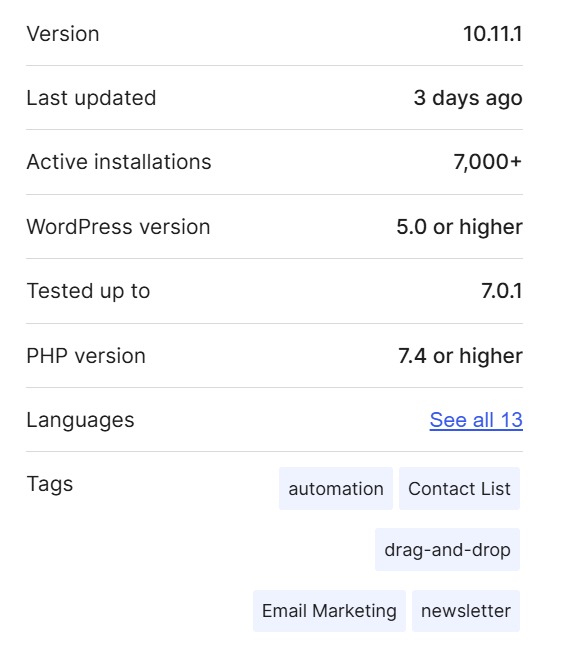
AcyMailing has over 7,000 active WordPress installations, making timely patching especially important. (Source: WordPress.org)
It’s also worth being precise here. AcyMailing has had more than one security advisory in 2026, each with its own CVE number and its own affected version range. CVE-2026-56292 specifically refers to the SQL injection issue in versions before 10.11.1, patched on both platforms in the same release. Don’t confuse it with other AcyMailing CVEs from the same year that describe different problems and different version numbers.
What Causes the Vulnerability?
At its heart, CVE-2026-56292 is a classic SQL injection problem, and understanding SQL injection makes the whole thing click.
Websites store their data in databases, and they ask for that data using a language called SQL. A normal request might say, in effect, “give me the subscriber whose ID is 42.” The trouble starts when a web application takes input from a user and drops it straight into that SQL request without checking or sanitizing it first.
Before diving into the mitigation steps, it helps to see how SQL injection actually works in practice:
This video explains SQL injection fundamentals in general — it isn’t specific to CVE-2026-56292, but the underlying attack technique is the same one exploited in the AcyMailing vulnerability discussed above.
Imagine a query that’s built by gluing text together like this:
SELECT * FROM subscribers WHERE id = [whatever the user typed]
If the application trusts the user’s input blindly, an attacker can type something that isn’t just a number. Instead of 42, they might supply input crafted to change the meaning of the query itself, tricking the database into returning far more than a single subscriber. That’s SQL injection in a nutshell: user input that gets treated as database instructions.
The root cause is almost always the same two things working together: unsafe query construction and missing input validation. When user-controlled values are concatenated directly into SQL statements, and nothing verifies that the input is what it claims to be, the door is open. This is the same broad family of “the application trusted input it shouldn’t have” mistakes we cover in our guide to unrestricted file upload vulnerabilities.
⚠️ The root cause in one line: SQL injection happens when user input is
dropped into a database query without validation. If the application
trusts input it never checked, that input can change what the query does.
Technical Details
Here’s how the pieces of CVE-2026-56292 fit together at a technical level. Keep in mind that the goal of this section is understanding and defense, not a how-to for attackers.
| Attribute | Detail |
|---|---|
| Vulnerability class | SQL Injection (CWE-89) |
| Affected component | AcyMailing — Joomla component and WordPress plugin |
| Vulnerable versions | Before 10.11.1 |
| Authentication required | None (unauthenticated) |
| User interaction required | None |
| Attack vector | Network |
| CVSS 3.1 score | 7.5 (High) |
| Primary impact | Confidentiality (data disclosure) |
| Result | Unauthorized database access and data leakage |
The core issue is that a request parameter handled by the vulnerable versions of the component can influence a database query in ways it shouldn’t. Because no authentication or user interaction is required, any attacker who can reach the affected endpoint over the network can attempt exploitation, which is part of why this vulnerability was rated 7.5 rather than something lower. When exploited, this lets an attacker read data from the database that should be off-limits, which is why the described impact is unauthorized database access and data leakage.
How Attackers Could Exploit CVE-2026-56292 (Conceptually)
It helps to understand the general shape of an attack so you can defend against it and recognize it in your logs. This is a conceptual walkthrough, not a working exploit.
An attacker typically starts with reconnaissance, identifying that a target site runs Joomla or WordPress with a vulnerable version of AcyMailing installed. Fingerprinting the version is often possible from public-facing clues, such as version strings exposed in page source or plugin metadata.
Next, they locate the input that reaches the vulnerable query. Instead of supplying a normal, expected value, they craft input designed to alter the query’s logic. Because the vulnerability doesn’t require authentication, this step doesn’t need a valid account or login session.
If the application doesn’t sanitize that input, the malformed request changes what the database does. From there, the attacker can coax the database into returning information it shouldn’t, which may include subscriber details or other stored data. In the worst cases, exposed data such as credentials can become a stepping stone toward deeper compromise, which is why weak or reused passwords make incidents like this far more damaging, a point we dig into in why weak and reused passwords are so dangerous.
The important takeaway is not the mechanics but the lesson: every one of those steps depends on the application trusting input it should have validated, and on the site running unpatched software.
Potential Impact
The headline impact of CVE-2026-56292 is data exposure, but it’s worth spelling out what that can mean in practice:
- Database disclosure. Attackers may read tables they were never authorized to see.
- Subscriber data leakage. Newsletter extensions hold lists of email addresses and related details, which have real value to spammers and phishers.
- Credential exposure. If any sensitive values are reachable, they can fuel follow-on attacks.
- Website compromise. Data pulled from one flaw is often the first move in a larger intrusion.
- Business and trust damage. A data leak can mean regulatory headaches and lost user confidence, on top of the technical cleanup.
Because exploitation requires no authentication and no user interaction, the realistic exposure window is every public-facing site running an affected version, not just ones with weaker account security.
Affected Versions
| Product | Vulnerable Versions | Fixed Version | Status |
|---|---|---|---|
| AcyMailing for Joomla | Before 10.11.1 | 10.11.1 | Patched |
| AcyMailing for WordPress | Before 10.11.1 | 10.11.1 | Patched |
Both editions were fixed in the same release, dated July 9, 2026. If you’re running any AcyMailing release earlier than 10.11.1, on either platform, treat your site as affected until you’ve updated.
The vendor’s own changelog confirms the fix and release date:
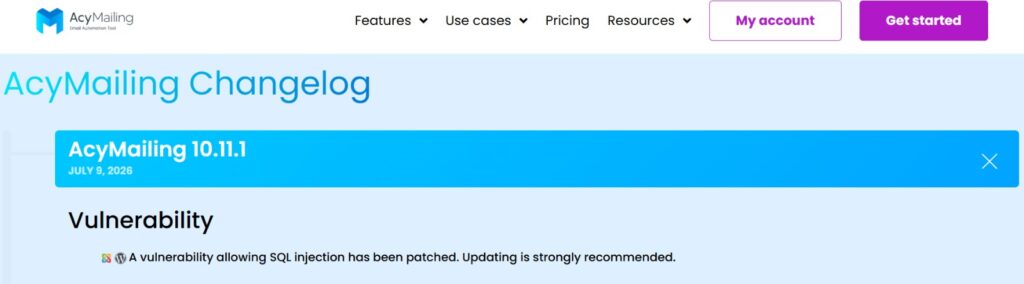
AcyMailing’s official changelog entry for version 10.11.1, released July 9, 2026, confirming the SQL injection fix. (Source: AcyMailing.com)
The WordPress.org changelog shows the identical version and date, confirming both editions were patched together:
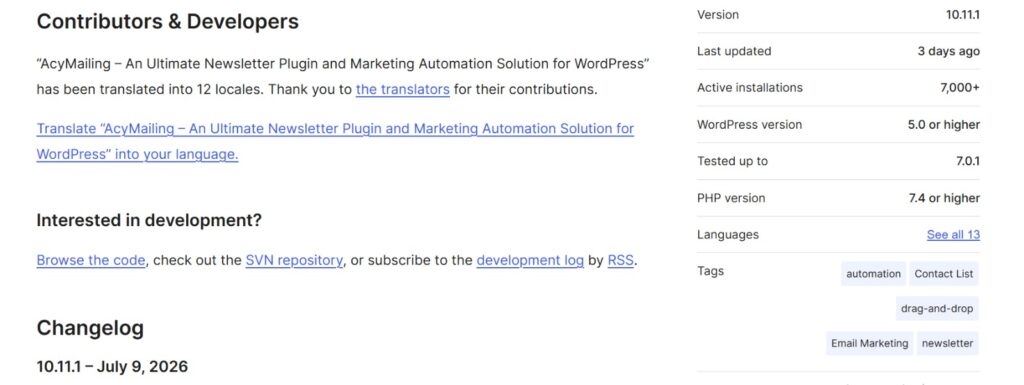
The WordPress.org changelog lists the same version 10.11.1 and the same date (July 9, 2026) as the vendor site — confirming both the Joomla and WordPress editions were fixed in the same release.
How to Check if Your Site Is Vulnerable
Start with the version number. In Joomla, check the installed version under your extensions or components list. In WordPress, go to Plugins → Installed Plugins and look at the AcyMailing row. If it reads anything below 10.11.1, you’re in the vulnerable range.
Beyond the version check, review the official vendor advisory and the NVD entry for CVE-2026-56292 to confirm details for your exact setup. Automated help is valuable here too: a database-focused vulnerability scanner can flag SQL injection exposure across your site, and if you’re new to how those tools work, our overview of database vulnerability scanners walks through what they do and how to read their results. Whatever you do, take a full backup before testing anything on a live site.
⚠️ Always back up first: Before testing anything on a live site or running
a scanner against it, take a full, verified backup. Testing safely means
being able to roll back cleanly if something breaks.
How to Fix CVE-2026-56292
The fix is refreshingly direct, which is one of the nicer things about a well-handled disclosure.
Update immediately. Upgrade AcyMailing to version 10.11.1 or later, on whichever platform you run. This is the single most important action and it resolves the vulnerability at its source.
If for some reason you can’t update right away, apply temporary mitigations while you plan the upgrade:
- Deploy WAF rules. A web application firewall can help block SQL injection attempts targeting the extension. If you’re weighing where a firewall fits in your defenses, our piece on how firewalls and API security work together explains the role they play.
- Apply least privilege to the database account. The database user your site connects with should have only the permissions it truly needs. The same hardening mindset applies to file and directory access, which we cover in why weak file permissions are risky.
- Restrict and monitor access to the affected functionality where possible.
- Keep verified backups so you can recover cleanly if something has already gone wrong.
Temporary mitigations reduce risk, but they are not a substitute for patching. Since exploitation requires no login and no user interaction, “wait and see” is not a safe posture here. Update as soon as you reasonably can.
✅ The one thing to do today: Update AcyMailing to 10.11.1 or later. WAF
rules and least privilege reduce risk, but only the update removes the
vulnerability at its source.
Detection Tips
To spot exploitation attempts, keep an eye on a few places:
- Web server logs for unusual requests aimed at AcyMailing endpoints, especially ones containing SQL-like fragments or odd parameter values.
- Database logs for unexpected or malformed queries.
- WAF alerts flagging injection patterns.
- IDS/IPS alerts for known SQL injection signatures.
- Spikes in traffic to specific parameters or endpoints from unfamiliar sources, particularly from requests with no corresponding login activity, since this flaw doesn’t require authentication.
Suspicious requests that repeatedly probe the same parameter with strange characters are a common early sign worth investigating.
Best Practices to Prevent SQL Injection
Fixing this one CVE is good; making the whole class of bug hard to exploit is better. These practices apply well beyond AcyMailing:
- Use parameterized queries and prepared statements. This is the gold standard. It keeps user input as data, never as executable SQL.
- Validate and sanitize all input. Never trust anything that came from a user.
- Apply output encoding where appropriate.
- Follow least privilege for database accounts.
- Put a WAF in front of your application for defense in depth.
- Patch regularly. Most real-world compromises exploit known, already-fixed bugs.
- Monitor continuously so you notice problems early.
For a structured framework of secure development requirements that includes injection defenses, the OWASP ASVS 5.0 is an excellent reference to build your standards around.
📌 Parameterized queries are the real fix: They keep user input as data,
never as executable SQL. Most SQL injection bugs simply cannot happen when
prepared statements are used consistently.
Timeline
| Stage | Detail |
|---|---|
| Discovery | Reported to the vendor (see vendor advisory) |
| Fix released | AcyMailing 10.11.1 — July 9, 2026 |
| CVE publication | July 9, 2026 |
| CVSS assigned | 7.5 (High) |
| Public advisories | NVD, CVE.org, vendor changelog (Joomla and WordPress editions) |
For context, CVE-2026-56292 is one of several recent issues our readers have asked about; if you’re tracking these, you may also want to read our breakdown of CVE-2025-58754.
Why This Vulnerability Matters
It’s easy to shrug off a single plugin bug, but SQL injection in a widely deployed extension is exactly the kind of thing attackers scan for at scale. AcyMailing has a substantial footprint across both the Joomla and WordPress ecosystems, which means a large number of sites are potentially in range until they update. A CVSS score of 7.5, driven by the fact that no authentication or user interaction is needed, means automated scanning tools can find and probe vulnerable installations with very little effort. The window between public disclosure and opportunistic attacks is short.
There’s also a broader lesson. Newsletter and marketing extensions are often installed once and forgotten, quietly running months or years behind on updates. That “install and forget” habit is what turns a patched vulnerability into a real breach. Timely patching isn’t glamorous, but it’s the difference between reading about CVE-2026-56292 as news and living through it as an incident.
Frequently Asked Questions
What is CVE-2026-56292?
It’s a SQL injection vulnerability in AcyMailing, affecting versions before 10.11.1 on both the Joomla component and the WordPress plugin. It can lead to unauthorized database access and data leakage.
Is CVE-2026-56292 serious?
Yes. It carries a CVSS 3.1 score of 7.5 (High), and because it requires no authentication and no user interaction, it’s straightforward for automated tools to find and target. Treat any unpatched installation as a real risk.
Which versions of AcyMailing are affected?
Versions before 10.11.1 are vulnerable, on both Joomla and WordPress. Version 10.11.1 contains the fix for both editions, released July 9, 2026.
How do I fix CVE-2026-56292?
Update AcyMailing to 10.11.1 or later on whichever platform you run. If you can’t update immediately, use WAF rules, apply least privilege to the database account, and monitor closely until you can patch.
What is SQL injection in simple terms?
It’s when an attacker sends specially crafted input that a website mistakenly treats as database commands, letting them read or manipulate data they shouldn’t be able to access.
How do I know if my site was already attacked?
Review web server and database logs for suspicious requests targeting AcyMailing, look for unexpected database queries, and check WAF and IDS/IPS alerts. If you find signs of compromise, treat it as an incident and restore from a known-good backup.
Does this affect WordPress too?
Yes. The AcyMailing plugin for WordPress and the AcyMailing component for Joomla share the same underlying codebase, and both were patched in version 10.11.1, released on the same date. If you run AcyMailing on WordPress, you need to update just as urgently as Joomla site owners.
Can a firewall alone protect me?
A WAF can block many injection attempts and buy you time, but it isn’t a replacement for updating. Patching to 10.11.1 removes the underlying flaw; a firewall only filters attempts to reach it.
Do I need to be logged in for my site to be at risk?
No. This vulnerability doesn’t require authentication or any user interaction, which is part of why it’s rated 7.5. Any publicly reachable site on an affected version is potentially exposed, regardless of who is logged in.
How can I prevent issues like this in the future?
Keep all extensions updated, prefer software that uses parameterized queries, apply least privilege, run periodic vulnerability scans, and monitor your logs. Good patch hygiene prevents the majority of real-world compromises.
Conclusion
CVE-2026-56292 is a reminder that even trusted, popular extensions can ship serious flaws, and that SQL injection remains one of the most consequential web vulnerabilities out there. With a CVSS score of 7.5 and no authentication required to attempt exploitation, this is not one to leave for later. The good news is that the response is simple and within everyone’s reach: if you run AcyMailing on Joomla or WordPress, update to 10.11.1 or later right now. Back up your site, review your logs for anything suspicious, and put the broader best practices, parameterized queries, least privilege, a WAF, and regular patching, into place so the next disclosure is a non-event for you.
Security isn’t about never having vulnerabilities appear; it’s about responding to them quickly and building habits that keep the whole class of problem at bay. Patch early, monitor consistently, and treat every extension you install as something you’re responsible for keeping current.

Abdul Shakoor writes practical, defensive cybersecurity and networking guides for SentrixHub. He focuses on making API security, mobile app security, authentication, and network concepts simple for beginners and developers.