
Is It Safe to Send Password Reset Tokens in URLs? Real Security Risks and Best Practices
Password reset links look simple from the user’s side. A user forgets the password, enters an email address, receives a reset link, clicks it, and creates a new password.
But from a security point of view, password reset is one of the most sensitive parts of authentication security. If this feature is poorly designed, attackers may use it to take over accounts without knowing the original password.
A common password reset link looks like this:
https://example.com/reset-password?token=abc123xyz
That token is not just a random value. It is a temporary key to the user’s account. If someone steals it before it expires, they may reset the password and gain access.
This is why password reset security is connected with
API security
, authentication security, rate limiting, session management, secure coding, logging, and bug bounty testing.
Many developers think HTTPS alone is enough to protect reset links. HTTPS is necessary, but it is not the full solution. A reset token can still leak through browser history, proxy logs, SIEM platforms, third-party analytics, email forwarding, mobile app logs, and Referer headers.
For official secure recovery guidance, developers should also review the
OWASP Forgot Password Cheat Sheet
.
What Is a Password Reset Token?
A password reset token is a temporary secret generated by an application when a user requests to reset a password.
The application sends this token through email, SMS, or a mobile deep link. When the user opens the reset link, the server checks whether the token is valid. If the token is valid, the user is allowed to set a new password.
A secure password reset token should be:
- Random
- Long enough
- Hard to guess
- Short-lived
- Single-use
- Stored securely
- Linked to the correct account
- Invalidated after successful reset
- Protected from logs and external leakage
A weak reset token can turn the “forgot password” feature into an account takeover vulnerability.
Password reset security should never be treated as a small feature. It is part of the authentication system. If your login page is secure but your recovery flow is weak, attackers may simply bypass the login process and abuse account recovery instead.
You can also read:
because weak password habits and weak recovery flows often create account takeover risks together.
Is It Safe to Send Password Reset Tokens in URLs?
Yes, it can be safe, but only when the reset flow is designed carefully.
Putting a reset token in a URL is common. The risk begins when that URL is exposed in places developers did not expect.
A reset token in a URL may appear in:
- Browser history
- Shared devices
- Server access logs
- Reverse proxy logs
- WAF logs
- SIEM platforms
- Email forwarding chains
- Third-party analytics
- Referer headers
- Mobile app logs
- Crash reports
- Screenshots
- Browser extensions
So the real question is not only:
Is the token in the URL?
The better question is:
Where can this token travel after the user clicks the link?
If the token is short-lived, single-use, stored as a hash, protected from logs, and invalidated after reset, the risk is much lower.
If the token is long-lived, reusable, visible in logs, and leaked through third-party scripts, then the reset link becomes dangerous.
Real Pentesting Observation
When testing password reset flows, one thing I always look for is not only whether the token is random. I also check where the token goes after the user clicks the link.
A reset token may look strong at first. It may be long, random, and impossible to guess. But that does not mean the flow is secure.
In real web application testing, I have seen cases where the token itself was strong, but the reset page loaded analytics scripts, tracking pixels, chat widgets, or external images. In that situation, the browser could send the full reset URL through the Referer header.
That means the token was not guessed. It was leaked.
This is an important security lesson:
A strong token can still become dangerous if the application leaks it.
A good tester does not only ask, “Can I brute force this token?” A good tester asks:
- Is the token leaked in logs?
- Is the token leaked through the Referer header?
- Is the token visible in browser history?
- Is the token reused?
- Does the token expire quickly?
- Are old tokens invalidated?
- Is the reset page loading third-party resources?
- Are sessions invalidated after reset?
This is where many password reset bugs are found: not in the token generation itself, but in the surrounding implementation.
Common Developer Mistake: “We Use HTTPS, So It’s Safe”
One of the most common mistakes is assuming that HTTPS solves the entire problem.
HTTPS protects the token while it is moving between the user’s browser and the website. That is important, but it does not protect the token after it reaches the browser.
For example, HTTPS does not stop the reset URL from being stored in browser history. It does not stop a reverse proxy from logging the URL. It does not stop analytics tools from collecting page URLs. It does not stop a user from forwarding the email. It does not stop a poorly configured reset page from leaking the token through the Referer header.
This is why password reset security needs layered protection.
HTTPS is required, but HTTPS alone is not enough.
For related secure transport mistakes, read:
dangerous SSL validation mistakes
Example Attack Scenario: Referer Header Token Leakage
Here is a realistic example of how a password reset token can leak.
1. User Receives a Reset Link
The user receives this email:
https://example.com/reset-password?token=abc123xyz
2. Link Contains Token in URL
The token is placed directly inside the query string:
?token=abc123xyz
3. User Opens the Reset Page
The user clicks the reset link and lands on the reset password page.
4. Reset Page Loads Third-Party Content
The reset page loads a third-party analytics script, image, tracking pixel, font, or chat widget.
Example:
<img src="https://third-party-site.com/pixel.png">
5. Browser Sends Referer Header
The browser may send the current page URL as a Referer header:
Referer: https://example.com/reset-password?token=abc123xyz
6. Reset Token Leaks Externally
The third-party system receives the full reset URL and may store it in its logs.
7. Attacker Uses the Token
If an attacker gets access to those logs before the token expires, the attacker can open the reset link and reset the victim’s password.
This is why reset pages should be clean, minimal, and protected with a strict Referrer-Policy header.
For more detail on this header, review:
MDN Referrer-Policy documentation
The following visual shows how a password reset token can leak when the reset page loads third-party content and the browser sends the full reset URL through the Referer header.
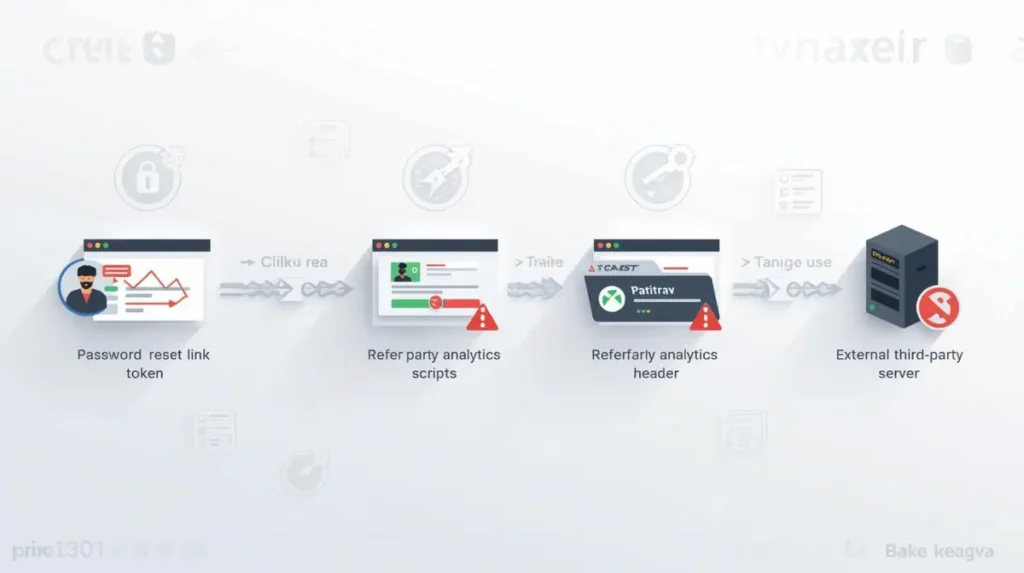
A reset token can leak externally if the reset page loads third-party scripts, tracking pixels, images, or analytics tools without proper Referrer-Policy protection.
Why Browser History Is a Real Risk
Browser history is often ignored in password reset design.
When a reset token is placed in the URL, the full URL may be saved in browser history. On a personal device, this may seem like a small issue. But on shared devices, it becomes serious.
This matters in:
- Offices
- Schools
- Internet cafés
- Shared family computers
- Public systems
- Compromised browsers
- Remote desktop environments
If someone opens browser history and finds a still-valid reset link, they may be able to reset the account.
This is one reason short expiry and one-time token usage are so important.
Why Proxy Logs and SIEM Platforms Matter
In enterprise environments, reset URLs may pass through multiple systems.
A company may use:
- Reverse proxies
- Load balancers
- Web application firewalls
- Email security gateways
- Corporate proxies
- SIEM platforms
- Cloud logging tools
- Endpoint security tools
If the application logs full URLs, the reset token may be stored in several places.
For example:
GET /reset-password?token=abc123xyz HTTP/1.1
This log entry may move from the web server to a log collector, then to a SIEM platform, then to long-term storage.
Now the token exists in multiple systems.
That does not automatically mean the account will be compromised, especially if the token expires quickly. But it increases the exposure surface.
This is why mature security teams avoid logging raw reset tokens.
For better understanding of how weak access to sensitive files can create security problems, read:
Bug Bounty Perspective
Password reset vulnerabilities are commonly tested in bug bounty programs because even a small mistake in the reset flow can lead to account takeover. The video below gives a practical view of how security researchers think about password reset token leakage, weak recovery flows, and account takeover risks.
The important lesson is that password reset bugs are not always about guessing the token. In many real cases, the token is strong, but the application leaks it through logs, Referer headers, third-party scripts, open redirects, or poor session handling. This is why password reset testing should always include token leakage checks, rate limiting checks, token reuse testing, and session invalidation testing.
From a bug bounty perspective, password reset issues are valuable because they can lead to account takeover.
A bug bounty hunter will usually test:
- Can the token be reused?
- Does the token expire quickly?
- Can old tokens still work?
- Is the token leaked through Referer?
- Is the token visible in logs?
- Can the Host header poison the reset link?
- Can an open redirect steal the token?
- Is rate limiting missing?
- Can attackers automate reset requests?
- Are sessions invalidated after reset?
- Is MFA bypassed during account recovery?
A simple password reset bug may become high severity if the tester proves account takeover.
For example, if a reset token leaks to an external domain and the attacker can use it to reset the password, that is a serious security issue.
This is also why password reset testing is a common part of bug bounty programs, penetration testing, and secure code review.
For practical web vulnerability learning, read:
unrestricted file upload vulnerability
Both file upload flaws and password reset flaws often become dangerous when developers trust user-controlled input too much.
Password Reset Security Testing Checklist
A secure password reset system should be tested from multiple angles, including token reuse, expiry, rate limiting, logging, MFA, and session handling.
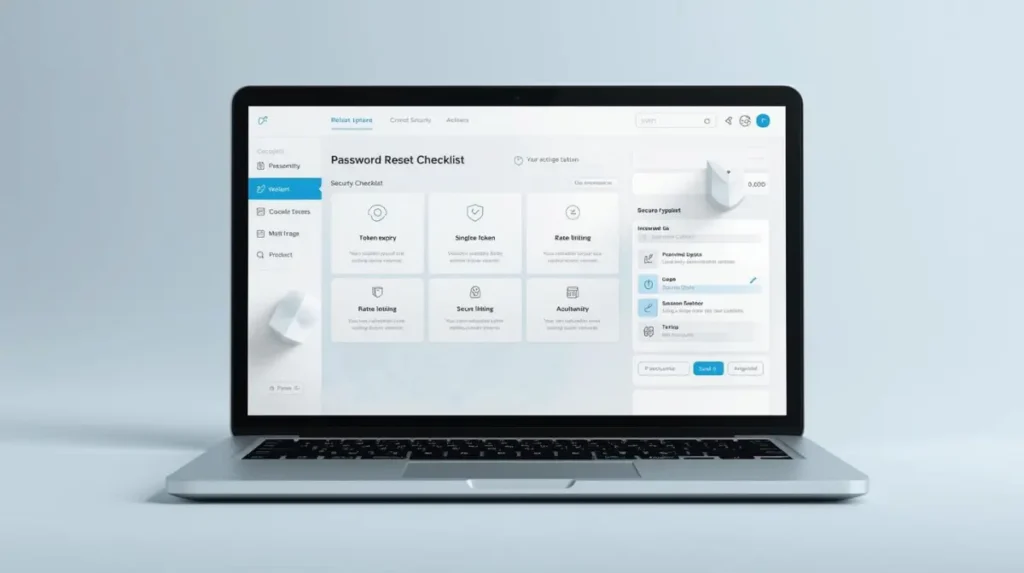
Password reset testing should not only check whether the token is random. It should also verify expiry, one-time use, safe logging, rate limiting, and session invalidation.
Use this checklist when testing a password reset feature.
| Test Question | Why It Matters |
|---|---|
| Is the token single-use? | Prevents reuse after password reset |
| Does the token expire quickly? | Reduces the attacker’s time window |
| Is rate limiting enabled? | Stops brute force and reset abuse |
| Is CAPTCHA implemented where needed? | Adds friction against bots |
| Are reset attempts logged safely? | Helps detection without exposing tokens |
| Can old tokens still work? | Old reset links should become invalid |
| Is MFA required for sensitive accounts? | Adds protection after recovery |
| Are tokens leaked in application logs? | Prevents internal token exposure |
| Are tokens leaked through Referer headers? | Prevents third-party leakage |
| Are third-party scripts loaded on reset pages? | Reduces external exposure |
| Are active sessions invalidated after reset? | Removes existing attacker access |
| Is the token stored as a hash? | Protects tokens if the database leaks |
| Can Host header poisoning occur? | Prevents attacker-controlled reset links |
| Can open redirects steal tokens? | Prevents chained account takeover |
| Are reset responses generic? | Prevents user enumeration |
This checklist is useful for penetration testing, bug bounty testing, internal audits, and secure coding reviews.
For official web application risk categories, review:
No Rate Limit Insight
Missing rate limiting on forgot password endpoints is a common security weakness.
Without rate limiting, attackers can abuse the reset system at scale.
They may:
- Send reset emails repeatedly
- Test which email addresses are registered
- Attempt token brute force
- Abuse reset APIs
- Create email flooding
- Trigger user confusion
- Automate attacks against many accounts
A secure reset system should rate limit:
- Reset requests per email address
- Reset requests per IP address
- Reset requests per account
- Token verification attempts
- Failed reset attempts
- Requests from suspicious networks
CAPTCHA can help, but it should not be the only defense. Attackers can use CAPTCHA-solving services, distributed IPs, automation tools, and bot networks.
Rate limiting should be enforced on the backend.
If your forgot password feature is API-based, it should be protected as part of your broader
API security strategy
.
CAPTCHA Alone Is Not Enough
CAPTCHA is useful, but it is not a complete password reset defense.
Attackers may bypass CAPTCHA using:
- CAPTCHA-solving services
- Browser automation
- Human farms
- Stolen sessions
- Proxy networks
- Low-cost bot services
A better approach is layered protection.
Use CAPTCHA together with:
- Rate limiting
- IP reputation checks
- Device fingerprinting
- Email sending limits
- Token verification limits
- Suspicious activity monitoring
- Risk-based challenges
CAPTCHA should slow attackers down. It should not be the only control protecting the reset flow.
Password Reset Poisoning
Password reset poisoning happens when an attacker tricks the application into generating a reset link with an attacker-controlled domain.
For example, the attacker sends a reset request with a manipulated Host header:
Host: attacker.com
If the application blindly trusts the Host header, it may generate a reset email like this:
https://attacker.com/reset-password?token=real-reset-token
The victim receives the email and clicks the link. The token is then sent to the attacker’s domain.
This is dangerous because the email may appear legitimate, but the reset link points to the attacker’s server.
To prevent password reset poisoning:
- Do not trust Host headers blindly
- Use a fixed trusted domain for reset links
- Validate allowed domains
- Reject suspicious Host headers
- Avoid building reset URLs from user-controlled input
- Monitor unusual reset requests
For more technical detail, you can read:
PortSwigger guide on password reset poisoning
Open Redirect Token Theft
Open redirects can also become dangerous when combined with password reset links.
Example:
https://example.com/reset-password?token=abc123&next=https://evil.com
If the application redirects users to the next URL without proper validation, attackers may abuse the redirect flow.
A possible attack chain looks like this:
- User opens a reset link.
- The reset link contains an attacker-controlled redirect parameter.
- The application redirects the user to an external domain.
- The reset token leaks through the redirect flow or Referer header.
- The attacker captures the token.
- The attacker resets the password.
Open redirect may look like a low-risk issue alone. But when chained with password reset token leakage, it can become serious.
To prevent this:
- Avoid open redirects
- Use allowlisted redirect destinations
- Remove sensitive tokens before redirects
- Never send reset tokens to external URLs
- Validate redirect parameters strictly
- Use Referrer-Policy headers
For phishing-related token theft patterns, read:
Why Reset Tokens Should Be Hashed in the Database
Storing raw reset tokens in the database is risky.
Bad example:
user_id: 101
reset_token: abc123xyz
expires_at: 2026-05-20 10:30
If the database is leaked, attackers can use the raw reset tokens directly.
A safer design is to store only a hash of the token.
Better example:
user_id: 101
reset_token_hash: 5f2a9c...
expires_at: 2026-05-20 10:30
The raw token is sent to the user. The database stores only the hash.
When the user clicks the reset link, the backend hashes the received token and compares it with the stored hash.
This is similar to the reason passwords should be stored as hashes instead of plaintext.
Why Old Tokens Should Be Invalidated
If a user requests multiple password reset links, older links should become invalid.
Example:
- User requests reset link at 10:00.
- User requests another reset link at 10:05.
- The first token should no longer work.
If old tokens remain valid, attackers may use an older email or leaked token to reset the account.
A secure system should either:
- Allow only the latest reset token to work, or
- Invalidate all previous tokens when a new reset request is made
This reduces the chance of an old link becoming useful to an attacker.
Why Password Reset Should Invalidate Active Sessions
After password reset, active sessions should usually be invalidated.
Changing the password does not always remove existing sessions. If an attacker is already logged in, they may stay logged in even after the user resets the password.
That creates a dangerous situation:
The user thinks the account is secure, but the attacker still has an active session.
For sensitive applications, the system should automatically log out all active sessions after password reset.
For normal applications, the user should at least get a clear option:
Log out from all devices
Session invalidation is especially important for:
- Admin dashboards
- Financial platforms
- Healthcare systems
- SaaS accounts
- Ecommerce admin panels
- Developer portals
- Corporate applications
Password reset and session management should work together.
POST-Based Reset Flows Can Reduce Some Risks
Many reset links place the token directly in the URL:
https://example.com/reset-password?token=abc123xyz
In some designs, a safer approach is to use the link only to start the reset process, then move the user into a temporary reset session.
Example flow:
- User clicks the reset link.
- Server validates the token.
- Server creates a short-lived reset session.
- Token is removed from the visible URL.
- User submits the new password through a POST request.
- Reset session is destroyed after use.
This approach can reduce how long the token remains visible in the URL.
However, POST is not magic security. The system still needs:
- CSRF protection
- Secure cookies
- Short expiry
- One-time usage
- Safe logging
- Backend validation
- Session invalidation
The goal is to reduce token exposure, not just change the HTTP method.
For secure coding habits, you can also read:
bug-free HTML, CSS, and JavaScript practices
Mobile App Deep Link Risks
Mobile apps often use deep links for password reset.
Example:
myapp://reset-password?token=abc123xyz
or:
https://example.com/reset-password?token=abc123xyz
Mobile reset flows can introduce extra risks.
For example:
- Another app may intercept weakly configured deep links
- Debug logs may store reset URLs
- Crash reporting tools may capture sensitive URLs
- Mobile analytics SDKs may collect screen URLs
- Misconfigured universal links may open in the browser
- App previews may expose reset links
Secure mobile reset flows should use verified app links or universal links. Tokens should be validated only on the backend. Sensitive URLs should never be logged in debug logs, analytics SDKs, or crash reports.
Mobile apps are also easier to inspect when attackers use reverse engineering and hooking tools. For more detail, read:
how hackers reverse engineer apps
and:
How Attackers Automate Forgot Password Abuse
Attackers do not always target one account manually. They often automate forgot password abuse.
They may write scripts to:
- Send reset emails to many users
- Check if an email is registered
- Flood inboxes with reset links
- Test token validation behavior
- Rotate IP addresses
- Bypass weak CAPTCHA
- Use botnets or proxy networks
- Abuse reset APIs at scale
This is why forgot password endpoints should be monitored like login endpoints.
A mature system should detect:
- Too many reset requests from one IP
- Too many reset requests for one account
- Many different accounts targeted from one network
- Repeated failed token validation attempts
- Reset requests from suspicious locations
- Reset attempts followed by login attempts from new devices
Forgot password abuse is not always about stealing one token. Sometimes attackers use it for user enumeration, spam, harassment, or automated account takeover attempts.
Enterprise-Level Concerns
In small applications, password reset tokens may pass through only a few systems.
In enterprise environments, they may touch many systems.
A reset URL may be processed by:
- Email security gateways
- Reverse proxies
- Load balancers
- WAFs
- Corporate proxies
- SIEM tools
- Endpoint security tools
- Cloud logging platforms
- Support ticket systems
- Monitoring dashboards
- Analytics tools
This creates a wider exposure surface.
For example, if support staff paste reset links into tickets, the token may enter a helpdesk platform. If the web server logs full URLs, the token may enter centralized logging. If analytics tracks full page URLs, the token may appear in dashboards.
Mature companies treat reset tokens as sensitive secrets.
Firewall protection and monitoring are useful, but they cannot fix poor reset flow design. For layered protection, read:
how firewalls protect networks
What Mature Security Teams Usually Implement
Mature security teams treat password reset as a critical authentication flow.
They usually implement:
Short-Lived Tokens
Sensitive systems often use tokens that expire in 5 to 15 minutes.
This reduces the attacker’s time window if a token leaks.
One-Time Token Usage
A reset token should work only once.
After the password is changed, the token should be invalidated immediately.
Hashed Token Storage
Raw reset tokens should not be stored in the database.
Only token hashes should be stored.
Device and IP Anomaly Checks
The system may check whether the reset request looks unusual.
Examples include:
- New country
- New device
- New browser
- Suspicious IP address
- Known risky ASN
- Impossible travel behavior
MFA Verification for Sensitive Accounts
For sensitive accounts, password reset may require MFA verification or step-up authentication.
This is especially important for admin accounts and financial systems.
For official digital identity guidance, review:
NIST SP 800-63B Digital Identity Guidelines
Rate Limiting
Reset requests and token validation attempts should be rate limited.
Rate limiting protects against brute force, email flooding, and automated abuse.
Session Invalidation
After a successful password reset, active sessions should be revoked.
This helps remove access from stolen or suspicious sessions.
Security Notifications
The user should receive a notification after password change.
Example:
Your password was changed. If this was not you, contact support immediately.
Safe Logging
Security teams should log reset events without logging raw tokens.
A safe log may include:
- User ID
- Timestamp
- IP address
- Device information
- Reset status
- Risk score
It should not include the reset token.
Author Insight: The Real Problem Is Usually the Flow, Not Just the Token
In many password reset reviews, people focus only on token randomness. That is important, but it is not enough.
A token can be cryptographically strong and still be unsafe if the surrounding flow is weak.
The real security questions are:
- What happens after the token is generated?
- Where is it stored?
- How long does it remain valid?
- Can it be reused?
- Does it leak through logs?
- Does it leak through third-party scripts?
- Does it survive after password change?
- Are sessions still active after reset?
- Can attackers automate the reset endpoint?
This is the difference between basic implementation and mature security design.
A secure password reset system is not just a link in an email. It is a complete recovery workflow with token security, abuse prevention, logging safety, session control, and monitoring.
Best Password Reset Flow
A professional password reset flow should work like this:
- User enters email address.
- Application shows a generic response.
- Backend generates a strong random token.
- Backend stores only the hashed token.
- Token expires quickly.
- Older reset tokens are invalidated.
- Reset email is sent through a trusted channel.
- Reset page avoids unnecessary third-party scripts.
- Referrer-Policy is applied.
- User opens the reset link.
- Token is validated server-side.
- User sets a new password.
- Token is marked as used.
- Active sessions are invalidated.
- User receives a security notification.
- Reset event is logged safely without exposing secrets.
This flow reduces the chance of account takeover.
Final Best Practices Checklist
Before deploying a password reset system, check these points:
- Use strong random tokens
- Store only hashed reset tokens
- Keep token expiry short
- Make tokens single-use
- Invalidate old reset tokens
- Use HTTPS everywhere
- Do not rely on HTTPS alone
- Avoid logging reset tokens
- Avoid third-party scripts on reset pages
- Use strict Referrer-Policy headers
- Apply backend rate limiting
- Use CAPTCHA only as an extra layer
- Prevent user enumeration
- Validate redirect URLs
- Prevent Host header poisoning
- Protect mobile deep links
- Revoke active sessions after reset
- Send security notifications
- Monitor suspicious reset activity
- Test reset flows during security audits
FAQs
Are password reset tokens in URLs safe?
They can be safe if they are random, short-lived, single-use, stored securely, and protected from logs, Referer leakage, third-party scripts, and reuse.
Is HTTPS enough to protect password reset links?
No. HTTPS protects data in transit, but it does not protect against browser history, shared devices, proxy logs, SIEM platforms, analytics tools, email forwarding, or Referer leakage.
How long should a reset token remain valid?
For most applications, 10 to 30 minutes is reasonable. For sensitive systems, 5 to 15 minutes is better.
Should reset tokens be stored in the database?
Yes, but only as hashes. Raw reset tokens should not be stored directly.
Should reset tokens be single-use?
Yes. A reset token should become invalid immediately after the password is changed.
Can reset tokens leak through analytics tools?
Yes. If analytics tools collect full page URLs or receive Referer headers, reset tokens may leak externally.
Should password reset invalidate active sessions?
Yes. If active sessions remain valid after reset, an attacker may keep access even after the password is changed.
Can open redirects steal reset tokens?
Yes. If an application allows unsafe redirects, attackers may chain open redirects with token leakage and account takeover.
Is CAPTCHA enough to stop forgot password abuse?
No. CAPTCHA helps, but backend rate limiting, monitoring, and abuse detection are more important.
Conclusion
Password reset tokens in URLs are common, but they must be handled carefully. A reset token is a temporary key to the user’s account. If it leaks, the account may be taken over.
The biggest mistake is thinking that HTTPS alone makes reset links safe. HTTPS is necessary, but it does not protect against browser history, shared devices, email forwarding, proxy logs, SIEM platforms, third-party analytics, Referer leakage, or poor logging practices.
From a real security testing perspective, password reset vulnerabilities are often found in implementation details: reusable tokens, long expiry times, missing rate limits, exposed logs, third-party scripts, weak session invalidation, password reset poisoning, open redirects, and mobile deep link issues.
A mature password reset system should use short-lived tokens, one-time usage, hashed token storage, rate limiting, device and IP anomaly checks, MFA for sensitive accounts, strict Referrer-Policy, safe logging, and session invalidation after reset.
Password reset is not just a convenience feature. It is a critical part of authentication security. If it is weak, attackers may not need to break the login system. They can simply abuse the recovery flow.

Abdul Shakoor writes practical, defensive cybersecurity and networking guides for SentrixHub. He focuses on making API security, mobile app security, authentication, and network concepts simple for beginners and developers.