
By Abdul Shakoor · SentrixHub Updated July 2026
Introduction: Should You Trust Yamaps With Your Location?
Is Yamaps safe? If you’ve just installed the app, or you’re weighing whether to, that’s probably the first question on your mind — and it’s a fair one to ask about any navigation app. GPS-based tools sit on top of some of the most sensitive data your phone generates — where you go, how often, and the patterns that make up your daily routine. Location data isn’t like a leaked email address; it can reveal your home, your workplace, your habits, and the people you’re near.
This guide breaks down how Yamaps actually works, what it collects, where the real risks sit, and — more importantly — what you can do about it. Whether you’re a hiker who just wants offline maps or someone generally cautious about app permissions, this is a full privacy and security breakdown, not just a surface-level opinion.
⚠️ Security Note: No location app is “safe” or “unsafe” in absolute terms. What matters is how much data it collects, how it’s stored, who it’s shared with, and how carefully you manage your own permissions. Treat every navigation app with the same baseline caution.
What Is Yamaps and How Does It Work?
Yamaps is a GPS navigation and route-planning app, popular mainly with hikers and outdoor travelers who need offline maps and terrain data in areas without reliable signal.
Core features:
- GPS-based navigation
- Offline map downloads
- Route tracking and trip history
- Location sharing with other users
- Points-of-interest browsing
At a technical level, Yamaps works the way almost every GPS app does: your device continuously exchanges signals with satellites (and often nearby Wi-Fi networks and cell towers) to calculate your position in near real time. That constant back-and-forth is what makes offline maps and live tracking possible — and it’s also the starting point for every privacy question that follows.
What Yamaps Actually Knows About You
Does It Track Your Location Continuously?
Yes — while the app is active, it continuously logs your GPS coordinates. That typically includes:
- Real-time position
- Movement patterns and speed
- Historical routes and trip logs
What Personal Data Gets Collected
Based on how navigation apps in this category typically operate, Yamaps likely collects:
- Device information (model, OS version, unique identifiers)
- IP address
- Precise GPS coordinates
- In-app behavior (searches, saved routes, frequency of use)
This lines up with a well-documented pattern across the mobile app industry — location data is consistently one of the most collected and most sensitive categories of information that apps gather, according to EFF’s Surveillance Self-Defense project.
Does Yamaps Share Data With Third Parties?
This depends entirely on the specific privacy policy in effect at the time you install it — and policies change. Most apps in this category share at least some data with:
- Analytics providers
- Ad networks
- Crash-reporting services
Once your data leaves the app and reaches a third party, you lose direct visibility into how it’s stored, aggregated, or resold. That’s the real risk — not necessarily malicious intent from Yamaps itself, but the loss of control once data changes hands.
Privacy Risks and Security Issues Worth Knowing
1. GPS Tracking Risk Continuous location tracking means that if your account or device is ever compromised, an attacker doesn’t just see a snapshot — they see your movement patterns, which makes stalking or predicting your routine much easier.
2. Data Exposure Risk If Yamaps retains location history on its servers, any breach could expose months of travel data at once, not just a single data point.
3. Third-Party Sharing Risk Even “legitimate” data sharing for analytics can lead to cross-platform tracking, where your location data gets combined with other datasets to build a more detailed profile than any single company intended to hold.
4. Technical Vulnerabilities Like any mobile app, Yamaps is exposed to the same categories of technical weaknesses that affect the wider industry — misconfigured APIs, insecure local data storage, or weak encryption in transit. This is exactly the kind of gap covered in our breakdown of API security fundamentals, and it’s also why the OWASP Mobile Application Security Verification Standard (MASVS) exists — to give developers a concrete checklist for exactly these failure points.
5. Location-Based Attacks If location data leaks — through a breach or an insecure API — it enables real-time tracking and route prediction, which moves beyond “privacy annoyance” into physical safety territory.
⚠️ Warning: The biggest risk with any location app usually isn’t a dramatic hack — it’s routine over-permissioning. An app tracking your location 24/7 “just in case,” combined with one data breach anywhere in its analytics chain, is enough to expose months of your movement history.
Yamaps vs. Google Maps: Privacy and Security Trade-Offs
| Google Maps | Yamaps | |
|---|---|---|
| Data collection | Extensive | Likely lighter |
| Security infrastructure | Enterprise-grade, heavily audited | Smaller ecosystem, less publicly audited |
| Anonymization | Advanced | Unclear/unverified |
| Transparency | Detailed public policies | Limited public documentation |
The trade-off in plain terms: Google collects more, but backs it with far stronger security infrastructure and more public scrutiny. A smaller app like Yamaps may collect less by default, but you’re trusting a team with fewer resources and less independent auditing behind it. Neither option is automatically “safer” — they’re different risk profiles.
Why This Actually Matters: Real Scenarios
Scenario 1 — Silent Location Exposure A user leaves background tracking on indefinitely. Over months, that builds a precise map of daily commute, workplace, and home address — all from data the user never consciously chose to share in that form.
Scenario 2 — A Data Breach If Yamaps stores location history server-side and that database is ever breached, it doesn’t leak one data point — it leaks a timeline of everywhere a user has been.
Scenario 3 — Social Engineering Location and behavioral data make targeted scams more convincing. This is the same mechanism behind local scams like NADRA verification scams in Pakistan and fake e-challan links that capture OTPs — attackers use small pieces of real personal context to make a fraudulent message look legitimate.
✅ Key Takeaway: Location data on its own rarely causes direct harm. The risk shows up when it’s combined with other leaked or scraped information to build a convincing enough profile for scams, stalking, or targeted phishing.
Common Mistakes — Users and Developers Both Make These
User-side mistakes:
- Leaving location tracking permanently ON, even when the app isn’t in use
- Granting permissions once and never reviewing them again
- Ignoring privacy settings entirely at setup
Developer-side mistakes:
- Weak or missing API authentication
- Storing location history with inadequate encryption
- Collecting far more data than the app’s actual functionality requires
Security researchers who evaluate this kind of over-collection often start by reverse-engineering the app itself to see exactly what data it captures and where it sends it — the same techniques covered in our comparison of Frida vs. Xposed Framework for mobile app analysis.
How to Protect Your Data on Yamaps
- Limit location access — choose “While Using the App” instead of “Always,” if the option exists.
- Disable background tracking — this alone removes the majority of passive exposure risk.
- Review privacy settings — check what’s shared for analytics and whether it can be turned off.
- Keep the app updated — updates routinely patch the exact vulnerabilities attackers look for.
- Avoid sharing sensitive locations — don’t save “Home” or repeated daily routes inside the app if you can avoid it.
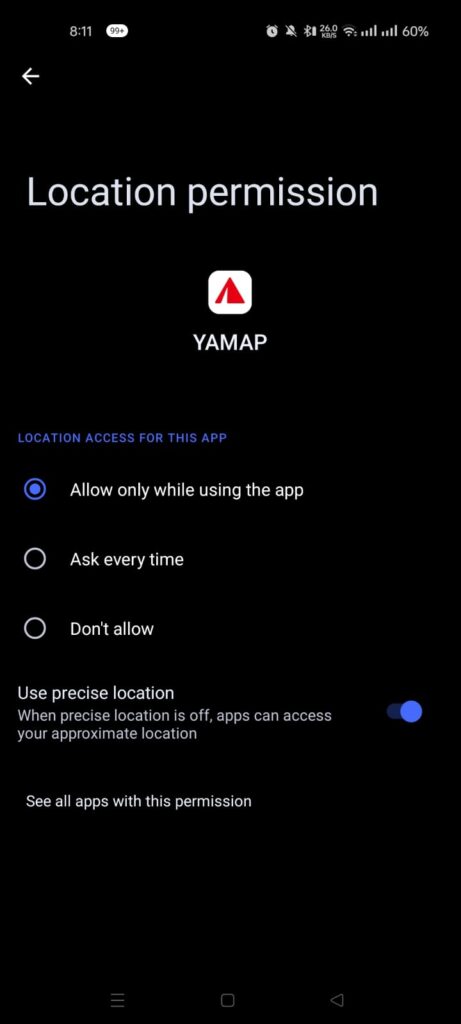
This is exactly what “limiting location access” looks like in practice — choosing “Allow only while using the app” instead of “Allow all the time.”
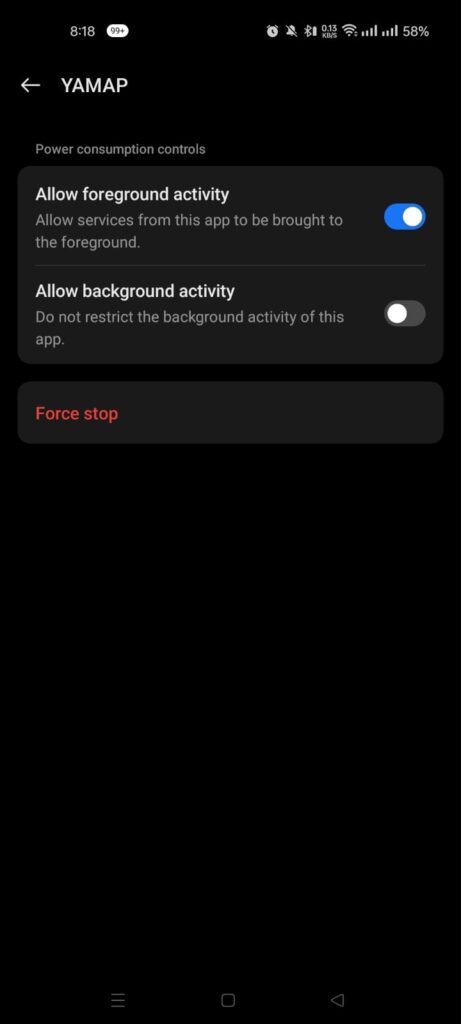
And this is the background activity toggle switched off — the single setting that removes most of the passive tracking risk covered above.
Security Best Practices for Safer Usage
- Enable full-device encryption
- Use strong, unique authentication for your account — weak or reused credentials remain one of the most common entry points; see our breakdown of dangerous password habits
- Avoid connecting over public Wi-Fi when possible, since even enterprise-grade WiFi networks carry exploitable risk, let alone open public hotspots
- Periodically audit which apps still have location permissions enabled
📌 Pro Tip: Set a recurring reminder — even quarterly — to open your phone’s permission manager and revoke location access for any app you haven’t opened in the last month. Most people never think to look until something goes wrong.
Expert Habits for Staying Ahead of Tracking Risks
- Default to zero trust — assume any app can and will collect data unless you’ve explicitly restricted it.
- Use privacy tooling — a VPN and a permission manager cover a large share of casual exposure.
- Minimize by default — only share what a feature genuinely requires to function.
- Understand app behavior — before installing anything, ask what it actually needs your location for, not just what it asks for.
🎥 Watch: How to Lock Down Location Permissions on Your Phone
If you’d rather see these permission settings in action than hunt through menus yourself, this walkthrough covers the same steps on both Android and iOS.
Conclusion: So, Is Yamaps Safe?
The honest answer: yes, if you manage it carefully — and no, if you leave every setting on default and never look back.
Yamaps isn’t inherently malicious or unusually dangerous compared to other navigation apps in its category. Like virtually every location-based tool, it comes with real privacy trade-offs baked into how the category works. The deciding factor isn’t the app itself — it’s whether you understand what it collects and take five minutes to configure it accordingly.
If you’re already thinking about security hygiene, it’s worth extending that same mindset elsewhere — our guide on writing bug-free HTML, CSS, and JavaScript in CodePen covers the same “assume nothing is safe by default” thinking from a developer’s side, and our Cash App screenshot scam breakdown is a useful next read if financial-side social engineering is more of a concern for you.
Frequently asked questions
Is Yamaps safe to use in 2026?
Generally yes, but safety depends heavily on how you manage permissions — leaving background tracking on indefinitely is the main risk, not the app’s core functionality.
Does Yamaps track my location continuously?
Yes, while active it continuously logs GPS coordinates for navigation purposes, the same way most mapping apps function.
What personal data does Yamaps collect?
Likely device information, IP address, precise location data, and in-app usage behavior — the standard set for this app category.
How can I protect my privacy while using Yamaps?
Limit location permissions to “while using the app,” disable background tracking, and review privacy settings after every major update.
Is Yamaps safer than Google Maps?
It depends on what you value — Google Maps has stronger security infrastructure and auditing, while Yamaps may collect less data by default but offers less public transparency.

Abdul Shakoor writes practical, defensive cybersecurity and networking guides for SentrixHub. He focuses on making API security, mobile app security, authentication, and network concepts simple for beginners and developers.