
If you run a WordPress site with the Gravity SMTP plugin installed, there’s a reasonable chance an automated scanner has already knocked on your door looking for CVE-2026-4020. This isn’t a theoretical, sitting-in-a-lab vulnerability — within days of disclosure, security vendors were tracking exploitation at a scale that turns “you should patch eventually” into “patch today.” Wordfence alone reported blocking on the order of 17 million exploit attempts against this flaw, which tells you everything about how quickly attackers move once an unauthenticated data-exposure bug goes public.
What makes CVE-2026-4020 worth understanding isn’t that it’s clever — it’s that it’s embarrassingly simple. No login required, no chained exploit, no social engineering. Just a single request to an exposed REST API endpoint that hands back sensitive configuration data, including API keys and SMTP credentials. That combination — trivial to exploit, valuable to steal, widely installed — is exactly the recipe for a mass-scanning campaign, and that’s precisely what unfolded.
This guide breaks down what the vulnerability is, why it happened at the code level, what an attacker actually gets, and the concrete steps to shut it down. I’ll keep the attacker’s perspective in view throughout — not to enable anyone, but because you can’t defend against a technique you don’t understand.
What is CVE-2026-4020?
CVE-2026-4020 is an information-disclosure vulnerability in the Gravity SMTP plugin for WordPress. In plain terms: a REST API endpoint that should have required authentication didn’t, so anyone on the internet could request the plugin’s configuration data — and that data included secrets it had no business exposing.
The core failure is an unauthenticated WordPress REST API endpoint. The plugin registered a route intended for internal testing, but the permission check that was supposed to gate it either wasn’t there or didn’t do its job. The result is what’s known as a broken or missing permission callback — the door had a lock fitted, but it was never actually locked.
CVE-2026-4020 on the National Vulnerability Database
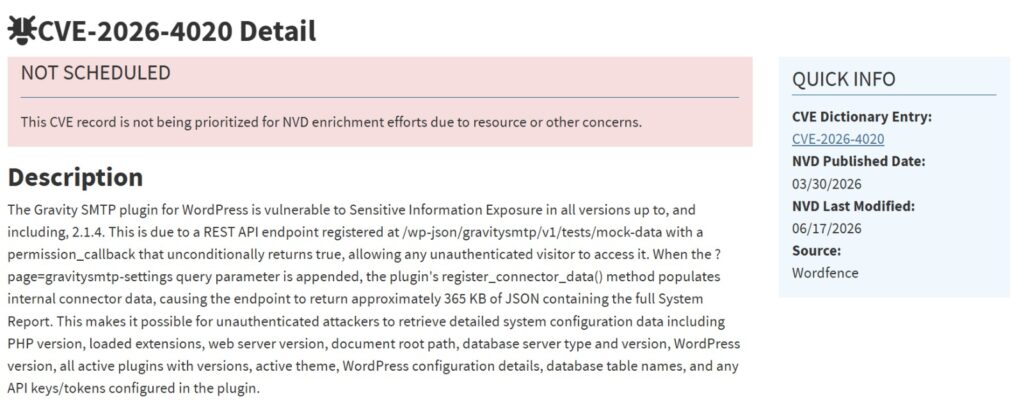
The NVD entry confirms the technical details: a REST API endpoint with a permission callback that unconditionally returns true, exposing roughly 365 KB of system data to any unauthenticated visitor — including PHP versions, database details, active plugins, and configured API keys.
| Field | Detail |
|---|---|
| CVE ID | CVE-2026-4020 |
| Affected Plugin | Gravity SMTP |
| Affected Versions | Up to and including 2.1.4 |
| Patched Version | 2.1.5 |
| CVSS Score | 5.3 |
| CWE | CWE-200: Exposure of Sensitive Information |
| Attack Vector | Network — no authentication required |
| Published | March 30, 2026 |
📌 Worth understanding: This attack needs no login, no user interaction, and no special skill — just one request to an exposed endpoint. That combination of trivial-to-exploit and valuable-to-steal is exactly what turns a bug into a mass-scanning campaign within hours.
A quick note on that score, because it matters for how you prioritise: Wordfence
rates this 5.3 (Medium). On paper, “medium” sounds like something you can get to
next week. But the score reflects a fairly narrow technical reading — and once you
factor in what’s actually exposed (API keys and SMTP credentials) plus the active,
at-scale exploitation, the real-world risk is higher than a medium label suggests.
Treat it as urgent regardless of the number.
Technical details: why the auth was missing
To understand the root cause, you need a quick grasp of how WordPress handles REST API permissions.
Every REST API route in WordPress is registered with a permission_callback. This is a small function whose entire job is to answer one question before the request runs: is this caller allowed to do this? If the callback returns true, the request proceeds. If it returns false, WordPress rejects it. When developers get this right, it’s invisible. When they get it wrong, it’s catastrophic — because a missing or permissive callback means every request is treated as authorised, including from a complete stranger.
In the case of CVE-2026-4020, the Gravity SMTP plugin registered an endpoint at /wp-json/gravitysmtp/v1/tests/mock-data with a permission callback that unconditionally returned true — meaning it approved every caller, authenticated or not. This is the worst version of the flaw: the lock wasn’t just left open, it was wired to say “yes” to everyone. When the ?page=gravitysmtp-settings query parameter is appended, the plugin’s internal data-population logic runs and the endpoint returns roughly 365 KB of JSON — effectively a full system report. The route appears to have been built for internal testing and diagnostics, and that’s the recurring danger: test endpoints have a nasty habit of shipping to production with their guardrails missing.
Here’s the why behind it, because this pattern repeats across the WordPress plugin ecosystem constantly. Developers build internal tooling endpoints during development, test them locally where authentication feels like friction, and then the endpoint quietly survives into the shipped product. The code works perfectly in every functional test — it returns the data it’s supposed to. Nobody writes a test that asks “what happens when an unauthenticated user calls this?” And so the flaw sails through review. This is the single most common class of WordPress REST API vulnerability, and it’s almost never malicious — it’s just an assumption that was never challenged.
How the attack works
Let me walk through this the way a defender should understand it — enough to recognise and block it, without anything that helps someone abuse it. There’s deliberately no exploit code here, because none is needed to grasp the mechanics.
The attack is essentially a single step, which is what makes it so dangerous at scale.
An attacker — almost always an automated scanner rather than a human — sends a standard web request to the vulnerable endpoint on a target site. The request looks completely ordinary at the network level; it’s an HTTP GET to a REST API path, indistinguishable at a glance from legitimate plugin traffic.
Because the endpoint lacks a working permission check, WordPress processes the request as if it were authorised. The plugin gathers its configuration and diagnostic data — the very information the endpoint was designed to return for testing — and sends it back as a JSON response.
That JSON response is the payload. No brute-forcing, no privilege escalation, no second stage. The attacker reads the secrets straight out of the response body. Then the scanner moves to the next target and repeats, which is how you get to tens of millions of attempts in a short window.
A safe educational example
To make this concrete without enabling abuse: the vulnerable request targets the path /wp-json/gravitysmtp/v1/tests/mock-data with the ?page=gravitysmtp-settings parameter appended. The JSON response that comes back is large — around 365 KB — and amounts to a full system report. Depending on the site’s setup, it can include PHP version and loaded extensions, web server version, document root path, database server type and version, the WordPress version, every active plugin and its version, the active theme, database table names, and — most damaging — any API keys or tokens configured in the plugin. That’s the entire attack: one request in, one revealing JSON document out. The simplicity is the point.
One Request, Full Exposure
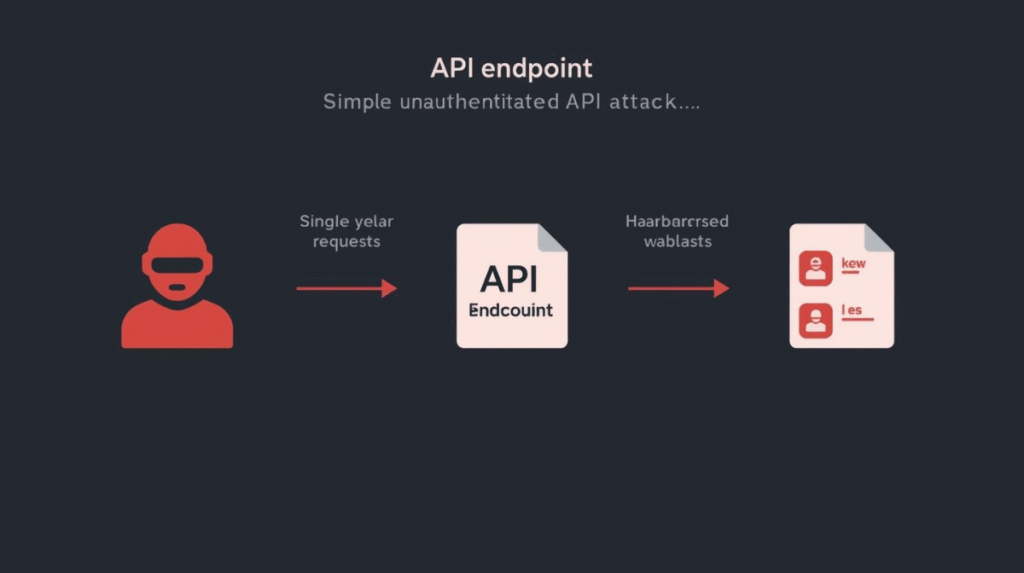
The entire attack is a single step: a request hits the unprotected endpoint, and the server returns a JSON response containing API keys, OAuth tokens, and SMTP credentials. No login, no second stage — which is exactly why it scaled to millions of attempts so fast.
What data gets exposed
This is where a “medium” severity bug starts to feel a lot more serious. The exposed configuration can include:
API keys for mail services. Gravity SMTP integrates with providers like SendGrid, Mailgun, Amazon SES, and similar. The API keys for those services may sit in the plugin’s configuration — and an exposed third-party API key is a master key to that account’s sending capability.
OAuth tokens. Where the plugin uses OAuth to authenticate with a mail provider (Google Workspace or Microsoft 365, for instance), those tokens can grant ongoing access to send mail through the connected account.
SMTP credentials. Username and password pairs for the configured SMTP server — the literal keys to sending email as your domain.
Server and configuration details. Diagnostic endpoints often leak useful reconnaissance data too: software versions, paths, configuration values that help an attacker map the environment.
The reason this matters so much is the post-exploitation potential. Stolen mail credentials don’t just expose your data — they let an attacker send email as you. That means phishing campaigns launched from your legitimate, well-reputed domain, with your SPF and DKIM records vouching for them. For a business, that’s reputational damage and deliverability poisoning rolled into one. Understanding why credentials in plain config are so dangerous is foundational to API and email security — a leaked key is rarely the end of the story, it’s the beginning of someone else’s.
Real-world exploitation
This is not a “proof of concept exists, watch this space” situation. It’s an active, at-scale campaign.
Security vendors tracking the flaw reported exploitation beginning almost immediately after disclosure — the hallmark of attackers who monitor advisory feeds and weaponise new bugs within hours. Wordfence‘s telemetry pointed to blocking in the region of 17 million exploit attempts, and exploitation-tracking efforts from groups like CrowdSec observed coordinated scanning from clusters of IP addresses systematically sweeping the internet for vulnerable installations. Coverage in outlets like The Hacker News amplified awareness, which is a double-edged sword: it warns defenders, but it also signals to every opportunistic scanner that there’s easy loot to be had.
Tracked and Patched: The Wordfence Record

Wordfence’s vulnerability database lists CVE-2026-4020 with a CVSS score of 5.3, marked as patched, and credits researcher Osvaldo Noe Gonzalez Del Rio with the discovery. Cross-checking advisories like this is the fastest way to confirm a CVE’s severity, status, and the version where the fix landed.
The exploitation pattern here is textbook mass-scanning. Attackers don’t target specific sites; they spray the entire IPv4 space, fire the same harmless-looking request at every WordPress install they find, and harvest whatever credentials come back. Your site doesn’t need to be important. It just needs to be reachable and unpatched. That’s the uncomfortable reality of automated exploitation — it’s indiscriminate, and it never sleeps.
Business impact
Different people own different slices of this risk, so it’s worth separating them.
For site owners, the immediate exposure is the theft of mail credentials and API keys, followed by the real damage: your domain being used to send phishing or spam, your sender reputation tanking, and potentially significant cleanup costs. If your mail provider account gets abused, you may also face unexpected billing or account suspension.
For agencies managing client sites, the blast radius multiplies. A single vulnerable plugin across dozens of managed sites is dozens of exposures, and the reputational hit of a client breach you were supposed to prevent is severe.
For hosting providers, mass exploitation across a shared fleet means support load, abuse complaints, and the operational headache of compromised accounts sending mail through your infrastructure.
The honest framing: this is a confidentiality breach, not remote code execution. An attacker isn’t getting a shell on your server through this bug alone. But treating “only” credential exposure as low-stakes is exactly the mistake that turns a contained incident into a sprawling one — because credentials are how the next stage happens.
Detection and indicators of compromise
Because the malicious request looks like ordinary REST API traffic, detection lives in your logs, not at the network edge.
The single most useful indicator is requests to the vulnerable endpoint path. Search your access logs for hits on /wp-json/gravitysmtp/v1/tests/mock-data. Legitimate traffic to that diagnostic route should be essentially nonexistent, so any external requests to it — especially from unfamiliar IPs, in bursts, or from known scanning infrastructure — warrant immediate investigation.
Other signals worth correlating: a spike in requests to /wp-json/ paths generally, repeated requests from a single IP sweeping multiple endpoints, and any unexplained outbound email activity from your mail provider after the disclosure date. If you find requests to that endpoint that returned a successful response, you should treat the associated credentials as exposed.
On the prevention side, a WAF rule blocking external access to that specific endpoint buys you protection even before you patch — though it’s a stopgap, not a substitute for updating. This kind of log-driven detection is the same discipline that underpins good firewall and network monitoring: the attack hides in normal-looking traffic, so you watch the application layer, not just the perimeter.
✅ Quick check: Search your access logs for requests to /wp-json/gravitysmtp/v1/tests/mock-data. Legitimate traffic to that endpoint is essentially zero, so any external hits — especially successful ones — mean you were targeted and should rotate credentials.
CVE-2026-4020 fix and remediation
The patch is straightforward, but patching alone is not enough — and this is the step most admins get wrong.
Update Gravity SMTP to version 2.1.5 or later. This closes the vulnerable endpoint. Do this first, immediately.
Then rotate everything that was exposed. This is the part people skip, and skipping it leaves the door open even after you’ve fixed the lock. If your site was running a vulnerable version while exploitation was active, you must assume your credentials were harvested. That means rotating all mail-service API keys, regenerating OAuth tokens, and changing SMTP credentials. Patching stops future leaks; it does nothing about credentials that already walked out the door.
| Action | Priority |
|---|---|
| Update Gravity SMTP to 2.1.5+ | Immediate |
| Rotate all API keys and OAuth tokens | Immediate |
| Rotate SMTP credentials | Immediate |
Check logs for /wp-json/gravitysmtp/v1/tests/mock-data | Immediate |
| Enable WAF rule blocking vulnerable endpoint | High |
| Audit all installed plugins for REST API exposure | Medium |
The credential-rotation step deserves emphasis because of a subtle trap: after a disclosure like this, many admins update the plugin, see the scanner traffic stop, and consider the incident closed. But if the attacker already pulled your SendGrid key during the exposure window, your patched plugin is irrelevant — they have the key, and they’ll use it from their own infrastructure. Rotate first, breathe later.
⚠️ Don’t stop at patching: Updating to 2.1.5 closes the leak, but it does nothing about credentials already stolen during the exposure window. If your site ran a vulnerable version while exploitation was active, you must rotate every API key, OAuth token, and SMTP credential. Patch first, rotate immediately after.
Security best practices
Beyond this specific CVE, a few habits dramatically reduce your exposure to this entire class of vulnerability.
Harden your REST API. Don’t expose more than you need. Consider restricting REST API access for unauthenticated users where your site’s functionality allows it, and be aware of which plugins register public endpoints. Many sites never need anonymous REST access at all.
Treat plugin updates as security events, not chores. The window between disclosure and mass exploitation is now measured in hours. Enable auto-updates for plugins where you can tolerate it, and monitor security advisory feeds for the plugins you depend on.
Practice least privilege with credentials. API keys should be scoped as narrowly as the provider allows. A SendGrid key that can only send mail is bad to lose; one with full account access is a disaster. The same principle applies to strong, well-managed passwords and to tight file permissions — minimise what a single stolen secret can do.
Audit what you install. Every plugin is attack surface. Periodically review what’s installed, remove what you don’t use, and favour actively maintained plugins with a track record of responsible disclosure handling. Many WordPress compromises trace back to a forgotten plugin, much like how an unrestricted file upload flaw can sit unnoticed until someone scans for it.
This whole episode is a case study in why client-side and config-stored secrets need careful handling — the same lesson that runs through nearly all API security work.
Frequently asked questions
What is CVE-2026-4020?
It’s an information-disclosure vulnerability in the Gravity SMTP WordPress plugin. An unauthenticated REST API endpoint exposed plugin configuration data — including API keys, OAuth tokens, and SMTP credentials — to anyone who requested it.
Which versions are affected?
All versions of Gravity SMTP up to and including 2.1.4. The fix landed in version 2.1.5.
Is CVE-2026-4020 actively exploited?
Yes. Exploitation began shortly after disclosure, with security vendors reporting exploitation at massive scale — on the order of 17 million blocked attempts — driven by automated mass-scanning campaigns.
What data gets exposed?
Mail-service API keys, OAuth tokens, SMTP username/password credentials, and diagnostic server information stored in the plugin’s configuration.
How do I detect whether I was targeted?
Search your access logs for requests to /wp-json/gravitysmtp/v1/tests/mock-data. External requests to that endpoint, especially successful ones from unfamiliar IPs, indicate targeting and likely exposure.
How do I fix CVE-2026-4020?
Update Gravity SMTP to 2.1.5 or later immediately, then rotate all exposed secrets — API keys, OAuth tokens, and SMTP credentials. Patching without rotating leaves stolen credentials usable.
Should I assume my site was compromised?
If you ran a vulnerable version while exploitation was active and your logs show requests to the endpoint, yes — assume the exposed credentials are compromised and rotate them. When in doubt, rotate anyway; it’s cheap insurance.
Is the CVSS score 5.3?
Wordfence lists CVE-2026-4020 with a CVSS score of 5.3 (Medium). While that sounds moderate, the exposure of API keys and SMTP credentials enables real-world abuse, so treat it more seriously than the medium label implies.
Does patching alone protect me?
No. Patching closes the leak but does nothing about credentials already stolen during the exposure window. Rotation is mandatory, not optional.
Can a WAF protect me before I patch?
A WAF rule blocking the vulnerable endpoint provides temporary protection and is worth enabling, but it’s a stopgap. Update the plugin and rotate credentials as soon as possible.
Conclusion
CVE-2026-4020 is a reminder that the most damaging vulnerabilities are often the least sophisticated. There’s no clever exploit chain here — just a test endpoint that shipped without a lock, exposing exactly the secrets attackers most want: the keys to send mail as you. The simplicity is what made it a mass-exploitation event within hours of disclosure.
If you take three things away, make them these: update Gravity SMTP to 2.1.5 immediately, rotate every credential the plugin touched, and check your logs for the telltale endpoint requests. Patching stops the bleeding; rotation is what actually closes the wound. And more broadly, let this be the nudge to treat plugin updates and REST API exposure as the front-line security concerns they’ve become — because the scanners are already out there, and they found your site before you finished reading this.
Don’t wait for the next advisory to find out you were exposed. Audit, patch, and rotate today.

Abdul Shakoor writes practical, defensive cybersecurity and networking guides for SentrixHub. He focuses on making API security, mobile app security, authentication, and network concepts simple for beginners and developers.