
By Abdul Shakoor · SentrixHub
If you’ve ever tried to answer the question “is our application actually secure?” you’ve probably discovered how slippery it is. Secure against what? Verified by whom? To what depth? The OWASP Application Security Verification Standard (ASVS) exists precisely to turn that vague question into a concrete, testable checklist — and version 5.0 is the most significant update the standard has seen in years.
This guide walks through the complete, verified OWASP ASVS 5.0 table of contents — all seventeen chapters — along with what each one covers, how the verification levels work, what changed from 4.0.3, and how to actually put the standard to work in a real development team. The chapter list here is taken directly from the official OWASP ASVS 5.0.0 release files, not reconstructed from memory, because getting the chapter names and count exactly right matters to the auditors and engineers who rely on them.
What is OWASP ASVS 5.0? The OWASP Application Security Verification Standard 5.0 is an open, vendor-neutral catalogue of application security requirements, organized into seventeen chapters and three verification levels (L1–L3). It gives developers, testers, and auditors a common, testable baseline for building and verifying secure web applications and APIs.
What OWASP ASVS 5.0 actually is
ASVS is, at heart, a list of security requirements written so they can be verified. That word is doing a lot of work. Unlike a high-level framework that says “protect sensitive data,” ASVS breaks security down into specific, checkable statements — each one something a tester or reviewer can confirm as present or absent.
It’s maintained by OWASP, is completely free and open-source, and is deliberately vendor-neutral: it doesn’t push you toward any product or scanner. That neutrality is why it’s become a shared language between developers who build applications, testers who probe them, and auditors who sign off on them. When a security requirement is phrased as an ASVS verification statement, everyone in that chain is talking about the same thing.
The standard serves three broad purposes: it’s a security baseline you design against, a verification checklist you test against, and a procurement/compliance reference you can point to in contracts and audits. Understanding its structure — the table of contents — is the fastest way to grasp what “comprehensive application security” really spans, because the chapters together map the entire attack surface of a modern web application.
The Official OWASP ASVS Project
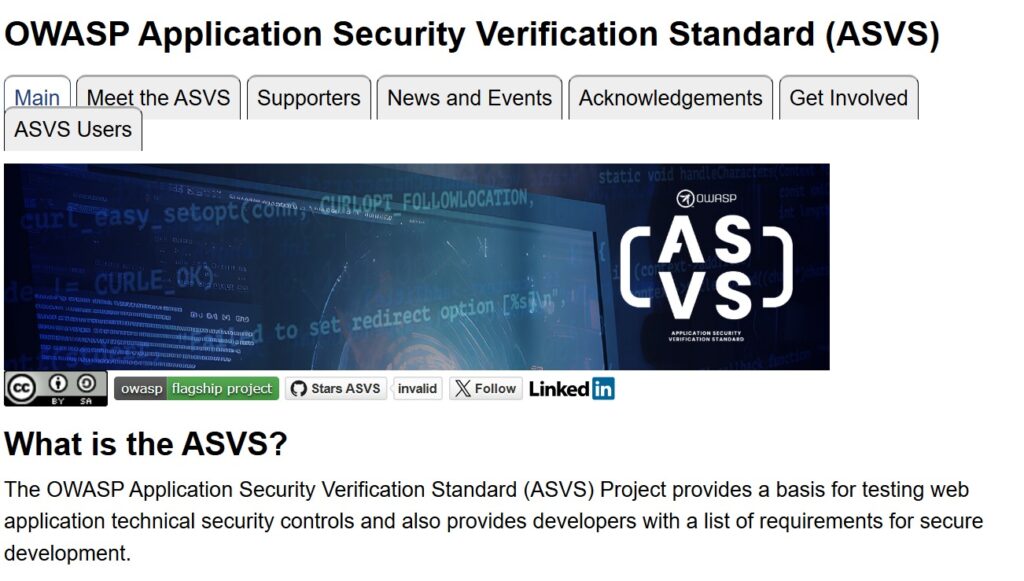
ASVS is maintained by OWASP as a free, open-source flagship project. The official project page is the authoritative home for the standard, its documentation, and every downloadable format.
Understanding ASVS verification levels
Before the chapters, you need the levels — because every single requirement in ASVS is tagged L1, L2, or L3. The levels are cumulative: L2 includes everything in L1, and L3 includes everything in L2. They represent increasing rigour, not different topics.
Level 1 is the baseline — the minimum every application should meet. It focuses on controls that defend against common, opportunistic attacks and can largely be verified from the outside, without deep access to source code or design docs. It’s a floor, not a goal.
Level 2 is where most business-critical applications should aim. It’s for applications that handle sensitive data — anything with logins, personal data, payments, or business transactions. L2 assumes the tester has access to documentation, source, and developers, and it covers the substantial majority of what real-world applications need.
Level 3 is the highest tier, reserved for the applications where failure is catastrophic — think healthcare, finance, critical infrastructure, or systems handling highly sensitive data. L3 demands the most thorough verification, deep design review, and defense-in-depth throughout.
| Level | Focus | Typical use case | Example applications |
|---|---|---|---|
| L1 | Baseline / opportunistic threats | Low-assurance apps, first step for any app | Simple marketing sites, low-risk internal tools |
| L2 | Sensitive data & business logic | Most business applications (recommended default) | E-commerce, SaaS, apps with logins & payments |
| L3 | Highest assurance / defence-in-depth | Critical systems where breach is catastrophic | Banking, healthcare, critical infrastructure |
⚠️ The most common mistake: Many teams implement Level 1 and assume they’re covered. L1 is only the baseline. If your application has logins or stores user data, L2 is the honest target — stopping at L1 leaves exactly the higher-risk controls (deeper authorization, cryptography, session-abuse defenses) unaddressed.
One point worth stressing, because it’s a mistake I see teams make constantly: many organisations stop at L1 and quietly assume they’re “covered.” L1 is genuinely just the beginning. If your application has a login and stores anything about your users, L2 is the honest target — and treating L1 as the destination leaves exactly the higher-risk controls (authorization depth, cryptography, session abuse defences) unaddressed.
The Three Verification Levels at a Glance
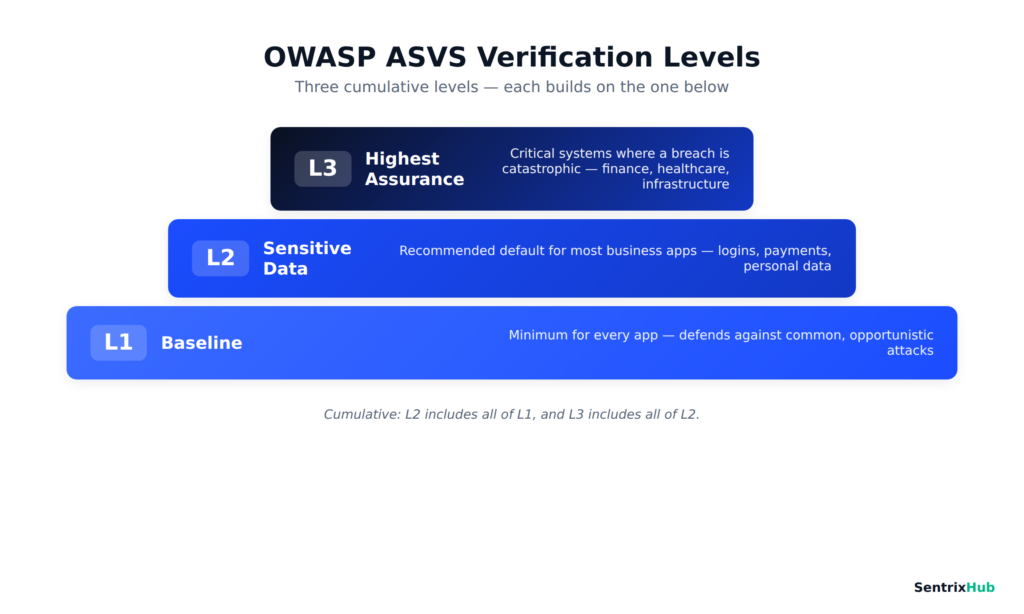
The levels are cumulative, not separate tracks — L2 includes everything in L1, and L3 includes everything in L2. Think of it as building upward: every application should meet the L1 baseline, most business applications should reach L2, and only the highest-risk systems need L3.
OWASP ASVS 5.0 Table of Contents (complete, verified)
Here is the full chapter list for ASVS 5.0.0, taken directly from the official release. Version 5.0 organizes its requirements into seventeen chapters, each covering a distinct security domain. Rather than reproduce the requirement text (which is OWASP’s copyrighted work), the table below summarizes what each chapter is for.
📌 Worth knowing: ASVS 5.0.0 has exactly 17 chapters (V1–V17). Older sources sometimes cite different counts because they’re referencing 4.0.3 (which had 14) or draft versions. The list here is taken directly from the official OWASP 5.0.0 release files.
| # | Chapter | What it covers |
|---|---|---|
| V1 | Encoding and Sanitization | Output encoding, injection prevention (SQL, OS, LDAP, etc.), sanitization, safe deserialization, memory safety |
| V2 | Validation and Business Logic | Input validation, business logic integrity, sequencing, anti-automation |
| V3 | Web Frontend Security | Browser-side defences: CSP, security headers, cookie setup, origin separation, content interpretation |
| V4 | API and Web Service | HTTP message structure, REST/API security, GraphQL, WebSocket protections |
| V5 | File Handling | Safe file upload, storage, download, content validation, path handling |
| V6 | Authentication | Password security, MFA, credential lifecycle, recovery, out-of-band & cryptographic auth |
| V7 | Session Management | Session token security, timeout, termination, session-abuse defences, federated re-auth |
| V8 | Authorization | Function-, data-, and field-level access control, IDOR/BOLA prevention |
| V9 | Self-contained Tokens | Token integrity, signature validation, safe token content (e.g. JWT claims) |
| V10 | OAuth and OIDC | OAuth client/server, OIDC, resource server, consent management |
| V11 | Cryptography | Crypto inventory, secure implementation, algorithms, hashing, randomness, key handling |
| V12 | Secure Communication | TLS configuration, HTTPS, service-to-service encryption |
| V13 | Configuration | Secret management, backend communication, information leakage, hardening |
| V14 | Data Protection | Data classification, general & client-side data protection |
| V15 | Secure Coding and Architecture | Dependencies/SBOM, defensive coding, safe concurrency, secure architecture |
| V16 | Security Logging and Error Handling | Logging inventory, security events, log protection, safe error handling |
| V17 | WebRTC | TURN server, media (DTLS/SRTP), and signaling security |
That seventeen-chapter structure is worth internalizing, because it’s essentially a map of everything that can go wrong in a modern application — from the encoding layer all the way out to real-time media.
A closer look at the major security domains
Seventeen chapters is a lot to hold in your head, so it helps to group them by the questions they answer. Here’s how the major domains break down in practice — with the kinds of vulnerabilities each one is designed to stop.
Input handling: Encoding, Validation, and File Handling (V1, V2, V5)
The first cluster is about never trusting input. V1 (Encoding and Sanitization) is the front line against injection — SQL injection, OS command injection, XSS, XXE, and their many cousins — by insisting that data is encoded for the context it’s used in and that dangerous parsing is locked down. V2 (Validation and Business Logic) adds the layer above raw injection: validating that input makes sense for your business rules and that logic flows can’t be abused or skipped. V5 (File Handling) covers the perennially dangerous area of uploads and downloads, where a single unchecked file can become remote code execution — the exact risk explored in our guide to unrestricted file upload vulnerabilities.
The developer takeaway across these three: validate on a trusted server layer, encode at the point of output, and treat every uploaded file as hostile until proven otherwise.
The web and API surface: Web Frontend and API/Web Service (V3, V4)
V3 (Web Frontend Security) is entirely about the browser — Content Security Policy, security headers, cookie attributes, and origin separation to stop CSRF and clickjacking. V4 (API and Web Service) covers the machine-facing side: HTTP message structure (including request-smuggling defenses), REST, GraphQL, and WebSocket security. If you build APIs, this chapter pairs naturally with broader API and firewall security practices — and it’s exactly the class of REST-endpoint flaw behind real incidents like CVE-2026-4020, where a missing permission check exposed sensitive data to anyone who asked.
Identity: Authentication, Session Management, Authorization (V6, V7, V8)
This is the heart of most applications. V6 (Authentication) covers password rules, MFA, and account recovery — the domain where weak choices around dangerous passwords cause so many breaches, and where standards-based approaches like 802.1X authentication show how identity verification is meant to work. V7 (Session Management) governs how sessions are created, timed out, terminated, and defended against abuse — including the token-handling pitfalls we cover in password reset tokens in URLs and its React-specific counterpart. V8 (Authorization) is about who can do what — function-, data-, and field-level access control that prevents IDOR and broken object-level authorization (BOLA), consistently among the most exploited API weaknesses.
Tokens and delegated access: Self-contained Tokens and OAuth/OIDC (V9, V10)
New and expanded in 5.0, these two chapters reflect how modern apps actually authenticate. V9 (Self-contained Tokens) deals with token integrity — signature validation, algorithm allow lists, and safe JWT claim handling. V10 (OAuth and OIDC) is a substantial, dedicated treatment of OAuth 2 and OpenID Connect, covering the client, resource server, authorization server, and consent — a clear signal of how central federated identity has become.
Cryptography and communication: Cryptography and Secure Communication (V11, V12)
V11 (Cryptography) goes well beyond “use encryption”: it asks for a cryptographic inventory, crypto-agility (so you can swap algorithms as threats evolve, including toward post-quantum), approved algorithms, and proper key handling. V12 (Secure Communication) focuses on TLS done right — modern protocol versions, strong cipher suites, and validated certificates. Getting this wrong is exactly how attacks like the BEAST attack and the broader family of SSL validation mistakes take hold.
Operations and resilience: Configuration, Data Protection, Secure Coding, Logging (V13–V16)
The final cluster covers how the application is built, deployed, and observed. V13 (Configuration) handles secret management, backend communication, and information-leakage prevention — closely tied to getting file permissions right. V14 (Data Protection) is about classifying sensitive data and protecting it both server- and client-side. V15 (Secure Coding and Architecture) brings in dependency management (SBOM), defensive coding, and safe concurrency — the same architectural mindset behind runtime defenses like a RASP tool. V16 (Security Logging and Error Handling) ensures you can actually detect and investigate incidents without leaking data through error messages or logs.
Real-time media: WebRTC (V17)
The newest domain, V17 (WebRTC), addresses the security of real-time audio/video — TURN servers, DTLS/SRTP media protection, and signaling. Its inclusion reflects how many applications now embed live communication, an area most older standards ignored entirely.
What’s new in OWASP ASVS 5.0
Version 5.0.0 (released May 2025) is a ground-up restructure, not a minor revision from 4.0.3. The changes are extensive enough that OWASP itself describes them as too broad to fully detail in release notes — but the headline shifts are clear.
The chapters were reorganized and renamed for clarity, with security domains regrouped so related requirements sit together. Some areas got dedicated chapters they never had before: OAuth and OIDC (V10) and Self-contained Tokens (V9) are now first-class chapters, reflecting how modern identity actually works, and WebRTC (V17) is entirely new. The cryptography chapter gained forward-looking material on crypto-agility and post-quantum readiness. Throughout, requirements were rewritten to be more precisely testable.
| Aspect | ASVS 4.0.3 | ASVS 5.0.0 |
|---|---|---|
| Structure | 14 chapters (V1–V14) | 17 chapters (V1–V17) |
| OAuth/OIDC | Scattered / limited | Dedicated chapter (V10) |
| Tokens | Within session mgmt | Dedicated chapter (V9) |
| WebRTC | Not covered | New chapter (V17) |
| Cryptography | Standard coverage | Crypto-agility, post-quantum guidance |
| Requirement style | Broader statements | More precisely testable |
If you’re currently mapped to 4.0.3, migrating is worth planning deliberately rather than rushing. OWASP publishes mappings between the versions, so existing verification work isn’t lost — but the new structure will change where some requirements live and surface gaps (particularly around OAuth and tokens) that 4.0.3 didn’t make explicit.
How to use ASVS during development
ASVS delivers the most value when it’s woven into the development lifecycle rather than bolted on as a final-audit checklist. In practice, that means touching it at every stage.
During planning and design, pick your target level (usually L2 for a business app) and use the relevant chapters as a design checklist — deciding how you’ll meet the authentication, authorization, and data-protection requirements before writing code. During development, the requirements become coding standards; developers can reference the specific chapter for whatever they’re building. During code review and testing, ASVS becomes the verification checklist — each requirement is something to confirm. And during deployment and maintenance, the configuration and logging chapters (V13, V16) guide hardening, while the dependency requirements in V15 drive ongoing patching.
Something worth being honest about from experience: teams that try to retrofit ASVS onto a finished product find it painful. The requirements around architecture, cryptography, and authorization are far cheaper to satisfy as design decisions than as late-stage fixes. Integrating ASVS into your secure SDLC early is the difference between the standard guiding your build and merely grading it.
Using the OWASP ASVS 5.0 checklist
Here’s a practical detail many articles gloss over: OWASP publishes an official machine-readable version of ASVS 5.0.0 as a CSV file, right alongside the PDF on the GitHub release page. This isn’t a third-party product — it’s the standard itself, in a format that opens directly in Excel or Google Sheets.
That makes building a working compliance checklist genuinely simple. Download the official CSV, open it in your spreadsheet tool, and you have every requirement in rows with its chapter, section, requirement ID, description, and level. From there you can:
- Filter by level — show only L1, or L1+L2, to match your target
- Filter by chapter — focus a review on, say, Authentication (V6) or Authorization (V8)
- Add your own columns — Owner, Status (Pass/Fail/N-A), Evidence, and Notes — to track internal compliance and produce audit-ready records
That handful of extra columns turns the official standard into a live project tracker your whole team can work from. It’s the single most practical way to adopt ASVS, and because it’s the official export, you’re always working from the authoritative wording rather than someone’s paraphrase. You’ll find the CSV (and the other formats) on the official OWASP ASVS GitHub releases page under the v5.0.0 release.
✅ Practical tip: The official ASVS 5.0.0 CSV opens directly in Excel or Google Sheets. Filter by level (L1/L2/L3) and chapter, then add your own Owner, Status, and Evidence columns — and the standard becomes a live compliance tracker your whole team can work from.
The Official CSV, Open in Excel
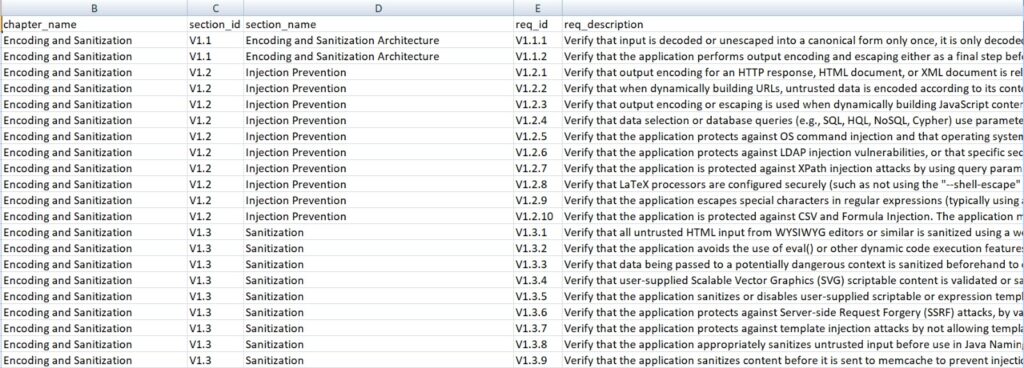
This is the official ASVS 5.0.0 CSV opened directly in a spreadsheet — every requirement in rows, with its chapter, section, requirement ID, and level. From here you can filter by level or chapter and add your own Owner, Status, and Evidence columns to turn the standard into a live compliance tracker.
Where to download the OWASP ASVS 5.0 PDF
Always get ASVS from official OWASP sources — the standard is free, and there’s no reason to trust a third-party mirror that could be outdated or altered. The authoritative locations are:
The GitHub release page carries every format — PDF, CSV, DOCX, JSON, and XML — so you can pick whichever fits your workflow. A quick word of caution: because ASVS is popular, plenty of blogs host their own copies. Stick to the OWASP-controlled sources above so you know you have the real, current 5.0.0.
⚠️ Download safely: Because ASVS is popular, many blogs host their own copies that may be outdated or altered. Only download from official OWASP sources (the OWASP project page or the OWASP/ASVS GitHub repo) so you know you have the authentic, current 5.0.0.
ASVS 5.0.0 Downloads on GitHub
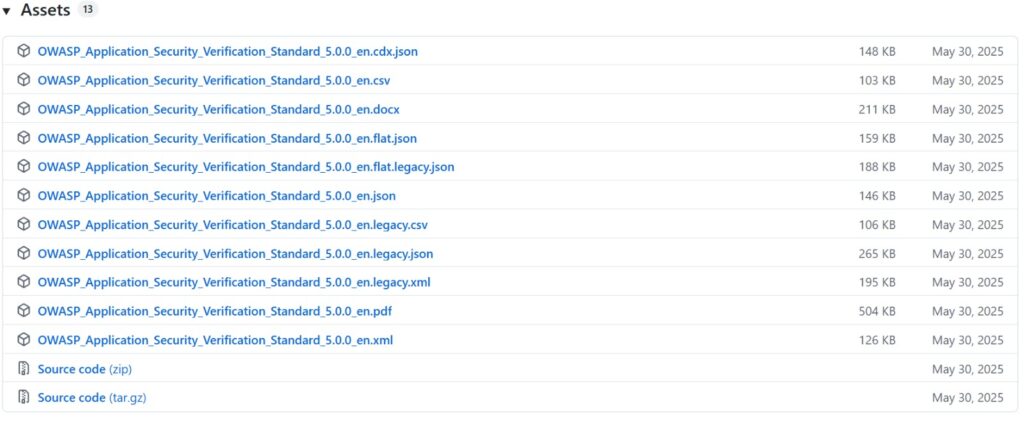
The official GitHub release page carries every format — PDF, CSV, DOCX, JSON, and XML — all dated to the 5.0.0 release. Whichever format fits your workflow, this is the authoritative source to download it from.
Mapping ASVS with OWASP Cheat Sheets
ASVS tells you what to verify; it doesn’t always tell you how to implement it. That’s where the OWASP Cheat Sheet Series comes in — it’s the practical companion to the standard. OWASP even publishes an ASVS index that maps requirements to the relevant cheat sheets.
The workflow is natural: when you hit an ASVS requirement you’re unsure how to satisfy — say, a session-management or CSRF-defense requirement — you jump to the corresponding cheat sheet for concrete implementation guidance, code patterns, and pitfalls to avoid. ASVS is the requirement; the cheat sheet is the recipe. Used together, they close the gap between “we need to verify this” and “here’s exactly how we build it.” You can find the mapping at the OWASP ASVS Cheat Sheet index.
How ASVS relates to other standards
ASVS doesn’t exist in isolation, and a common source of confusion is how it lines up with other things teams already use. At a high level:
| Standard | What it is | Relationship to ASVS |
|---|---|---|
| OWASP Top 10 | Awareness list of the 10 most critical risks | Top 10 raises awareness; ASVS is the detailed, testable standard that covers those risks and far more |
| NIST SSDF | Secure software development framework (process) | SSDF defines secure process; ASVS provides the concrete technical requirements to verify |
| ISO/IEC 27034 | Application security management guidance | 27034 is high-level organizational guidance; ASVS is the hands-on verification detail |
The key mental model: the OWASP Top 10 is an awareness document, not a standard you certify against. It’s the poster on the wall that tells developers what to worry about. ASVS is the standard you actually verify against — comprehensive, testable, and structured. If the Top 10 is “here are the ten things that go wrong most,” ASVS is “here is the complete set of controls, at three depths, that you can test line by line.”
📌 Key distinction: The OWASP Top 10 is an awareness list — the ten risks to worry about most. ASVS is the standard you actually verify against, covering those risks and far more, at three depths. Awareness vs. verification — they complement each other, they don’t compete.
Common mistakes organisations make with ASVS
Having seen ASVS adopted well and badly, a handful of mistakes come up again and again.
The most common is treating ASVS as a pentest checklist only — pulling it out once a year for an external test rather than building against it from the start. That inverts its value; ASVS is a design and development tool first, a verification tool second. Closely related is stopping at Level 1 and assuming coverage, when any application handling real user data should be targeting L2.
Other recurring pitfalls: skipping threat modeling, so the ASVS controls get applied generically instead of being prioritized by actual risk; incomplete documentation, which matters because many ASVS requirements explicitly ask you to document decisions (a lot of L2/L3 requirements begin with “verify that the documentation defines…”); no developer training, so requirements are checked mechanically without understanding; and no automation, leaving teams to verify manually what could be continuously tested in CI. Finally, teams often adopt once and never revisit — but dependencies age, threats evolve, and ASVS itself updates.
Best practices for adopting ASVS 5.0
A few principles make adoption far smoother:
Start by choosing the right level for the risk — don’t blanket-apply L3 to a marketing site or L1 to a payments platform. Tailor to your application: not every chapter applies equally (V17 WebRTC is irrelevant if you have no real-time media), so scope sensibly. Integrate early into design and CI rather than retrofitting. Use the official CSV as your living checklist with owner/status/evidence columns. Pair it with the Cheat Sheets for implementation guidance. Document your security decisions as you go, since the standard expects it. And automate what you can — many requirements map cleanly to automated tests or scanner rules, freeing human review for the design-level controls that genuinely need judgement.
A realistic adoption scenario
To make this concrete, imagine a mid-sized team building a new SaaS platform with logins, payments, and stored customer data.
They start at planning by choosing L2 as their target — appropriate for sensitive business data. During design, they walk the relevant chapters (V6 Authentication, V7 Session Management, V8 Authorization, V11 Cryptography, V14 Data Protection) and make architectural decisions up front: how MFA works, how sessions terminate, how data is classified and encrypted. During development, developers reference specific chapters as coding standards, and the team wires a subset of ASVS checks into CI so regressions get caught automatically.
At code review, the official CSV — filtered to L2 and annotated with Owner/Status/Evidence columns — becomes the review checklist. Before release, a security engineer verifies the remaining requirements that can’t be automated, particularly the authorization and cryptography controls that need human judgement. Post-launch, the V15 dependency requirements drive ongoing patching, and V16 logging ensures they can detect and investigate incidents. The result isn’t a one-time pass/fail; it’s a repeatable, documented process — which is exactly what auditors and customers increasingly ask to see.
Frequently asked questions
What is OWASP ASVS 5.0?
It’s the OWASP Application Security Verification Standard, version 5.0 — a free, open, vendor-neutral catalogue of application security requirements organized into 17 chapters and 3 verification levels, used to build and verify secure applications.
Is OWASP ASVS free?
Yes, entirely. It’s an open-source OWASP project, free to download and use in any format (PDF, CSV, DOCX, JSON, XML) from the official OWASP sources.
Where can I download the ASVS 5.0 PDF?
From the official OWASP ASVS project page or the OWASP/ASVS GitHub repository. Avoid third-party mirrors to ensure you have the authentic, current version.
How many chapters are in ASVS 5.0?
Seventeen (V1 through V17), ranging from Encoding and Sanitization through to WebRTC.
What’s the difference between L1, L2, and L3?
L1 is the baseline for all apps; L2 is for applications handling sensitive data (the recommended default for most business apps); L3 is for the highest-assurance systems where a breach would be catastrophic. The levels are cumulative.
Which ASVS level should I choose?
Most business applications with logins, personal data, or payments should target L2. Use L1 only for genuinely low-risk apps, and L3 for critical systems like finance, healthcare, or infrastructure.
Does ASVS replace penetration testing?
No. ASVS structures and deepens verification, and a pentest can be conducted against ASVS requirements — but ASVS is a design and development standard, not just a test. The two complement each other.
Is there an official ASVS Excel checklist?
There’s an official CSV export of ASVS 5.0.0 that opens directly in Excel or Google Sheets. It’s not a separate “checklist product” — it’s the standard itself in spreadsheet form, which you can filter and annotate to track compliance.
How is ASVS different from the OWASP Top 10?
The Top 10 is an awareness list of the most critical risks. ASVS is a comprehensive, testable standard covering those risks and much more, at three levels of depth. You verify against ASVS; you raise awareness with the Top 10.
How often is ASVS updated?
Periodically, in major versions. 5.0.0 (May 2025) was a significant restructure from the previous 4.0.3. Between releases, the GitHub repository reflects ongoing work.
Can startups use ASVS?
Absolutely. Startups can start with L1 or a scoped subset of L2, focusing on the chapters most relevant to their app, and expand coverage as they grow. It scales down as well as up.
Do I need to implement every chapter?
No — scope to your application. A chapter like V17 (WebRTC) only applies if you use real-time media. Tailor the standard to your actual architecture and risk profile.
Conclusion
OWASP ASVS 5.0 turns the fuzzy question “are we secure?” into something you can actually answer, requirement by requirement. Its seventeen chapters map the full attack surface of a modern application — from encoding and input handling, through identity and cryptography, out to configuration, logging, and real-time media — and its three levels let you match rigour to risk.
The teams that get the most from it treat the table of contents not as a reading list but as a working map: they pick a level, scope the chapters to their application, build against the requirements from day one, and use the official CSV as a living checklist. Adopted that way — early, deliberately, and paired with the OWASP Cheat Sheets — ASVS stops being an audit hurdle and becomes what it was designed to be: a practical blueprint for building applications that are secure by design, and verifiably so.
If you’re starting out, download the official 5.0.0 files, pick your target level, and walk the chapters against your own application. That first honest pass is usually where the most valuable gaps reveal themselves.
Related reading on SentrixHub: API and firewall security, unrestricted file upload vulnerabilities, dangerous SSL validation mistakes, and the BEAST attack.

Abdul Shakoor writes practical, defensive cybersecurity and networking guides for SentrixHub. He focuses on making API security, mobile app security, authentication, and network concepts simple for beginners and developers.